

GoGlow
- 48.00
- 4.6
- Installs
- 50.00K
- Price
- Free
Screenshots
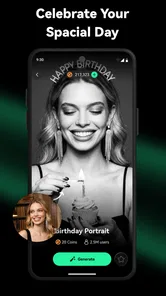
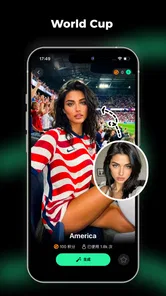
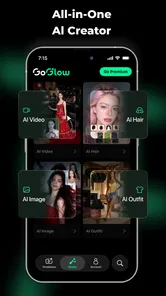
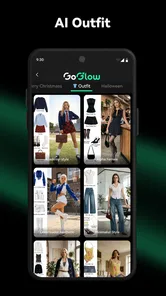
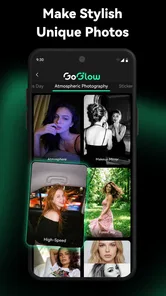
Analysis by Reviewed
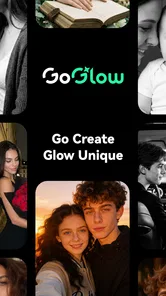
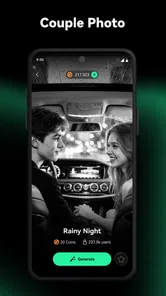
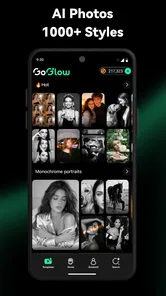
GoGlow is an AI-focused photography app from NGMOB PTE LTD that I would describe as a creative starting point rather than a complete replacement for a traditional camera editor. Its purpose is to help turn an idea into an image or video, which makes it appealing when I want to explore a visual concept quickly instead of spending a long time building it manually.
What makes it interesting is the gap between having an idea and knowing how to express that idea visually. I can begin with a simple concept, adjust my wording, and judge the result by how closely it matches the mood I had in mind. That process is more useful for brainstorming than for situations where every detail must be exact. If you need a dependable tool for precise retouching, GoGlow may feel less predictable than a conventional photo editor.
The app is free to install and is rated for Everyone, while optional purchases range from $2.99 to $99.99 per item. I would keep that payment model in mind before treating it as an everyday production tool. The free starting point is convenient, but frequent experimentation can make it important to understand what is available without spending and what may require a purchase.
Getting past the first points of friction
I’d use the first session to learn which parts of the process feel intuitive before deciding whether GoGlow fits a regular creative routine. A small, low-stakes experiment can also help me judge how much revision I’m willing to do and whether the available free access is enough for my needs. From there, the key question is how to turn that early trial into a smoother workflow.
Why the first result may disappoint
The most common difficulty with an AI image or video generator is not necessarily a technical failure. Often, the first instruction is simply too broad. A request such as “make a beautiful travel image” leaves too many decisions open: location, season, lighting, camera angle, color palette, clothing, and the relationship between the subject and the background.
With GoGlow, I would approach the first attempt as a draft. Instead of judging the app from one vague instruction, I would describe the subject, setting, visual style, lighting, framing, and intended mood. I would also avoid combining too many unrelated ideas at once. A focused prompt gives me a clearer way to decide what needs changing.
A useful habit is to change only one important detail between attempts. If I alter the subject, style, background, and lighting together, I cannot tell which change improved or weakened the result. Keeping a short note of the wording that worked best is also practical, especially when I am developing a consistent look for several images.
More From Our News Desk

 Gmail
GmailGmail in a Busy Inbox: Who Benefits Most?
From first account to crowded workday, Gmail earns its place through dependable search and flexible sorting—but its best fit depends on how much inbox maintenance you can tolerate.

 Prime Video
Switching to Prime Video: What Changes in Your Viewing Routine
Prime Video can make a compelling second home for streaming, but switching means learning a different catalog, rental layer, and route from browsing to playback.

 Universal TV Remote Control
Universal TV Remote Control Works Best as a Reliable Backup
A phone remote earns its place through quick setup and reliable habits. Here is how to get more from Universal TV Remote Control—and where its limits show.

 Weather - By Xiaomi
Weather by Xiaomi Review: Clear at a Glance, Less Clear Up Close
Xiaomi’s weather app makes everyday forecasts quick to scan, but its calm surface can leave useful details and recovery paths harder to find than they should be.

 X
XX Under Pressure: Can It Recover When Posting Goes Wrong?
A resilience-focused review of X, examining setup, mistaken posts, interruptions, weak connections, and the gaps that matter when recovery needs to be dependable.

 Clash of Clans
Clash of Clans Is Won Between the Battles
Its raids are quick; its community is a long-term project of coordination, teaching, rivalry, and shared responsibility—with all the friction that entails.
Latest News



What to check before blaming the app
Before using the generator seriously, I would make sure the device is running a compatible operating system. GoGlow supports Android 7.0 or later, so an older phone may be the first thing to check if installation or normal use becomes difficult. I would also leave enough free storage for generated media and avoid starting a large creative session when the device is already struggling with several demanding apps.
Connection quality matters for any workflow that depends on remote processing, even when the phone itself appears to be working normally. If a request seems stuck, I would first test another network, wait briefly, and try a smaller or simpler request rather than repeatedly tapping the same control. Repeated submissions can make it harder to know which attempt actually completed.
It is also worth checking the app version before drawing conclusions from an unexpected screen or failed action. The current version is 3.1.0, and keeping an app current is a sensible first step when the interface behaves differently from what I expect. I would close and reopen the app after an update, then retry the same small task before attempting a longer generation.
A calmer setup for first-time use
My preferred first session would be deliberately modest. I would create one image with a clear subject, inspect the result, and learn how GoGlow responds to wording before moving on to video. This avoids wasting time on a complicated idea while I am still learning the app’s rhythm.
I would prepare three versions of the same concept: a short description, a more detailed description, and a version that specifies composition and mood. Comparing those attempts can reveal whether the app benefits more from concise direction or from additional visual context. This is a more useful test than generating unrelated pictures because it shows how controllable the results feel.
Since the app is listed under Photography, I would also think about the final destination of each creation. A square social post, a phone wallpaper, a presentation image, and a short video may need different framing choices. Starting with the intended use helps prevent a visually attractive result from becoming awkwardly cropped or difficult to reuse.
Recovering a workflow after an awkward result
When an output is close but not right, I would not immediately discard the whole idea. I would identify the single visible problem: perhaps the subject is too small, the background is too busy, the mood is wrong, or the scene contains details that distract from the main concept. Then I would rewrite the instruction around that problem instead of adding a long list of new demands.
This approach is especially helpful with a recurring character, product concept, or visual theme. I would keep the central description stable and modify the setting or composition around it. The trade-off is that AI-generated results can vary, so consistency may take several attempts. GoGlow is better suited to guided exploration than to work where identical details must remain perfectly unchanged from one creation to the next.
For video ideas, I would begin with a simple action rather than a crowded scene. A single subject performing one clear movement is easier to evaluate than a complicated sequence involving several people, objects, and camera changes. If the result feels confusing, reducing the action is a better recovery step than making the instruction longer.
Saving time when an attempt fails
I would avoid treating every failed generation as a total loss. Even an imperfect result can show which words the app understood and which parts were ignored. I might reuse the successful description of the lighting or setting while replacing the subject, then compare the new output with the earlier attempt.
Another practical technique is to build a small personal prompt library outside the app. I would save useful phrases for portrait mood, background simplicity, color direction, and framing, then combine them selectively. This makes experimentation faster without forcing me to repeat the same trial-and-error process from the beginning.
Because optional purchases can become relevant during repeated experimentation, I would also decide on a stopping point before beginning a session. If I have not reached a usable concept after several focused revisions, I would pause and reconsider the brief. More attempts are not always better, particularly when the underlying idea is still too broad.
When GoGlow is not the real cause
Sometimes the result feels wrong because the request itself contains a contradiction. Asking for a detailed crowd, a perfectly clean background, several distinct actions, and a very specific composition gives the generator too many competing priorities. Simplifying the brief can improve the outcome more than changing the device or reinstalling the app.
Storage and display limitations can also change how I perceive a result. A creation that looks acceptable in the app may appear less impressive after compression, cropping, or sharing through another service. If the original looks fine but the exported or shared version does not, I would inspect the next step in the workflow instead of assuming GoGlow created a poor file.
Likewise, a weak visual idea may remain weak even when the app works correctly. AI generation can accelerate execution, but it cannot always replace decisions about audience, message, and composition. I get better value when I know why I want the image or video before asking the app to make it.
How it compares with familiar photography tools
Compared with a standard camera app, GoGlow is aimed at imagination rather than capture. A camera app is the better choice when I need a faithful record of a real place, person, or event. GoGlow becomes more useful when the image I want does not exist yet or would be expensive and time-consuming to stage.
Compared with a conventional editor, it moves the starting point earlier in the creative process. An editor gives me direct control over adjustments such as cropping, color, and retouching. GoGlow is more helpful when I want to generate a concept from words, but it may feel less satisfying when I already have a photograph and know exactly which pixels need changing.
It also differs from manually designed graphics software. Design tools reward precision and repeatability, while an AI generator rewards experimentation. For a poster that must follow strict brand rules, I would prefer a tool with dependable alignment and typography controls. For mood boards, visual references, playful concepts, and quick alternatives, GoGlow can be the faster first step.
A realistic everyday scenario
Imagine that I am preparing a weekend post about a small local trip. I want a warm visual that suggests a quiet morning, but I do not have a suitable photograph. I could use GoGlow to explore a few scene directions, such as a peaceful street, a breakfast table, or a landscape with soft light. Rather than accepting the first result, I would choose the concept that communicates the feeling most clearly, then adjust the framing for the platform where I plan to share it.
In that situation, the app saves me from searching through unrelated stock images or arranging a full photo session. It does not remove the need for judgment: I still need to check whether the image feels believable, whether it represents the post honestly, and whether the final crop works. That balance is where I see its practical value.
Who will appreciate it most
I think GoGlow is a good fit for people who enjoy visual experimentation but do not want to learn a complicated editing suite first. It may also suit social media users, writers developing visual references, students preparing creative concepts, and anyone who wants to test several directions before committing to a finished design.
It is less suitable for photographers who need faithful editing of their own camera files, professionals who require exact repeatability, or users who dislike results that need several revisions. I would also be cautious about relying on it for important work without checking the output carefully. An attractive generated image can still contain distracting details or fail to communicate the intended subject.
What the app’s reception suggests
GoGlow has an average rating of 4.5 from around 444 ratings, with 47 written reviews and more than 10K installs. Those figures suggest that it has attracted a meaningful early audience, while the written feedback is still a relatively small pool compared with long-established photography apps. I would treat that as encouraging but not as a reason to expect the same experience on every device.
The developer, NGMOB PTE LTD, has positioned it around AI image and video creation rather than traditional photography controls. That focus explains both its appeal and its limits: the creative leap can be fast, but the process is less direct than adjusting a photograph with familiar sliders.
My practical verdict
After using GoGlow as a concept-generation tool, I would recommend it to anyone who wants to turn rough visual ideas into something testable without beginning in a full editing application. Its strongest role is the first stage of a project: exploring mood, subject, setting, and direction quickly.
The best way to use GoGlow is to treat each generation as a draft, not a final answer. Start with a simple brief, change one element at a time, check the device and connection when something stalls, and inspect the finished media after sharing or cropping. Those habits make the experience more predictable and reduce wasted attempts.
I would skip it if my priority were precise retouching, guaranteed consistency, or a completely manual workflow. For everyone else, especially curious creators who want a quick visual sketchpad, GoGlow is worth trying while keeping its optional purchase model and AI variability in mind. Its free entry point makes experimentation accessible, but its real value depends on how thoughtfully I guide the process.
GoGlow Frequently Asked Questions
What kind of app is GoGlow, and who develops it?
GoGlow is a photography app from NGMOB PTE LTD, presented as an AI image and video generator. It may appeal to people interested in creating or experimenting with visual content on a mobile device. The app is free to download, and its Everyone content rating makes it suitable for a general audience. Check the app’s current features and permissions during setup to make sure it fits your needs.
Which devices can run GoGlow?
GoGlow is available for Android and iOS devices, with Android support starting at version 7.0. Before downloading, check that your phone or tablet meets the platform’s requirements and has enough free storage for the app and the media you create. Keeping your operating system updated can also help with compatibility and performance. The current app version is 3.1.0.
What is GoGlow and what can I use it for?
GoGlow is generally presented as a lifestyle and social-oriented app designed to help users discover experiences, connect with others, and engage with glow-up or wellness-related content. Its exact tools may vary depending on the version and region, so it is worth checking the current app description before downloading. During setup, review the available categories and permissions to confirm that its features match your expectations.
Is GoGlow free to download and use?
GoGlow is free to download, but it offers in-app purchases ranging from $2.99 to $99.99 per item. Before creating an account or starting a trial, open the pricing section and read the renewal terms carefully. Check whether the app offers a limited free version, how billing is handled, and whether subscriptions can be canceled through Google Play or the App Store.
Does GoGlow require an account or personal information?
Depending on the features you want to use, GoGlow may ask you to create an account and provide information such as an email address, name, profile details, or preferences. Some functions may also request access to notifications, location, photos, or other device features. Only provide information you are comfortable sharing, and review the privacy policy and permission settings before completing registration.
Pros
- Simple interface makes browsing and discovering content quick.
- Personalized recommendations can help users find relevant items.
- Regular updates may introduce fresh content and improvements.
- Works well for users who prefer a visually focused experience.
- Convenient access to key features from a mobile device.
Cons
- Some features may require an account or personal information.
- Recommendations can become repetitive without regular interaction.
- Performance may vary on older phones or weaker connections.
- Notifications could feel excessive unless carefully managed.
- Availability of certain content or features may vary by region.










