Go Kinetic
- 11.15K
- 4.3
- Installs
- 500.00K
- Price
- Free

Screenshots
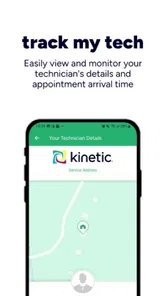
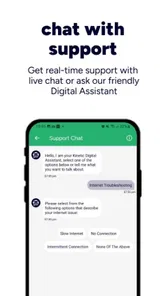
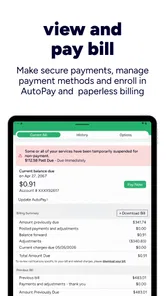
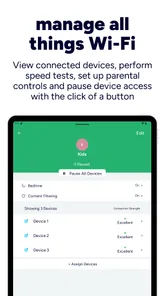
Analysis by Reviewed
I approached Go Kinetic as a practical account-management tool rather than something I would open for entertainment. Its job is straightforward: help Kinetic customers manage their account and connected home from a phone. That narrow purpose is also its main strength. Instead of treating it like a general productivity app, I found it more useful as one small, dependable part of a routine for keeping household internet and related account tasks under control.
The app is free, aimed at everyone, and developed by Uniti Group. It has built a solid audience, with more than half a million installs, an average score of 4.3 from roughly thirty thousand ratings, and about eleven thousand written reviews. Those figures suggest that many customers see value in having a mobile route into their Kinetic service, although they do not remove the need to judge whether the app fits your own account and habits.
Where Go Kinetic fits in a better household workflow
Before using it, my usual approach to broadband administration was scattered. I might search through email for an account message, open a browser, look for the correct customer page, or postpone a small task because I was away from a computer. That kind of workflow is manageable when everything is working, but it becomes irritating when I need to check something quickly from another room or while travelling.
Go Kinetic makes more sense when it replaces that scattered process with a repeatable starting point. I can think of it as the front door for Kinetic-related account activity: open the app, sign in, check what needs attention, and close it again. That sounds modest, but account tools are often most useful when they reduce the number of places I need to remember.
I would not use it as a replacement for every internet-related tool on my phone. It is not a general network analyzer, a full smart-home platform, or a universal service-management app. Its value depends on being a Kinetic customer and wanting a mobile way to interact with that service. If your household uses several unrelated providers or you want detailed technical diagnostics, you will probably still need other tools.
Starting with a clear purpose
The best first step is to decide what you expect from the app. For me, that means account access, connected-home management, and a quick place to begin when something related to the Kinetic service needs checking. I would avoid opening it without a reason and then expecting it to organize every digital task in the household.
That distinction matters because a focused app works best when paired with a simple personal system. I keep broader reminders elsewhere, while Go Kinetic is the service-specific checkpoint. If I need to remember to review an account issue later, I create a separate reminder rather than assuming I will remember the next time I happen to open the app.
More From Our News Desk

Weather by Xiaomi Review: Clear at a Glance, Less Clear Up Close

X Under Pressure: Can It Recover When Posting Goes Wrong?

Clash of Clans Is Won Between the Battles

Android Auto Makes the Case for Quieter Car Software

MobiOffice: Transforming Mobile Productivity with Seamless Integration

EA SPORTS FC™ Mobile Soccer: Redefining Mobile Sports Gaming
This division of labor prevents a common mistake: expecting one provider app to become a complete household dashboard. Go Kinetic can be the place where I inspect Kinetic-related information, but it should not become the only place where I track bills, appointments, equipment notes, or troubleshooting history.
Capturing information without creating clutter
Account apps are easiest to use when I already know what I am trying to find. Before opening Go Kinetic, I try to describe the task in one sentence: check the service, review the account, or manage something connected to the home. That tiny pause keeps the session focused and makes it easier to tell whether I have actually finished.
For a household with more than one person, I would also agree on who handles which tasks. One person might manage the account while another deals with everyday connectivity questions. The app can provide a shared place to access Kinetic-related information, but it does not automatically solve household communication. I still find it useful to write down important follow-up details in a separate note instead of relying on memory.
A practical example is a family member asking whether an account matter has been dealt with. Rather than forwarding a vague message, I can open the app, check the relevant area, and then record the outcome in the household’s usual notes or messaging system. The app handles the service interaction; the separate note preserves the decision or next action.
The useful insight is to separate service information from personal reminders. Go Kinetic is more effective when I use it to inspect and manage Kinetic matters, while a calendar, notes app, or task list holds deadlines and responsibilities. That approach avoids filling the provider app with expectations it was not designed to carry.
Building a repeatable routine
I get the most from Go Kinetic when I attach it to an existing moment rather than checking it randomly. For example, I might review the account when I am already handling household administration. The routine does not need to be long. A quick visit is enough if I know what I want to verify and what action would follow.
A good routine has three stages. First, I identify the reason for opening the app. Second, I check the relevant account or connected-home area without wandering through unrelated screens. Third, I decide whether the matter is complete, needs a reminder, or requires another support route. That final decision is important because simply looking at information is not the same as resolving a problem.
This workflow is particularly useful when the app is part of a broader maintenance habit. I can combine it with checking the physical router, confirming that household devices are behaving normally, or reviewing whether anyone has reported a recurring issue. Go Kinetic becomes the digital checkpoint, while the rest of the routine covers the real-world context around the connection.
One non-obvious advantage of this approach is that it keeps troubleshooting from becoming emotional guesswork. When the internet feels slow, I am less likely to restart random devices repeatedly if I first check the account and connected-home side of the service. That does not guarantee an instant fix, but it gives me a more orderly path before I escalate the issue.
A realistic everyday scenario
Imagine that I am working from home and another person in the house reports a connection problem. My old response might be to ask whether the issue affects one device or everyone, search for account details, and then lose time switching between browser tabs. With Go Kinetic already installed, I have a more direct first step: open the app, inspect the Kinetic-related information available to me, and decide whether the problem looks like an account matter, a connected-home matter, or something that needs technical support.
If the app points me toward a manageable account action, I can deal with it from the phone instead of waiting until I reach a computer. If the issue appears more technical, I have still gained a clearer starting point. I can then test the affected device, check the home setup, or contact the appropriate support channel with a better description of what I already checked.
The important benefit here is not that every connection problem disappears inside the app. It is that the app can reduce the first layer of uncertainty. That is valuable during a busy day, especially when I need to distinguish between an account task and a genuine network or device problem.
What feels efficient in daily use
The focused scope makes Go Kinetic easier to understand than a large collection of unrelated services. I do not need to learn a complicated productivity system before using it. The mental model is simple: this is where I go for Kinetic account and connected-home management.
It also suits people who prefer handling small administrative tasks on a phone. A mobile app is more convenient than opening a laptop for every minor check, particularly when I am already moving around the home. That convenience is strongest when the account is used regularly enough that a dedicated access point saves repeated searching.
The app’s current version is 6.0.4, and it supports devices running Android 6.0 or later. That broad operating-system requirement makes it accessible to people who do not replace their phone frequently. Still, compatibility alone does not guarantee an equally smooth experience on every device, so I would keep expectations realistic if the phone is older or heavily constrained.
Where the workflow can break down
The first failure point is account access. If I cannot sign in, have forgotten the relevant details, or am using the wrong account, the app cannot provide much practical help. I would prepare the correct account information before an urgent situation rather than waiting until the connection fails.
The second is scope. A provider app may help me manage service-related matters, but it cannot necessarily explain every cause of poor performance inside the home. Wi-Fi placement, an individual device, interference, or a local hardware issue may still require hands-on checks. Go Kinetic should be my first organized checkpoint, not my only diagnostic instrument.
The third failure point is overreliance on notifications or memory. If I open the app, notice an issue, and then close it without recording the next step, the problem can quietly return to the background. I prefer to turn an unfinished check into a separate reminder. That small habit makes the app part of a reliable system instead of a place where tasks disappear.
There can also be friction when a household expects one person to manage everything. The app may make access easier, but it does not decide who should act, explain a technical result to other residents, or preserve a complete history of every conversation. For shared homes, a short household note about account responsibility and troubleshooting steps is still worthwhile.
When a browser or another tool is better
I would choose Go Kinetic over a browser when I want a quick mobile entry point into my Kinetic account or connected-home management. The dedicated app feels more appropriate for repeated, service-specific checks than searching for the right page each time.
A browser may be preferable when I am already working on a computer, need to compare several documents, or want a broader desktop workflow. Likewise, a separate network utility may be better for testing a device or investigating local connectivity. A notes app remains better for keeping a household log, and a calendar is better for dates and follow-up commitments.
This is not a weakness unique to Go Kinetic; it is a trade-off created by specialization. The app is convenient precisely because it concentrates on Kinetic. That concentration means I should not expect it to replace the tools I use for technical testing, personal organization, or communication.
Small habits that make it more useful
- Open it with a defined question: decide whether you are checking the account, reviewing the connected home, or preparing to troubleshoot before starting.
- Keep a separate action record: if something needs follow-up, place the task in your usual notes or reminder system rather than trusting memory.
- Use it before random resets: check the account side first, then inspect devices and physical equipment in a logical order.
- Agree on household ownership: make clear who handles account administration and where other people should report unresolved issues.
- Close each session with a decision: mark the matter complete, create a reminder, or move to support or hands-on troubleshooting.
These habits are more valuable than simply installing the app and hoping it will improve household organization automatically. They turn a narrow service tool into a dependable checkpoint within a larger routine.
Who should adopt it
I would recommend Go Kinetic to Kinetic customers who regularly manage their service from a phone, share responsibility for a connected home, or dislike hunting through browser pages for account access. It is especially suitable for people who want a simple starting point when a household connection question appears.
It is also a sensible choice for someone who prefers lightweight systems. You do not need to build an elaborate process around it. A clear purpose, a short review routine, and a separate place for follow-up tasks are enough to make the app useful.
I would be more cautious about recommending it to someone who is not a Kinetic customer, since the app’s usefulness is tied to that service relationship. I would also steer advanced users toward additional diagnostic tools if they expect detailed network analysis, device-by-device testing, or a universal smart-home control center. Installing Go Kinetic will not remove those needs.
My final assessment
After treating it as part of a sustainable productivity system, I see Go Kinetic as a focused and practical business app rather than an all-purpose household organizer. Its strongest contribution is reducing the distance between a Kinetic customer and the account or connected-home tasks they need to handle.
The app works best when I use it deliberately: open it for a specific service question, check the relevant information, decide what happens next, and record any unfinished action elsewhere. That workflow avoids both extremes—ignoring the app until a crisis and expecting it to manage the entire home.
My recommendation is positive for Kinetic customers who want convenient mobile account access, with one clear condition: treat it as a service checkpoint, not a complete troubleshooting or productivity platform. Used that way, its free access, broad age suitability, and straightforward purpose make it an easy addition to a household routine. People seeking deeper technical controls or support for another provider should choose a different primary tool, but for the right customer, Go Kinetic earns a regular place on the phone.
Go Kinetic Frequently Asked Questions
Can I use Go Kinetic to manage my connected home as well as my account?
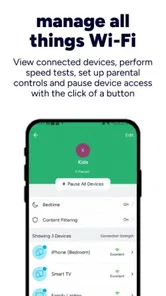
Yes. Go Kinetic is intended to help customers manage their Kinetic account and connected home quickly and easily. What you can manage in the app depends on the services attached to your account and what is available in your area. If you mainly want to keep track of Kinetic services from a phone or tablet, the app brings those account and connected-home tasks together.
What should I know about Go Kinetic before downloading it?
Go Kinetic is a Business app developed by Uniti Group for Kinetic customers. It is free to download and is rated for Everyone, so it is presented for a broad audience. The app is most relevant if you already use Kinetic services and want to manage your account or connected home from a mobile device; its usefulness depends on your account and the services you have.
What devices can I install Go Kinetic on?
Go Kinetic is available for Android and iOS devices, making it a convenient option for managing Kinetic services from a phone or tablet. On Android, the device needs to run version 6.0 or later. Before downloading, check that your device’s operating system meets this requirement and that you have enough space for the app and its updates.
Who makes Go Kinetic, and is it intended for personal or business use?
Go Kinetic is developed by Uniti Group and is listed as a Business app. Its main purpose is to help Kinetic customers manage their account and connected home quickly and easily. Whether you are considering it for household or work-related service, the features available depend on your Kinetic account, service type, and location.
What is Go Kinetic and what can I use it for?
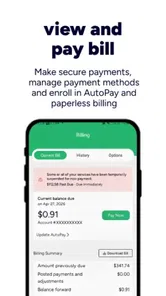
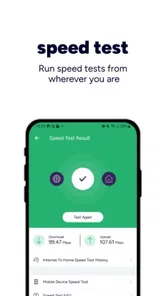
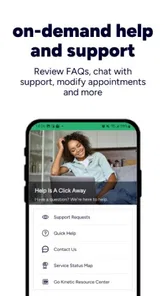
Go Kinetic is a mobile application designed to connect users with Kinetic services and account features in supported areas. Depending on your location and service type, you may be able to view account information, manage services, check connection details, troubleshoot common issues, contact support, or receive important notifications. The exact tools available can vary by region, account status, and whether you use Kinetic internet, phone, or other eligible services.
Pros
- Simple interface makes workout tracking easy for beginners.
- Supports goal setting to help maintain motivation.
- Useful progress records let users review activity over time.
- Workout reminders can encourage a more consistent routine.
- Suitable for home workouts without requiring much equipment.
Cons
- Some features may require a paid subscription or in-app purchase.
- Limited guidance may not suit users seeking detailed coaching.
- Tracking accuracy can vary depending on device sensors and permissions.
- The app may feel basic for advanced athletes and structured training plans.
- Battery usage may increase when location or motion tracking stays active.











