

Go Attend
- 0.00
- 0.0
- Installs
- 10.00K
- Price
- Free

Screenshots
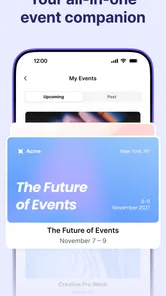
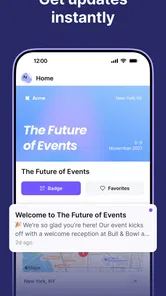
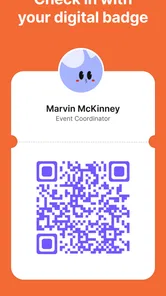
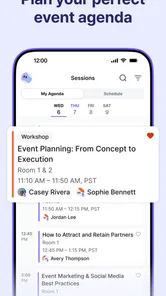
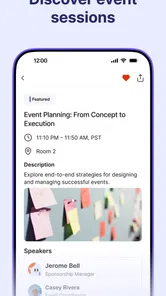
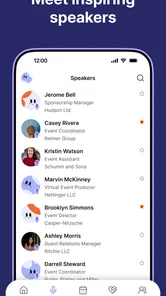
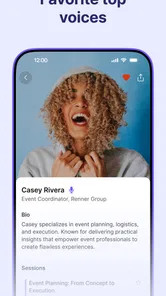
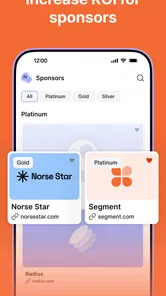
Analysis by Reviewed
When I install an event app, I want it to do more than repeat information I could already find in an email. I want a practical place to orient myself, check what matters, and move through an event without constantly switching between messages, websites, and notes. That is the role Go Attend is designed to fill. It is a free events app from Swoogo, aimed at making an event easier to follow from the attendee’s side.
My first impression is that Go Attend makes the most sense when it is connected to a specific event rather than treated as a general-purpose discovery tool. The useful experience begins before arrival: an organizer provides the event environment, and the attendee uses the app as a mobile companion. That distinction matters. This is not the kind of app I would open casually to browse every concert, conference, or local activity. Its value depends on the event being set up for it.
As an event companion app, it sits between a traditional event website and a collection of practical phone tools. A website may contain the full details, while email may deliver reminders and updates. Go Attend is more focused on keeping the attendee’s event information close at hand during the day itself. I found that approach appealing because event information is most useful when I am already moving, deciding what to do next, or trying to recover from a change in plans.
Following an event from invitation to outcome
I look at this section as the point where an invitation becomes a practical plan, rather than just another message in my inbox. I’ll focus on how I would prepare before leaving, use the event information while plans are unfolding, and judge whether the app has made the day easier to navigate. The key is choosing a few moments to check it, so the phone supports the event instead of taking me out of it.
Starting with the right expectation
The first thing I would tell a friend is to think of Go Attend as an access point supplied by an event organizer. The app is free, and its content rating is Everyone, so it is approachable for a broad audience. It runs on Android devices using Android 7.0 or later, which makes it relevant even if someone is using an older compatible phone rather than a recent flagship.
That accessibility is useful for mixed groups. At a professional event, not everyone arrives with the same phone, technical confidence, or patience for complicated setup. A lightweight attendee app has a better chance of being accepted when people can install it without worrying about a purchase or a demanding device requirement. Still, installation alone does not guarantee a useful experience: the event itself has to be available through the app, and the organizer’s preparation remains a major part of the outcome.
The app’s current version is 1.21.0, and it was released on September 9, 2025. I see that as a sign that the product is being maintained as an active event tool rather than left as a static companion to one occasion. For an attendee, the practical lesson is simple: keeping the app updated before traveling is sensible, especially when an event depends on current information.
More From Our News Desk

 Gmail
GmailGmail in a Busy Inbox: Who Benefits Most?
From first account to crowded workday, Gmail earns its place through dependable search and flexible sorting—but its best fit depends on how much inbox maintenance you can tolerate.

 Prime Video
Switching to Prime Video: What Changes in Your Viewing Routine
Prime Video can make a compelling second home for streaming, but switching means learning a different catalog, rental layer, and route from browsing to playback.

 Universal TV Remote Control
Universal TV Remote Control Works Best as a Reliable Backup
A phone remote earns its place through quick setup and reliable habits. Here is how to get more from Universal TV Remote Control—and where its limits show.

 Weather - By Xiaomi
Weather by Xiaomi Review: Clear at a Glance, Less Clear Up Close
Xiaomi’s weather app makes everyday forecasts quick to scan, but its calm surface can leave useful details and recovery paths harder to find than they should be.

 X
XX Under Pressure: Can It Recover When Posting Goes Wrong?
A resilience-focused review of X, examining setup, mistaken posts, interruptions, weak connections, and the gaps that matter when recovery needs to be dependable.

 Clash of Clans
Clash of Clans Is Won Between the Battles
Its raids are quick; its community is a long-term project of coordination, teaching, rivalry, and shared responsibility—with all the friction that entails.
Latest News



Moving from a message to a usable event space
My realistic starting scenario would be a day-long professional gathering. I receive an invitation from the organizer, install Go Attend, and open it before leaving home. The important handoff happens here: the organizer’s communication points me toward the app, while the app becomes the place where I continue preparing. I would use this moment to make sure I can reach the event area and understand what information is available before I am in a crowded venue with limited time.
This workflow is better than relying on a long email thread because email is built around messages, not around the attendee’s changing priorities. A message may contain an agenda, a location, and several reminders, but those details can become difficult to scan when they are mixed with unrelated mail. An event-specific mobile space gives the information a clearer context. I do not have to remember which message contained the detail I need; I can return to the event itself.
There is also a useful mental shift here. Instead of asking, “Which email should I search?” I can ask, “What do I need to know about this event now?” That is a small difference, but it becomes meaningful when I am checking details between sessions or while walking through an unfamiliar venue.
Using the app during the event
Once I arrive, the value of Go Attend changes. Preparation is no longer the main task; quick orientation is. I would open it when deciding where to go next, checking the event’s available information, or confirming what the organizer has made available for attendees. The best event apps reduce the need for repeated context switching, and that is the standard I use here.
A concrete example would be a schedule change. If the day does not unfold exactly as expected, I would rather consult the event’s mobile space than depend on a printed page or an old screenshot. The app can serve as the current reference point for the event experience, while the organizer remains responsible for keeping the content useful. That relationship is important: Go Attend can make information easier to reach, but it cannot correct an event plan that has not been updated by the people managing it.
I also see value for attendees who need to make quick decisions rather than read everything in advance. Someone may arrive late, skip one part of the program, or suddenly have a free period. A mobile event environment is more helpful in those situations than a static document because it supports checking information at the moment a decision is needed.
Handling the handoffs between people
The most interesting part of the workflow is the handoff between organizer and attendee. The organizer supplies the event structure and information; the attendee turns that information into actions. Go Attend is the layer that carries the handoff onto the phone. If that layer is clear, the attendee spends less time asking basic questions and more time participating.
There is a second handoff between the app and the physical venue. A screen can tell me what an event offers, but I still have to translate that into movement: find the room, arrive at the right moment, and adjust if circumstances change. This is where I would keep my expectations realistic. An event app can reduce uncertainty, but it does not replace signs, staff, or common sense on site. If the venue is large or confusing, I would still pay attention to physical directions rather than assuming the phone has every answer.
For a group, the app can also reduce inconsistent information. If several attendees are working from the same event source, they are less likely to rely on different saved documents or forwarded messages. That does not eliminate questions, but it can give everyone a shared reference point. In practice, this is one of the stronger reasons to use an event-specific app: it helps align people who are arriving from different places with different levels of preparation.
Reaching a useful result
The result I want from Go Attend is not a spectacular feature demonstration. It is a smoother event day. I want fewer moments spent searching, fewer doubts about what comes next, and a more direct path from information to action. When the organizer has prepared the event properly, the app can become a quiet tool that supports the day without demanding attention for its own sake.
That makes it particularly suitable for conferences, organized gatherings, and other events where attendees need a central mobile reference. It can help first-time visitors who would otherwise feel unsure about the flow of the day. It can also suit experienced attendees who do not need explanations but do appreciate having relevant details available in one place.
The outcome is less impressive for someone who only wants broad event discovery. If I am searching for things happening near me without already belonging to a particular event, I would choose a local listings service, a ticketing platform, or a social calendar instead. Go Attend is more focused than those alternatives, and that focus is both its strength and its boundary.
Where the flow becomes less comfortable
The main limitation is dependence on the organizer. The app can provide a structured event experience, but the quality of that experience follows the quality of the event setup. If information is incomplete, confusing, or slow to reflect changes, the attendee may still feel lost even though the app is installed. This is not a reason to dismiss it; it is a reason to understand where responsibility sits.
There is also a practical risk in depending too heavily on a phone during a busy day. Notifications, battery life, connectivity, and crowded surroundings can all affect how convenient a mobile workflow feels. I would prepare before leaving by opening the event area in advance, charging my phone, and keeping any essential confirmation details accessible. Those habits are useful because they protect against friction without pretending the app replaces every other form of preparation.
Another trade-off is that a dedicated event app adds one more installation to a phone. For a single short event, some people may prefer a browser page or a printable schedule. I understand that choice. Go Attend becomes easier to justify when the event contains enough moving parts to make a central mobile space worthwhile, or when I expect to attend several events that use the same platform.
Who will get the most from it
I would recommend Go Attend to attendees who regularly join organized events and want a cleaner way to keep event information nearby. It is especially useful for people who dislike digging through email, who need to make decisions during a busy schedule, or who are attending somewhere unfamiliar. The free price also removes a common barrier when an organizer asks a large audience to use an app.
It is a sensible choice for teams as well. When colleagues attend the same gathering, a shared event space can make coordination easier than forwarding individual updates. One person can still communicate directly with another, but the app offers a common starting point for the event’s official information.
I would be less enthusiastic about it for someone who rarely attends organized events, has no event invitation that uses the platform, or wants a broad catalog of activities. In those cases, a general calendar, ticket marketplace, or venue website may be more useful. Choosing the right category matters more than choosing the most feature-rich tool.
Small habits that improve the experience
My first tip is to install and open the app before the event day, not while standing outside the venue. That gives me time to identify the relevant event and notice whether I need to ask the organizer for access or clarification. It also separates technical preparation from the pressure of arrival.
My second tip is to treat the app as a live reference rather than a replacement for all planning. I would review the event information before traveling, then use it selectively during the day. This avoids the common mistake of staring at a phone continuously when the real purpose is to participate in the event.
My third tip is to use the event’s official information as the baseline when comparing it with messages from other attendees. If someone forwards an old detail or shares a personal interpretation, I would check the event space before acting. That workflow can prevent small misunderstandings, particularly when a group is moving between activities.
Finally, I would keep a backup mindset. I do not mean carrying a complicated folder of paperwork; I simply would not assume that one app solves every venue problem. A saved confirmation, a note of the location, and awareness of staff or signage can make the day more resilient when the phone is unavailable or the information needs human explanation.
My overall assessment
Go Attend is a focused mobile event guide rather than a general discovery platform, and I think it works best when judged on that basis. Swoogo has positioned it as an attendee-facing companion, and the free access, Everyone rating, and support for Android 7.0 and later make it easy to consider for a wide audience. Its presence on the store has reached over ten thousand installs, which gives it a real user base without suggesting that it is as universal as the largest consumer platforms.
What I like most is the complete workflow it encourages: receive an event invitation, move into a dedicated mobile space, check information when plans change, and finish the day with less dependence on scattered messages. What I would watch carefully is the organizer’s execution. The app’s usefulness rises or falls with the event content, and people who expect a universal event search engine may find its scope too narrow.
My recommendation is therefore conditional but positive. If an event you are attending uses Go Attend, I would install it and prepare with it before arrival. It can make the practical side of attending feel more orderly, particularly when the day includes several moving parts. If you are looking for local event discovery or a permanent personal calendar, I would choose a different tool. Used for its actual purpose, though, Go Attend is a straightforward way to keep an organized event within reach from the first invitation to the final decision of the day.
Go Attend Frequently Asked Questions
Will Go Attend work on my phone?
Go Attend is an event app from Swoogo, and it supports devices running Android 7.0 or later. Before installing, check your device’s operating system version and make sure you have enough space for the app. The app is free to download, and its age rating is Everyone, making it suitable for a broad range of users.
Who makes Go Attend, and what kind of app is it?
Go Attend is developed by Swoogo and focuses on events. It is presented as an event mobile sidekick, so its purpose is to support participation in events rather than provide a general-purpose social or entertainment experience. The app has over 10,000 installs, giving prospective users a sense of its reach while leaving the specific experience dependent on the event they plan to attend.
What is Go Attend and what can I use it for?
Go Attend is an event-focused application designed to help users discover, organize, and participate in activities, meetings, or scheduled events. Depending on the event organizer’s setup, you may be able to view event details, check schedules, receive updates, access attendance information, and interact with invitations or registrations. Its exact features can vary between events, so the experience may depend on the organization using the platform.
Do I need an account to use Go Attend?
An account may be required for features such as registering for an event, confirming attendance, viewing personalized schedules, or receiving organizer notifications. In some cases, you may be able to browse public event information without signing in. During setup, the app may request basic details such as your name, email address, or contact information. Check the registration requirements for the specific event before downloading.
Is Go Attend free to download and use?
Go Attend is free to download. However, events listed through the app can have their own registration fees, membership requirements, or paid access rules. The application itself may also offer features controlled by event organizers or institutions. Before confirming attendance or submitting payment details, review the event’s pricing, cancellation policy, and any additional charges shown in the registration process.
Pros
- Quick access to event schedules
- updates
- and important announcements.
- Useful for checking session details and planning your day at an event.
- Digital event information can reduce the need for printed programs.
- May support networking through attendee or participant information.
- Convenient for receiving timely notifications during conferences or events.
Cons
- Its usefulness depends on whether the event organizer fully supports the app.
- Some features may require an account
- registration
- or an event code.
- Information can become outdated if organizers do not update the event content.
- Notifications may be excessive or easy to miss during a busy event.
- Performance and available features may vary between different Go Attend events.











