

Glora AI: Photo & Video Editor
- 55.00
- 4.3
- Installs
- 10.00K
- Price
- Free
Screenshots
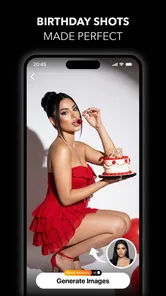
Analysis by Reviewed
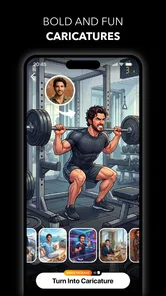
I approached Glora AI: Photo & Video Editor as a practical photography app rather than a simple novelty generator. Its central appeal is clear: it brings AI-assisted portraits, anime-inspired transformations, hairstyle experiments, baby-themed generations, and broader photo and video edits into one mobile workspace. After spending time with that mix, my view is that it works best as a quick creative playground for people who want to explore visual ideas without opening several specialized apps. It is less convincing as a replacement for a careful, traditional editor.
That distinction matters. The app can help turn an ordinary selfie into something shareable, give you a fast way to test a different visual identity, or produce a playful image for a message or social post. At the same time, AI editing is not magic: results depend heavily on the source image, the selected style, and how much imperfection you are willing to accept. My overall impression is positive, but conditional. Glora AI is most useful when speed and experimentation matter more than exact control.
What the app is really good at
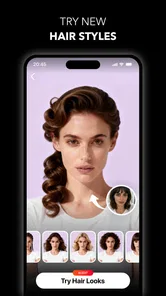
The strongest part of the experience is the range of ideas gathered under one roof. Instead of treating photography as only color correction or cropping, the app invites you to rethink the subject entirely. Anime looks can change the mood of a portrait, hairstyle concepts can help you imagine a new appearance, and baby-generator effects offer a more playful reason to edit a picture. The broader AI photo and video tools make the app feel more like a collection of creative prompts than a conventional adjustment panel.
I found that approach especially appealing when I did not begin with a precise editing plan. With a standard editor, I usually know that I need to brighten a face, straighten a frame, or remove a distracting color cast. Here, the starting point is often a question: what would this portrait look like in another style? That makes the app easy to pick up during a short break, because the goal is discovery rather than a long sequence of technical corrections.
The photography focus also gives the app a natural audience among people who post portraits, profile images, stories, and casual creative updates. You do not need to understand layers, masks, curves, or detailed retouching terminology to get value from the main concepts. The experience is built around choosing a direction and seeing what the AI can do with the image you provide.
One useful workflow is to treat the first generation as a draft, not the final result. I would start with a well-lit image where the face is clearly visible, try one style, and then compare the result with the original before making another choice. This prevents the common mistake of judging an effect only because it looks dramatic. A striking transformation is not automatically a good profile picture, and a subtle edit may be more useful for everyday sharing.
Portrait experiments are the clearest strength
The portrait-oriented tools are where the app feels most immediately understandable. A selfie gives you an obvious subject, and the visual difference is easy to notice. Hairstyle concepts are a good example: they can be entertaining even when you are not seriously planning a change, while still helping you discuss a possible look with a friend or stylist. I would not use an AI result as a guarantee of how a real haircut will appear, but it can be a convenient conversation starter.
More From Our News Desk

 Gmail
GmailGmail in a Busy Inbox: Who Benefits Most?
From first account to crowded workday, Gmail earns its place through dependable search and flexible sorting—but its best fit depends on how much inbox maintenance you can tolerate.

 Prime Video
Switching to Prime Video: What Changes in Your Viewing Routine
Prime Video can make a compelling second home for streaming, but switching means learning a different catalog, rental layer, and route from browsing to playback.

 Universal TV Remote Control
Universal TV Remote Control Works Best as a Reliable Backup
A phone remote earns its place through quick setup and reliable habits. Here is how to get more from Universal TV Remote Control—and where its limits show.

 Weather - By Xiaomi
Weather by Xiaomi Review: Clear at a Glance, Less Clear Up Close
Xiaomi’s weather app makes everyday forecasts quick to scan, but its calm surface can leave useful details and recovery paths harder to find than they should be.

 X
XX Under Pressure: Can It Recover When Posting Goes Wrong?
A resilience-focused review of X, examining setup, mistaken posts, interruptions, weak connections, and the gaps that matter when recovery needs to be dependable.

 Clash of Clans
Clash of Clans Is Won Between the Battles
Its raids are quick; its community is a long-term project of coordination, teaching, rivalry, and shared responsibility—with all the friction that entails.
Latest News



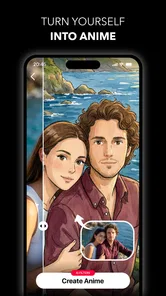
The anime direction has a different advantage. It is not trying to preserve a completely natural appearance; the point is to create a recognizable interpretation. That makes small inconsistencies less distracting than they would be in a realistic retouch. If the output changes facial proportions or simplifies details, those changes can feel like part of the style rather than a technical failure.
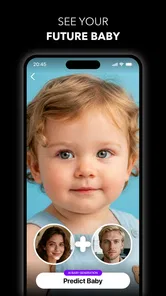
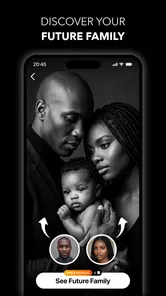
The baby-generator concept is even more dependent on expectations. It is best understood as light entertainment, not a prediction or a meaningful assessment of future appearance. Used that way, it can be a fun group activity or a quick image to share privately. I would avoid treating the output as anything more serious, because an AI-generated result is shaped by the selected effect and source material rather than by a dependable real-world process.
A less obvious tip is to keep the original image untouched and save edited versions under descriptive names outside the creative session. When several variations look similar, it becomes easy to forget which one came from which style. Preserving the original also gives you a clean reference for deciding whether the edit improved the image or merely made it more unusual.
Video support broadens the use case, but raises expectations
Having video editing alongside image generation makes the app more flexible than a portrait-only tool. It gives users a reason to return when they are preparing short visual content rather than a single still image. I see this as useful for casual creators who want to experiment with a consistent mood across different formats without learning an entirely separate application.
Still, video naturally demands more patience than a single photograph. A visual effect that looks convincing on one frame may feel repetitive or uneven when viewed across movement. I would therefore begin with short clips and a clear visual idea rather than applying an ambitious transformation to a long recording. The app is more attractive for quick creative tests than for a carefully produced project where every frame must remain consistent.
That trade-off is important when comparing it with the usual alternatives. A dedicated photo editor will generally be the better choice for precise exposure work, selective adjustments, detailed retouching, and repeatable manual results. A dedicated video editor is usually preferable when timing, transitions, audio, captions, or a longer sequence are the priority. Glora AI sits between those categories: it offers breadth and imaginative effects, but it does not replace the depth of a specialist tool simply because it includes both photos and videos.
The main weakness is control and predictability
My biggest reservation is the gap between choosing an idea and receiving a result you genuinely want to keep. AI editing can produce an image that is attractive at first glance but awkward in smaller details. Faces, hair, hands, clothing edges, and backgrounds are the areas I would inspect most carefully. These issues are not always obvious in a thumbnail, so I recommend viewing each result at a useful size before sharing it.
This also means that the quality of the input matters more than a casual user may expect. A dark, blurry, heavily cropped, or partially hidden face gives the system less to work with. If the first result feels strange, the problem may not be the chosen style alone. A clearer source image, a simpler pose, and less visual clutter behind the subject can make the next attempt more convincing.
Another limitation is that creative automation can make the process feel less deliberate. In a manual editor, I know which adjustment caused a change and can usually reverse it with precision. With an AI transformation, the result may change several aspects at once. That is convenient for fast experimentation, but frustrating when I like the face from one version, the hair from another, and the background from a third. Users who want to combine those elements carefully may eventually prefer a more traditional workflow.
There is also a practical cost consideration. The app is free to install and is suitable for trying the main concept before committing money, but it includes in-app purchases ranging from $6.99 to $99.99 per item. That is a wide range, so I would pay close attention to the purchase screen and the exact value of any option before confirming it. For occasional amusement, the free experience may be enough; for frequent generation, the potential expense becomes part of the decision rather than a minor detail.
I would also keep expectations realistic about the app’s maturity. The current version is 0.8.0, which suggests an experience that may still be developing. That is not automatically a problem, especially for users who enjoy trying evolving creative tools, but people who need a completely settled workflow should be more cautious. I would test the app with a few nonessential images first instead of making it part of an important project immediately.
Small habits that improve the results
My first recommendation is to choose source images according to the effect. For a portrait transformation, use one clear subject with enough space around the head and shoulders. For a hairstyle experiment, a straightforward front or three-quarter view is more useful than a dramatic angle. For a playful baby-themed result, use an image where the faces are easy to identify rather than a crowded group shot. These choices do not guarantee perfection, but they reduce avoidable confusion.
Second, compare variations for usefulness, not just intensity. The most heavily transformed result may be entertaining, while a gentler version may work better as an avatar or social image. I would make a small selection of candidates, leave them for a few minutes, and then return with fresh eyes. That simple pause helps separate an exciting first impression from an edit that still looks good after the novelty fades.
Third, consider the destination before editing. A portrait intended for a profile image needs to remain recognizable after cropping. A story image can tolerate a stronger visual concept because it is viewed in a more temporary context. A private joke between friends can be much more experimental than an image attached to a professional identity. The same generated result can be successful or unsuitable depending on where it will appear.
Finally, use the app as an idea generator when the output is not quite right. A hairstyle variation may suggest a direction even if the simulated strands look unnatural. An anime result may reveal a color combination you want to recreate manually. This is one of the more valuable ways to use AI editing: not as an unquestionable finished product, but as a fast source of visual possibilities.
Who should install it, and who should look elsewhere?
I would recommend it to casual photographers, social-media users, portrait enthusiasts, and anyone who enjoys trying new visual identities without committing to a complicated editing course. It is particularly suitable for people who want a quick result on a phone and are comfortable choosing from creative directions rather than adjusting every detail themselves. Families and friend groups may also enjoy the playful generators as occasional entertainment.
It is a reasonable option for younger users in terms of its Everyone content rating, although that label should not be confused with a promise that every generated image will suit every situation. Parents and users who share devices should still make their own decisions about what kinds of images are appropriate to create and share. The app’s creative themes can be harmless fun, but the context and the chosen source photos still matter.
I would skip it if your priority is professional color grading, exact skin retouching, fine object removal, detailed compositing, or dependable control over every element. In those cases, a dedicated editor is the better investment of time. I would also hesitate if you dislike trial and error, because AI results can require several attempts and a willingness to reject images that are technically interesting but visually weak.
The developer, Glora AI, has positioned the product around accessible creative experimentation, and that focus comes through clearly. Its average rating is 4.3 from around 550 ratings, while the app has passed 10K+ installs. Those figures suggest that it has found an interested early audience, but I would still interpret them alongside the app’s developing version and the variable nature of AI output rather than as proof that it will suit everyone.
My final take after using the creative tools
Glora AI succeeds when I ask it to help me explore: a different portrait mood, a playful anime interpretation, a possible hairstyle, or a quick visual idea for a post. It is approachable, varied, and more entertaining than a standard adjustment editor when I want inspiration instead of technical precision. The combination of photo and video options also gives it a wider role than a single-effect novelty app.
Its weaknesses are just as clear. Results can be unpredictable, detailed control is limited compared with specialist alternatives, and the in-app purchase range deserves careful attention. The free entry point makes experimentation easy, but frequent users should decide whether the ongoing cost matches how often they will actually use the generated images. I would not rely on it for an important client deliverable or a polished production workflow.
My recommendation is therefore specific: install it if you want a fast, playful AI photography companion and are happy to judge each result critically. Start with ordinary, well-lit portraits, keep your originals, inspect details before sharing, and treat the generators as creative suggestions rather than facts. If you need precision, consistency, or professional finishing, use a dedicated editor instead. For everyone in between, Glora AI is a worthwhile free experiment, provided you value discovery more than complete control.
Glora AI: Photo & Video Editor Frequently Asked Questions
What devices and operating systems can run Glora AI: Photo & Video Editor?
Glora AI: Photo & Video Editor is a photography app for mobile devices, with Android support starting at version 8.0. Before downloading, check that your device meets this requirement and has enough available storage for the app and the media you plan to edit. Glora AI is the developer, and the app is free to download.
What kinds of AI creations can I make with Glora AI?
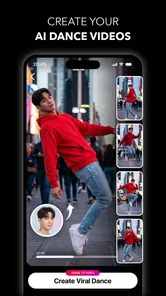
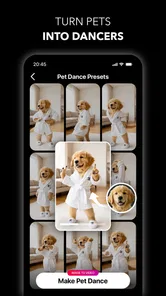
The app’s featured AI options include creating AI photos and videos, trying anime-inspired looks and hairstyles, and using a baby generator alongside other AI edits. These features make it suitable for experimenting with different visual styles as well as polishing existing pictures. The specific tools available to you may depend on the app version and whether a feature requires an in-app purchase.
What is Glora AI: Photo & Video Editor used for?
Glora AI: Photo & Video Editor is designed for creating and enhancing visual content on a mobile device. It combines photo-editing tools, video adjustments, creative effects, filters, templates, and AI-powered features in one app. It may be useful for social media posts, profile pictures, short videos, collages, and quick creative projects without requiring advanced editing experience.
Does Glora AI: Photo & Video Editor require an internet connection?
Some basic editing functions may work directly on your device, but AI-powered tools, online templates, cloud-based effects, and certain content libraries can require an active internet connection. Availability may also depend on the version installed and your device. If you plan to edit while traveling or offline, it is best to test the specific tools you need before leaving a reliable connection.
Is Glora AI: Photo & Video Editor free to download and use?
The application may be available as a free download, but some advanced tools, premium effects, exclusive templates, exports, or AI functions can be restricted behind in-app purchases or a subscription. Before confirming a purchase, check the pricing page, trial conditions, renewal terms, and whether exported content includes limitations such as watermarks or reduced quality.
Pros
- AI tools quickly enhance portraits and social media photos.
- Includes creative filters
- effects
- and templates for varied edits.
- Simple interface makes basic editing accessible to beginners.
- Useful for creating polished content directly on a mobile device.
- Regular creative features can help inspire new photo and video ideas.
Cons
- Some advanced tools may require a subscription or in-app purchase.
- AI results can vary depending on lighting
- image quality
- and subject.
- Export options may be limited unless premium access is enabled.
- Video editing features may feel less comprehensive than dedicated editors.
- Using AI features can require an internet connection and extra processing time.










