Gibson: Learn to Play Guitar
- 378.00
- 4.4
- Installs
- 100.00K
- Price
- Free

Screenshots
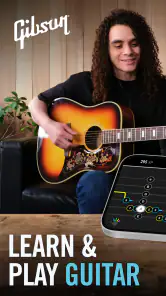

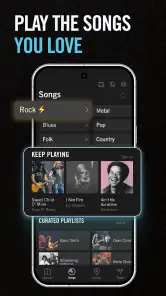
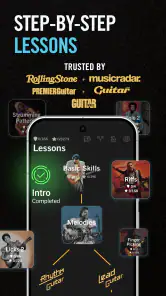

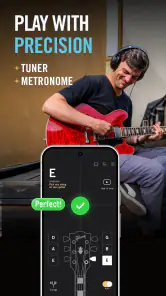
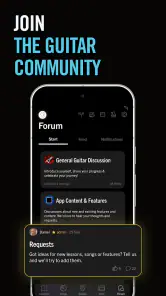
Analysis by Reviewed
Learning guitar often fails for a simple reason: the instrument asks you to coordinate too many things at once. You need to know where your fingers go, keep time, listen for a clean note, and remember what comes next. Gibson: Learn to Play Guitar approaches that problem as an education app rather than just a collection of songs. In my experience, it is most useful when I treat it as a guided practice companion, not as a complete replacement for a teacher or a real instrument.
The app comes from Zoundio AB and sits in the Education category. It is free to install, with optional in-app purchases ranging from $19.99 to $159.99 per item. Its focus is beginner guitar learning, while also bringing together practical tools such as a tuner, tabs, chords, and playing tips. That combination makes it more useful than an app that only shows chord diagrams, especially when I want to move from “I know the shape” to “I can actually play it in time.”
It has a 4.4 average from around 3.3 thousand ratings, and has passed 100 thousand installs. Those figures suggest a substantial audience, but they do not tell me whether the teaching style will suit every learner. The real question is how comfortably a new player can read the material, follow the lessons, and practice in ordinary surroundings.
How clearly the learning path works for different abilities
Readability and navigation during a practice session
The strongest part of the experience is the way the main learning tasks are grouped. A beginner usually needs three things close at hand: an explanation, a visual reference, and a way to check the result. Having lessons alongside a tuner, tabs, and chord material reduces the need to jump between several unrelated apps. That matters more than it sounds. Every extra switch is an opportunity to lose focus or forget what the exercise was meant to teach.
I find the app easiest to approach when I decide on one small goal before opening it. For example, I might work on changing between two chords rather than browsing every available lesson. This makes the interface feel less like a library and more like a short practice route. New players who are easily overwhelmed should resist trying to explore everything at once; the supporting tools are valuable, but they can also distract from the basic lesson sequence.
The tuner is particularly helpful at the beginning because poor tuning can make a learner think their fingers are wrong. I would tune before every serious session, especially after moving the guitar or changing strings. A chord that sounds unpleasant may be a fingering issue, but it may also be an instrument that is out of tune. Separating those two problems saves frustration.
Tabs and chord references serve different reading preferences. Chord diagrams are generally easier for someone who wants to see finger placement at a glance, while tabs are more useful when the player needs to know which string and fret to play in sequence. I would not expect either format to feel instantly obvious to every learner. The app helps by keeping both kinds of information in the same learning environment, but the user still needs time to understand the symbols.
More From Our News Desk

Clash of Clans Is Won Between the Battles

Android Auto Makes the Case for Quieter Car Software

MobiOffice: Transforming Mobile Productivity with Seamless Integration

EA SPORTS FC™ Mobile Soccer: Redefining Mobile Sports Gaming

How Microsoft OneDrive Became a Mobile Productivity Giant

How Google Translate Breaks Language Barriers Effortlessly
For someone with limited reading stamina, a short routine works better than a long browsing session. I would open one lesson, check the relevant chord or tab, play slowly, and return to the same material instead of continually moving forward. This is also a good approach for younger users under the Teen content rating: an adult can help choose a manageable starting point without needing to supervise every note.
Navigation is less demanding when the phone or tablet is positioned before playing. Reaching across the instrument to tap the screen can interrupt rhythm and create unnecessary hand movement. I prefer placing the device on a stand or nearby surface, then using the app in brief pauses. That is a small practical adjustment, but it makes the teaching flow feel much smoother.
Motor demands, sound, and sensory comfort
Any guitar-learning app has a physical limit: it can explain the movement, but it cannot make the movement easy. Pressing strings, stretching between frets, and changing shapes require strength and coordination. Gibson: Learn to Play Guitar is therefore most accessible to people who can comfortably hold the instrument and make repeated finger movements, although a learner can still adapt the pace and choose simpler practice goals.
I would begin with chord transitions that use only a few fingers and allow plenty of time between changes. Trying to match a fast demonstration too early creates tension in the hand and turns a learning exercise into a test of endurance. A better workflow is to form the chord, check each string, release the hand, and repeat. This uses the app’s visual material as a reference without demanding that the player immediately follow a full-speed performance.
Sound is central to the experience. The tuner and lesson guidance are useful only if the device can hear the guitar clearly enough and the learner can hear the result. A quiet room is not always necessary, but heavy background noise can make it harder to distinguish a muted string from a clean one. Players who are sensitive to sound may prefer short sessions at a controlled volume, while those who cannot rely on audio should not expect the app alone to provide a fully visual substitute for listening.
There is also a sensory trade-off between looking at a screen and looking at the fretboard. Beginners often need both, yet switching their eyes repeatedly can break concentration. I get better results by studying the chord shape first, placing my fingers, and then looking down only long enough to correct the position. With practice, the screen becomes a reference rather than something I must watch continuously.
People with limited hand mobility may need to modify the instrument setup or choose a guitar with a more comfortable neck before the app becomes genuinely useful. The software cannot resolve pain, reach limitations, or poor posture. If playing causes discomfort rather than ordinary beginner effort, I would stop and adjust the setup instead of pushing through a lesson.
Using the app in real-life situations
The most realistic use case is a short evening session. I can tune the guitar, review one chord, practice a transition with a tab or simple pattern, and finish by checking whether the notes sound clean. That routine fits better into daily life than promising myself an ambitious practice block and then skipping it because I do not have enough time.
It also works well for a learner who travels between rooms or takes the instrument to a friend’s house. The app puts several reference tools together, so I do not need to carry a printed chord book and a separate tuner. The phone becomes a compact practice guide, although the player still needs a stable place for the device and enough quiet to follow the material.
For shared homes, timing matters. A learner may not want to repeat the same chord change loudly while other people are working or sleeping. In that situation, I would use the visual lesson and practice silent finger placement, then play a smaller number of audible repetitions later. This is not as satisfying as a full session, but it keeps the habit alive and lets the app support practice even when the environment is not ideal.
Someone with vision difficulties may find chord shapes and tabs more manageable when the device is positioned close and the display is kept at a comfortable angle, but the usefulness will depend on the person’s ability to distinguish the visual information. Likewise, a player with hearing difficulties may benefit from focusing on finger placement and rhythm through visible guidance, while still needing another way to confirm tuning and sound quality. I would judge the app as potentially adaptable, not universally accessible, because the core activity remains visual and auditory.
The minimum operating requirement is Android 8.0, so it is suitable for many older Android devices that still meet that baseline. The current version is 6.5.6. In practical terms, I would still check that the phone can remain visible while I play and that its battery is healthy enough for a session. A technically compatible device can be inconvenient if its screen is too small, its speaker is weak, or it has to be handled constantly.
What the app does better than usual alternatives
The usual alternative is a mixture of a standalone tuner, printed chord charts, random online videos, and song tabs found separately. That approach can be inexpensive and flexible, but it places the burden of organization on the learner. I have used that kind of setup before, and the problem is not a lack of material; it is knowing what to do next and whether the material belongs to the same progression.
This app’s advantage is the connection between learning content and practical reference tools. A beginner can move from a lesson to a chord shape, tune the instrument, and return to playing without changing the whole study system. That continuity is especially valuable for people who struggle with planning or who lose confidence when several sources explain the same idea differently.
A private teacher remains better when the learner needs immediate correction. A teacher can notice a collapsed wrist, excessive pressure, or a rhythm problem that an app cannot physically observe in the same way. Free videos may be better for someone who wants a particular playing style or a very specific song, while a printed book may suit a person who wants no screen during practice. Gibson’s approach is strongest in the middle: more structured than scattered resources, but more independent and less personal than instruction from another musician.
Where the inclusive experience still has limits
The biggest barrier is that the app cannot remove the physical demands of guitar. A person may understand every chord diagram and still struggle to fret the strings. That is not a failure of motivation, and it is not something more screen time automatically fixes. Learners with pain, tremors, restricted reach, or fatigue should treat the lessons as adaptable guidance and consider support from a teacher who can suggest safer technique.
Another barrier is attention. The app contains several useful areas, but beginners may not know which one deserves priority. The tuner, tabs, chords, and tips are helpful individually; together, they can create a feeling of abundance. My solution is to choose the lesson first and use the other sections only when that lesson calls for them.
Cost can also affect the decision. The app itself is free, but optional purchases can reach $159.99 per item. That means I would explore the free experience carefully before committing to anything. Someone who only wants a basic tuner or occasional chord reminder may not need to spend money at all, while a committed learner should compare the paid route with lessons, books, or other structured courses before deciding.
The Teen content rating is worth considering for families. It does not tell me how much supervision a particular learner needs, so I would focus on the child’s independence, comfort with the instrument, and ability to make sensible in-app purchase decisions. The app may be suitable for a motivated younger player, but the guitar itself still requires patience and physical control.
There is also a difference between accessibility and convenience. Being able to enlarge a device or choose a quiet practice time can make the experience easier, but those adjustments do not guarantee that every lesson will be usable for every person. I appreciate the app most when I treat it as a flexible reference rather than assuming one presentation style will suit all learners.
My verdict for different kinds of learners
I recommend Gibson: Learn to Play Guitar to beginners who want one place for guided learning, tuning, chord help, tabs, and practical guitar advice. It is particularly appealing if random videos leave you unsure what to practice next. The free starting point lowers the risk of trying it, and the app’s education-focused design gives a new player more structure than a standalone tuner or a folder of saved videos.
I would be more cautious if you need detailed personal feedback, have significant difficulty with hand movement, cannot comfortably use visual and audio instructions, or want a completely screen-free method. In those cases, a patient teacher, adapted instrument setup, printed material, or a different learning format may serve you better. The app can support a practice plan, but it cannot assess your body or replace human encouragement.
My most useful tip is to make the app part of a repeatable routine: tune first, choose one lesson, use the chord or tab reference only as needed, and finish before fatigue turns technique into strain. That workflow makes the experience clearer for beginners and more manageable for people whose energy, attention, or surroundings change from day to day.
Overall, I see it as a practical starting point rather than a magic shortcut. It brings the essential early tools together, respects the need for gradual practice, and gives learners a way to build confidence without assembling their own course from unrelated sources. Its limits are real, especially around physical ability, sensory needs, and the lack of personal correction. Still, for a new guitarist who wants an approachable guide on a compatible Android device, Gibson: Learn to Play Guitar is a sensible app to try before deciding whether a paid course or one-to-one teaching is the better long-term fit.
Gibson: Learn to Play Guitar Frequently Asked Questions
Who develops Gibson: Learn to Play Guitar, and what devices can run it?
Gibson: Learn to Play Guitar is an education app developed by Zoundio AB. It is available for Android and iOS, and the Android version requires Android 8.0 or later. If you are choosing a device for lessons, consider whether its screen is comfortable to follow while holding your guitar and whether it can connect reliably to the internet for lesson content.
What is Gibson: Learn to Play Guitar?
Gibson: Learn to Play Guitar is an interactive guitar-learning app designed for beginners and developing players. It combines guided lessons, song tutorials, practice exercises, chord instruction, and technique demonstrations in one place. The app is associated with Gibson’s guitar expertise and aims to make learning more structured, approachable, and engaging than practicing randomly from isolated online videos.
Is Gibson: Learn to Play Guitar suitable for complete beginners?
Yes, the app is primarily aimed at people who are starting from scratch, although intermediate guitarists may also find useful material for improving chords, rhythm, and song-playing skills. Beginners can follow step-by-step lessons covering fundamental techniques, while more experienced users can choose specific songs or exercises. Having a properly tuned guitar and practicing regularly will make the learning experience much more effective.
What type of lessons and content does the app include?
The app generally focuses on practical guitar development rather than only presenting music theory. Its content may include guided video lessons, chord and strumming instruction, technique practice, song-based tutorials, and structured learning paths. Depending on the available catalog and subscription plan, users may also receive access to additional lessons, artist-related content, practice tools, and material covering different musical styles.
Does Gibson: Learn to Play Guitar require a paid subscription?
The app is free to download, but full access typically depends on an in-app subscription or premium purchase. Before downloading, users should check the current pricing, trial period, renewal conditions, and exactly which lessons are included. Subscription terms can vary by platform and region, so reviewing the store listing is important before confirming payment. In-app purchases range from $19.99 to $159.99 per item.
Pros
- Clear
- beginner-friendly lessons with a gradual learning curve.
- Useful chord and strumming exercises for building basic skills.
- Short practice sessions make it easy to learn at your own pace.
- Covers popular songs that can help keep practice motivating.
- Suitable for acoustic and electric guitar learners.
Cons
- Some lessons may feel too basic for experienced guitarists.
- Song and lesson access may depend on a paid subscription.
- Requires a properly tuned guitar for accurate practice.
- Limited feedback compared with learning from a live instructor.
- Progress can feel repetitive when practicing similar chord patterns.
- Category
- Education
- Version
- 6.5.6











