GetCode - Virtual Number SMS
- 15.29K
- 4.3
- Installs
- 1.00M
- Price
- Free

Screenshots


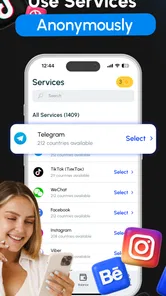
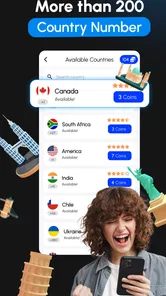
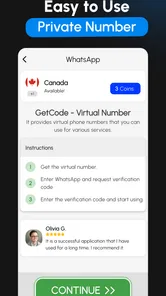
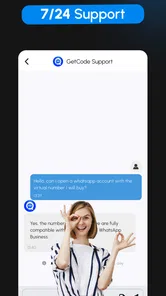
Analysis by Reviewed
My view of GetCode - Virtual Number SMS is simple: it can be a handy way to keep some sign-up texts separate from your personal number, but I’d treat it as a convenience tool, not a universal replacement for a phone line. That distinction matters. A virtual number may help with a service that accepts it, yet no app can make every platform accept every number or guarantee that a verification message will arrive.
A practical role for a second number
I’d consider this kind of business app when I want a little distance between my everyday contact details and a new account. For example, if I’m testing a service for a short project, I may prefer not to attach my main number immediately. GetCode is made by MIA DIGITAL SOLUTIONS, and its focus on receiving verification SMS makes that narrow task easy to understand: it is about access to codes, rather than replacing the broader calling and messaging role of a mobile plan.
The distinction is useful when deciding what to expect. A temporary verification number is not the same as a private, permanent line for family, clients, or account recovery. I would not move important accounts to a number unless I understood how I could access it later. For everyday sign-ups, though, separating a code from my main inbox can reduce clutter and make it easier to keep track of which account I used it for.
Easy Setup and User-Friendly Interface
First off, setting up GetCode - Virtual Number SMS is a breeze. Seriously, I was up and running in just a few minutes. The interface is clean and straightforward, which I really appreciate. You know how some apps just bombard you with options and you’re left scratching your head? Well, this isn’t one of them. Everything is laid out clearly, making it super easy to navigate.
How Does It Work?
Here’s the magic part: you get a virtual number that you can use to receive SMS verifications. This is perfect for those times when you’re signing up for a new service and don’t want to give out your real number. It’s like having a burner phone, but way more convenient and less shady. Plus, you can choose from numbers in various countries, which is pretty neat if you’re dealing with international services.
The app also supports multiple numbers, so if you’re a digital nomad or just someone who loves having options, this feature will definitely come in handy. No more juggling between different phones or SIM cards. It’s all right there in the app.
Making the workflow less messy
A useful habit is to decide what each number is for before using it. I’d keep a simple private note with the service name and the number chosen, especially when managing several accounts. That small bit of organization can prevent confusion later, because a list of virtual numbers is only helpful if I remember which one belongs to which sign-up. I’d also request a code only when I’m ready to complete registration, rather than collecting numbers first and trying to sort them out afterward.
More From Our News Desk

Weather by Xiaomi Review: Clear at a Glance, Less Clear Up Close

X Under Pressure: Can It Recover When Posting Goes Wrong?

Clash of Clans Is Won Between the Battles

Android Auto Makes the Case for Quieter Car Software

MobiOffice: Transforming Mobile Productivity with Seamless Integration

EA SPORTS FC™ Mobile Soccer: Redefining Mobile Sports Gaming
For a realistic everyday case, imagine I’m registering for a work-related tool while traveling and would rather not add my personal number to another service. I can check whether a suitable country option is available, use the virtual number for the verification step, then keep the account details together for later. If the service refuses the number, I’d switch to its email option or use my usual mobile line instead; repeatedly requesting codes is unlikely to fix a platform’s number restrictions.
Choosing the right moment to use a virtual number
I find this works best when I think about the account’s future before I begin sign-up. For a one-off community, trial service, or project space that I may later abandon, a separate number can be a sensible boundary. For an account I expect to keep, I would first check whether the service offers another recovery route, such as an email address or an authenticator option. A verification code gets me through the door; it does not automatically give me a dependable way back in months later.
That distinction also answers a common practical question: should I use the app for every registration? I wouldn’t. If the account will hold purchases, private records, or work access, the convenience of keeping my number separate may not outweigh the risk of depending on a number I might not be able to use again. I reserve virtual numbers for lower-stakes sign-ups and use a long-term number I control for accounts where continuity matters.
Performance and Reliability
Now, let’s talk performance. I’ve tested this app quite a bit, and honestly, it holds up well. The messages come through promptly, and I haven’t noticed any delays. That’s crucial because, let’s face it, no one likes waiting around for SMS verifications when you’re in the middle of signing up for something exciting.
Reliability is key, and GetCode - Virtual Number SMS delivers. Whether you’re using it for personal or business purposes, you can trust that it’ll work when you need it to. It’s like having a trusty sidekick that’s always there to back you up.
What to do when a code doesn’t arrive
Even with a straightforward setup, a missing message can have more than one cause. I’d confirm that I’m looking at the number I selected for that particular registration, check that its country matches what I intended, and make sure I haven’t switched to another number while setting things up. If those details look right and the platform still sends nothing, I’d avoid hammering the resend button. A service may limit attempts or reject virtual numbers, and repeated requests can make the process more frustrating rather than more successful.
Before paying for any option, I’d also make sure I understand what I’m buying and whether it suits the account I’m trying to create. The app is free to install, but that does not mean every number or use is free. A small pause to check the in-app price and the service’s verification choices is better than assuming a code will arrive simply because a number is available.
Where the trade-offs show
There is a real limit to the convenience: verification systems vary, and a virtual number may not be accepted by the particular service I’m trying to join. I would not depend on one for banking, essential work accounts, or anything where losing access would be costly. Those accounts are better tied to a number I control consistently, with recovery options I can maintain. If a text does not arrive, checking that I selected the intended number and country is a sensible first step; if the platform blocks it, the better alternative is its official recovery or verification method.
It also differs from the usual alternative of buying a second SIM. A SIM gives me a number tied to a mobile subscription and can be more suitable for ongoing personal contact, while a virtual-number app is more convenient when I only need a separate route for receiving a code. I would choose a regular line for long-term identity and account recovery, and GetCode for selective sign-ups where flexibility matters more than permanence.
How it compares with other ways to keep accounts separate
Compared with using my main number everywhere, GetCode creates a useful separation for selected sign-ups, but that separation is only helpful if I can still manage the account later. Compared with a second SIM, it is the less cumbersome choice when I do not need a full mobile line; the SIM is the stronger option when I want a lasting number for calls, texts, and recovery. Email verification is often the simplest alternative when a service offers it, because it avoids depending on SMS acceptance at all.
There is also a trade-off between convenience and control. A dedicated physical line gives me a more familiar long-term point of contact, while using multiple virtual numbers can make sign-ups easier to sort but creates more details to track. I would not treat the app as a privacy shield that makes an account anonymous: the service I join may still ask for other personal information, and a separate number only changes the phone-number part of the process.
Who it suits, and what it costs
The app is free to install, but it includes optional in-app purchases ranging from $0.99 to $214.99 per item, so I’d check the price shown for a particular option before committing. That range makes it especially important to decide whether a one-off verification is worth the cost rather than assuming every use is free. It is rated for Everyone, and its current version is 3.9.3, with Android support starting at version 7.0.
GetCode has an average rating of 4.4 from around 278,000 ratings, with about 13,000 written reviews and over one million installs. Those figures suggest it has found a broad audience, but they don’t remove the practical question that matters most: whether the specific platform you need will accept the number you choose. I’d use it for lower-stakes registrations and keep a fallback ready for anything important.
Who should choose it—and who should skip it
I can see it being most useful for people who regularly test online services, keep side projects separate, or want to avoid giving their everyday number to every low-priority sign-up. Someone managing several project accounts may appreciate having more than one number available, provided they keep clear notes linking each number to its service. It can also suit a traveler who needs to attempt a registration while away from their usual SIM, as long as the platform accepts the chosen number and the user has a fallback.
I’d skip it as a substitute for a permanent business contact line, a family number, or the recovery number for an account I cannot afford to lose. It is also a poor fit if I need guaranteed acceptance across many services or want to make ordinary calls and texts from a second line. In those cases, a conventional SIM or the service’s own non-SMS verification option is the more dependable choice.
My final take
So, why should you consider using this app? Well, if privacy is a big deal for you, and let’s be honest, it should be, then this app is a no-brainer. It keeps your real number safe and secure, reducing the chances of spam or unwanted calls. Plus, if you’re someone who frequently signs up for new services, the convenience of having a virtual number is unbeatable.
Overall, GetCode - Virtual Number SMS is a solid choice for anyone looking to manage their SMS verifications discreetly and efficiently. With its user-friendly interface and reliable performance, it’s an app that I’d confidently recommend. So, go ahead and give it a try. It might just be the app you didn’t know you needed.
GetCode - Virtual Number SMS Frequently Asked Questions
What is GetCode - Virtual Number SMS?
GetCode - Virtual Number SMS is an application designed to provide users with virtual phone numbers for the purpose of receiving SMS messages. This is particularly useful for situations where users wish to keep their personal phone numbers private or need to access services in different regions without owning multiple SIM cards. It is a business app built around receiving OTP messages and creating a second account on other platforms.
Can I use GetCode to keep my personal number separate from online accounts?
That is one of the main reasons someone might use GetCode. A virtual number can give you another option for receiving SMS codes when creating or accessing accounts, so you do not have to share your everyday number in every situation. Treat it as a way to separate some signups from your personal line, rather than as a guarantee of anonymity or a substitute for a number you rely on for sensitive accounts.
Who develops GetCode, and what is it like to get started?
GetCode is developed by MIA DIGITAL SOLUTIONS. The app is free to download and is rated for Everyone, so its basic audience is broad. Its core purpose is straightforward: use a virtual number to receive SMS codes when setting up or accessing accounts. Before relying on it for an important signup, consider whether the service you want to use accepts virtual numbers.
How does GetCode - Virtual Number SMS ensure privacy and security?
GetCode - Virtual Number SMS prioritizes user privacy by not requiring personal information for sign-up. The app assigns temporary virtual numbers that can be used to receive SMS messages, ensuring that users can maintain anonymity. Additionally, the app employs encryption protocols to secure all communication and data transactions within the platform. Since these numbers are virtual, they are best treated as a privacy aid rather than a replacement for a personal number used for sensitive accounts.
Can I use GetCode - Virtual Number SMS for verification purposes?
Yes, GetCode - Virtual Number SMS is particularly useful for verification purposes. Users can receive verification codes from various online services without exposing their personal phone numbers. This feature is beneficial for signing up or accessing services that require phone number verification, enhancing user privacy and security. However, acceptance can depend on the platform being verified, so it is sensible to check whether it allows virtual numbers before depending on GetCode for account access.
Pros
- Easy setup and user-friendly interface.
- Supports multiple countries for virtual numbers.
- Affordable pricing for premium features.
- Reliable SMS delivery without delays.
- No personal SIM card or phone needed.
Cons
- Limited free trial options available.
- Requires internet connection to function.
- Some numbers may not support all services.
- Occasional app crashes reported by users.
- Advertisements in free version can be intrusive.











