

Geriatrics At Your Fingertips
- 6.00
- 4.9
- Installs
- 10.00K
- Price
- Free
Screenshots
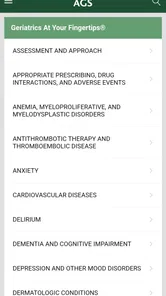
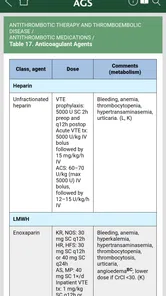
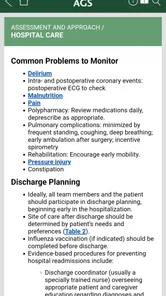
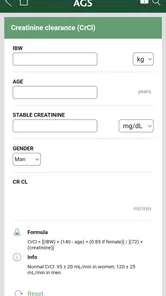
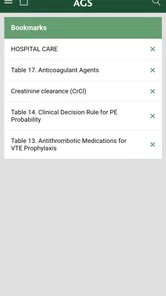
Analysis by Reviewed
When I use a medical reference app, I want it to help me make sense of a situation quickly without pretending to replace clinical judgment. Geriatrics At Your Fingertips is built for that narrow and useful purpose: it is a geriatrics reference app from the American Geriatrics Society, aimed at healthcare providers who work with older adults. My impression is that its value comes less from entertainment or visual polish and more from having relevant geriatric information close at hand when a consultation, ward round, or care discussion moves faster than a printed reference.
This is a free medical app for Everyone, and it runs on Android devices using Android 8.0 or later. The app has been available since April 17, 2014, and its current version is 6.9.0.839. Those details matter because this is not a brand-new general wellness tool; it is an established professional reference with a focused audience. The store shows a 4.9 average from around 160 ratings, along with over 10K installs, which suggests that the people who find it useful tend to value its specialization.
Where the real friction usually begins
The first challenge is deciding whether this is the right kind of medical app for you. The short description is simply “Geriatrics,” so a casual reader may expect a broad patient-health guide, symptom checker, or medication reminder. I would not approach it that way. Its natural home is professional care for older adults, where a clinician needs geriatric context rather than a generic health article.
That distinction prevents a common disappointment. If you are looking for personal advice about a new symptom, a diagnosis, emergency guidance, or a replacement for a consultation, this is not the tool I would choose. A reference app can support a clinical conversation, but it cannot examine a patient, interpret the full history, or account for local protocols and individual risks. For a patient or family caregiver, an official healthcare service or direct advice from a qualified professional will usually be more appropriate.
For the intended user, the friction is more practical. A reference app is only useful if it can be opened at the right moment, searched or browsed without confusion, and read comfortably on the device being used. I found it helpful to think of the app as a point-of-care companion rather than as a course in geriatric medicine. That mindset changes how I use it: I check it to orient myself, verify a concept, or prepare a better question, not to outsource a decision.
Another source of hesitation is the paid-content detail. The app itself is listed as free, while in-app purchases are shown at $19.99 per item. That means a user should distinguish between installing the app and accessing any optional paid material. I would check what is available in the free portion before building a workflow around it, especially if the app is being considered for a team, a student placement, or a personal device used for occasional reference.
Who benefits most from a focused geriatric reference
I see the strongest fit for doctors, nurses, pharmacists, physician assistants, trainees, and other healthcare providers who regularly encounter older adults. It can also make sense for someone in a general clinical setting who does not work exclusively in geriatrics but wants a dedicated reference nearby when age-related complexity changes the usual approach.
More From Our News Desk

 Gmail
GmailGmail in a Busy Inbox: Who Benefits Most?
From first account to crowded workday, Gmail earns its place through dependable search and flexible sorting—but its best fit depends on how much inbox maintenance you can tolerate.

 Prime Video
Switching to Prime Video: What Changes in Your Viewing Routine
Prime Video can make a compelling second home for streaming, but switching means learning a different catalog, rental layer, and route from browsing to playback.

 Universal TV Remote Control
Universal TV Remote Control Works Best as a Reliable Backup
A phone remote earns its place through quick setup and reliable habits. Here is how to get more from Universal TV Remote Control—and where its limits show.

 Weather - By Xiaomi
Weather by Xiaomi Review: Clear at a Glance, Less Clear Up Close
Xiaomi’s weather app makes everyday forecasts quick to scan, but its calm surface can leave useful details and recovery paths harder to find than they should be.

 X
XX Under Pressure: Can It Recover When Posting Goes Wrong?
A resilience-focused review of X, examining setup, mistaken posts, interruptions, weak connections, and the gaps that matter when recovery needs to be dependable.

 Clash of Clans
Clash of Clans Is Won Between the Battles
Its raids are quick; its community is a long-term project of coordination, teaching, rivalry, and shared responsibility—with all the friction that entails.
Latest News



The benefit is not simply “more medical information.” Older patients often bring several conditions, multiple medicines, functional changes, cognitive concerns, and different goals of care into one encounter. A geriatric reference can prompt a clinician to look beyond the immediate complaint. In my view, that is the app’s most important role: it encourages a broader frame when a standard adult-medicine shortcut may be too narrow.
I would be more cautious recommending it to a learner who needs a structured textbook, a complete teaching curriculum, or detailed explanations from first principles. A compact reference can be excellent during practice and still be insufficient for deep study. Likewise, a specialist who needs a highly technical database, extensive citation tools, or institution-specific guidance may prefer a larger professional resource.
Setup checks that save time later
Before judging the app, I would start with the basics. Confirm that the phone or tablet uses Android 8.0 or newer, install it from the official app marketplace, and leave enough time for the first opening rather than trying it for the first time during a hurried patient encounter. This is simple advice, but medical tools are often evaluated unfairly when the first test happens under pressure.
I would also check the display and reading conditions. A small phone screen may be perfectly adequate for a quick lookup, but longer passages can be easier on a tablet or a larger handset. If text appears cramped or navigation feels awkward, rotate the device, adjust the system text size where appropriate, and try again before assuming the content itself is difficult to use. These adjustments do not change the medical material, but they can make a substantial difference during a busy shift.
The next check is access. Because the app is free to install but may offer individual in-app purchases, I would review the available sections calmly and identify which material is accessible without payment. If a particular reference area is behind a purchase, decide whether it is genuinely relevant to your work before spending money. The listed price of $19.99 applies per item, so it is worth treating each purchase as a separate decision rather than assuming that one payment unlocks everything.
For a clinic or teaching group, I would avoid assuming that one person’s purchase automatically answers everyone else’s access needs. Each user should review the purchase screen and the account arrangement on their own device. That is a small administrative step, but it prevents an awkward situation in which a clinician expects a resource to be available during a consultation and discovers that the needed material is tied to a different device or account.
Privacy habits are just as important as technical setup. I would never type identifiable patient information into a general reference app, and I would not use it as a place to store case notes. Instead, I would keep the clinical context in the approved health-record system and use this app only for general reference. That separation is useful even when an app is working exactly as intended.
A sensible first session
My preferred first session would be short and deliberate. I would open the app when there is no immediate clinical pressure, look through its main areas, test how quickly I can reach a familiar topic, and note whether the wording is easy to scan. Then I would close and reopen it once. The point is not to perform a technical stress test; it is to learn the route I will take later.
I would also make a personal rule about verification. If the app gives me a useful reminder, I would compare it with current institutional guidance, the patient’s complete record, and my professional judgment before acting. That is especially important when treatment decisions, drug changes, urgent symptoms, or local policies are involved. A good reference can sharpen thinking, but it should not become a substitute for the safeguards around clinical care.
One practical tip is to use the app during preparation rather than only at the bedside. Before a clinic focused on older adults, I might review the relevant topic and write down questions to explore in the patient interview. That makes the app more valuable than a last-second search because it turns a quick reference into a prompt for more complete assessment.
Recovering a workflow when something feels wrong
When an app appears stuck, I start by separating content problems from device problems. If the screen does not respond, I close and reopen the app, check whether the device itself is behaving normally, and retry the same action. If the problem occurs only on one screen, I make a note of the exact path rather than repeatedly tapping at random. That information is more useful if support or the developer needs to investigate.
If a section seems unavailable, I first check whether it is part of the free material or an optional purchase. A locked area is not necessarily a loading failure. Likewise, if a purchase does not appear immediately, I would avoid buying the same item again in frustration. I would review the account used for the transaction, restart the app, and follow the marketplace’s normal restoration or support process.
When reading is difficult, I would test the device orientation, display brightness, and system text settings. If navigation is slow, I would close other demanding apps, make sure the operating system is not in an unusual restricted state, and try again. These are deliberately modest troubleshooting steps. They are safe, reversible, and useful without making claims about the app’s internal design.
A realistic example would be a nurse preparing for a medication review with an older patient. The app opens, but the desired reference area appears unavailable. Instead of delaying the appointment or repeatedly purchasing content, the nurse can confirm whether the section is optional, use the material that is already accessible for general orientation, and rely on the approved clinical reference and prescribing process for the actual decision. The app remains helpful without becoming a single point of failure.
Another useful recovery habit is keeping a backup route. In practice, that might be a trusted institutional reference, printed protocol, or another approved clinical resource. I would never allow an app that is temporarily unavailable to determine whether a patient receives urgent care. The best mobile reference tools fit into a larger workflow; they do not replace it.
When the app is not the cause
Sometimes the apparent problem is really a mismatch between the question and the tool. If I am trying to interpret a patient’s changing mental status, calculate a treatment adjustment, or decide whether symptoms require immediate escalation, the issue is not that the reference app failed to answer quickly enough. The question may require examination, consultation, current local guidance, or emergency assessment.
The same applies when information seems too brief for the situation. A concise reference is useful for orientation, but a complicated patient may require a full history, medication reconciliation, laboratory results, functional assessment, and discussion with the wider care team. I would treat a short entry as a starting point for thought, not as permission to skip those steps.
There is also a difference between general geriatric knowledge and current policy. A hospital may have its own pathways, formularies, escalation rules, or documentation requirements. If those differ from what I remember from any external reference, the local approved process takes priority. This is one reason I like using the app before or after a clinical interaction, when I can place its information in context rather than making an isolated decision.
For students, the limitation may be educational rather than technical. If you cannot explain why a recommendation applies, you need more than a quick lookup. Use the app to identify subjects for further study, then return to teaching materials, supervision, and primary clinical resources. For experienced clinicians, the limitation may be breadth: a specialized geriatric reference can complement, but not replace, the broader tools used in a particular specialty.
How it compares with familiar alternatives
Compared with a web search, this app has the advantage of a deliberately geriatric focus. A search engine can produce a huge mixture of patient pages, advertisements, outdated discussions, and specialist documents. That breadth is sometimes useful, but it also creates noise. A focused reference is more likely to keep my attention on the needs of older adults instead of making me sort through unrelated general-health results.
Compared with a printed handbook, the app is easier to carry and more practical when I am moving between rooms. A book can still be preferable for uninterrupted study, annotation, or a broad overview, while the app suits a short lookup. I would choose based on the moment: mobile reference for speed and portability, a textbook or formal course for depth and structured learning.
Compared with a general drug or medical database, its appeal is specialization rather than universal coverage. A broad database may be better when I need exhaustive medicine details, interaction checking, or a specialty-specific monograph. This app makes more sense when the question is rooted in geriatric care and I want a resource shaped around that perspective.
Compared with a patient-facing health app, it is less suitable for self-management. The intended audience is healthcare providers, and I would not hand it to a family member expecting plain-language guidance for a personal diagnosis. That is not a weakness in itself; it is a reminder that the right reference depends on who is using it and what decision is being made.
Small habits that make the reference more useful
I would keep three habits when using it. First, search with the clinical concept rather than a vague symptom whenever possible. “Older adult with several medicines” is a situation, not a precise lookup, so I would break it into focused questions about the concern I am actually assessing.
Second, use the app to prepare conversations. If a topic raises a concern about function, cognition, medication burden, or care goals, I would turn that concern into a question for the patient and the care team. This is a more valuable use than collecting isolated facts because it connects reference reading with assessment.
Third, record the date and source of any decision elsewhere according to workplace policy. I would not rely on memory of a quick screen view, and I would not store patient details inside the app. The reference can support the reasoning process while the official record remains the place for clinical documentation.
One trade-off deserves emphasis: convenience can encourage overconfidence. A fast answer feels authoritative even when the patient in front of me has exceptions, competing risks, or a care plan that changes the priorities. I regard the app as strongest when it prompts a second look and weakest when someone uses it as a shortcut around professional review.
My practical verdict
After looking at its audience, setup, purchase structure, and realistic place in clinical work, I see Geriatrics At Your Fingertips as a worthwhile specialist companion for healthcare providers who care for older adults. Its free installation lowers the barrier to trying it, and its focused medical purpose is more useful to that audience than a crowded general-health app. The American Geriatrics Society name also makes the app’s intended direction clear, even though I would still compare any clinically important information with current local practice.
I would recommend installing it before a busy day rather than waiting until an urgent question appears. Test the reading experience, learn the navigation, identify which content is available, and understand where optional purchases begin. That preparation answers the most important practical question: whether the app fits your own workflow, device, and professional responsibilities.
I would skip it if you want personal diagnosis, emergency instructions, a complete learning course, or a full replacement for a comprehensive clinical database. I would also look elsewhere if your main need is detailed medication interaction checking or institution-specific protocols. In those cases, a different approved resource is likely to be better.
For the right user, however, the app earns its place by keeping geriatric thinking close during ordinary clinical moments. It is not a magic solution and it should not be treated as one. My recommendation is to use it as a focused prompt for safer, more complete assessment—not as the final authority on a patient’s care. That balance is what makes this free reference worth considering.
Geriatrics At Your Fingertips Frequently Asked Questions
Is Geriatrics At Your Fingertips free to download, and are there additional costs?
Geriatrics At Your Fingertips is free to download, while in-app purchases are listed at $19.99 per item. That means the initial download does not necessarily include every paid option or all content you may want to access. Before purchasing, review the options shown in the app store and within the app so you can decide whether its available material fits your needs and budget.
What devices can run Geriatrics At Your Fingertips?
The Android version requires Android 8.0 or later, so check your device’s operating system before downloading. The app is a medical reference for healthcare providers, and the store rates it for Everyone. Compatibility and available features can differ by platform, so confirm the version in the store you plan to use and make sure your device meets its requirements.
Who publishes Geriatrics At Your Fingertips, and is it actively used?
The app is published by the American Geriatrics Society and is intended as a practical resource for people caring for older adults. It has more than 10,000 installs and a 4.9 average rating from 162 ratings, alongside 6 written reviews. Those figures offer a snapshot of its store presence, but the best way to judge its fit is to compare its clinical focus with the reference material you need.
What is Geriatrics At Your Fingertips?
Geriatrics At Your Fingertips is a clinical reference app designed for healthcare professionals who care for older adults. It brings geriatric assessment information, practical treatment guidance, medication-related content, and common conditions affecting aging patients into a portable format. The app is intended to support clinical decision-making and quick reference, rather than replace professional training, patient evaluation, or institutional guidelines.
Who should use Geriatrics At Your Fingertips?
The app is primarily aimed at physicians, nurses, pharmacists, physician assistants, students, and other healthcare professionals working with older patients. It may also be useful for trainees learning about geriatric medicine. Because much of the content is clinical and uses professional terminology, it is not designed as a general health app for patients or as a substitute for advice from a qualified doctor.
Pros
- Quick access to geriatric assessment tools and clinical references.
- Useful medication information supports safer prescribing decisions.
- Covers common conditions affecting older adults in one app.
- Search and navigation make key topics easy to find.
- Helpful for students
- clinicians
- and caregivers reviewing geriatric care.
Cons
- Some content may require clinical knowledge to interpret correctly.
- Information should be checked against current local guidelines.
- The interface may feel text-heavy on smaller phone screens.
- Not a substitute for individualized medical assessment or diagnosis.
- Certain features or updates may depend on the app version.











