Genmoji - AI Emojis™
- 40.00
- 3.0
- Installs
- 500.00K
- Price
- Free

Screenshots
Analysis by Reviewed
I tend to notice an emoji app most when I need a reaction that the usual keyboard options don’t quite capture. Genmoji - AI Emojis™ is aimed at that small but familiar gap: making custom emoji-style images from ideas you describe. It’s a playful art-and-design app from 851 Inc., and its appeal is less about replacing your regular keyboard than giving a personal message a visual twist.
When creating depends on a connection
Because the central idea is AI-generated artwork, a request may involve waiting for the app to process it, and network conditions can shape how smooth that moment feels. I’d treat a custom emoji as something to make when I have a little time, rather than something I need instantly in the middle of a fast conversation. If a result takes longer than expected, I’d avoid repeatedly sending the same prompt; changing one detail after the first attempt is a more useful way to steer the idea.
That makes the app best suited to casual experimentation: making a one-off reaction, creating a funny image for a friend, or exploring a visual idea before sharing it. If you need a dependable text symbol right now, the built-in emoji keyboard remains the quicker choice. Genmoji is for the moments when the familiar options feel too generic and you’re willing to trade a little speed for something more specific.
Fits into everyday mobile messaging
A realistic use for me would be making a small image for a group chat after something unexpectedly funny happens: describe the mood, see what the generator comes up with, then share the version that best fits the joke. It could also help with a birthday message or a lighthearted reply when words feel flat. The useful habit is to keep a prompt focused on one clear subject and mood; a short, specific idea is easier to judge than a request that tries to combine several unrelated scenes.
There is a practical distinction between creating an image and using it in conversation. Standard keyboard emojis are already within reach and behave consistently across messaging apps. A generated design is more personal, but sharing it is a separate step, and its appearance or convenience can depend on how the receiving app handles images. If you want a symbol that blends neatly into a sentence, a normal emoji is still the better fit; if the image itself is the point, custom creation makes more sense.
Discovering the Magic of Genmoji
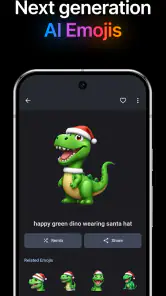
The first time I opened Genmoji - AI Emojis™, I was greeted with a simple yet engaging interface that invites you to dive right into the fun. The app uses AI technology to create emojis that are uniquely tailored to your preferences, capturing the nuances of your personality in each tiny icon.
How It Works
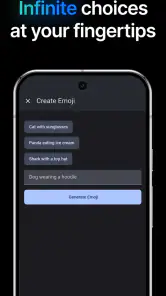
So, how do you get started? It’s super easy! You begin by giving the app some prompts about what kind of emoji you’re looking to create. Whether it’s an emoji that represents your love for pizza or one that captures your Monday morning mood, the possibilities are endless. The AI takes your input and crafts a series of emojis that are not only unique but also strikingly relevant to your personal style.
More From Our News Desk

Weather by Xiaomi Review: Clear at a Glance, Less Clear Up Close

X Under Pressure: Can It Recover When Posting Goes Wrong?

Clash of Clans Is Won Between the Battles

Android Auto Makes the Case for Quieter Car Software

MobiOffice: Transforming Mobile Productivity with Seamless Integration

EA SPORTS FC™ Mobile Soccer: Redefining Mobile Sports Gaming
What I love about Genmoji is how intuitive it is. The app guides you through the emoji creation process with minimal fuss, making it accessible even for those who aren’t particularly tech-savvy. Plus, the results are often hilarious and surprisingly accurate, which adds to the overall enjoyment of the app.
A Playground for Creativity
One of the standout features of Genmoji is its ability to let your creativity run wild. You’re not confined to standard expressions or themes—instead, you have the freedom to experiment and come up with emojis that are as quirky or straightforward as you like. It’s like having a mini art studio right in your pocket, where you’re the master of your emoji universe.
Moreover, Genmoji allows you to share your creations with friends directly from the app. Whether you want to boast about your emoji-making skills or just want to send a personalized message, the sharing feature is seamless and adds a social element to the whole experience.
Choosing it for the right reasons
There’s a trade-off between novelty and consistency here. A prompt-based image can capture a niche joke or a particular mood better than a standard emoji, but it may not communicate as cleanly at small sizes. I’d check that a creation is still readable when viewed in a chat, especially if its humor depends on a small detail. Keeping the main expression or object prominent makes the result more useful than adding lots of decorative ideas.
For anyone who enjoys tinkering with visual prompts and sending playful images, this is an approachable option. Someone who mainly wants a stable keyboard replacement, quick reactions, or a polished design workflow may be happier with the emoji tools already built into their phone or a conventional art app. Genmoji’s strength is quick, informal invention, not precise illustration or guaranteed uniformity.
Price, access, and practical expectations
The app is free to download, with in-app purchases listed from $2.95 to $24.95 per item. I’d explore the basic experience before deciding whether any paid item is worth it for my own habits; occasional emoji makers may not need to spend, while someone who regularly creates and shares designs may value extra options if they suit their needs. It’s rated for Everyone, though younger users should still have an adult nearby when making purchase decisions.
Genmoji has a 3.0 average from around 1.3 thousand ratings, alongside about 40 written reviews, so I’d approach it with measured expectations rather than assuming every prompt will land perfectly. It has passed 500 thousand installs and was released on December 4, 2024. On Android, version 1.0.23 requires Android 6.0 or newer. Those details make it easy to check basic compatibility, but the more important question is whether the create-and-share routine fits how you message.
Handling a slow or disappointing result
If a generation doesn’t match what I had in mind, I’d first simplify the description and change just one element, such as the subject or expression. That gives the next attempt a clearer direction and makes it easier to tell what helped. If the app feels slow while I’m away from a reliable connection, I’d save the idea for later rather than turning a quick chat into a series of retries. For people keeping mobile data use in mind, making fewer, more deliberate requests is a sensible approach; I wouldn’t assume that every creation or share works the same way across every connection or messaging app.
Making a prompt work harder
I’d use a prompt like a tiny art brief rather than a shopping list of ideas. Start with the object or character that matters, then add one emotion or visual cue that changes its meaning. For example, a sleepy coffee cup is easier to assess than a request that asks for a cup, a pet, a weather scene, and several expressions at once. This also makes it easier to revise: if the subject is right but the mood is wrong, I can adjust the mood without rebuilding the whole concept.
There’s another practical reason to keep the prompt focused: the final image has to survive the scale and speed of a chat. I’d favor a clear silhouette and an obvious expression over tiny details that look clever on a full screen but disappear in a message thread. If the joke needs a caption to explain what the image is meant to be, the standard emoji may actually communicate better.
Choosing the right moment and audience
The app makes most sense when the recipient will appreciate a personal visual, not when I’m trying to send a neutral acknowledgement. A custom reaction can make a birthday greeting feel more specific or give a familiar group chat a running joke of its own. For a work message, a delicate conversation, or any situation where a quick, unambiguous response matters, I’d stick with plain text or a standard emoji. The extra personality is a benefit only when it suits the relationship and tone.
I’d also think about how the other person will receive it. A generated image is not quite the same as a keyboard character that sits naturally between words; it may appear as a separate visual message, depending on the messaging app. Before making a batch of designs for a group, I’d try sharing one and see whether it arrives at a useful size and in a format the recipients can easily view. That small check avoids spending time on a style that doesn’t work well in the place I plan to use it.
What to expect when a request stalls
When a generation is slow, I’d separate a temporary connection problem from a prompt that simply needs a clearer direction. I’d wait briefly, check that the phone has a usable connection, and then try once with a simpler description rather than tapping repeatedly. If the task is not urgent, stepping away and returning when the connection is steadier is less frustrating than treating the app like an instant keyboard. For a time-sensitive reply, I’d send a normal emoji first and experiment with a custom image later.
This distinction matters because creating and sharing are two different parts of the experience. Even if an image is ready, the handoff to a chat can still feel different from inserting a built-in symbol. I’d keep the original conversation moving with text when needed, then share the image as an extra rather than making it responsible for carrying an important message by itself.
Using it thoughtfully on mobile data
If I’m trying to be careful with mobile data, I’d save image-making for moments when I actually have a reason to use the result. One clear prompt and a considered revision are more sensible than generating many near-identical options just to browse them. I’d also avoid creating a design simply because I’m waiting around; a custom image is most satisfying when I know who it is for and where I plan to send it. That approach keeps the process purposeful without needing to guess how much data any individual request uses.
For a commute or a short break away from a reliable connection, I’d plan around the possibility that creation may take longer. I can think of the idea first, then make it when the connection is more dependable. That is a small adjustment, but it changes the app from a tool I expect to respond instantly into a creative extra I can pick up when conditions suit it.
The Verdict
Overall, Genmoji - AI Emojis™ is a delightful app that caters to anyone looking to add a dash of personality to their digital conversations. It’s not just about creating emojis; it’s about expressing yourself in a unique way that resonates with who you are. The app is easy to use, fun to explore, and offers a creative outlet that’s both entertaining and satisfying.
If you’re someone who loves emojis and wants to take your emoji game to the next level, I’d definitely recommend giving Genmoji a try. It’s a small download with a big impact, bringing a touch of magic to your daily interactions.
My connectivity verdict
I’d recommend it to people who enjoy playful experimentation, have a few minutes to spare, and are happy to share an image as an image rather than expecting a custom character to behave exactly like a built-in emoji. The connection-sensitive creation process is a poor match for urgent replies, and conventional emoji remain better for speed, readability, and predictable display. For an occasional personal reaction, though, the trade-off can be worthwhile: make a focused request, judge it at chat size, and share it where the visual adds something. That’s the most useful way to approach this art-and-design app without expecting it to replace a keyboard or a full drawing tool.
Genmoji - AI Emojis™ Frequently Asked Questions
Is Genmoji - AI Emojis™ available on my device?
Genmoji - AI Emojis™ is an app in the Art & Design category, with a keyboard, stickers, and emojis as its focus. It is available for Android devices running version 6.0 or later. The app is rated for Everyone, making it suitable for a broad audience interested in creating and using emoji-style designs.
Who makes Genmoji - AI Emojis™, and is it popular?
Genmoji - AI Emojis™ is developed by 851 Inc. It has more than 500,000 installs and an average rating of 3.0 from around 1,300 ratings, so users have had mixed experiences. The app was released on December 4, 2024, and its current version is 1.0.23. These details can help you decide whether it seems like a good fit before downloading.
What is Genmoji - AI Emojis™ and how does it work?
Genmoji - AI Emojis™ is an innovative app that allows users to create personalized emojis using artificial intelligence. By analyzing your photos, the app generates unique emojis that resemble your facial features and expressions. Users can customize these emojis further, making them a fun and personal way to express emotions in digital communication.
Is Genmoji - AI Emojis™ free to use or does it require a subscription?
Genmoji - AI Emojis™ offers a free version with basic features, allowing users to create and share a limited number of custom emojis. For access to premium features, such as advanced editing tools and a wider range of emoji styles, users can opt for a subscription plan. This plan offers more flexibility and creative options for emoji enthusiasts. In-app purchases are available, with prices ranging from $2.95 to $24.95 per item.
What devices are compatible with Genmoji - AI Emojis™?
Genmoji - AI Emojis™ is compatible with both Android and iOS devices, making it accessible to a wide range of smartphone users. The app supports most modern smartphones and tablets, ensuring that users can enjoy creating AI-generated emojis on their preferred devices without any hassle or compatibility issues.
Pros
- Innovative emoji creation tool
- User-friendly interface
- Wide variety of emoji styles
- Regular updates with new features
- High customization options
Cons
- Requires internet connection
- Premium features are paid
- May drain battery quickly
- Limited offline functionality
- Occasional app crashes
- Category
- Art & Design
- Version
- 1.0.23











