

GeminiMan WearOS Manager
- 207.00
- 4.8
- Installs
- 100.00K
- Price
- Free
Screenshots
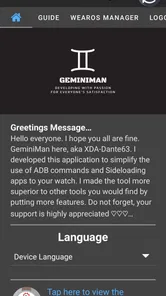
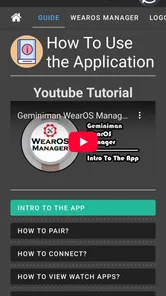
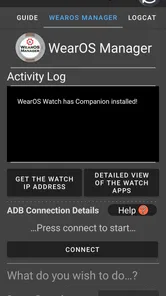
Analysis by Reviewed
If you use a Wear OS watch as more than a step counter, GeminiMan WearOS Manager is the kind of Android personalization app that can make daily maintenance much less awkward. I found its main appeal in the way it brings technical controls to a phone, rather than forcing me to handle every task from a tiny watch display. The app is built by GeminiMan and is free to install, with optional in-app purchases ranging from $0.99 to $4.99 per item.
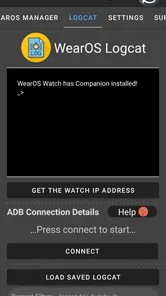
This is not a watch-face collection or a simple settings shortcut. It is aimed at people who want to manage a Wear OS device over Wi-Fi ADB, inspect Logcat information, create backups, run shell commands, and handle installed apps from a larger screen. That immediately makes it more specialized than the usual personalization tools. I would recommend it to a curious watch owner who is comfortable exploring technical menus, but not to someone looking only for a quick way to change colors or add a new face.
What using GeminiMan WearOS Manager feels like in practice
I’ll focus on what the phone-based workflow changes in everyday use, then on the practical checks I’d make before trusting it with watch maintenance. The useful distinction is between having access to a control and knowing when it is appropriate to use it; that’s where this tool rewards a measured approach.
Speed expectations: quick access, but not instant magic
The biggest practical advantage is the phone-based workflow. Typing, reading logs, selecting applications, and reviewing backup-related options are all easier on a handset than on a watch. In my experience, that makes the app feel responsive in the moments that matter most: when I am trying to find a setting, inspect a problem, or prepare a change without repeatedly tapping a small display.
Its connection model also shapes expectations. Wi-Fi ADB is convenient because it avoids a cable during supported tasks, but it is not the same as a local watch setting. The phone and watch need to communicate correctly, and the first connection or a troubleshooting session can involve more attention than ordinary personalization apps require. Once the relationship is established, the app’s value comes from reducing the number of fiddly steps on the watch itself.
I would not judge it by the same standard as a lightweight clock widget. Shell commands, Logcat viewing, app management, and backups are inherently more involved jobs. The interface has to expose useful controls without hiding important details, so a short pause while information loads is less concerning than unclear feedback. What matters is whether I can tell what device I am connected to, what action I am about to perform, and whether the operation completed.
A useful habit is to open the manager before starting a complicated change and confirm the target watch first. That simple check is especially worthwhile if you own more than one Wear OS device or switch between watches. The convenience of phone control can otherwise create a different risk: making a technically correct change on the wrong device.
More From Our News Desk

 Gmail
GmailGmail in a Busy Inbox: Who Benefits Most?
From first account to crowded workday, Gmail earns its place through dependable search and flexible sorting—but its best fit depends on how much inbox maintenance you can tolerate.

 Prime Video
Switching to Prime Video: What Changes in Your Viewing Routine
Prime Video can make a compelling second home for streaming, but switching means learning a different catalog, rental layer, and route from browsing to playback.

 Universal TV Remote Control
Universal TV Remote Control Works Best as a Reliable Backup
A phone remote earns its place through quick setup and reliable habits. Here is how to get more from Universal TV Remote Control—and where its limits show.

 Weather - By Xiaomi
Weather by Xiaomi Review: Clear at a Glance, Less Clear Up Close
Xiaomi’s weather app makes everyday forecasts quick to scan, but its calm surface can leave useful details and recovery paths harder to find than they should be.

 X
XX Under Pressure: Can It Recover When Posting Goes Wrong?
A resilience-focused review of X, examining setup, mistaken posts, interruptions, weak connections, and the gaps that matter when recovery needs to be dependable.

 Clash of Clans
Clash of Clans Is Won Between the Battles
Its raids are quick; its community is a long-term project of coordination, teaching, rivalry, and shared responsibility—with all the friction that entails.
Latest News



Heavy-use moments: where the app earns its place
The strongest use case is maintenance in batches. If I want to review several installed apps, examine system output, or prepare a backup before experimenting, a phone is a much better work surface than the watch. I can keep the watch nearby, use the larger display for context, and avoid the cramped interaction that makes technical work frustrating on wearable hardware.
Logcat is particularly useful when a watch behaves strangely and the visible symptom is vague. A frozen screen, an app that closes unexpectedly, or a feature that stops responding may not explain itself through the normal Wear OS interface. Having a way to inspect diagnostic output gives a technically minded user a better starting point than simply restarting and hoping. It does not turn every problem into an easy fix, but it can make the investigation more informed.
Shell commands are another reason this app is not for everyone. They can be powerful, but they also demand restraint. I would use them for a clearly understood task, copy commands carefully, and avoid treating random instructions from a forum as harmless experiments. The manager makes command-oriented work more accessible; it does not remove the need to understand what a command changes.
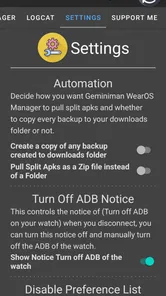
Backups are most valuable before a period of tinkering rather than after something goes wrong. A sensible workflow is to connect the watch, review the available backup controls, save a known-good state if appropriate, and only then test a change. This is one of the less obvious strengths of the app: it can support a repeatable maintenance routine instead of being used only as an emergency tool.
App management also benefits from this approach. On a watch, browsing and deciding what to keep can feel slow, especially when the screen is busy with notifications or other complications. From the phone, I can think through the list more comfortably. That does not mean every installed package should be removed; it simply makes it easier to identify what I actually use and what deserves further investigation.
Reliability: useful control with a human-checking requirement
I see reliability here as a combination of connection consistency, clear status feedback, and safe recovery habits. Wi-Fi ADB is practical, but it depends on the watch being reachable and correctly prepared for the connection. If the app cannot communicate with the watch, the problem may be the connection setup rather than the manager itself. That distinction matters because repeatedly tapping the same action will not fix a device that is offline or no longer paired in the expected way.
For that reason, I would keep the recovery process simple. If a task appears stuck, I would stop rather than launch the same command again, check the watch connection, and confirm whether anything actually changed. When working with backups or shell commands, duplicate actions can be more confusing than a single failed attempt. A calm, staged workflow is a real part of using this app safely.
The app’s role is closer to a control panel than an automatic repair service. It can expose information and provide tools, but the user still decides what to do with that information. That is a strength for experienced users because it avoids hiding the important parts. It is also a limitation for beginners who expect a guided button labeled “fix my watch.”
I would also avoid making changes while the watch is needed for something important, such as a workout, a commute, or a night of sleep tracking. Technical maintenance is better done when an interruption is acceptable. Even a well-designed management tool cannot make every device operation risk-free, and the cost of a poorly timed restart is higher when the watch is actively serving a purpose.
Device constraints: the watch still sets the boundaries
The app requires Android 9 or later, which is worth checking before installation. That requirement applies to the phone running the manager, while the practical experience also depends on the Wear OS watch, its available storage, its connection state, and the particular task being attempted. A capable manager cannot make an older or heavily constrained watch behave like a newer model.
Resource demands are best understood by the job. Browsing a list of apps should feel lighter than collecting diagnostic output or handling a backup. If the watch is already low on storage or under unusual load, I would first reduce unnecessary activity and avoid starting several maintenance operations at once. The app is most useful when it is treated as a focused tool, not as something that should remain busy in the background all day.
There is also a difference between managing a watch and replacing its normal settings. For everyday display changes, notifications, battery options, and watch-face choices, the standard Wear OS controls are usually the simpler route. GeminiMan WearOS Manager becomes more compelling when the task crosses into inspection, backup, package management, or command-line work. Choosing the right tool for the job keeps the experience faster and less confusing.
That distinction answers an important question for casual owners: do you need this just because you own a Wear OS watch? Probably not. If your watch works well and your only goal is visual customization, a dedicated watch-face app or the built-in controls will be easier. If you regularly troubleshoot, test software, or want more visibility into what the watch is doing, the manager has a much clearer purpose.
A realistic everyday scenario
Imagine that a watch app starts behaving oddly after several weeks of normal use. The watch still turns on, but the app closes during a task and the reason is not obvious. Instead of repeatedly reinstalling things from the watch, I would connect the device through the manager, inspect the relevant logs, and check the installed-app view for anything that looks unnecessary or recently changed. If I had prepared a backup beforehand, I would have more confidence while testing a solution.
The important point is not that every problem will be solved immediately. The better outcome is that the investigation becomes structured. I can gather evidence, make one change, and observe the result. That is more useful than randomly changing several settings and losing track of what helped. For someone who enjoys understanding their devices, this workflow is a genuine improvement over ordinary watch controls.
There is a trade-off, though. A family member who simply wants the watch to show notifications would probably find this process excessive. They may be better served by the normal Wear OS companion experience, where fewer technical choices mean fewer opportunities for confusion. This manager rewards curiosity and patience; it does not try to hide the technical nature of the work.
How it compares with the usual alternatives
Compared with built-in Wear OS settings, GeminiMan WearOS Manager offers a deeper and more technical view. The standard tools are better for routine changes because they are familiar and designed around common actions. The manager is better when I need to look beyond those visible options, especially for logs, backups, shell commands, and broader app handling.
Compared with a generic personalization app, it is less immediately decorative but more useful for device maintenance. A watch-face tool can deliver a visible result in minutes; this app’s payoff is often invisible when everything is working properly. Its value appears when I want control, diagnostics, or a safer way to prepare for experimentation.
Compared with using ADB from a computer, the phone-based approach can be more convenient for quick sessions. I do not need to move to a desk simply to inspect the watch or perform a supported management task. On the other hand, a computer may still be preferable for long command sessions, detailed text editing, or workflows that involve copying and comparing a lot of output. The manager is a practical middle ground, not a universal replacement for desktop tools.
Who should install it, and who should skip it
I think it is a strong fit for Wear OS owners who like to troubleshoot their own devices, test less obvious settings, maintain several apps, or keep backups before making changes. Developers and advanced hobbyists may get the most from Logcat and shell access, while experienced users who simply want better control over their watch can benefit from the phone-sized interface.
I would skip it if you dislike technical terminology, never intend to use Wi-Fi ADB, or want an app that improves the watch automatically without requiring decisions. It is also not the first recommendation for someone whose main interest is watch faces. Installing a specialized manager and then using only a tiny portion of it may add complexity without adding much value.
The free entry point makes it easy to try, while the optional purchases mean some capabilities may involve spending between $0.99 and $4.99 per item. I would explore the workflow first and only pay for something that matches a real need. That approach is especially sensible with a technical utility, because its usefulness depends more on your habits than on how many controls it contains.
Version, maturity, and overall performance impression
The current version is 6.0.6, and the app has been available since April 9, 2023. It has built a noticeable user base, with more than 100 thousand installs, an average rating of 4.8 from around 2.6 thousand ratings, and 207 written reviews. Those figures suggest that the concept resonates with a specific audience, although they should not be mistaken for a promise that every watch and every connection will behave identically.
The Everyone content rating is consistent with the app being a general-purpose device utility rather than an age-restricted entertainment product. Still, “Everyone” does not mean every action is beginner-friendly. The interface may be accessible, but shell commands, diagnostics, and backups remain areas where careful reading matters more than age or technical confidence.
My performance verdict is positive with a clear condition: GeminiMan WearOS Manager is fast and useful when the task is deliberate, the connection is ready, and the user understands the operation being performed. It is not a magic speed booster for the watch, and I would not install it expecting battery life or general responsiveness to transform. Its real performance benefit is reducing friction around technical work by moving that work to a larger screen.
After using it as a maintenance companion rather than a daily entertainment app, I came away seeing it as a specialized tool with a sensible place in a Wear OS setup. I would recommend it to a friend who has ever wished for better access to logs, backups, app controls, or ADB-based commands without immediately reaching for a computer. I would point a casual watch owner elsewhere. For the right person, the extra control is worth learning; for everyone else, the ordinary Wear OS tools remain the calmer choice.
GeminiMan WearOS Manager Frequently Asked Questions
Is GeminiMan WearOS Manager free to download?
GeminiMan WearOS Manager is free to download, with optional in-app purchases ranging from $0.99 to $4.99 per item. You can begin with the free app and consider paid items only if you want them. Before confirming any purchase, check its price and details in the app store, and make sure the available features suit the way you intend to manage your Wear OS watch.
What does GeminiMan WearOS Manager do over Wi-Fi ADB?
GeminiMan WearOS Manager is described as a Wear OS management app that works over Wi-Fi ADB. Its tools include managing apps, viewing Logcat, creating backups, and running shell commands, making it aimed at users who want more direct ways to interact with a watch. Wi-Fi ADB features may require setup and authorization, so be comfortable following the connection steps before relying on them.
What is GeminiMan WearOS Manager used for?
GeminiMan WearOS Manager is a companion utility designed to help users manage and interact with Wear OS smartwatches from an Android phone. Depending on the watch model and Android version, it may provide tools for handling watch-related settings, installed applications, files, connectivity, or device maintenance. Its exact functions can vary, so users should review the app description and compatibility details before downloading.
Which smartwatches and phones are compatible with GeminiMan WearOS Manager?
Compatibility is one of the most important points to check before installation. The app is intended for Wear OS devices, but not every smartwatch supports every available feature. Your phone must also meet the required Android version and connection requirements. Some tools may work only with specific manufacturers, watch generations, or software versions, so confirm your model and operating system in the store listing before relying on the app.
Does GeminiMan WearOS Manager require special permissions or advanced access?
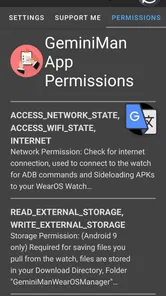
The application may request permissions needed to communicate with the smartwatch, access device information, manage files, or perform system-related actions. Certain features can also require additional access, such as wireless debugging, ADB-related authorization, or developer settings, depending on what you are trying to do. Read each permission request carefully and grant only the access you understand and consider necessary.
Pros
- Simplifies installing and organizing apps on compatible Wear OS watches.
- Provides a convenient way to manage watch content from an Android phone.
- Can save time compared with handling installations directly on a small watch screen.
- Useful for users who regularly test or switch between Wear OS applications.
- A focused interface makes basic watch management easier for beginners.
Cons
- Compatibility may vary between watch models
- Android versions
- and Wear OS releases.
- Some features may require extra permissions or access to connected devices.
- It is primarily useful for Android users and offers no iPhone support.
- The app may feel unnecessary if you rarely install or manage watch applications.
- Connection issues can interrupt transfers or require reconnecting the smartwatch.











