Game Launcher: Gaming Hub App
- 250.00
- 4.2
- Installs
- 500.00K
- Price
- Free

Screenshots


Analysis by Reviewed
When I first installed Game Launcher: Gaming Hub App, the appeal was easy to understand: it gives scattered games a shared home instead of leaving me to hunt through the rest of my phone. That tidy starting point is useful if I play in short bursts and forget which screen holds a particular title. The bigger question, though, is whether a gaming hub stays useful after the novelty of a freshly arranged library wears off. For me, its lasting value depends less on the first setup and more on whether I actually return to it before each session.
Who gets the most from a gaming hub
I can see this being most helpful for someone who installs games casually, keeps several around, and wants a single place to browse them. It is less compelling if you only play one or two games and already have them on your home screen. A launcher can make access feel more deliberate, but it does not replace the games themselves or necessarily change how you play them. If you prefer a minimal phone layout, another destination for your games may feel like extra organization rather than a real improvement.
It is also worth separating a hub from the tools people often confuse it with. A phone’s built-in game mode or a device maker’s gaming utility may focus on controls or system-level behavior, while a launcher’s central job is to bring games together. I would treat those as different roles, not assume one can substitute for the other. If your main frustration is finding a game, a hub is a sensible place to start; if it is a specific device setting, the phone’s own gaming tools may be the more direct option.
Your Personal Gaming Assistant
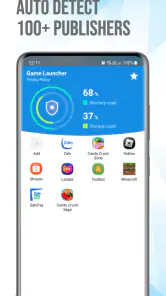
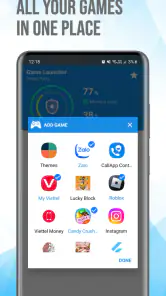
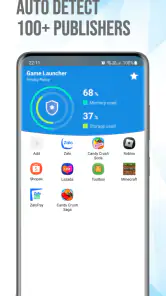
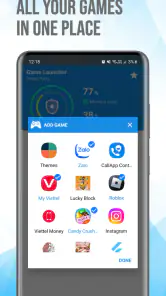
Let’s talk about the heart of the Game Launcher: Gaming Hub App. Right off the bat, it acts as your personal gaming assistant. The app seamlessly organizes all your games in one spot, making them easily accessible without having to sift through a sea of unrelated apps. I was pleasantly surprised by how intuitive the navigation is. With a few taps, I set up my gaming library, and it felt like magic watching the app arrange everything neatly.
Performance Boost? Yes, Please!
One of the standout features that caught my eye is the performance optimization tool. If you’re a gamer, you know the frustration of laggy gameplay. The app optimizes your phone’s performance, ensuring smoother gameplay. I tested it on a few hefty games, and the difference was noticeable. It’s like giving your phone a quick power nap before diving into an intense gaming session. Honestly, it’s a game-changer, pun intended.
Stay Updated and Informed
If you’re someone who likes to stay on top of the latest in the gaming world, this app has something for you too. It offers updates and news from the gaming universe right at your fingertips. I found myself browsing through game trailers and news articles, feeling quite in the loop about upcoming releases and updates. It’s like having a gaming news channel in your pocket.
Another delightful feature is the game recommendations. Based on your gaming habits, the app suggests new games that you might enjoy. I discovered a few hidden gems that I wouldn’t have looked at twice otherwise. It’s a fantastic way to broaden your gaming horizons without the hassle of endless searches.
More From Our News Desk

Clash of Clans Is Won Between the Battles

Android Auto Makes the Case for Quieter Car Software

MobiOffice: Transforming Mobile Productivity with Seamless Integration

EA SPORTS FC™ Mobile Soccer: Redefining Mobile Sports Gaming

How Microsoft OneDrive Became a Mobile Productivity Giant

How Google Translate Breaks Language Barriers Effortlessly
A small routine that can make it earn its place
For an ordinary commute or a few minutes waiting for a friend, I would open the library first, choose a game, and use the hub’s news or recommendations only if I had time to browse. That keeps the app serving a practical purpose instead of turning every launch into another feed to scroll. A useful tip is to treat recommendations as discovery prompts, not a to-do list: if a suggestion does not fit the kind of session I have time for, I can leave it for later rather than adding another game I will not play.
The performance option also deserves a measured expectation. I would try it before a session when a game feels sluggish, then judge by how the game behaves on my own phone rather than assuming an optimization button can fix every slowdown. Device limits, network conditions, and the game itself can all affect how play feels. That makes the feature worth testing, but not a substitute for troubleshooting a connection or lowering a demanding game’s own settings.
Moreover, the app is designed with a sleek, user-friendly interface. You don’t need to be tech-savvy to navigate through it, which is always a plus in my book. The design is modern, and the functionality is smooth, providing a pleasant user experience that keeps you coming back for more.
Does it keep earning a place?
My month-to-month test would be simple: do I still open it because it saves a step, or do I go straight to the same game icons I used before? If the library becomes my default starting point, its organization has recurring value. If not, the news and discovery material may still give me a reason to visit now and then, but I would not keep a separate launcher just for a feature I rarely use. The best fit is someone who enjoys both a game shelf and a little browsing; a player who wants only the fastest route into one favorite may prefer a direct shortcut.
There is a maintenance trade-off, too. A hub is most helpful when its library reflects what I actually play, so I would periodically remove games I no longer use or check that newly installed titles appear as expected. That is a small task, but it matters: a crowded hub can recreate the clutter it was meant to solve. I would also avoid treating every recommendation or news item as something that needs attention. The app works better as a convenient doorway than as another feed demanding daily upkeep.
Using it around a real gaming day
Picture a short break between errands: I have time for one quick round, but not for browsing a long list or reading several gaming stories. In that moment, the hub is useful if the library gets me to a familiar game quickly. Later, when I am at home and have more time, the discovery side makes more sense; I can look at a recommendation without feeling that I should install it immediately. Separating those two habits keeps the app practical during rushed moments and enjoyable when I actually want to explore.
That distinction also helps answer whether I need to make it my phone’s permanent starting point. I would not reorganize my entire home screen around the hub on day one. I would leave my most-played game easy to reach, then use the launcher for the broader collection. If it gradually becomes the place I naturally check when choosing what to play, I can give it a more central role. If I keep tapping the same direct icon, there is no benefit in forcing a new habit.
How it compares with other ways to organize games
The simplest alternative is a folder on the home screen. That is hard to beat for someone who wants a clean collection of icons and nothing else. A folder usually asks less of the player’s attention, while this hub adds discovery and gaming-related material alongside the library. I would choose the folder if my priority were the fewest steps and no extra browsing; I would try the app if I wanted organization with an optional place to look for new games.
Compared with a phone’s built-in gaming utility, the difference is purpose rather than a clear winner. Device tools are the natural choice when I want a setting tied to gameplay or the handset itself. A library-focused launcher makes more sense when the inconvenience is locating titles among everyday apps. Some players may find both useful, but I would avoid expecting the hub to replace every manufacturer tool or solve a device-level issue simply because it is gaming-focused.
It also sits differently from a general app-store search. Searching a store is more deliberate when I already know what I want; recommendations in a gaming hub are better suited to casual discovery. My practical tip is to use each for its strength: search when I have a particular title in mind, and browse recommendations when I am open to suggestions. That reduces aimless scrolling and makes it easier to tell whether the discovery feed is genuinely helping me.
Keeping the library useful without turning it into a chore
For a new install, I would check the library against the games I actually use rather than assuming the first arrangement will stay useful forever. When I download something for a one-time test, I can decide later whether it deserves a place in my regular collection. This small distinction prevents the hub from becoming a second app drawer full of titles I barely remember. The goal is not a perfectly curated shelf; it is a short path to the games I am likely to open.
There is a related trade-off with recommendations. They can help me notice something I might have overlooked, but suggestions based on my gaming habits may not match what I want every day. A preference for quick sessions, for example, does not mean I always want another short game. I would treat the suggestions as a starting point and check whether a title suits my available time and interest before committing. That makes discovery more useful without letting the feed dictate what I play.
News and trailers have a similar place in the routine. They are a pleasant extra when I want to browse, not a reason to interrupt a quick launch. If I notice myself opening the app only to skim content and then leaving without playing, that is a sign to use the library more intentionally or reconsider whether I need the hub. For me, a launcher earns a lasting spot through convenience first; its extra material should enrich that habit, not compete with it.
Final Thoughts
In a nutshell, Game Launcher: Gaming Hub App is more than just an organizational tool. It’s a comprehensive gaming hub that optimizes your device, keeps you informed, and introduces you to new gaming experiences. Whether you’re a casual player or a hardcore gamer, this app has something to offer. It’s like having a gaming headquarters right in your pocket. So, if you haven’t tried it out yet, I’d say give it a whirl. Your gaming life might just get a whole lot easier, and hey, who doesn’t want that?
Who should try it, and what to expect
MC Tech’s free app sits in the libraries-and-demo area, and its audience response is positive overall: it holds an average rating of 4.2 from around 7,200 ratings, with over 500,000 installs. It is rated for Everyone, and version 1.3.2 is listed for Android 5.0 and up. Those details make it approachable for a broad range of Android users, though I would still check that the app behaves well on my own device before making it part of a daily routine.
A practical question is whether the hub launches every game and improves performance in every situation. I would use it as a convenient organizer and test its optimization option on a game that already runs on my phone, while keeping expectations realistic: a launcher cannot guarantee a smoother result for every title or device. Likewise, its news and recommendations can help me browse, but they are optional extras rather than reasons every player needs to keep the app installed.
For a fair trial, I would add the games I genuinely play, use the hub for a few normal sessions, and notice whether it saves time without adding clutter. If I keep returning to the library or discover games that suit me, it has earned its space. If I bypass it and launch everything from my usual home screen, uninstalling it is a reasonable choice. That is the distinction that matters after the first week: not how much a gaming hub promises, but whether its small conveniences become part of a routine I already enjoy.
Game Launcher: Gaming Hub App Frequently Asked Questions
Is Game Launcher: Gaming Hub App free to download?
Game Launcher: Gaming Hub App is free, so you can try it without paying to download it. It is an app in the Libraries & Demo category, and its stated purpose is to help manage apps and elevate your gaming experience. Check the app’s current store page for the latest details before installing.
What is the minimum Android version needed to install Game Launcher: Gaming Hub App?
The app requires Android 5.0 or later. Before downloading, check your device’s Android version in its settings to make sure it meets this requirement. Game Launcher: Gaming Hub App is listed as version 1.3.2, so checking the app page as well can help you confirm you are choosing the current release for your device.
What is the Game Launcher: Gaming Hub App?
The Game Launcher: Gaming Hub App is a comprehensive platform designed to enhance your mobile gaming experience. It organizes all your games in one place, provides game optimization tools, and offers features like screen recording, game boosting, and performance monitoring to ensure you get the best gaming experience on your Android or iOS device.
How does Game Launcher improve my gaming performance?
Game Launcher enhances your gaming performance by optimizing system resources and providing tools like a game booster and performance monitor. These features help reduce lag, improve frame rates, and ensure smoother gameplay. Additionally, it allows you to block notifications and manage background processes, so your games run more efficiently.
Is Game Launcher: Gaming Hub App compatible with all mobile games?
While Game Launcher supports a wide range of popular mobile games, compatibility may vary depending on the game and device. Most mainstream games are supported, but it's always best to check the app's compatibility list or user reviews to ensure your favorite games can be optimized with this app.
Pros
- Enhances gaming experience efficiently.
- Offers game organization features.
- Minimal battery consumption.
- Supports a wide range of games.
- User-friendly interface.
Cons
- Contains in-app purchases.
- Occasional ads disrupt gameplay.
- Requires internet for full features.
- Limited customization options.
- May slow down low-end devices.
- Category
- Libraries & Demo
- Version
- 1.3.2










