FX File Explorer: Plus License
- 346.00
- 4.1
- Installs
- 100.00K
- Price
- $2.99
Screenshots





Analysis by Reviewed
When a file manager makes routine housekeeping feel fiddly, I start looking for something that can handle more than copying and deleting. FX File Explorer: Plus License makes the most sense as an upgrade for people who already use FX File Explorer and want its added media, networking, and cloud capabilities. It aims to bring local and remote files into one working space, though the paid license is not a reason for every phone owner to switch.
A practical fit for files in more than one place
The useful question is not simply whether you can browse folders, but whether you can move between the places where your files actually live. If you regularly shuttle documents between your phone, a cloud account, and a network location, having those tasks together can save repeated app switching. I would treat the Plus License as an extension to FX File Explorer rather than a standalone file manager: it unlocks added capabilities for the main app, so it is best suited to someone who expects to use that environment.
For a realistic example, imagine finishing a work document on your phone, moving it into cloud storage, then checking a related file in a shared network folder. A file manager built around local storage may leave you opening separate cloud and networking apps for each step. FX’s broader approach can make that workflow feel more continuous. The trade-off is that a broader toolbox is only valuable if you need it; for occasional downloads and photo sorting, a simpler built-in manager may be quicker to learn and entirely adequate.
Who benefits from a connected file workflow
I see the strongest fit for people who handle the same kinds of files across several locations: someone reviewing documents on a phone, keeping working copies in cloud storage, and occasionally reaching a home or office network folder. Bringing those destinations into a familiar file-management routine can reduce the small interruptions that add up when every transfer means opening a different app. It is also useful for people who prefer to inspect folders and choose where files go instead of relying entirely on automatic syncing.
That does not mean it replaces every dedicated service. A cloud provider’s own app may be better when the main job is sharing a link, collaborating on a document, or managing account-specific settings. FX is more compelling when the task is moving or organizing files, not when you need the full collaboration features of a particular cloud platform. I would keep those apps for their specialized jobs and use FX as a central place for file operations.
For a busy day, picture downloading a meeting attachment, checking its contents, then placing it alongside the right project files before heading out. Later, you may need to move a finished copy to cloud storage or compare it with a version in a shared folder. A manager that can work across local and remote locations can make that sequence feel less fragmented. My practical advice is to decide on a simple folder convention first—such as separating active work from finished copies—so convenience does not lead to confusing duplicates.
Getting Started with FX File Explorer
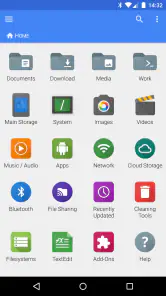
Jumping straight into FX File Explorer: Plus License, I was immediately struck by its clean and intuitive user interface. Unlike some of its cluttered competitors, FX File Explorer keeps things straightforward, making navigation as smooth as a well-oiled machine. You know that feeling when you open an app and everything just makes sense? That’s exactly what you get here.
More From Our News Desk

Clash of Clans Is Won Between the Battles

Android Auto Makes the Case for Quieter Car Software

MobiOffice: Transforming Mobile Productivity with Seamless Integration

EA SPORTS FC™ Mobile Soccer: Redefining Mobile Sports Gaming

How Microsoft OneDrive Became a Mobile Productivity Giant

How Google Translate Breaks Language Barriers Effortlessly
Why It Stands Out
One of the standout features of FX File Explorer is its robust set of functions. It’s not just about moving files around; this app allows for seamless management of files across various cloud storage services. Whether you’re a Google Drive devotee or a Dropbox aficionado, FX has got your back. The app supports a range of cloud services, making it incredibly versatile for handling all your digital assets in one place.
Aside from cloud compatibility, the app offers a plethora of features such as file encryption, app management, and even a text editor. The encryption feature, in particular, gives you that extra layer of security, which, let’s be honest, we all need these days.
Workflows that reward a little planning
One handy habit is to keep a clear separation between files you are actively working on and copies you are ready to archive or share. When using a manager that can reach both local and remote locations, that small distinction helps prevent accidental edits to the wrong copy. I also recommend testing a transfer with a nonessential file before relying on a new cloud or network workflow for something important; it is an easy way to learn where each destination appears and how you prefer to organize it.
The text editor is useful for quick checks or small changes without turning a file-management task into a hunt for another app. I would still use a dedicated editor for substantial writing, and encryption is best treated as a deliberate extra step rather than a substitute for careful account and device security. Those are practical strengths, but they also show why this package suits someone who likes hands-on control more than someone who wants every action automated.
Small habits that prevent file mistakes
A useful way to evaluate the cloud and networking tools is to start with a harmless test file and make a round trip: copy it to the destination, confirm that it appears where expected, then check that you can bring it back or open it from the other location. This is not busywork. It helps you learn whether you are looking at the original or a separate copy, which matters when two folders contain documents with similar names.
I would also avoid treating a successful transfer as proof that every future change will stay synchronized. When you work with remote locations, be clear about whether your task is copying, moving, or editing in place. For important documents, keeping a distinct working copy until you have confirmed the destination is a sensible safeguard. FX’s strength is giving you more direct control over files; that control is useful, but it asks you to pay attention to the operation you choose.
The same careful approach applies to encryption. It can be a valuable option when you intentionally want an extra layer around selected files, but it should fit into a broader security routine rather than stand in for one. I would make sure I understand which files are being protected and how I will access them later before using it for anything I cannot afford to lose. That makes the feature more useful than simply turning it on without a plan.
User Experience
Using FX File Explorer feels like having a conversation with a tech-savvy friend who’s always ready to help. The app’s split-screen feature is a game-changer for multitasking. You can effortlessly drag and drop files between folders, all while keeping an eye on what’s happening in another directory.
Split-screen is especially useful when you already know the source and destination: keep each location visible, compare filenames, and move only what you intended. It can be less helpful on a small display, where two panes leave less room to inspect long names or details. In that situation, I would work through one folder at a time rather than rush a bulk move. This is a good example of FX’s power being most valuable when the screen and task suit it.
Where it sits beside simpler alternatives
Compared with a phone’s built-in file browser, FX is aimed at a more involved job. A default manager is usually enough to locate a download, tidy photos, or make a quick rename, and its simpler scope can be an advantage if you rarely work with remote storage. FX becomes easier to justify when you routinely switch among local folders, cloud services, and network locations and want those tasks to feel like part of one workflow.
Compared with opening each cloud or network app separately, a central file manager can reduce app-hopping, but it is not automatically the best place for every task. Dedicated services often make account management and collaboration more straightforward. I would choose FX for organizing and transferring files, then move to the relevant service when I need its own sharing or editing tools. That division keeps the broader file manager from becoming a reason to abandon useful specialist apps.
And the cherry on top? No pesky ads interrupting your workflow. The Plus License ensures a seamless experience, free from those annoying pop-ups that plague so many other apps.
What to consider before paying
FX File Explorer is a business-oriented app from NextApp, Inc., with an average rating of 4.1 from around 3,600 ratings and more than 100,000 installs. The Plus License costs $2.99, and the app is rated for everyone. It has been available since September 20, 2012, giving it a long history as a file-management option, but that alone does not make its extra tools necessary for every user.
The key buying question is whether you already rely on FX File Explorer or expect to use its cloud and networking functions often. If you only need to find a downloaded attachment, rename a photo, or clear a folder now and then, your phone’s built-in file app is likely the simpler choice. If you routinely move work between storage locations, the one-time license is easier to justify because it supports a repeatable workflow rather than solving a single occasional task. I would also check that the main FX app fits the way you organize files before paying for an add-on to it.
Who should skip the license
I would not recommend paying for the Plus License just because a phone has accumulated a messy downloads folder. If your file tasks are occasional and local, the built-in browser is likely to do the job with less to learn. The same applies if you mainly need a cloud service’s sharing and collaboration features: using that service directly may be clearer than adding a file manager to the process.
It is also not the right choice for someone who dislikes making decisions about copies, destinations, and folder structure. FX’s reach across different storage locations is useful precisely because it gives you more ways to handle files, but that flexibility is less appealing if you want everything to happen automatically. Before buying, I would make sure I am comfortable using the main FX app and can name a recurring task the Plus capabilities would simplify.
The Bottom Line
At the end of the day, FX File Explorer: Plus License is more than just a file manager; it’s a productivity booster. It's perfect for anyone looking to streamline their digital life without getting bogged down by unnecessary features or distractions.
So, if you're in the market for a reliable and efficient file management app, give FX File Explorer a try. It’s the kind of app that makes you wonder how you ever got by without it. Download it, and your future self will thank you.
My recommendation
My verdict is positive, with a clear condition: choose it when you already use FX File Explorer or have a regular reason to work across cloud and network storage. Its value comes from making those file operations easier to bring together, not from adding another icon to a phone that only needs occasional cleanup. For me, that distinction is the difference between a useful license and an unnecessary purchase.
If you are unsure, begin by identifying one recurring workflow—such as moving a work document from local storage to a cloud folder and checking a related network copy. If that process happens often enough to be irritating, the license is worth considering. If you cannot think of a task where the added reach would help, stick with your current file app for now. That is the fairest way to judge this particular upgrade.
FX File Explorer: Plus License Frequently Asked Questions
Who develops FX File Explorer: Plus License, and what kind of app is it?
FX File Explorer: Plus License is a file-management app from NextApp, Inc. It is intended for people who want to work with files and storage from one place, with the Plus License adding media, networking, and cloud capabilities to FX File Explorer. It is listed in the Business category and has an Everyone content rating.
What features does the FX File Explorer: Plus License offer?
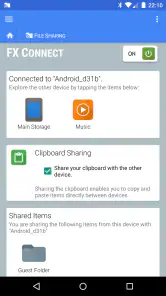
FX File Explorer: Plus License offers a robust set of features including file management, cloud storage support, network storage access, and media management. Users can enjoy a seamless experience with tools like app management, root access, and a built-in text editor. The Plus License unlocks additional features such as encryption and file transfer over Wi-Fi.
Is FX File Explorer: Plus License easy to use for beginners?
Yes, FX File Explorer: Plus License is designed with a user-friendly interface that caters to both beginners and advanced users. The app features intuitive navigation, drag-and-drop capabilities, and clear visual elements that simplify file management tasks, making it accessible even for those new to file management apps.
How secure is FX File Explorer: Plus License?
FX File Explorer: Plus License prioritizes user security and privacy. The app includes features like file encryption, secure file transfer protocols, and a privacy-focused design that ensures users' data is protected. It does not contain ads, tracking, or bundled software, offering a clean and secure user experience.
What are the system requirements for installing FX File Explorer: Plus License?
To install FX File Explorer: Plus License, users need a device running Android 5.0 (Lollipop) or higher. The app is optimized to run smoothly on both smartphones and tablets, ensuring a consistent performance across different devices. Sufficient storage space is also required to accommodate the app and its functionalities.
Pros
- Comprehensive file management features.
- Supports a wide range of file formats.
- User-friendly interface design.
- No ads in the Plus version.
- Integrated cloud storage support.
Cons
- Paid app for full features.
- Lacks advanced editing tools.
- Occasional sync issues.
- Limited free version capabilities.
- No integrated media player.

- Category
- Business
- Version
- Varies with device











