

Furnished Finder
- 2.17K
- 3.9
- Installs
- 100.00K
- Price
- Free

Screenshots

Analysis by Reviewed
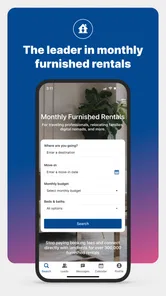
Finding a furnished place for a month is a very different task from booking a hotel for a weekend. I noticed that immediately while reviewing Furnished Finder, a free Travel & Local app from Furnished Finder, LLC. Its focus is monthly housing, including options aimed at travel nurses, so it speaks to people who need a practical home base rather than a short stay with daily housekeeping.
That focus gives the app a useful identity. I would look at it when starting a temporary job, arranging a longer medical placement, relocating between homes, or needing a furnished room without committing to a conventional lease. The central attraction is the possibility of connecting with furnished monthly rentals while avoiding booking fees. Still, this is not the same experience as reserving a hotel or completing an instant vacation-rental checkout, and understanding that difference matters.
How the app feels to read and navigate
My first impression was that the app is built around a straightforward housing search rather than a busy travel dashboard. That is a good choice for someone who already knows the destination and mainly wants to compare places, neighborhoods, and rental details. The app’s purpose is easier to understand than that of a broad travel platform because it stays centered on furnished monthly housing.
For people who read carefully before making a decision, the monthly-rental format is helpful. A user is not simply choosing a photograph and a nightly rate; they need to think about whether the property fits a temporary routine. I found that this naturally encourages a slower review of the listing information. That is important for anyone who needs a quiet environment, a particular sleeping arrangement, space for work equipment, or a location that makes a daily commute manageable.
The main accessibility strength is conceptual clarity. Someone who finds general-purpose travel apps overwhelming may appreciate opening an app with a narrower purpose. The audience is also easy to identify: traveling professionals, people between homes, and renters searching for furnished accommodation for a month or longer. That does not guarantee that every listing is equally clear, but it gives the search a more useful starting point.
Text size, contrast, screen-reader behavior, and other technical accessibility details can affect whether a person can comfortably use any housing app. I would not assume that the same experience works equally well for every reader or every device. If you rely on enlarged text, voice control, a screen reader, or a particular contrast setting, it is sensible to test the search and listing screens before depending on the app for an urgent move.
The app has attracted a 3.9 average from around 4.3 thousand ratings, with roughly 2.2 thousand written reviews. I read that overall signal as mixed but usable: enough interest to show that the service solves a real problem, while the score also suggests that the experience may not feel effortless for everyone. Its reach is established rather than tiny, with over 100 thousand installs, but popularity alone does not remove the need to inspect each property carefully.
More From Our News Desk

 Weather - By Xiaomi
Weather by Xiaomi Review: Clear at a Glance, Less Clear Up Close
Xiaomi’s weather app makes everyday forecasts quick to scan, but its calm surface can leave useful details and recovery paths harder to find than they should be.

 X
XX Under Pressure: Can It Recover When Posting Goes Wrong?
A resilience-focused review of X, examining setup, mistaken posts, interruptions, weak connections, and the gaps that matter when recovery needs to be dependable.

 Clash of Clans
Clash of Clans Is Won Between the Battles
Its raids are quick; its community is a long-term project of coordination, teaching, rivalry, and shared responsibility—with all the friction that entails.

 Android Auto
Android Auto Makes the Case for Quieter Car Software
The car interface is no longer judged by how much it can do, but by how quietly it helps. Android Auto shows what drivers now expect—and what still gets in the way.

 MobiOffice: Word, Sheets, PDF
MobiOffice: Transforming Mobile Productivity with Seamless Integration
MobiOffice: Word, Sheets, PDF is redefining mobile productivity with a surprising blend of functionality and innovation.

 EA SPORTS FC Soccer Mobile 26
EA SPORTS FC™ Mobile Soccer: Redefining Mobile Sports Gaming
Dive into EA SPORTS FC™ Mobile Soccer, where immersive gameplay and strategic depth transform mobile sports gaming.
Latest News



Why readable listing information matters more here
In a monthly rental search, a small piece of unclear information can become a serious daily problem. A traveler may need to know whether the bedroom is private, whether the home is suitable for a longer stay, how far it is from a work site, and what kind of surroundings to expect. I recommend treating every listing as a starting point for questions, not as a complete substitute for communication.
One useful workflow is to make a short checklist before searching. I would write down the maximum commute I can tolerate, the type of sleeping space I need, whether stairs are a concern, the amount of cooking I expect to do, and any sensory issues such as street noise or bright lighting. This prevents attractive photographs from distracting me from practical requirements.
That approach is especially valuable for users with disabilities or temporary injuries. A furnished rental may look convenient while still being difficult if the entrance, bathroom, bed height, or kitchen layout does not work for the person staying there. The app can help locate candidates, but the meaningful accessibility assessment still happens through the listing details and direct questions.
Motor, sensory, and communication considerations
Housing searches can be tiring even when a person has no accessibility needs. For someone with limited hand movement, tremors, chronic pain, or fatigue, repeated scrolling and typing may turn a simple search into a demanding task. I found that the best way to reduce that burden is to search with a prepared set of priorities instead of opening every possible listing.
For a user with motor limitations, the practical question is not only whether the app can be opened or searched. It is whether the whole process can be completed without excessive repeated actions: entering a destination, comparing homes, recording questions, and contacting the relevant person. If typing is difficult, preparing a concise message outside the app can help. It can include the intended dates, mobility requirements, number of occupants, and the exact features that need confirmation.
People with low vision may benefit from the ability to enlarge text at the device level, but enlarged content can also create more scrolling or alter how information fits on screen. I would avoid rushing through listings on a small display. Instead, I would review one property at a time and save the important facts in notes using plain language. This makes it easier to compare homes without repeatedly searching through the same screen.
For users with dyslexia, attention difficulties, or cognitive fatigue, a consistent comparison method is useful. I would record each candidate under the same headings: location, monthly cost information shown in the listing, entrance, bathroom, sleeping arrangement, noise concerns, and questions still waiting for an answer. This is a stronger strategy than relying on memory after browsing several homes.
Sensory access deserves special attention because photographs rarely communicate the full experience of a home. A bright room may be uncomfortable for someone sensitive to glare. A property near traffic, nightlife, or a busy shared area may be unsuitable for a light sleeper or someone with sensory processing differences. I would ask directly about noise at night, lighting that can be controlled, shared spaces, and whether the home has strong odors or other environmental factors that matter to me.
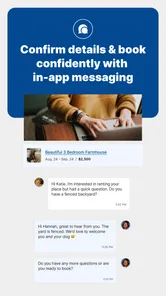
Communication style is another important part of access. A person who cannot comfortably manage a phone call may need written answers to detailed questions. Before treating a rental as a serious option, I would confirm that the conversation can happen in a way I can follow and document. Written communication also reduces misunderstandings about dates, accessibility needs, and what has actually been agreed.
A realistic monthly-housing scenario
Imagine that I am accepting a temporary nursing assignment in a city I do not know. I need a furnished place for the length of the assignment, want to keep the commute predictable, and cannot afford to discover after arrival that the bathroom requires a difficult transfer. I would begin with Furnished Finder because its audience and rental format match the assignment better than a hotel search.
I would narrow my search by area, then inspect listings with the commute in mind rather than choosing the most attractive interior. Next, I would make a written list of questions: Is the entrance step-free? Is there a usable shower arrangement? Is the bedroom on the same level as the entrance? Are laundry facilities easy to reach? How much noise is typical at night? Can the room support the equipment I bring?
I would not treat a friendly description or a polished photograph as proof that the property works for me. I would ask for specific answers and keep them together with the listing information. If the responses were vague, delayed, or inconsistent, I would move to another candidate. For this kind of stay, the time spent verifying details is far less costly than arriving at a home that creates daily strain.
This scenario also shows where the app is different from a hotel platform. A hotel may make short-term booking and standardized room features easier to compare. Furnished Finder is more relevant when I need a home-like arrangement for a longer period, but the trade-off is that I must take more responsibility for checking the individual property and clarifying the rental process.
Access in different situations and environments
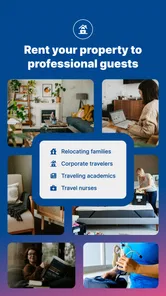
The app can be particularly useful when the user’s situation is temporary. A person recovering from an injury may need furnished accommodation near family or a treatment center. A worker may be away from home for a project. A student, researcher, or relocating household may need a bridge between permanent addresses. In each case, the value is not simply having furniture; it is reducing the effort of setting up a temporary daily life.
Travel nurses are an obvious audience because assignments can require housing in unfamiliar locations and for periods that do not fit ordinary vacation booking. The same monthly orientation can help people who are not nurses but have similar needs: predictable housing, a workspace, kitchen access, and a place that feels more settled than a hotel room.
There is also a useful distinction between physical access and situational access. A property may be physically suitable but still difficult to reach without a car. Another may be close to work but located in a noisy area. A third may have a comfortable interior but require a long walk from public transportation. I would judge the complete journey from the front door to the places I need to visit, not just the room itself.
For someone with limited energy, location can be an accessibility feature even when it is not described that way. A shorter trip to work, groceries, a pharmacy, or a transit stop can make a monthly stay much more manageable. When comparing listings, I would estimate the repeated weekly effort of the location. A slightly less attractive home may be the better choice if it removes a difficult commute.
People traveling with support workers, service animals, children, or medical equipment should clarify those circumstances early. A listing that works for one occupant may not work for two people or for additional equipment. I would ask focused questions before assuming that “furnished” means the space has enough room, storage, or flexibility for my situation.
The app is also worth considering for users who dislike the temporary feeling of hotels. Having a kitchen and a more residential setup can support routines, dietary needs, rest, and work. That said, a home-style rental may involve more variation than a hotel. The accessibility of one property cannot be generalized to another, so the app is best used as a discovery and comparison tool rather than a guarantee of uniform standards.
Where friction and barriers remain
The biggest limitation is the gap between discovering a rental and confidently knowing that it will work. Monthly housing is personal and variable. Two listings in the same area can differ greatly in entrance design, bathroom layout, noise, lighting, and the amount of support available from the person managing the property. The app can bring options together, but it cannot make those differences disappear.
That means the service will not suit everyone. If I need an immediate, standardized reservation with clearly defined hotel accessibility features, a conventional hotel app may be a better fit. If I need a short stay of only a few nights, a vacation-rental or hotel platform may also involve less effort. Furnished Finder makes more sense when the length and purpose of the stay justify careful comparison.
Users who expect a fully automated booking journey may also feel friction. Monthly rentals often require questions, negotiation, scheduling, and confirmation of details. I see that as a consequence of the housing category rather than a simple flaw, but it still affects usability. Someone with limited time, limited communication energy, or difficulty handling uncertain replies should build in extra time and keep backup options.
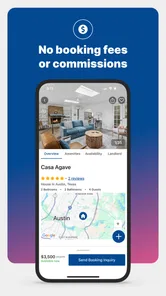
Cost comparison can require care as well. Avoiding booking fees is appealing, but the total financial picture of a monthly rental depends on the specific arrangement and the terms communicated for that property. I would compare the complete expected cost, timing, included furnishings, and practical obligations rather than focusing only on the headline amount shown during the search.
There is also a safety and trust dimension to any housing search. I would avoid sending sensitive information before understanding who I am dealing with and what the next step involves. I would keep conversations organized, verify the property details, and be cautious if pressure is used to make me decide before my questions are answered. The app may help me find a candidate, but responsible judgment remains essential.
For people with hearing, speech, or language-related access needs, the communication stage may be more challenging than the search itself. I would state my preferred communication method at the beginning and ask for important terms in writing. For people with cognitive disabilities, involving a trusted person in reviewing the listing and messages can provide a valuable second check, especially when the stay is long or the move is urgent.
An inclusive verdict for the right kind of renter
After reviewing it as a Travel & Local app, I see Furnished Finder as a focused option for people who need furnished monthly housing and are willing to participate actively in the selection process. Its free price and clear connection to longer stays make it more relevant to temporary workers, travel nurses, relocating households, and people who need a home base rather than a conventional short booking.
Its strongest accessibility contribution is giving people a place to begin a housing search that is already oriented toward longer, furnished stays. That can reduce the noise found in broad travel apps. The app is also useful when I want to compare residential possibilities and ask questions that would not matter during a weekend trip.
My recommendation comes with a firm condition: use it as a careful screening tool. Prepare requirements before searching, inspect the practical details behind the photographs, ask direct questions about physical and sensory needs, and keep written records of the answers. For an accessible stay, the most important work often happens after finding a promising listing.
The app runs on Android from version 7.0 onward, and its current version is 1.9.1. It is rated for Everyone, which makes it broadly approachable from an age-rating perspective. It was released on February 27, 2019, and the continuing presence of the service suggests that this housing niche has lasting usefulness, even though the average rating indicates that individual experiences vary.
I would choose it over a hotel app when I needed a furnished monthly arrangement and had enough time to verify the details. I would choose a more standardized booking service when immediate confirmation, uniform room information, or a short stay mattered more than a residential setup. For users with disabilities, the same rule applies even more strongly: the best platform is the one that makes the required features easiest to confirm.
My final advice is to match the app to your situation, not just your destination. If you need a month-long furnished home and can ask precise questions, Furnished Finder is worth trying. If you need certainty without extended communication, or if a specific accessibility feature is non-negotiable and must be guaranteed in a standardized way, I would keep other accommodation options open. Used thoughtfully, Furnished Finder can make a difficult temporary move more manageable, but the quality of the final experience depends on the care taken to evaluate the individual rental.
Furnished Finder Frequently Asked Questions
Is Furnished Finder free to download, and what does “no booking fees” mean?
Furnished Finder is free to download, and its service is promoted as a way to find furnished monthly rentals without booking fees. That does not mean every part of a rental is cost-free: rent and any landlord-required deposit, utilities, or other charges may still apply. Review the property’s terms and ask the landlord to explain all costs before you agree to move in.
Can I use Furnished Finder on my phone, and what should I check before installing it?
Furnished Finder is a Travel & Local app from Furnished Finder, LLC. Its current version is 1.9.1 and it requires Android 7.0 or later. Before installing, check that your device meets the requirement and that you are downloading the app from the official app store for your device. The app is rated for Everyone, making its content suitable for a general audience.
What is Furnished Finder, and who is it designed for?
Furnished Finder is a rental marketplace focused on furnished, medium-term housing, typically for stays of 30 days or longer. It is especially popular with traveling nurses, medical professionals, corporate travelers, relocating families, students, and other people who need temporary accommodation. Unlike a traditional vacation-rental service, the platform is designed around practical monthly housing rather than short weekend stays.
How do I search for and contact landlords on Furnished Finder?
After entering a destination and preferred dates, you can browse available furnished properties and review details such as monthly rent, amenities, location, minimum stay, and contact information. Furnished Finder generally connects renters directly with property owners or managers, so communication, questions, applications, lease terms, deposits, and payment arrangements are handled between both parties rather than entirely inside a standard booking checkout.
Is Furnished Finder safe to use, and how can I avoid rental scams?
Furnished Finder can be a useful way to find temporary housing, but renters should still verify every listing and landlord independently. Read reviews, ask for a video tour or live walkthrough, confirm the property address, request a written lease, and never send money before understanding the rental agreement. Be cautious of unusually low prices, urgent payment requests, pressure to communicate off-platform, or owners unwilling to provide verifiable information.
Pros
- Focused on mid- and long-term furnished rentals for traveling professionals.
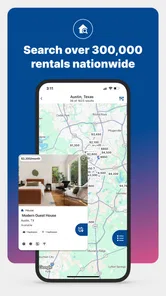
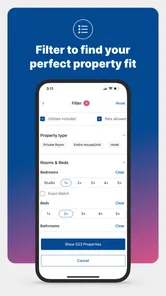
- Search filters help narrow listings by location
- dates
- amenities
- and property type.
- Useful for nurses
- students
- and relocating workers needing flexible housing.
- Listings may include utilities and household essentials in the advertised price.
- Direct communication with landlords can simplify questions and booking arrangements.
Cons
- Availability varies greatly by city
- with fewer options in smaller markets.
- Some listings may require deposits
- screening
- or additional fees before move-in.
- Rental terms and cancellation policies differ between individual property owners.
- Not every listing includes the same level of furniture
- amenities
- or maintenance support.
- Users should verify photos
- reviews
- and lease details before sending any payment.











