

Frontier Airlines
- 16.75K
- 4.8
- Installs
- 5.00M
- Price
- Free

Screenshots


Analysis by Reviewed
I think a travel app earns trust less through a polished first screen than through how clearly it handles the moments when money, identity, and travel plans meet. Frontier Airlines is a free travel app from Frontier Airlines, and its purpose is practical: it gives you a phone-based route into arranging and managing travel with the airline. I would treat it as a useful companion for a Frontier trip, not as a general-purpose booking service or a substitute for checking the details of a fare before paying.
Keep the trip details in view
For a traveler deciding whether to install it, the key question is not simply whether booking feels quick; it is whether you can keep the important parts of your own trip straight. I find a dedicated airline app most useful after choosing a flight: it can put booking, check-in, and travel information in one place, so I am not hunting through unrelated travel tools when I need to prepare. That convenience is strongest when the whole itinerary is with Frontier. If you are comparing several airlines, a broader travel search tool may be better for the initial decision, while Frontier’s app is the more focused place to handle the airline-specific part.
That distinction is useful in a real planning routine. I might use a comparison service or browser to consider departure times and carriers, then switch to the airline app once I have settled on a Frontier flight. Keeping those jobs separate can make the decision clearer: a broad search tool helps me compare options, while a carrier app is intended to handle the relationship with that specific airline. I would not expect Frontier’s app to be the best place to organize every part of a trip that includes other carriers, lodging, and local transport.
Trust starts with what you can verify
I’m careful about treating any travel app as a vault for sensitive information. Booking and managing flights can involve personal and payment details, but I would not assume anything about data handling or device permissions without reading the current privacy disclosures and the prompts shown on my own phone. Before entering details, I check that I am in the official Frontier Airlines app, review each requested permission in context, and avoid granting access that does not seem necessary for the task I am doing.
That habit matters most when I am in a hurry: booking on public Wi-Fi, checking in while heading to the airport, or opening a notification from the lock screen. I prefer to open the app myself rather than follow an unexpected message, and I pause before confirming a purchase or an add-on. These are simple checks, but they help keep the traveler in control without pretending that an app alone can remove every travel or privacy risk.
For me, the practical privacy question is less about guessing what happens behind the scenes and more about making careful choices at the points I can see. I can decide whether to sign in, what information to enter for a booking, and whether a permission prompt makes sense for the action I am taking. If a prompt appears when I am only trying to view an itinerary and its purpose is unclear, I can pause and review it rather than tapping through automatically. That is a sensible habit with any airline app, especially when travel pressure makes it tempting to accept every prompt just to move on.
Choices and practical limits
The app makes most sense if you already expect to fly Frontier and want a single airline-specific place for the trip. If you only fly the carrier occasionally, you may not need to keep it installed year-round; installing it when planning or preparing for a flight is a reasonable alternative. Travelers who want broad comparisons across airlines, or who are coordinating a complicated itinerary with several carriers, should keep a comparison or itinerary tool in the mix rather than expecting one airline’s app to cover everything.
More From Our News Desk

 Weather - By Xiaomi
Weather by Xiaomi Review: Clear at a Glance, Less Clear Up Close
Xiaomi’s weather app makes everyday forecasts quick to scan, but its calm surface can leave useful details and recovery paths harder to find than they should be.

 X
X Under Pressure: Can It Recover When Posting Goes Wrong?
A resilience-focused review of X, examining setup, mistaken posts, interruptions, weak connections, and the gaps that matter when recovery needs to be dependable.

 Clash of Clans
 Is Won Between the Battles
Its raids are quick; its community is a long-term project of coordination, teaching, rivalry, and shared responsibility—with all the friction that entails.

 Android Auto
 Makes the Case for Quieter Car Software
The car interface is no longer judged by how much it can do, but by how quietly it helps. Android Auto shows what drivers now expect—and what still gets in the way.

 MobiOffice: Word, Sheets, PDF
MobiOffice: Transforming Mobile Productivity with Seamless Integration
MobiOffice: Word, Sheets, PDF is redefining mobile productivity with a surprising blend of functionality and innovation.

 EA SPORTS FC Soccer Mobile 26
EA SPORTS FC™ Mobile Soccer: Redefining Mobile Sports Gaming
Dive into EA SPORTS FC™ Mobile Soccer, where immersive gameplay and strategic depth transform mobile sports gaming.
Latest News



I also recommend checking the final itinerary and any optional selections before completing a booking. A convenient mobile flow can make it easy to move quickly, but speed is not a reason to skip a careful review of dates, airports, passenger details, and any extras you choose. The app’s value is in giving Frontier travelers a direct way to manage their side of the journey; it does not make airline-specific arrangements interchangeable with those of other carriers.
A small but useful trade-off is deciding where to keep your travel information. An airline app can bring the carrier’s booking and check-in tasks together, while email and a general itinerary app may be easier for seeing several providers in one timeline. I would avoid relying on any single screen as my only record: keeping booking confirmation details somewhere I can retrieve them and checking the app before important steps gives me a backup routine without turning trip preparation into a complicated system.
Easy Navigation and User-Friendly Interface
When you first open the Frontier Airlines app, you’re greeted with a sleek and straightforward interface. The designers clearly had user experience in mind, making it super easy to navigate. Whether you’re tech-savvy or not, you’ll find booking flights a breeze. Just a few taps, and you’re all set for your next adventure. The app’s layout feels intuitive, and everything is where you’d expect it to be, which is a big win in my book.
Booking and Managing Flights
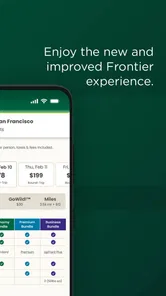
One of the app’s standout features is the seamless booking process. You can search for flights, compare prices, and book your tickets without any hassle. Plus, managing your bookings is a piece of cake. Need to change a flight or add some extras like checked bags or seat selections? No problem! The app handles it all efficiently. I particularly love how it keeps you updated with notifications, so you never miss a beat.
Even when a mobile booking feels straightforward, I would use the review screen as a deliberate pause rather than a formality. A fare can look attractive before optional choices are considered, so I check whether the itinerary and any selected extras match the trip I actually intend to take. For example, a traveler packing light for a short visit may not value the same add-ons as someone carrying equipment or traveling with family. The useful approach is to decide what I need first, then judge the total against that plan instead of adding options because they are presented during checkout.
Check-In Made Simple
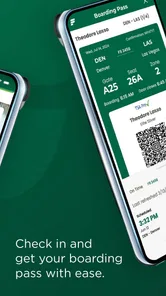
Gone are the days of standing in long airport lines thanks to the app’s easy check-in feature. You can check in for your flight directly from your phone and even download your boarding pass. It’s all about convenience, and let me tell you, it saves a ton of time and stress. The feature is reliable and works like a charm every time.
A useful routine is to check in when you have a calm moment and keep the boarding pass available before leaving home, rather than waiting until you reach a crowded terminal. I would still make sure I can retrieve the pass if my phone battery runs low, and keep an eye on airport screens for gate information. A mobile boarding pass reduces paper and one source of friction, but it is not a reason to stop checking the airport’s live instructions.
That routine is especially helpful for someone traveling early or with children, when there may be little spare time to troubleshoot at the airport. I would open the app while I still have a stable connection, confirm that the trip details are accessible, and consider what I would do if my phone were unavailable. The point is not to assume a problem will occur; it is to avoid making a phone screen the only plan for a time-sensitive step. Airport staff and airport displays remain important sources of current instructions.
Additional Features and Offers
Beyond booking and check-ins, the app offers a slew of additional features to enhance your travel experience. Love a good bargain? Keep an eye on the app for exclusive deals and promotions that are often available to app users. There’s also a section dedicated to frequent flyers, helping you make the most out of their frequent flyer program.
For a realistic use case, imagine booking a short trip after work, then returning to the app later to review the itinerary, decide whether a bag or seat selection suits your plans, and handle check-in before travel day becomes hectic. That sequence is where a carrier-specific app can be more convenient than keeping booking emails and airline pages open side by side. I would compare the total trip cost and the choices that matter to me before committing, rather than letting a promotion or a quick checkout decide for me.
Promotions can be useful, but I treat them as a reason to inspect an offer, not as proof that the resulting trip is the best fit. A deal only helps if its dates, route, and conditions work for the traveler. I also would not make a decision based solely on an alert: I open the app and review the actual itinerary and choices before acting. That keeps convenience in its proper role—as a way to find and manage options, not a substitute for deciding whether those options suit my plans.
One of the features I find particularly handy is the travel info section. It’s packed with useful information about your destination, airport guides, and travel tips. It’s like having a mini travel advisor in your pocket!
Travel information is most useful to me as a preparation aid rather than a replacement for checking current conditions. I might use an airport guide to orient myself before leaving, then confirm details on the day of travel through the relevant airport displays and announcements. This is a practical distinction for any traveler: general guidance can help me feel prepared, while real-time airport directions are what I follow when plans are underway.
Frontier’s Android app has a 4.7 average from around 147,000 ratings, and it has passed five million installs. Those figures suggest that plenty of travelers use it, but I would weigh them alongside my own needs: frequent Frontier flyers have the clearest reason to keep it close, while occasional passengers may prefer installing it only around a trip. It is rated for everyone, is free, and version 3.3.0 Build-805 requires Android 11 or later. The app was released on October 21, 2015, so it is an established airline companion rather than a new experiment.
Those details make it an easy app to consider if your phone runs Android 11 or later and you have a Frontier trip coming up. Its 15,000 reviews offer another sign that it is actively used, though review volume cannot tell me whether a particular booking or travel day will go smoothly. I see the strong average rating as encouraging, not a guarantee; my own assessment still depends on whether the app fits the way I travel and whether the choices on screen are clear to me.
Who will get the most from it
I would recommend it most readily to people who fly Frontier often, travelers who have already booked with the airline, and anyone who prefers to handle airline-specific tasks on a phone. It can be particularly helpful when one person is coordinating a family trip: keeping the carrier’s booking and check-in workflow close at hand can reduce the back-and-forth of searching through old messages. Even then, I would check passenger names and trip details carefully before relying on a saved itinerary, because a convenient interface does not make careful review less important.
On the other hand, someone who travels infrequently and wants to keep their phone uncluttered can wait until a trip is planned before installing it. A traveler who mainly wants to compare multiple airlines or assemble a multi-carrier itinerary may be better served by a general travel service for discovery and organization, then use Frontier’s app only for the Frontier portion. That division of labor is more realistic than expecting one carrier’s app to be a universal travel planner.
Final Thoughts
All in all, the Frontier Airlines app is a must-have for anyone who flies with them regularly or is looking to save some bucks on their next flight. It’s user-friendly, reliable, and packed with features that make traveling easier and more enjoyable. So, next time you’re planning a trip, give this app a whirl. You might just find yourself wondering how you ever traveled without it!
My recommendation is a little more specific: I’d use it when booking or flying Frontier, while keeping the airline’s final terms and airport updates in view. If you mainly need cross-airline comparisons, or simply do not want another app on your phone, a mobile browser or general travel service may suit you better. For an eligible Frontier itinerary, though, having booking, check-in, and travel information close at hand is a sensible convenience—as long as I stay deliberate about permissions, personal details, and each choice before confirming.
Frontier Airlines Frequently Asked Questions
Is the Frontier Airlines app free to download, and is it suitable for all ages?
Yes. Frontier Airlines is free to download, and its Everyone content rating makes it suitable for a broad audience. It is a travel app from the airline, intended to make travel easier by bringing flight-related tasks together on a mobile device. Before installing, check that your phone meets the operating system requirements.
Can I use the app to keep my trip details organized in one place?
The app is designed to bring useful flight-related tasks together on your phone. Travelers can view bookings and access travel information, and the app also supports tasks such as managing reservations and accessing boarding passes. This can make it more convenient to check trip details while on the go, rather than relying only on separate travel documents.
What kind of app is Frontier Airlines, and who makes it?
Frontier Airlines is a travel app developed by Frontier Airlines. It is intended to make travel easier by bringing flight-related tasks together on a mobile device, including viewing bookings and accessing travel information. The app is free to download and is rated for Everyone, making it suitable for a broad range of travelers.
What is the Frontier Airlines app used for?
The Frontier Airlines app is designed to enhance the travel experience by providing users with convenient access to their flight bookings, boarding passes, and real-time flight status updates. It also allows passengers to manage their reservations, choose seats, and purchase additional services such as baggage or in-flight amenities directly from their mobile devices.
How do I book a flight using the Frontier Airlines app?
To book a flight using the Frontier Airlines app, simply open the app and navigate to the booking section. Enter your travel details including departure and destination cities, dates, and the number of passengers. The app will display available flights, allowing you to select flights, choose your preferred seats, and make secure payments directly within the app.
Pros
- Affordable flight options available.
- User-friendly interface for easy booking.
- Frequent flyer program with rewards.
- Mobile check-in simplifies travel.
- Real-time flight status updates.
Cons
- Limited legroom in economy class.
- Additional fees for seat selection.
- No complimentary in-flight meals.
- Limited customer support options.
- Occasional flight delays reported.











