Fresno Bee News | California
- 93.00
- 3.8
- Installs
- 10.00K
- Price
- Free

Screenshots




Analysis by Reviewed
I found Fresno Bee News most useful when I treated it as a local window for one household rather than as a replacement for every news source. Its focus is Fresno and the Central Valley, with attention to California weather, politics, sports, and nearby developments. That narrow geographic focus is its main reason to exist: instead of asking a national news app to notice what affects your street, school district, commute, or weekend plans, you get a publication built around the region.
The app is free to install, although it includes in-app purchases ranging from $7.99 to $159.99 per item. That distinction matters if several people in a home want to use it. Installing it costs nothing, but a household should still decide who is using which account and whether anyone is considering a paid option before tapping through a purchase screen. I would not leave that decision vague on a shared phone or tablet.
McClatchy develops the app, which places it in the news and magazine space rather than in the broader category of general-purpose aggregators. The store summary points directly to Fresno and Central Valley coverage, local California weather, politics, and sports. In my experience, that makes the app easier to judge than a sprawling news service: the question is not whether it covers everything, but whether its local emphasis matches your daily life.
How it works in a shared household
A realistic use case is a family preparing for a busy weekday. One person checks local weather before leaving for work, another looks for Central Valley headlines during breakfast, and a sports fan checks the latest local coverage later in the day. The app can serve all three interests without forcing everyone to search through national stories first. That is a modest convenience, but it is exactly the kind of convenience that makes a local news app earn a place on a home screen.
I especially like the idea of using it as a short, repeatable check-in rather than keeping it open constantly. A quick visit in the morning can help with weather and major regional developments; another visit later can catch updates that matter to evening plans. This approach also reduces the temptation to scroll endlessly through unrelated headlines. The app’s value comes from relevance, not from trying to occupy every spare minute.
On a shared device, however, the experience depends on household habits. If one person leaves the app open on a particular story, the next person may assume that story represents the whole news experience. I recommend returning to the main news view before handing over the device. That small routine keeps the app useful for different readers and avoids turning one person’s interest in politics, sports, or weather into the default for everyone else.
Another practical tip is to agree on what “local news” means in your home. Someone living in Fresno may want city-specific developments, while another household member elsewhere in the Central Valley may care more about regional weather or sports. The same app can be relevant to both, but not necessarily in the same way. I would encourage each person to identify the sections they actually expect to check instead of assuming that every headline has equal value.
More From Our News Desk

Weather by Xiaomi Review: Clear at a Glance, Less Clear Up Close

X Under Pressure: Can It Recover When Posting Goes Wrong?

Clash of Clans Is Won Between the Battles

Android Auto Makes the Case for Quieter Car Software

MobiOffice: Transforming Mobile Productivity with Seamless Integration

EA SPORTS FC™ Mobile Soccer: Redefining Mobile Sports Gaming
Setting expectations before anyone uses it
The app supports Android devices running version 8.0 or later, so compatibility is the first thing I would check on an older family phone or tablet. It is a free app in the News & Magazines category, and its age rating is Everyone 10+. That makes it broadly suitable for a household setting, but the rating should not be confused with a promise that every article will feel comfortable for every child. News naturally includes serious subjects, political disagreement, accidents, and other events that younger readers may need help understanding.
For a shared device, I would establish three simple boundaries. First, decide whether the device is only for reading or whether adults may also use it to explore paid content. Second, agree that purchases require the owner’s permission. Third, make clear that reading a headline is not the same as confirming a fact. These are not special controls supplied by the app; they are sensible household rules that prevent confusion when multiple people use one screen.
The purchase range deserves a calm conversation rather than an automatic rejection. Some readers may be happy with the free experience, while others may consider paid access worthwhile if they depend on local reporting. Because the available items can reach a substantial amount, I would make the adult responsible for checking the purchase details and deciding whether the expense fits the household budget. Children and guests should not be expected to make that judgment.
I also recommend separating personal preferences from shared-device etiquette. If a family member follows politics closely, that does not mean everyone else wants political coverage first. If another person checks sports several times a day, the device should still be left in a neutral place when possible. A local news app works better in a household when it is treated as a common information tool, not as one person’s private dashboard accidentally passed around.
Coordinating around weather, politics, and sports
The three subject areas named for this app create different reading rhythms. Weather is usually practical and time-sensitive: it can influence clothing, travel, outdoor work, and school plans. Politics tends to reward slower reading because a headline may not provide enough context for a complicated local issue. Sports is often event-driven, with readers checking for updates around games or team news. I would not use the same reading habit for all three.
For weather, I would use the app as one part of planning rather than as the only authority for an urgent decision. A household can check the local outlook together, then confirm conditions through the source it normally trusts before making decisions affected by safety. The useful insight here is that a local news app adds context: it may help explain how weather is affecting the region, while a dedicated weather service may be better for minute-by-minute details.
Politics benefits from coordination because family members may read the same issue with different assumptions. I found it more productive to share the article itself and discuss what it says than to forward a reaction based only on a headline. If a story matters to a household decision, such as a local change affecting schedules or services, I would read beyond the first line and compare it with official information when appropriate.
Sports coverage has a different advantage. It gives a household an easy common topic, especially when one person follows local teams and another only wants occasional updates. A non-sports reader does not need to become a devoted fan to benefit from a quick local result or community angle. Conversely, a serious fan may still prefer a dedicated sports app for live scores, alerts, standings, or deeper statistical tools. The trade-off is simple: this app keeps sports within a broader local-news routine, while a specialist service usually goes further in game-by-game detail.
One useful household workflow is to nominate one person as the “context reader” for an important story. That person can read the full piece and explain the basic situation to others without requiring everyone to spend the same amount of time in the app. This is not a built-in collaboration feature; it is a practical way to share information when time is limited. It also reduces the chance that a dramatic headline becomes the entire family’s understanding of a complicated event.
Age, trust, and responsible reading
The Everyone 10+ rating gives the app a reasonable place in a family environment, but I would still introduce it differently to a child than to an adult. A younger reader may need help distinguishing reporting from opinion, a developing story from a settled one, and a local claim from a verified public announcement. Those lessons are more important than simply deciding whether the app is “allowed.”
I would use the app with a child during a quiet moment rather than handing over the device during a stressful event. Looking at a weather story together can teach practical reading: What area does it cover? What time period does it discuss? What should we do with that information? A politics story can prompt a different conversation about sources and differing viewpoints. The app becomes more valuable when it supports media literacy instead of functioning as an unattended stream of adult concerns.
Trust also matters between adults. News preferences can reveal personal interests, and a shared device may blur who read what or why. I would not assume that everyone wants their reading history, political interests, or sports habits treated as communal information. If the app is installed on a personal phone, each adult should decide how much access others have to that device. If it is on a family tablet, the household should accept that the experience is shared and avoid using it for sensitive conversations that belong elsewhere.
The local focus can improve trust because it keeps the reader close to recognizable places and issues, but local does not automatically mean complete. No single publication can represent every perspective or answer every question. I would use Fresno Bee News for regional reporting and then consult primary sources or another reputable outlet when a decision has legal, financial, medical, or safety consequences. That is not a criticism of this app specifically; it is the responsible limit of relying on one news source.
Its average rating is 3.8 from around 284 ratings, with 93 written reviews. I read that as a sign to keep expectations practical: there is a real audience, but the app is not universally loved. Ratings are helpful for spotting broad satisfaction, yet they do not tell me whether a particular reader values Fresno coverage, wants national breadth, or expects a polished aggregator. For this app, personal fit matters more than chasing a number.
Where it beats broad news alternatives
Compared with a national news aggregator, the clearest strength is focus. Aggregators are excellent when I want a wide scan across countries, markets, technology, entertainment, and national politics. They can also combine many publishers in one place. The downside is that local developments may be buried beneath stories chosen for broad popularity. Fresno Bee News makes a different trade: less breadth, more regional identity.
Compared with a dedicated weather app, it is better suited to understanding the local-news angle around weather than to replacing specialized forecasting tools. Compared with a sports app, it is more balanced for a household that wants sports alongside politics and community coverage. Compared with visiting a publication’s website in a browser, an app can feel more convenient for repeated mobile reading, though some people may prefer the browser’s flexibility when switching between sources or using a larger screen.
That comparison also reveals who should skip it. If you live far from Fresno and the Central Valley, the local emphasis may not justify another news app. If your priority is worldwide coverage, financial markets, live scores, or highly specialized forecasts, a broader or dedicated service will probably serve you better. I would also skip it if I only wanted a single headline each morning and had no interest in local California reporting. The app’s purpose is narrower than that of a general news hub.
For a Central Valley household, the decision is more favorable. The app can act as a shared regional reference point without requiring one person to curate links from several unrelated sources. It is particularly sensible for families who want local weather, politics, and sports in the same place, while accepting that specialist apps and additional sources may still be necessary.
Technical details that affect the decision
The app first appeared on December 27, 2011, and its current version is 11.1.16. It has passed 10K+ installs, which suggests a modest but established presence rather than the scale of a mass-market national platform. I would interpret that as useful context, not as a quality guarantee. A long-running local app can be valuable because it serves a defined region, while a smaller install base may also mean fewer people are discussing every update or troubleshooting issue.
On my checklist, the minimum operating-system requirement is important for older shared devices. Before assigning the app to a family tablet, I would check its Android version rather than assuming that any device capable of browsing the web can install it. This is especially relevant when a household keeps an older device for children, guests, or kitchen use.
I would also avoid judging the app solely by how it behaves during one short session. Local news changes throughout the day, and the usefulness of the app depends on whether its coverage aligns with the times your household checks it. Try it during a normal week: look at the morning weather, scan a local political story, and check sports when there is a reason to care. That trial gives a better answer than a quick glance at the store summary.
Because the app is free to install but includes paid items, I would review the purchase path before allowing unsupervised use. Keep the decision with the account owner, explain the boundary to children, and treat any paid access as a household subscription decision rather than an accidental extension of a free download. This is one of the few areas where a shared-device setup can create more friction than a personal phone.
My household verdict
After using it as a focused local-news tool, I would recommend it to households connected to Fresno or the Central Valley that want one place for regional weather, politics, sports, and nearby reporting. I would present it to children with guidance, not because the age rating is unusually restrictive, but because news requires context even when an app is broadly suitable for family use.
My strongest recommendation is to give each reader a clear role. Let the weather-focused person use it for regional context, let the sports fan check relevant coverage, and encourage everyone to slow down when a political or serious community story affects the household. That division makes the app feel useful without pretending that every reader needs the same information.
I would not make it the only source in the home. A dedicated weather service, a specialist sports tool, official public information, or a broader news app may be better for specific questions. Fresno Bee News earns its place by connecting those general interests to one region. Its best use is as a shared local starting point, not as an all-purpose answer machine.
For me, that is a worthwhile distinction. The app is free to begin with, supports a clear local purpose, and can fit naturally into household routines when account boundaries and purchase expectations are discussed first. If your daily life includes Fresno or the Central Valley, I think it is worth trying. If your news needs are national, global, or highly specialized, I would choose a broader alternative and keep this one off the device.
Fresno Bee News | California Frequently Asked Questions
What devices and operating systems can run Fresno Bee News | California?
Fresno Bee News | California is available for Android and iOS devices, with the Android version requiring Android 8.0 or later. Before downloading, check that your device’s operating system meets that requirement and that you have enough storage for an app update. Keeping the app current can help you use its latest available features and maintain compatibility.
Who publishes Fresno Bee News | California, and what is its age rating?
The app is published by McClatchy and is categorized as a news and magazines app. Its content rating is Everyone 10+, which can help families decide whether it is suitable for younger readers. As with any news service, articles may discuss serious or sensitive events, so parents may want to review the app’s content with children.
What is Fresno Bee News | California?
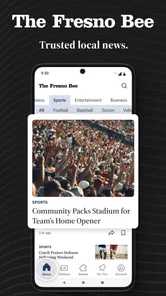
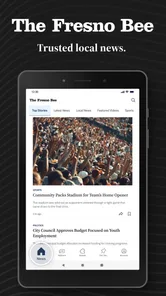
Fresno Bee News | California is a news app focused on Fresno, the Central Valley, and broader California coverage. It brings together reporting on local government, crime, education, business, sports, weather, entertainment, and community events. The app is designed for readers who want to follow regional stories in one place instead of relying only on general national news platforms.
Is Fresno Bee News | California free to download and use?
The app is free to download, but access to all articles and premium features may depend on the publisher’s subscription policy. Some stories may be available without signing in, while other content can be limited to subscribers or registered users. In-app purchases are available, with items ranging from $7.99 to $159.99. Review the current in-app terms for pricing, trial periods, and renewal details.
What type of news and features does the app provide?
The application focuses on Fresno and Central Valley reporting, with local California news, weather, politics, and sports. It is intended to give readers a convenient way to follow regional developments alongside broader California coverage. The available reporting makes it particularly relevant to people interested in local issues and events, rather than readers looking primarily for national or international headlines.
Pros
- Covers local Fresno and Central Valley news in depth.
- Includes reporting on California politics
- crime
- education
- and communities.
- Easy-to-read articles with timely updates throughout the day.
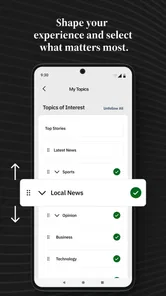
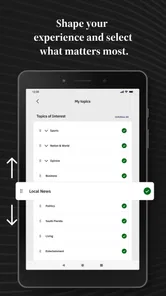
- Supports personalized news interests and relevant story discovery.
- Useful source for local events
- sports
- and regional developments.
Cons
- Some articles may require a paid subscription to read in full.
- Advertising and subscription prompts can interrupt the reading experience.
- Coverage is strongly focused on Fresno and may feel narrow elsewhere.
- Breaking-news updates may vary depending on the story and newsroom schedule.
- Some readers may find the app’s layout less intuitive on smaller screens.













