FreshBooks Invoicing App
- 1.42K
- 4.3
- Installs
- 500.00K
- Price
- Free

Screenshots






Analysis by Reviewed
I judge accounting apps by what they help me finish on an ordinary workday: record a cost before I forget it, bill a client without rebuilding the same document, and understand what still needs attention. FreshBooks is a business app from FreshBooks Cloud Accounting, aimed at freelancers and small businesses that want invoicing and basic financial organization together. Its focus is practical: keep client work, expenses, and billing close at hand rather than split across notes, spreadsheets, and separate tools.
Starting with the work you actually do
The first useful decision is not how to configure everything; it is which recurring task you want to stop postponing. If invoices are your main bottleneck, begin with client details and a clear invoice format. If forgotten costs are the bigger problem, make receipt capture part of the moment you finish a purchase. Trying to adopt every accounting habit at once can turn a helpful app into another chore.
I’d also decide what stays in FreshBooks and what remains elsewhere. A simple division—client billing and day-to-day expense records here, specialist advice or complex bookkeeping with the appropriate professional—keeps expectations sensible. That matters because convenient mobile records are useful, but they are still only as dependable as the information entered and reviewed.
Building a reliable day-to-day workflow
Setting up FreshBooks is as smooth as butter. You start by creating an account, and within minutes, you're ready to roll. The interface is clean and intuitive, which is a big win for those of us who aren't exactly number crunching enthusiasts. It's designed to get you up and running without a steep learning curve.
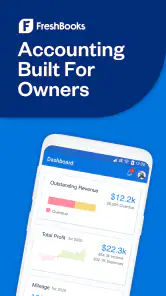
Once you're in, the dashboard greets you with a snapshot of your financial health. You can see outstanding invoices, total profit, and expenses at a glance. It's like having a personal finance assistant who’s always on top of things.
Creating and sending invoices
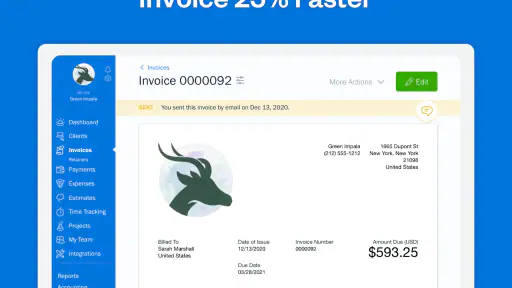
Now, let's talk invoices. Creating an invoice in FreshBooks is as easy as pie. You can customize it to match your brand, add your logo, and even choose from a variety of templates. There's something satisfying about sending out a professional-looking invoice that reflects the quality of your work.
Once you've crafted the perfect invoice, sending it off is just a click away. FreshBooks even lets you send reminders and set up recurring invoices for those steady clients. It's like having an automated nudge that ensures you get paid on time.
More From Our News Desk

Clash of Clans Is Won Between the Battles

Android Auto Makes the Case for Quieter Car Software

MobiOffice: Transforming Mobile Productivity with Seamless Integration

EA SPORTS FC™ Mobile Soccer: Redefining Mobile Sports Gaming

How Microsoft OneDrive Became a Mobile Productivity Giant

How Google Translate Breaks Language Barriers Effortlessly
Tracking expenses without losing the paper trail
Expense tracking is often the bane of small business owners. But with FreshBooks, it's surprisingly hassle-free. You can snap pictures of your receipts and upload them directly to the app. No more piles of paper cluttering your desk.
FreshBooks categorizes your expenses automatically, making tax time a breeze. You can even connect your bank account to import transactions, so you never miss a deductible.
Turning time into billable work
For freelancers and contractors, time is literally money. With FreshBooks' time tracking feature, you can log hours with precision. There's a built-in timer, or you can manually enter your hours. Either way, it's a lifesaver for billing clients accurately.
The best part? You can convert your tracked time into an invoice directly. It's seamless and saves you from juggling multiple apps or spreadsheets.
Using reports to guide decisions
Understanding your business's financial health is crucial, and FreshBooks delivers with comprehensive reports. Whether it's profit and loss, tax summaries, or client account statements, everything is available at your fingertips.
These reports give you insights into where your money is going and coming from, helping you make informed decisions. It's like having a crystal ball for your business finances.
Mobile access and connected tools
FreshBooks plays well with others, offering integrations with popular apps like PayPal, Stripe, and G Suite. This connectivity ensures that your invoicing ecosystem is as robust as you need it to be.
And let's not forget about the mobile app. Whether you're on Android or iOS, FreshBooks keeps you connected on the go. It's like carrying your office in your pocket, allowing you to manage your business from anywhere.
Settings and habits that make a difference
The biggest improvement I’d make to my own workflow is consistency, not clever configuration. I’d settle on a clear naming style for clients and invoice descriptions, then use it every time. That makes later searches and report reviews less fiddly, especially when a client has several projects or recurring work. Before sending a bill, I’d also check the recipient, dates, line items, and payment details as a routine; a tidy template saves typing, but it doesn’t catch every human mistake.
Receipt capture works best as a small habit rather than a month-end rescue mission. I’d photograph a receipt as soon as practical, add enough context to recognize the purchase later, and compare imported transactions with the receipt instead of assuming an automatic category is always right. A mixed personal-and-business purchase deserves particular care: the convenience of a quick upload is not a substitute for deciding what portion belongs in the business records.
A practical rhythm for freelancers
Imagine finishing a client call between appointments. I can note the time while the task is fresh, then later review the entry before turning it into billable work. At the end of the week, I’d prepare invoices in one short batch, check each against the agreed work, and use reminders for invoices that remain outstanding. That sequence reduces forgotten hours and rushed billing without pretending the app can make judgment calls about scope or client agreements.
Recurring invoices are useful when the amount and service genuinely repeat, such as a steady monthly arrangement. They are less suitable when hours, deliverables, or fees vary: in that case I’d review each period and create or adjust the invoice rather than let a routine become an unchecked assumption. The time saved is real only if the underlying details stay accurate.
Make repeat work quicker without skipping review
For a consultant with several similar client jobs, the most dependable shortcut is a repeatable sequence rather than rushing through the screens: record the work, check the time entry, prepare the bill, and confirm the client-facing details before sending. A familiar order reduces the chance of forgetting a step when the day is busy. I’d keep invoice descriptions specific enough to explain the work, even if that means typing a little more than a vague label.
Another useful habit is to separate capture from approval. I might add a receipt or time entry quickly while I’m on the move, then review it when I can give it proper attention. That keeps the first action small without treating an unreviewed entry as finished bookkeeping. It is especially helpful when a purchase has several purposes or a work session included both billable and non-billable time.
Before relying on any recurring setup, I’d ask whether the client arrangement is genuinely stable. A repeating service can save effort, but a changed scope or fee should prompt a deliberate edit rather than a blind repeat. The same principle applies to imported transactions: importing can reduce manual entry, while checking the transaction against its receipt and business purpose protects the quality of the record.
Where it fits—and where it doesn’t
Compared with a spreadsheet and a separate invoicing tool, FreshBooks brings client billing, time entries, expense records, and reports into one workflow. That can be a meaningful advantage for a solo consultant who wants to connect work performed with money owed. A spreadsheet may still be preferable for someone who wants complete control over custom columns and formulas, while a dedicated accounting setup may suit a business with more complicated bookkeeping needs or a specialist preparing its accounts.
I’d recommend it most to independent professionals and small teams who invoice clients directly, track time, and want a mobile way to keep receipts and billing from piling up. I’d think twice if I only send an occasional invoice, already have a bookkeeping process I trust, or need a highly tailored accounting workflow. Moving records between systems can create duplicate work, so the best choice is the one that matches the process you will actually maintain.
For instance, a designer who bills by project and buys materials for client work may value having time, costs, and billing close together. Someone who sells through a more involved inventory operation or needs unusually customized financial controls may be better served by a tool built around those demands. The choice is less about which app appears to do more and more about whether its everyday workflow matches the way money moves through the business.
Compared with a bare invoice maker, FreshBooks has a broader role because expenses, time, and reports sit alongside client billing. That breadth is useful if you’ll maintain those records, but it can be unnecessary overhead for someone who only needs to send an occasional bill. A spreadsheet offers flexibility and direct control, yet it asks you to build and maintain the process yourself; a more specialized accounting system can offer a better fit when the business has complex needs, at the cost of a heavier workflow.
One useful question is whether the app replaces an accountant. I wouldn’t treat it that way: organized records and reports can make conversations and preparation easier, but they don’t remove the need to understand your obligations or get professional advice when your situation calls for it. I’d also check that the current plan and connected services suit the way I work before building a business routine around them.
What to expect from the app
FreshBooks is free to download, with in-app purchases listed from about twenty-one to sixty-five dollars per item. Its average rating is 4.3 from around six thousand ratings, and it has passed half a million installs. It is rated for Everyone; the listed release date is August 29, 2016, and the current version is 1.24.40, with Android 8.0 or later required. Those details provide context, but they don’t tell me whether a particular plan or workflow is right for my business, so I’d check the purchase options before relying on it for ongoing bookkeeping.
If you’re deciding whether to try it, I’d first map your current routine: how you bill, where receipts go, and how you record client time. Then compare that routine with the parts of FreshBooks you expect to use. The app is most compelling when it replaces several small, disconnected tasks; it is less compelling if using it means maintaining the same records in another system as well.
My main reservation is that an uncluttered mobile workflow can make financial tasks feel simpler than the decisions behind them. Categories, imported transactions, time entries, and recurring bills still deserve review. I’d use the app to make good habits easier, not as a reason to stop checking records. For a business that needs extensive customization or complex accounting controls, a more specialized desktop-oriented tool may be the better fit.
What mastery looks like in practice
For me, getting real value from this app would mean a few dependable routines rather than constant tinkering: consistent client names, timely receipt capture, a quick check of recorded hours, and a final review before invoices go out. I’d look at reports as a way to spot questions worth investigating, not as a substitute for understanding the underlying transactions. That approach keeps convenience in its proper place: supporting better administration, not making decisions automatically.
FreshBooks comes from FreshBooks Cloud Accounting and sits squarely in the small-business and freelance finance space. Its 4.3 average from around six thousand ratings and more than half a million installs suggest that many people have tried it, but the better test is whether you need the combination of mobile invoicing, expense organization, and time-based billing. For an Android user, the minimum system requirement is version 8.0; on either supported mobile platform, I’d also consider how the current purchase options fit my budget before committing my records to a new routine.
So, if you're someone who appreciates a streamlined, user-friendly approach to invoicing and accounting, FreshBooks might just be your new best friend. It's more than just a tool; it's a comprehensive solution that takes the stress out of managing your business finances.
Whether you're a seasoned entrepreneur or a budding freelancer, FreshBooks provides the support you need to keep your financial house in order. Give it a whirl, and you might just find that invoicing isn’t so bad after all. My recommendation is strongest when you’ll use its connected routines—recording work, capturing costs, and following up on bills—often enough to justify keeping everything together.
My recommendation, with the right expectations
I’d choose it for a service business that regularly bills clients, benefits from turning logged time into invoices, and wants to keep expense records close to the workday. I’d skip it if all I need is a one-off invoice, or if my accounting process depends on customization the app does not provide in the workflow I need. Before switching, I’d test a typical client cycle from recording work through reviewing the bill, rather than judging the app only by how quickly I can create the first invoice.
The strongest reason to keep using it is the connection between everyday admin tasks: fewer scattered notes, a clearer path from work completed to an invoice, and a more orderly place for costs. The trade-off is that convenience never removes the need to verify details or choose a suitable plan. Used with that balance, FreshBooks can make routine business admin feel manageable; used as a substitute for careful bookkeeping, it can create misplaced confidence. FreshBooks is at its best when it supports a routine you can maintain.
FreshBooks Invoicing App Frequently Asked Questions
Who develops FreshBooks Invoicing App, and what is it designed for?
FreshBooks Invoicing App is a business app developed by FreshBooks Cloud Accounting. Its focus is invoicing and expense tracking, making it relevant to people who want to handle financial tasks for a business from a mobile device. The app is free to download, and its content rating is Everyone, so it is presented for a general audience.
Will FreshBooks Invoicing App work on my device?
Before downloading, check that your device meets the app’s operating-system requirement: FreshBooks Invoicing App requires Android 8.0 or later. If your device runs an older version, you may need to update its software or use a compatible device. Checking this first can help avoid a failed installation and gives you a clearer idea of whether the app is an option for your phone or tablet.
What features does FreshBooks Invoicing App offer?
FreshBooks Invoicing App provides a comprehensive suite of features designed for small business owners and freelancers. These include customizable invoice templates, automated billing, expense tracking, time tracking, and client management. Additionally, it offers financial reporting and integrates with various other business tools, making it a versatile choice for managing business finances.
Is FreshBooks Invoicing App user-friendly for beginners?
Yes, FreshBooks is known for its intuitive and user-friendly interface, making it accessible even for those who are new to invoicing software. The app guides users through the setup process and offers numerous tutorials and customer support options to help novices navigate its features effectively.
What are the pricing options for FreshBooks Invoicing App?
FreshBooks offers several pricing tiers to accommodate different business needs, ranging from a basic plan for freelancers to more comprehensive options for larger teams. Each plan varies in terms of the number of billable clients and features available. The app is free to download, with in-app purchases listed at $21 to $65 per item. There is also a free trial available, allowing potential users to explore the app before committing financially.
Pros
- User-friendly interface for easy navigation.
- Comprehensive invoicing features available.
- Supports multiple currencies and languages.
- Seamless integration with accounting tools.
- Automated payment reminders save time.
Cons
- Limited customization for invoice templates.
- Advanced features require a subscription.
- Occasional syncing issues with bank accounts.
- Mobile app lacks some desktop features.
- Customer support response can be slow.
- Category
- Business
- Version
- 1.24.40











