Freepik: Design & edit with AI
- 158.00
- 4.4
- Installs
- 1.00M
- Price
- Free

Screenshots






Analysis by Reviewed
I’d start by treating Freepik: Design & edit with AI as a creative workspace to explore, rather than assuming every generated or edited result will be ready to publish untouched. For me, that distinction matters: AI can help me get past a blank canvas, but the final choices about tone, layout, and whether an image fits the job still belong to me.
Where I’d use it in a real routine
Picture me needing a quick visual for a community event announcement. I could search for a suitable template or image, then use the editing tools to shape a draft around the event’s subject and mood. The useful part is the combination: browsing resources and experimenting with AI in one design-oriented app can make it easier to move from a vague idea to something I can review. I’d still check that the text is readable on a phone and that the visual feels appropriate before sharing it.
I see the strongest fit for people making occasional social posts, presentation visuals, or personal projects who want inspiration and a starting point without opening a full desktop design program. It may also help a designer sketch directions while away from a computer. If I needed exact brand control, detailed layer-by-layer work, or a tightly repeatable production process, I’d be more comfortable using a dedicated editor and treating Freepik as a source of ideas or assets instead.
Trust, choices, and practical caution
Since creative work can involve personal photos or material that is not ready to share, I’d pause before sending sensitive content into any AI workflow. I’d review the app’s current permission prompts and account controls on my own device, and choose only what the task actually needs. I wouldn’t assume that a particular privacy setting or data-handling option exists unless I could see it in the app. That cautious habit is useful whether I’m editing a family image or preparing a client concept.
Freepik is a free art-and-design app from Freepik Company, with a 4.4 average from around 7.9 thousand ratings and over 1 million installs. It is rated for everyone, and its current version is 5.5.2. Optional in-app purchases range from around $11 to $350 per item, so I’d check the purchase details before committing to a paid feature. The app first appeared on April 8, 2022, and requires Android 8.0 or later.
What I would check before making a project
My first practical check would be whether the task is a quick visual experiment or a finished deliverable with strict requirements. For a casual event graphic, a first draft can be enough to reveal a useful color direction, image style, or composition. For a client-facing design, I’d write down the required wording, dimensions, and brand elements before opening the app. That small step makes it easier to judge suggestions against the actual brief instead of letting an appealing result pull the design off course.
I’d also separate the parts of a project that are safe to explore from the parts that need careful handling. A generic concept image is different from an unpublished campaign photo, a personal portrait, or material containing confidential details. When a task involves the latter, I’d first consider whether I can work with a non-sensitive substitute or crop out unnecessary information. This is not a claim about a particular setting; it is a sensible workflow for any creative app that may process user-selected material.
More From Our News Desk

Clash of Clans Is Won Between the Battles

Android Auto Makes the Case for Quieter Car Software

MobiOffice: Transforming Mobile Productivity with Seamless Integration

EA SPORTS FC™ Mobile Soccer: Redefining Mobile Sports Gaming

How Microsoft OneDrive Became a Mobile Productivity Giant

How Google Translate Breaks Language Barriers Effortlessly
Making the library work harder
A large collection is most useful when I give it boundaries. I’d search for a subject and a visual role, not just a broad mood: for example, an image that can sit behind a short event title, rather than an image that merely looks lively. Then I’d compare a few candidates in the same layout. This makes it easier to spot whether the design has enough contrast and empty space for text, two details that can be missed when browsing attractive assets one at a time.
For repeat work, I’d keep a simple note of the choices that made a draft usable: the format, the audience, the kind of imagery that worked, and any edits I had to make afterward. That note can save time the next time I create a similar post, even if I do not reuse the same asset. It also gives me a more honest sense of whether AI is helping with the part I find difficult or simply adding another step to a task I could finish faster in a basic editor.
When a quick draft is not enough
I would be cautious about using a generated result as final artwork when accuracy matters. A graphic for an informational notice, for instance, needs clear and correct wording, and an image can be visually convincing while still being unsuitable for the message. I’d proofread every line, inspect small details at full size, and check that the visual does not imply something the text does not say. For work that must follow exact brand rules, I’d use a specialist tool for the finishing pass rather than assume an AI edit will preserve every detail.
Another trade-off is the difference between convenience and control. Working on a phone is handy when I have a few spare minutes, but a small screen makes alignment, fine typography, and comparisons harder to judge. I’d use mobile editing to collect ideas and rough out a direction, then review the result on a larger screen if the design will be printed, presented, or reused across several formats. That division of labor lets the app speed up exploration without asking it to replace a more precise production setup.
Unleashing Creativity with Ease
Imagine having a tool that combines the power of AI with an immense library of design resources at your fingertips. That's precisely what Freepik: Design & edit with AI delivers. The app is a treasure trove of templates, vectors, photos, and more, all ready to be manipulated and customized to your heart's content. Whether you're a seasoned designer or a newbie, this app is designed to cater to all skill levels.
The Design Library
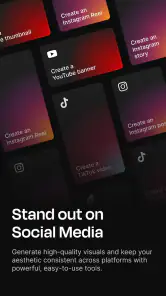
One of the standout features of Freepik is its expansive library. Seriously, it's like walking into a candy store for designers. Need a vector for that blog post? Done. Looking for a template to spice up your social media? Easy peasy. The app’s search functionality is super intuitive, making it a breeze to find exactly what you need in seconds. Plus, everything is tagged and categorized, so you won't be hunting around aimlessly.
AI-Powered Editing
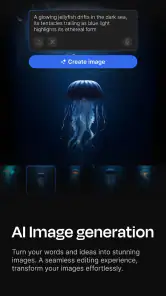
Okay, here's where things get really exciting. The AI editing capabilities of Freepik are nothing short of impressive. You can tweak and adjust designs with just a few taps. The AI helps in suggesting edits and improvements, ensuring your final product looks polished and professional. It’s like having a personal assistant who’s got your back any time you hit a creative block.
User Experience
Let’s talk about usability. The interface is sleek, and navigation is as smooth as silk. Whether you’re working on an iOS or Android device, the app performs flawlessly. It’s designed to keep everything at your fingertips, so you can focus more on creating and less on figuring out how to get things done. Trust me, once you get the hang of it, you’ll wonder how you ever managed without it.
In conclusion, Freepik: Design & edit with AI isn’t just an app; it’s a gateway to unleashing your creative potential. With its comprehensive library and AI-powered editing features, it’s a must-have tool for anyone in the design realm. So why not give it a whirl and see how it can transform your creative projects? Happy designing!
Comparing it with familiar alternatives
When I compare this app with a basic photo editor, I see its main advantage in having design resources and AI-assisted creation in the same general workflow. A simple editor can be quicker for trimming, correcting, or adding a small annotation to a photo, while Freepik makes more sense when I need to turn an idea into a composed visual and want assets to explore. A full desktop design suite is the better choice when I need fine control, extensive revisions, or a repeatable system for a large set of branded materials.
That difference also helps answer who should skip it. If I only edit personal photos, do not want to browse design assets, or prefer to build every element manually, a focused photo editor may be less distracting. If I am working to a detailed art direction and need exact control over typography, spacing, and layers, I would begin in a more specialized design tool. I would choose Freepik when inspiration, speed, and a flexible starting point matter more than meticulous control.
Costs, access, and reasonable expectations
The app is free to start, but optional purchases can make the overall experience a paid one depending on what I choose to use. I’d look closely at the purchase screen before confirming anything and decide whether a paid option solves a real need in my workflow. That is especially important if I am only experimenting: a single useful draft does not automatically mean I need to commit to a recurring creative routine or buy features I will rarely use.
Its Everyone content rating makes it broadly suitable from an age-classification perspective, but that is separate from deciding whether a particular image or AI result is appropriate for a given audience. I would still review content before sharing it, especially for school, community, or work contexts. The app’s Android requirement is also worth checking before installing; anyone using an older device should confirm compatibility rather than plan a project around an app they cannot run.
My cautious verdict
One practical question is whether I’d rely on it as my only design tool. I wouldn’t: I’d use it for finding visual directions, assembling a quick draft, and trying AI-assisted edits, then move to a specialist editor when precision and consistent brand rules matter. Compared with a basic photo editor, its appeal is the broader design-resource context; compared with a full desktop suite, the trade-off is that a phone-first workflow is better suited to quick creation than painstaking control.
My other advice is to search with a clear purpose. Rather than scrolling through assets indefinitely, I’d decide on the format and audience first, save a small shortlist, and compare those options against the same layout. That makes the library more useful and helps avoid choosing an attractive image that does not support the message. If you want a flexible place to explore ideas and make everyday visuals, I think it is worth trying; if you need predictable, highly controlled production, I’d choose a more specialized editor for the final work.
Overall, I’d approach Freepik as a useful companion for exploration rather than a promise of instant finished design. It can help me move from a rough thought to a draft I can evaluate, but the value depends on how deliberately I search, how carefully I review the output, and whether the task suits a mobile workflow. I’d keep sensitive material out unless I had checked the choices visible in my own account, verify every detail before publishing, and treat optional spending as a decision to make only when it supports a real need. With those habits, it is an appealing option for quick creative work; for precision-heavy or privacy-sensitive projects, I’d choose a more controlled workflow.
Freepik: Design & edit with AI Frequently Asked Questions
Can I use Freepik: Design & Edit with AI on my device?
Freepik: Design & Edit with AI is an app in the Art & Design category, developed by Freepik Company. It is available for Android and iOS, so you can use it on a compatible phone or tablet. The Android version requires Android 8.0 or later, making device compatibility worth checking before you download.
Is Freepik: Design & Edit with AI free to download?
The app is free to download, but it also offers in-app purchases, with listed items ranging from $11.00 to $350.00. That means you can try the app without paying upfront, while some purchases may be available for users who want additional options. Check the purchase details in your app store before choosing to buy anything.
What is Freepik: Design & Edit with AI used for?
Freepik: Design & Edit with AI is an innovative app designed to assist both amateurs and professionals in creating stunning visual content efficiently. It offers a wide range of tools for designing and editing graphics, powered by artificial intelligence to enhance creativity and productivity. The app provides templates, images, and other resources to simplify the design process.
Is Freepik: Design & Edit with AI suitable for beginners?
Yes, Freepik: Design & Edit with AI is user-friendly and perfect for beginners. It includes intuitive features and AI-driven suggestions that help guide users through the design process without needing extensive prior experience. The app's simple interface and comprehensive tutorials make it accessible to all skill levels, allowing anyone to create professional-quality designs.
What platforms is Freepik: Design & Edit with AI available on?
Freepik: Design & Edit with AI is available on both Android and iOS platforms, making it accessible to a wide audience of mobile users. Whether you use a smartphone or a tablet, you can download the app from Google Play Store or Apple App Store, ensuring that you can design and edit on the go, whenever creativity strikes.
Pros
- User-friendly interface for quick edits
- Vast library of free resources
- AI tools enhance creative workflow
- Easy integration with other platforms
- Regular updates with new features
Cons
- Requires internet for full functionality
- Some features locked behind paywall
- Occasional glitches in AI processing
- Ads can be intrusive at times
- Limited export formats in free version

- Category
- Art & Design
- Version
- 5.5.2











