FREE FAX App Send Fax, Receive
- 436.00
- 4.0
- Installs
- 100.00K
- Price
- Free

Screenshots
Analysis by Reviewed
When a document suddenly needs to be faxed, the problem is rarely the document itself. The real nuisance is finding a machine, locating a working phone line, or dealing with an office process that still depends on fax. FREE FAX App Send Fax, Receive takes a more practical route by turning an Android phone into a faxing tool for sending and receiving documents. After spending time with it, my view is fairly clear: it is most useful as an emergency business utility, not as a complete replacement for every traditional fax workflow.
The app is made by Amplify· and sits in the Business category. It is free to install, carries an Everyone age rating, and has reached over one hundred thousand installs. Its average score is 3.9 from around two thousand ratings, so the public reaction suggests a service that works well enough for many people but still leaves room for frustration. That matches my impression: the basic idea is convenient, while the details matter a lot when a fax is urgent.
What the mobile fax experience gets right
I find the best mobile fax tools useful not because they make faxing exciting, but because they remove a detour when an office still requires it. In this section, I’ll focus on the practical trade-offs of handling documents on a phone: what becomes easier, and what still deserves a careful check before you rely on it.
A useful answer to an outdated office requirement
The strongest part of this app is its timing. If a clinic, insurer, landlord, government office, or small business asks for a fax, I do not want to search for a print-and-ship store or borrow office equipment. A phone-based option is especially handy when I am away from my desk. I can prepare the document on the same device where I received it, rather than moving files between a computer, printer, scanner, and fax machine.
That convenience is more important than it may sound. Fax requests often arrive as interruptions: a form must be returned before the end of the day, a signed page needs to reach an office, or a business contact will not accept email for a sensitive document. The app gives that task a dedicated place instead of forcing me to improvise with a scanner or a public copy shop.
The store positions it for both sending and receiving, which makes it more useful than a one-way fax sender. A person who only occasionally sends paperwork may appreciate the outgoing function, while a freelancer or small office that still receives faxes can benefit from having the incoming side available on the phone. That combination is the reason I see it as more than a novelty.
Where it fits into a real document workflow
My preferred workflow starts before opening the app. I first make sure the document is complete, readable, and saved in a convenient location on the phone. If it is a paper page, I capture it in good lighting and check the edges before trying to fax it. This small preparation step prevents a common mistake: sending a blurry or cropped page and only discovering the problem after the recipient has rejected it.
More From Our News Desk

Weather by Xiaomi Review: Clear at a Glance, Less Clear Up Close

X Under Pressure: Can It Recover When Posting Goes Wrong?

Clash of Clans Is Won Between the Battles

Android Auto Makes the Case for Quieter Car Software

MobiOffice: Transforming Mobile Productivity with Seamless Integration

EA SPORTS FC™ Mobile Soccer: Redefining Mobile Sports Gaming
For a multi-page packet, I would also arrange the pages in the correct order before beginning. Faxing is not the moment to discover that a signature page is missing or that an attachment is upside down. The app can make transmission easier, but it cannot fix incomplete paperwork. In my experience, the best results come from treating the phone as the final step in a document process, not as a substitute for checking the document.
A realistic example is a self-employed contractor who receives a signed authorization as a phone attachment during a job. Instead of returning to an office, the contractor can review the file, prepare it for transmission, and send it while the details are still fresh. For that person, the value is not that faxing has become modern; it is that a time-consuming detour has disappeared.
The free entry point is appealing, but read the payment screen carefully
The app is free to download, which lowers the barrier to testing it when a fax request appears unexpectedly. That is a meaningful advantage over committing immediately to a desktop fax service or buying dedicated equipment. However, the presence of in-app purchases ranging from $0.99 to $369.99 per item means “free” should be understood as free to install, not automatically free for every transmission or receiving arrangement.
I would not begin an urgent fax until I had reviewed the available purchase choices inside the app. A low-cost occasional need and a high-volume business requirement are very different situations. The right decision depends on how often I fax and whether the cost of each action makes sense compared with a local service or a subscription-based alternative.
This is also where the app’s audience becomes important. Someone sending one document once a year may find the mobile route worthwhile because it avoids buying hardware. A company that sends paperwork every day should calculate the ongoing expense before making the app part of its permanent operation. The broad purchase range is a reminder that convenience can become expensive when usage increases.
Receiving faxes changes the usefulness of the app
Sending a fax is an occasional action. Receiving one is closer to maintaining a business channel. That distinction affects whether this app is a good fit. A person who needs to receive a document while traveling may value having the option on a phone, especially if missing the fax would delay a transaction. A small business may also find it simpler than keeping a physical fax machine powered and connected.
At the same time, I would not assume that a mobile receiving setup automatically replaces a formal office system. A business has to think about who monitors incoming documents, how quickly they are reviewed, and where they are stored afterward. If several employees need access or if records must follow a strict internal process, a dedicated business platform may be easier to manage.
My practical advice is to decide the receiving workflow before relying on it. Know which phone will be checked, who is responsible for acting on an incoming page, and how the document will be preserved. The app can reduce equipment, but it does not remove the organizational work that comes after a fax arrives.
Simple tasks benefit most from a phone-based approach
FREE FAX App Send Fax, Receive makes the most sense when the document is already digital or can be captured cleanly with a phone. A short form, a signed authorization, a basic invoice, or a small business letter is the kind of material I would feel comfortable handling this way. The fewer moving parts involved, the more the app’s convenience stands out.
Longer or more sensitive packets deserve extra care. Before sending, I would inspect every page at readable zoom, confirm the recipient number character by character, and keep the original file until the transaction is finished. A fax is not like sending a casual message: a wrong number or missing page can create a second round of work that wipes out the time saved.
That checking routine is one of the less obvious strengths of using a phone. Because the document and the transmission tool are together, it is easy to rush. The better approach is to use the phone’s portability without adopting a careless attitude. Mobility helps only when it is paired with a final review.
The meaningful weakness is uncertainty at the moment of urgency
My main reservation is not the concept; it is the friction that can appear around a time-sensitive transmission. Faxing is a chain of dependencies. The file must be suitable, the destination must be correct, the service must accept the job, and the receiving office must process it. A mobile app makes the first part easier, but it cannot guarantee that the other side will respond quickly or that a business will treat the fax as received until someone confirms it.
That means I would avoid using it as the only plan for a deadline-critical document without a follow-up method. If the recipient matters, I would contact the office afterward and ask whether the pages arrived clearly. This is not a criticism unique to mobile faxing, but a phone interface can create the false impression that pressing a button completes the entire process.
There is also a trust question for anyone handling private paperwork. I would be cautious with medical, financial, legal, or identity-related documents and would take time to understand how the app presents its transmission and receiving process before using it for highly sensitive material. If an employer or institution requires a particular approved fax provider, this app may not satisfy that requirement even if the technical transmission works.
How it compares with the usual alternatives
Compared with a physical fax machine, the app wins on portability and setup. I do not need a separate device taking up space, and I can work from a phone rather than returning to an office. The machine still has advantages for a busy workplace with frequent paper documents, several users, and an established filing routine. In that environment, the familiar hardware may be less disruptive.
Compared with a local print-and-fax shop, the app is more convenient when I already have a clean digital file and need to act outside business hours. A shop may be preferable for a large paper bundle, careful scanning, or help with a document that needs professional handling. The choice is less about which method is universally better and more about whether the paperwork is digital, urgent, and manageable from a phone.
Compared with email, fax can still be necessary because some organizations insist on it. Email is usually easier for conversation, attachments, and ongoing collaboration, but it does not help when the recipient’s process specifically requires a fax. I see the app as a bridge for those situations, not as a reason to fax documents that could be handled more simply by email.
Compared with a full online fax service, this app may be attractive to a light user who wants a mobile-first option. A more established business service can be the better choice when a team needs administrative controls, predictable billing, searchable records, or a long-term business number. I would choose the app for occasional flexibility and investigate alternatives for a structured office operation.
Who should use it, and who should skip it?
I would recommend trying it if you are an individual, freelancer, student, caregiver, or small-business owner who only occasionally encounters fax requirements. It is particularly suitable when the documents are already on an Android phone and the alternative is a frustrating trip to a store or office. The free installation makes it reasonable to explore before a crisis, rather than downloading it for the first time while standing under a deadline.
It can also suit a very small team that needs a lightweight way to send or receive paperwork without buying a machine. In that case, I would establish a simple rule for file naming, document storage, and checking incoming faxes. Even a basic routine makes the app more dependable because everyone knows what happens after transmission.
I would skip it as a primary system if your organization sends a high volume of faxes, needs several people to manage one inbox, or must maintain formal records with strict access controls. I would also hesitate if your documents are mostly paper-based and require frequent scanning, or if the cost of repeated in-app purchases would be difficult to predict. A dedicated service or physical office setup may be more suitable in those cases.
What the current release tells me about its place in the market
The app is currently at version 1.4.2 and requires Android 10 or newer. That requirement is reasonable for people using a relatively recent Android phone, but it excludes older devices that some offices keep in service for basic tasks. Before planning a shared workplace setup, I would check the Android version on every phone that might need access.
The rating of 3.9, based on more than two thousand ratings, is neither a warning sign nor a guarantee. I read it as evidence of a mixed but usable experience. The app has attracted a real audience, yet the score is not high enough for me to recommend blind reliance on it for a critical business process. I would test a non-urgent document first, learn how the payment flow works, and only then decide whether it belongs in my regular toolkit.
Its Everyone rating also makes the app broadly approachable from an age-classification perspective. That does not mean every faxing situation is appropriate for every user, of course. A teenager might technically use a business fax tool, but a responsible adult should still oversee documents involving medical, financial, or legal information.
Small habits that make the app more dependable
My first habit would be to keep the source document until the recipient confirms that it arrived. I would not delete the original immediately after sending, because a missing page or unreadable signature may require a resend. Keeping a clearly named copy also makes it easier to explain exactly what was transmitted if a recipient asks for clarification.
My second habit would be to separate preparation from transmission. I would create one final version, check its page order, and avoid editing the file while the fax is being arranged. This reduces the chance of sending an earlier draft, especially when several similar documents are stored on the phone.
My third habit would be to use a fallback for important deadlines. That might mean calling the recipient, using a different fax provider, or visiting a local service if confirmation does not arrive. The app is valuable because it gives me another route, but a backup plan is sensible whenever the fax affects healthcare, employment, housing, or a payment.
These habits may sound cautious, but they are exactly what makes a convenient tool useful rather than risky. The app removes hardware from the process; I still need to supply the attention and record-keeping.
My final verdict on FREE FAX App Send Fax, Receive
My recommendation is positive for occasional Android faxing, with a clear condition: test the workflow and understand the purchase options before depending on it. The app addresses a real annoyance by putting sending and receiving within reach of a phone. For a one-off form, a remote worker handling an unexpected request, or a small operation that rarely uses fax, that convenience can be genuinely worthwhile.
I would not present it as a universal business communications system. Frequent fax users, teams with formal records, and organizations handling strict compliance requirements may be better served by a dedicated provider or existing office equipment. The app’s free entry point is helpful, but repeated use and higher-value documents call for more careful evaluation.
Amplify· has built something practical around a stubborn office habit. In my experience, the result is best viewed as a reliable emergency tool and a reasonable lightweight option, rather than a complete replacement for every fax environment. If your need is occasional and mobile, I think it is worth trying. If fax is central to your daily operation, compare it carefully with a service designed for sustained business use before making it your only channel.
FREE FAX App Send Fax, Receive Frequently Asked Questions
What devices and operating systems can I use with FREE FAX App Send Fax, Receive?
FREE FAX App Send Fax, Receive is a mobile app for faxing from a phone, and its business-oriented purpose is to send and receive faxes without relying on a traditional fax machine. The Android release is version 1.4.2 and requires Android 10 or later. The app is also described as available for iOS, so check the relevant app store for compatibility with your device before downloading.
Does FREE FAX App Send Fax, Receive require an account or a fax number?
The app is intended to handle both outgoing and incoming faxes, and receiving faxes is generally associated with having an assigned fax number. Whether you need to create an account or obtain a number can depend on the features you want to use and the plan available to you. Review the setup and plan options in the app before relying on it to receive important documents.
What is FREE FAX App Send Fax, Receive, and how does it work?
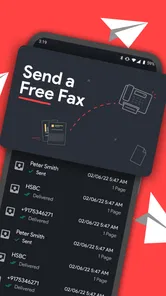
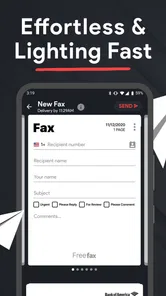
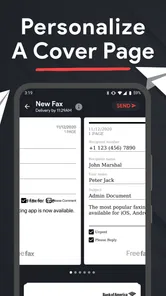
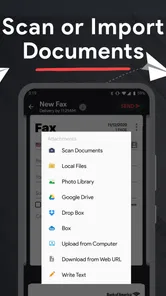
FREE FAX App Send Fax, Receive is a mobile faxing service designed to let you send documents from an Android or iOS device without using a traditional fax machine. After opening the app, you can usually import a file from your phone, cloud storage, or camera, enter the recipient’s fax number, preview the pages, and submit the fax. Received faxes, when supported by your plan and region, are generally managed inside the app or through an assigned fax number.
Can I really send and receive faxes for free with this app?
The app may offer free faxing features, trial credits, or limited pages, but “free” access can depend on the current promotion, country, document length, and account type. Some functions, especially receiving faxes or obtaining a personal fax number, may require a subscription, credits, or in-app purchases. Before sending sensitive documents, check the pricing screen and terms carefully so you understand any page limits, fees, renewal conditions, or watermark restrictions.
What types of documents and files can I fax from my phone?
Most mobile fax applications support common office and image formats, such as PDF, JPG, PNG, and sometimes Microsoft Office files. You can often select a document from device storage or a connected cloud account, or scan paper pages using the phone’s camera. For the best results, use clear, upright pages with good contrast and verify that every page appears correctly in the preview before confirming transmission.
Pros
- Send faxes directly from your smartphone.
- Supports document scanning with the phone camera.
- Receive incoming faxes within the app.
- Useful for occasional faxing without buying a machine.
- Works with common file formats for document uploads.
Cons
- Free usage may be limited by credits or page allowances.
- Fax numbers and subscriptions can cost extra.
- Delivery times may vary depending on the recipient’s fax line.
- Requires a stable internet connection to send or receive faxes.
- Sensitive documents are handled through a third-party service.











