

Foreclosure Home Search
- 1.44K
- 3.8
- Installs
- 1.00M
- Price
- Free

Screenshots

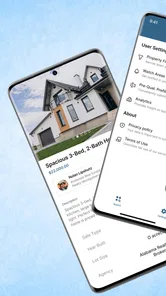
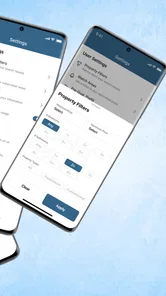
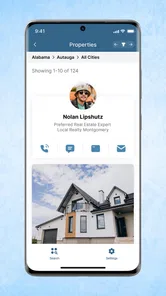
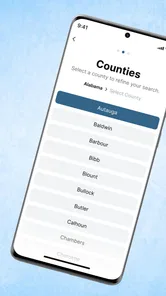
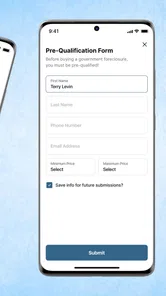
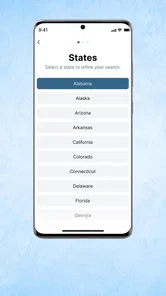

Analysis by Reviewed
USHUD.com is the kind of house-hunting app I would keep on my phone when I wanted to look beyond the polished, conventional property search. Its focus is foreclosure homes, so it serves a narrower purpose than a general real-estate app. That focus is also its main appeal: instead of asking me to browse every kind of listing, it points my attention toward properties that may need more investigation but could suit a buyer looking for a different route into the market.
My overall view is positive but cautious. This is a useful starting point for discovering foreclosure opportunities in a chosen area, especially if you are comfortable doing your own research afterward. It is not a complete buying system, and I would not treat a listing as a ready-made bargain. The app helps with the first step—finding possibilities—but the important work still involves checking the property, understanding the sale process, and deciding whether the numbers make sense.
What the app is really good at
USHUD.com is a free House & Home app from Heavy Hammer, and its central job is straightforward: help me look for homes for sale in my area, with a particular emphasis on foreclosure listings. That makes the experience more purposeful than opening a broad property marketplace with thousands of unrelated results. When I use a specialized search tool, I can begin with a specific question: are there foreclosure properties near the place I am considering?
That distinction matters because foreclosure searches are often approached differently from ordinary home shopping. A typical buyer may start with bedrooms, bathrooms, neighborhood style, and monthly budget. A foreclosure-focused search begins with opportunity and risk. I am looking for properties that might be priced or sold differently, while accepting that their condition, paperwork, timing, or eligibility may require more attention. The app fits that early discovery stage well.
The first useful habit is to treat the results as a research queue rather than a shopping cart. I would save or note the homes that appear relevant, then compare them outside the app with local records, recent comparable sales, taxes, liens, repair estimates, and financing requirements. That workflow prevents a common mistake: assuming that a low-looking asking figure automatically means a low total cost.
In everyday use, I can imagine opening the app after deciding to move to a new area, narrowing my attention to nearby foreclosure homes, and building a short list for a weekend of deeper research. I would not make an offer simply because one listing caught my eye. Instead, I would use the app to identify addresses, organize questions, and decide which properties deserve a call to an agent, lender, auction contact, or local authority.
That is where the app has practical value. It reduces the time spent searching blindly and gives a buyer a more focused starting point. For an investor, it can act as an initial source of leads. For an owner-occupier, it can reveal possibilities that may not appear in the same way during a normal search. For someone merely curious about local housing activity, it offers a direct way to explore a specialized part of the market.
More From Our News Desk

 Gmail
GmailGmail in a Busy Inbox: Who Benefits Most?
From first account to crowded workday, Gmail earns its place through dependable search and flexible sorting—but its best fit depends on how much inbox maintenance you can tolerate.

 Prime Video
Switching to Prime Video: What Changes in Your Viewing Routine
Prime Video can make a compelling second home for streaming, but switching means learning a different catalog, rental layer, and route from browsing to playback.

 Universal TV Remote Control
Universal TV Remote Control Works Best as a Reliable Backup
A phone remote earns its place through quick setup and reliable habits. Here is how to get more from Universal TV Remote Control—and where its limits show.

 Weather - By Xiaomi
Weather by Xiaomi Review: Clear at a Glance, Less Clear Up Close
Xiaomi’s weather app makes everyday forecasts quick to scan, but its calm surface can leave useful details and recovery paths harder to find than they should be.

 X
XX Under Pressure: Can It Recover When Posting Goes Wrong?
A resilience-focused review of X, examining setup, mistaken posts, interruptions, weak connections, and the gaps that matter when recovery needs to be dependable.

 Clash of Clans
Clash of Clans Is Won Between the Battles
Its raids are quick; its community is a long-term project of coordination, teaching, rivalry, and shared responsibility—with all the friction that entails.
Latest News



A focused search, not a promise of a bargain
The word “foreclosure” can create unrealistic expectations, so I appreciate the need to approach this app with discipline. A foreclosure property may need repairs, may have an unusual sale process, or may require checks that are less prominent in a standard listing. Even when the headline price looks attractive, the final cost can change after inspection, legal review, financing discussions, insurance checks, and estimates for work.
I would therefore use the app to answer, “What should I investigate?” rather than, “Which house should I buy?” That small change in mindset makes the experience much safer. It also highlights the app’s strongest feature in practical terms: it helps me find leads in a category that can be difficult to browse casually, but it does not replace professional due diligence.
A particularly useful approach is to compare each promising result with ordinary listings in the same area. If a foreclosure home appears close in price to conventional properties, the extra uncertainty may not be worthwhile. If the difference is substantial, I still need to estimate repairs and transaction costs before calling it an opportunity. This comparison is more valuable than looking at the foreclosure label alone.
Another tip is to separate “interesting” from “actionable.” An interesting property may have a good location or an appealing apparent price. An actionable property has a clear next step: confirm its current status, verify who handles the sale, arrange access if possible, and calculate a realistic maximum budget. The app is good for producing the first group; the buyer has to turn selected items into the second.
How I would use it during a real search
Suppose I am relocating and want to keep my purchase budget flexible. I would first search the target area and review several results without becoming attached to one address. I would note recurring neighborhoods, property types, and price ranges. Then I would choose only a few candidates for closer checking, rather than trying to investigate every result at once.
For each candidate, I would create a simple worksheet with the address, apparent asking amount, estimated renovation needs, likely closing expenses, and questions about occupancy or access. I would also record the date I checked it, because property status can change. This is one of the most useful ways to pair a discovery app with independent research: the app supplies leads, while the worksheet keeps enthusiasm from replacing analysis.
If I were an investor, I would add a conservative resale or rental estimate and a contingency for surprises. If I were buying a home for myself, I would put more weight on livability, commute, neighborhood services, and financing practicality. The same search results can mean very different things to these two users, and the app does not make that decision for me.
I would also avoid assuming that every result is equally current or equally suitable. A listing can be worth checking even if it is not immediately ready for purchase, but I would confirm its status before spending money on inspections, travel, or legal advice. The app is most useful when it starts a careful process, not when it is used as the only source of truth.
Where the experience becomes less comfortable
The focused nature of the app is also its main limitation. Buyers who want a broad comparison of standard sales, rentals, new construction, and foreclosure properties may find a general real-estate platform more convenient. USHUD.com is better suited to a targeted search than to managing an entire move from discovery through closing.
I also would not expect a foreclosure search to feel as simple as browsing ordinary homes. The category itself introduces uncertainty. A property may require more calls, more document checking, and more patience than a typical listing. That is not necessarily a flaw in the app, but it does affect how much effort the user must contribute after finding a result.
There is also a risk of overvaluing the search screen. A neat list of homes can make the process feel more settled than it really is. In my experience, the hard part begins after discovery: confirming whether the property is still available, understanding the sale terms, checking its condition, and deciding whether financing is realistic. Anyone expecting the app to remove those complications will probably be disappointed.
For that reason, I would skip this app if I wanted a guided, end-to-end buying experience with extensive financial tools, detailed neighborhood analysis, or a single place to communicate with every professional involved. A mainstream real-estate service, a local agent, or a specialist foreclosure adviser may be a better fit for that kind of support.
On the other hand, I would not dismiss it simply because the process needs extra work. The app’s value is precisely that it gives focused attention to a difficult-to-search segment. If I am willing to verify everything independently, that focus can save time at the beginning of a search.
Who should download it
USHUD.com is most appropriate for people who already understand that foreclosure buying involves research. It can be useful for prospective homeowners who want to explore less conventional options, investors screening possible leads, and curious buyers comparing different paths into a local market. The free price makes it easy to try without committing money at the discovery stage.
It is also a reasonable choice for someone who has a defined area in mind. The more specific my search, the more useful a focused foreclosure tool becomes. I can examine a local market, identify patterns, and then decide whether any result is worth professional attention. Someone with no target location or no willingness to investigate may get less from it.
New buyers can use it too, but I would recommend that they treat the app as an introduction rather than a shortcut. Before making a serious decision, they should learn how local foreclosure sales work, speak with an appropriate professional, and understand what their lender will and will not finance. The app can help form a list of questions, but it cannot answer every legal, financial, or structural question about a property.
The Everyone content rating makes the app broadly accessible, and its low barrier to entry is one of its practical advantages. It is available as a free app, and its scale—over a million installs—suggests that it has reached a substantial audience. Its average rating is 3.8 from around 4.8 thousand ratings, which feels consistent with a specialized tool that many users may find useful while still encountering limitations depending on their search and expectations.
Heavy Hammer has kept the product positioned around a clear housing-search purpose rather than trying to make it everything at once. The release history reaches back to June 27, 2017, while the current version is 2.5.25 and requires Android 7.0 or later. Those details matter if I am using an older device: compatibility should be checked before planning a search around it.
How it compares with ordinary property apps
A general property app usually wins when I want a complete overview of the market. It may make it easier to compare normal listings, contact agents, examine property photos, and follow a conventional buying journey. If my priority is convenience and breadth, I would start there.
USHUD.com has a different advantage: it gives foreclosure homes the leading role. That can make the initial search less scattered and more relevant for a buyer who specifically wants distressed or foreclosure-related opportunities. Instead of filtering a huge catalog every time, I can begin with a narrower purpose.
The trade-off is that specialization increases the need for verification. With a standard listing, I may still need due diligence, but the process often feels more familiar. With foreclosure searches, I would be more careful about status, condition, timing, access, and the exact route to purchase. In other words, a broad app may be a better map of the whole market, while this one is a more focused lens on one complicated part of it.
I would happily use both approaches together. I might use USHUD.com to find foreclosure leads, then use a conventional service and local sources to compare nearby homes and market conditions. That combination is stronger than relying on either type of app alone. It helps me see whether a possible foreclosure discount is genuine or simply reflects repair costs and additional risk.
Small habits that make the results more useful
My first recommendation is to set a strict research limit. Pick a manageable number of properties and investigate them properly instead of collecting dozens of attractive-looking results. A short list makes it easier to check records, request information, and keep estimates realistic.
Second, calculate a “walk-away” figure before contacting anyone. This should include the purchase amount, known fees, immediate repairs, a reserve for surprises, and the cost of making the home safe and usable. The figure protects me from raising my budget emotionally after I have already invested time in a property.
Third, compare location quality separately from property condition. A damaged home in a strong location may deserve attention, while a cheaper home in an unsuitable area may not. The app can expose the address, but only broader research can tell me whether the surrounding streets, transport, services, and resale prospects fit my needs.
Finally, keep a record of what has been confirmed and what remains an assumption. This is especially important when a listing looks unusually attractive. Writing down open questions makes it harder to mistake a promising lead for a verified opportunity.
My final recommendation
I recommend USHUD.com to readers who want a focused way to explore foreclosure homes and are prepared to do the serious checking themselves. Its strength is not that it turns a complicated purchase into a simple one. Its strength is that it helps me find relevant possibilities without beginning with an unfocused search across the entire housing market.
I would recommend skipping it if I wanted a complete home-buying companion, instant certainty, or a conventional listing experience with minimal investigation. For those needs, a broader property platform and professional guidance will likely serve better. But for early-stage research, investment screening, or a buyer willing to compare risks carefully, this free House & Home app is worth trying.
My clear thesis is simple: USHUD.com is a useful discovery tool, not a decision-making substitute. Used with that expectation, it can help me uncover foreclosure leads and organize the next steps. Used as proof that a home is a bargain, it can encourage exactly the kind of rushed judgment that this category demands I avoid.
Foreclosure Home Search Frequently Asked Questions
Who is Foreclosure Home Search designed for?
Foreclosure Home Search may suit homebuyers, real estate investors, and anyone researching distressed-sale properties in a particular area. Its focus is on helping users find homes for sale, including properties associated with foreclosure searches. If you are new to this market, treat the app as a starting point for research and learn about the purchase process before making financial or legal decisions.
Is Foreclosure Home Search free, and what devices can run it?
Foreclosure Home Search is free to download and is rated for everyone. It is listed for devices running Android 7.0 or later, so check your phone’s operating system before installing. The app is published by Heavy Hammer, and its main purpose is to help users search for homes for sale in their area.
What is Foreclosure Home Search?
Foreclosure Home Search is an app designed to help users discover properties that may be in foreclosure, pre-foreclosure, auction, or other distressed-sale situations. It can be useful for buyers, investors, and people researching local real estate opportunities. Before relying on any listing, review the property details carefully and confirm the information with the relevant county office, lender, auction provider, or a licensed real estate professional.
How does Foreclosure Home Search find available properties?
The app generally organizes foreclosure-related property information by location, allowing you to search by city, ZIP code, county, or other available filters. Listings may include details such as an estimated value, address, sale status, or auction information. Availability and accuracy can vary because foreclosure data changes frequently, so users should treat the app as a research tool rather than a guaranteed source of current legal or transaction information.
Can I buy a property directly through Foreclosure Home Search?
Foreclosure Home Search is primarily intended for finding and researching potential properties, not for completing an entire purchase inside the app. Buying a foreclosure may involve auctions, deposits, financing restrictions, title research, inspections, legal documents, and strict deadlines. If you find a property that interests you, contact the official sale administrator or a qualified real estate or legal professional before making an offer or sending money.
Pros
- Searches foreclosure listings by location and property details.
- Useful filters help narrow results to relevant homes.
- Property information is presented in a simple
- readable format.
- Saves time compared with checking multiple listing sources.
- Helpful for spotting potentially lower-priced real estate opportunities.
Cons
- Listing availability and accuracy may vary by area.
- Some properties may have limited photos or incomplete details.
- Foreclosure terms can be complex for first-time buyers.
- Listings may not reflect the latest auction or ownership status.
- The app is mainly useful for users actively seeking distressed properties.








