Fog of World
- 92.00
- 3.6
- Installs
- 10.00K
- Price
- $29.99

Screenshots
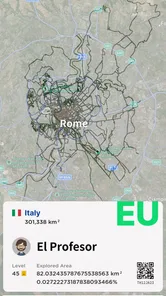


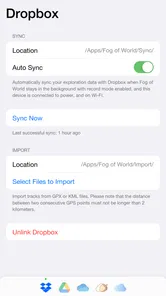
Analysis by Reviewed
I find the best way to approach Fog of World is as a personal exploration journal with a game-like map, rather than as a turn-by-turn travel guide. Its appeal is simple: places you pass through become part of a visual record of where you have been. That can make an ordinary route feel a little more deliberate, but it also means the experience depends on your phone recording movement reliably and on you enjoying the process of gradually filling in a map.
Where people can get stuck
The first point to understand is that the map reflects recorded journeys, not every place you have ever visited. If a route does not appear as expected, it is easy to assume the app has lost progress or that a setting is hidden. I would first check whether the phone was with me, whether location access was available, and whether the app was able to run during the trip. A map that has not changed is not necessarily evidence that the idea has failed; it may simply mean the journey was not captured.
There is also a difference between a travel map and a navigation app. I would not rely on this one to choose a faster route, find a business, or guide me through an unfamiliar city. Its satisfying part is looking back at movement and noticing uncovered areas. If I need dependable directions in the moment, a conventional maps app is the more practical tool; this one is better as a companion to the outing.
Setup checks before a first outing
Before taking it on a long walk or holiday, I would make a short test trip somewhere familiar and then check whether the route was recorded. That small check is more useful than waiting until the end of a day away to discover that the phone was not tracking as expected. I would also review the device’s location and background activity settings, since restrictions there can affect apps that need to follow a journey while the screen is not in use.
Battery habits matter too. Continuous location use can be demanding on a phone, so I would avoid starting a full-day exploration with a nearly empty battery and would keep a charger or power bank in mind for longer outings. If battery preservation matters more than capturing every turn, it is reasonable to use the app selectively rather than leave tracking active throughout every day. That trade-off is especially worth considering on trips where the phone is also needed for tickets, calls, and directions.
Recovering a routine when the map looks wrong
If a walk seems missing, I would troubleshoot in a calm order instead of repeating the whole journey. First, reopen the app and check the map again; then verify location access and any background restrictions before making another short test. A brief test helps separate a one-off delay from a phone setting that consistently prevents tracking. I would not assume that reinstalling or clearing app data is a safe first step, because that could put locally kept records at risk.
A useful habit is to check the map after an outing while the details are fresh. If a section looks incomplete, I can note when it happened and whether the phone was locked, in low-power mode, or out of signal. That gives me a more useful clue than a vague memory days later. It also helps set realistic expectations: the app is most enjoyable when I treat its map as a growing record, not a perfect audit of every step.
More From Our News Desk

Weather by Xiaomi Review: Clear at a Glance, Less Clear Up Close

X Under Pressure: Can It Recover When Posting Goes Wrong?

Clash of Clans Is Won Between the Battles

Android Auto Makes the Case for Quieter Car Software

MobiOffice: Transforming Mobile Productivity with Seamless Integration

EA SPORTS FC™ Mobile Soccer: Redefining Mobile Sports Gaming
When the phone, not the app, is the issue
Location accuracy can vary with the environment. Tall buildings, underground passages, dense tree cover, and poor reception may make a route less precise, while phone power-saving settings can limit background activity. If the map is uneven in one particular place but works elsewhere, I would consider the surroundings before blaming the app. For a cleaner record, I would keep the phone accessible during a test walk and avoid judging performance from a short stretch under difficult conditions.
The same caution applies to comparisons with ordinary travel tools. A navigation app is built around reaching a destination; a fitness tracker is usually centered on exercise measurements. Fog of World is appealing for a different reason: it turns accumulated movement into a visual exploration challenge. That focus is a strength for curious walkers and frequent travelers, but it is not a substitute for detailed route guidance or a training log.
Who will enjoy the exploration loop
I can see this working especially well for someone who walks to work, explores a new neighborhood on weekends, or likes revisiting a city and spotting streets they have never taken. A practical routine is to choose one unfamiliar block on the way home, then check later whether the trip added to the map. On a holiday, I would use it as a quiet prompt to wander beyond the familiar sights, while still keeping a standard map available for logistics.
It is less suited to people who want instant rewards, precise navigation, or a detailed account of every outing with no setup or battery trade-offs. It also asks for patience: the payoff builds gradually rather than arriving in one dramatic session. For me, that slow accumulation is the point, but anyone who dislikes background tracking or prefers to keep location use to a minimum may find the routine more trouble than fun.
What the app is and what it costs
As a Travel & Local app from Ollix, it has a distinctive niche rather than trying to cover every travel need. It is rated for Everyone, has a 3.6 average from around 550 ratings, and has passed 10,000 installs. The app costs $29.99, which makes it worth thinking about as a deliberate purchase rather than a casual download. I would want to be sure the map-clearing idea genuinely motivates me before paying, especially if I mainly need ordinary directions.
The app was released on December 27, 2018, and its current version is 3.7.2, with Android 8.0 as the minimum operating system. Those details help set expectations for compatibility, but my practical advice remains the same: test the tracking on a familiar short trip and decide whether the map itself makes you want to explore more. The listed review count is 93, so I would read user feedback for recurring device-specific issues rather than treating one person's experience as universal.
Discovering the World, One Step at a Time
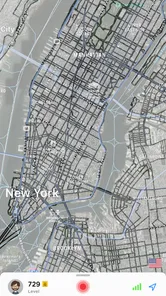
Fog of World is an ingenious app that merges the concept of gaming with real-world exploration. Picture this: a map covered in fog. As you move around in real life, the fog lifts, revealing the places you’ve visited. It’s like a live-action RPG where you’re the hero, and Earth is your game world.
How It Works
The app uses your phone’s GPS to track your travels. As you walk, drive, or cycle, it records your path and lifts the fog from the map in those areas. Not only does this make your real-world journeys more engaging, but it also gives you a visual record of your adventures. It’s a fantastic way to motivate yourself to explore new neighborhoods or even revisit places you haven’t seen in a while.
Features That Stand Out
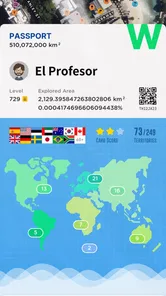
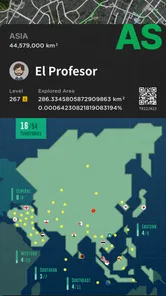
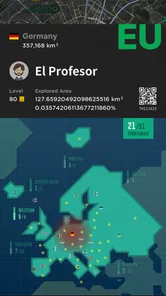
Let me tell you, this app isn’t just about lifting fog. It’s packed with features that make exploration a joy. You can earn achievements for visiting new places, track the percentage of the world you’ve uncovered, and even see stats on your most visited areas. It’s like collecting travel badges, and who doesn’t love badges?
A Personal Journey
Using Fog of World has been an eye-opener for me. It’s surprising to see how many local spots I’ve yet to visit, and it’s a fun challenge to try and clear the fog from my entire city. Plus, it’s a great conversation starter! Imagine telling your friends, “I’ve uncovered 30% of the world!” It’s a humble brag that’s sure to impress.
Moreover, the app’s design is sleek and intuitive, making it easy to navigate. Whether you’re tech-savvy or not, you’ll find it a breeze to use. The user interface is clean, with maps that are detailed yet not overwhelming. It’s like having a little piece of adventure right in your pocket.
Making it work for ordinary days
The most useful way I have found to make the map feel purposeful is to attach it to a routine I already have. On a weekday, I might take one different street on the walk home rather than plan a special expedition. On a weekend, I can pick a park or neighborhood I know only in fragments, then use the map afterward to see which parts of the outing were genuinely new to me. This keeps the app from becoming another obligation that demands a dedicated trip.
There is a small planning trade-off here: I would not stare at the screen while walking just to watch the map change. I would keep attention on crossings and surroundings, then review the record once I have stopped. That makes the app a prompt for noticing places, not a reason to navigate by looking down. If I am somewhere unfamiliar, I would plan the route with a directions app first and let this one quietly document the outing.
Choosing it over familiar travel tools
Compared with a standard map, this app serves a different question. A conventional map helps me decide where to go next; this one makes me curious about where I have already been and what nearby streets remain unexplored. A fitness tracker is the more natural choice if my goal is exercise data, while a travel diary is better when I want written notes, photographs, or a narrative of a trip. The appeal here is the visual accumulation of movement, not a complete travel record.
That distinction helps explain the purchase decision. The price is easier to justify for someone who expects to return to the map over months of ordinary walks and trips, rather than someone who wants a one-time holiday souvenir. I would also think about how much I enjoy map-based progress for its own sake. If filling in unfamiliar areas sounds satisfying even without practical directions or workout metrics, the niche is clear; if not, free tools already on a phone may cover the more immediate needs.
Keeping expectations and records sensible
Before relying on a long outing to add to the map, I would use a familiar short route as a baseline and avoid changing several phone settings at once. If tracking improves after a single adjustment, I have a better idea what helped. I would also be cautious about deleting app data or reinstalling as a troubleshooting shortcut. When a personal map matters to me, I would first look for a safe way to preserve it rather than treating the phone as if every record were automatically backed up.
For a trip with patchy reception, I would judge the result after returning to a place with a clearer view of the sky and a stable connection, rather than deciding mid-journey that the app has failed. GPS reception and background limits can affect the path independently of the map’s central idea. If one stretch is imperfect, the useful question is whether the app works well enough on the routes I care about, not whether it can produce a flawless trace under every condition.
Final Thoughts
In this digital age, where everything is just a click away, Fog of World brings back the joy of discovery. It encourages us to step outside, breathe in the fresh air, and see the world with fresh eyes. Whether you’re an avid traveler or someone who’s just looking to add a bit of adventure to your daily routine, this app is worth a try. So go on, lift the fog, and see what the world has in store for you!
My recommendation is strongest for curious walkers and travelers who enjoy collecting a personal picture of their movements and are comfortable treating it as an imperfect companion rather than an essential utility. I would skip it if I needed reliable directions, detailed exercise analysis, or location tracking without checking the phone’s settings and battery demands. For everyone else, a short test route is the sensible first step: if seeing a familiar map gradually fill in makes you want to take the scenic street, the idea has a real chance of becoming part of your routine.
Fog of World Frequently Asked Questions
Is Fog of World suitable for everyday use as well as trips?
Yes. Fog of World can make ordinary journeys part of your exploration record, not just holidays or long-distance travel. Its map gradually reveals places as you move through them, so a commute, walk, or visit to a new neighborhood can contribute to the experience. The app is best suited to people who enjoy seeing where they have been and discovering more of their surroundings over time.
What is Fog of World and how does it work?
Fog of World is a unique real-world exploration game that turns your travels into a fun and engaging experience. The app uses GPS to track your movements and reveals a fog-covered map as you explore new areas. As you move around, the fog disappears, letting you uncover new locations and keep a visual record of your travels. It's a perfect blend of gaming and travel diary.
Is Fog of World available on both Android and iOS devices?
Yes, Fog of World is available for download on both Android and iOS platforms. You can find it on the Google Play Store for Android users and the Apple App Store for iOS users. Make sure to check the app's compatibility with your device's version before downloading to ensure optimal performance.
Does Fog of World require an internet connection to function?
Fog of World does not require a constant internet connection to function, as it primarily relies on GPS for tracking your location. However, an internet connection may be necessary for initial setup, updates, or when you want to back up your data to the cloud. This makes it convenient for users who are traveling in areas with limited connectivity.
Are there any in-app purchases or subscriptions in Fog of World?
Fog of World is a paid app, listed at $29.99, so you should consider its upfront cost before downloading. The published description of in-app purchases in the original FAQ is not needed to understand this purchase model: the app is not presented here as a free download with optional paid upgrades. Its appeal is the ongoing map-based exploration experience.
Pros
- Immersive real-world exploration
- Motivates to discover new places
- Tracks travel history
- Offline mode available
- Supports multiple map types
Cons
- Battery consumption is high
- Limited features in free version
- Requires GPS for accuracy
- Map updates can be slow
- Some areas lack detail











