

Flume
- 215.00
- 4.5
- Installs
- 50.00K
- Price
- Free

Screenshots
Analysis by Reviewed
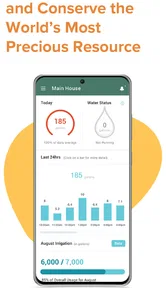
Water problems rarely announce themselves at a convenient time. A slow leak behind an appliance, an unusual overnight flow, or a sudden change while nobody is home can turn into a costly household problem before anyone notices. Flume is a free House & Home app from Flume that focuses on helping residential users watch water use and spot possible leaks. I found its appeal less in constant manual checking and more in giving a homeowner a clearer way to notice something unusual early.
The app has a 4.5 average from over 500 ratings, with more than 50 thousand installs. Those figures suggest that it has found a useful place among people who want more awareness around their home’s water system, but they do not make it a universal solution. The important question is whether your home setup can work with the wider Flume system and whether you are willing to investigate alerts instead of treating them as automatic proof of a plumbing failure.
Where Flume users usually get stuck
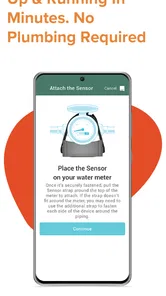
The first point of friction is understanding what the app can actually do by itself. Flume is not a magic sensor that can inspect every pipe, fixture, or appliance independently. Its usefulness depends on the connected residential water-monitoring setup behind it. That distinction matters because someone downloading the app expecting immediate leak detection may be disappointed if the necessary hardware or account connection is not already in place.
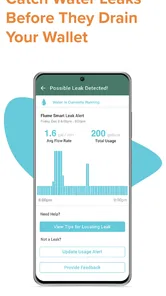
I also think the word “leak” can create the wrong expectation. An alert or unusual water pattern is a reason to investigate, not a plumber’s diagnosis. A toilet that occasionally refills, an irrigation schedule, a water softener cycle, or a family member taking a shower can all create activity that looks unusual when viewed without context. The app can help you notice a change, but you still need to decide whether the change is harmless, expected, or urgent.
That is why I would not install it and then ignore the surrounding details. Before relying on it, I would make sure I know where the home’s main shutoff is, which appliances use water, and what normal activity looks like during a quiet period. This preparation makes the app more useful because an alert becomes part of a household plan rather than an isolated notification.
Another common stumbling block is household interpretation. One person may see an alert while another person is running laundry, filling a pool, or watering plants. If everyone assumes the app is wrong, a genuine problem can be missed. If everyone assumes every alert is an emergency, ordinary water use becomes stressful. I found the best approach is to treat the notification as a prompt for a quick check: ask what was running, look at the relevant fixtures, and then decide whether further action is needed.
What the app is good at noticing
Flume makes the most sense for patterns that are easy to overlook in daily life. A small, persistent flow can be difficult to hear, especially in a larger home or when nobody is awake. The practical value is not just seeing a number; it is connecting unusual activity with a time when the house should have been quiet. That can point you toward a toilet, outdoor line, basement fixture, or appliance that deserves attention.
More From Our News Desk

 Gmail
GmailGmail in a Busy Inbox: Who Benefits Most?
From first account to crowded workday, Gmail earns its place through dependable search and flexible sorting—but its best fit depends on how much inbox maintenance you can tolerate.

 Prime Video
Switching to Prime Video: What Changes in Your Viewing Routine
Prime Video can make a compelling second home for streaming, but switching means learning a different catalog, rental layer, and route from browsing to playback.

 Universal TV Remote Control
Universal TV Remote Control Works Best as a Reliable Backup
A phone remote earns its place through quick setup and reliable habits. Here is how to get more from Universal TV Remote Control—and where its limits show.

 Weather - By Xiaomi
Weather by Xiaomi Review: Clear at a Glance, Less Clear Up Close
Xiaomi’s weather app makes everyday forecasts quick to scan, but its calm surface can leave useful details and recovery paths harder to find than they should be.

 X
XX Under Pressure: Can It Recover When Posting Goes Wrong?
A resilience-focused review of X, examining setup, mistaken posts, interruptions, weak connections, and the gaps that matter when recovery needs to be dependable.

 Clash of Clans
Clash of Clans Is Won Between the Battles
Its raids are quick; its community is a long-term project of coordination, teaching, rivalry, and shared responsibility—with all the friction that entails.
Latest News



It can also help people who travel or spend long periods away from home. A homeowner who is present can notice a wet floor or hear a running toilet, but an empty house removes those clues. Water awareness becomes more valuable in that situation, although it should not be mistaken for a replacement for a shutoff plan, a trusted person checking the property, or professional help when a serious leak is suspected.
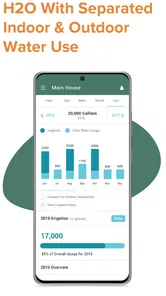
One less obvious benefit is learning your household’s rhythm. After watching normal activity, you may begin to recognize the difference between a short burst caused by a fixture and water use that continues at an odd time. That context can make future alerts less confusing. I would spend the first several days observing rather than reacting dramatically to every change.
Setup checks that prevent avoidable frustration
Before blaming the app, I would check the basics in a deliberate order. First, confirm that the app is being used with the intended Flume equipment and that the account connection is complete. If the app opens but does not show useful household information, the problem may be an incomplete setup rather than a failure of the monitoring idea itself.
Next, check the phone’s connection and make sure the app is running on a supported operating system. The listed minimum is version 10, so an older device may be the reason installation or normal operation is difficult. On a compatible phone, I would also verify that the app is current; its present version is 1.10.2. Updating is a sensible first step when screens behave unexpectedly, especially after a phone operating-system change.
It is also worth checking whether the phone is restricting background activity or notifications. I am not treating those settings as a special Flume feature; they are ordinary phone controls that can affect whether an app can alert you promptly. If notifications are disabled, delayed, or aggressively limited by battery-saving settings, the monitoring experience may feel unreliable even when the underlying service is working.
For a shared home, decide whose phone should receive alerts and who is responsible for checking them. Installing the app on several phones can be useful, but it can also create confusion if nobody knows who is taking the next step. A simple household rule works better: the first person who sees an unusual alert confirms whether water use is expected, then tells the others what was found.
During setup, keep the home’s normal schedule in mind. Do not test the system only while several fixtures are active, because that gives you no clear baseline. A quieter period is more useful for understanding what the app reports when the house is mostly inactive. I would also avoid changing several plumbing habits at once; if you alter irrigation, appliance schedules, and bathroom use together, it becomes harder to interpret later activity.
How I would establish a useful baseline
I would begin by noting the times when the home commonly uses water: morning routines, showers, laundry, dishwashing, outdoor watering, and any automatic equipment. This is not busywork. It gives you a reference for separating expected peaks from suspicious activity. A household with irregular schedules needs more observation than a household with a predictable routine.
Then I would pay attention to quiet hours. If water activity continues when everyone is asleep or away, I would walk through the home rather than immediately resetting anything. Listen near toilets, inspect visible connections, look for damp areas, and check outdoor taps if conditions allow. The app points you toward investigation; it does not tell you which physical component has failed.
One practical tip is to test household assumptions one at a time. If you suspect a toilet, stop using that fixture for a while and see whether the unusual activity changes. If you suspect irrigation, compare the activity with the programmed schedule. This kind of controlled check is more informative than repeatedly opening the app without changing anything.
Recovering when the workflow breaks
When the app appears stuck, I would avoid jumping straight to reinstalling it. Start by checking whether the issue is limited to one screen or whether the whole connection is unavailable. Close and reopen the app, confirm the phone has a working internet connection, and check that the account is still signed in. These simple steps can distinguish a temporary display problem from a broader connection issue.
If notifications stopped arriving, look at the phone’s notification settings before assuming that Flume has stopped monitoring. If information looks stale, compare the app behavior on a reliable connection and consider whether the phone is restricting background activity. Restarting the phone is another reasonable general troubleshooting step, but it should be followed by a physical check of the home if you are concerned about active water use.
Reinstalling can clear certain local app problems, but it should not be the first response if you are unsure of your account details or equipment connection. I would make sure I can sign back in and understand the setup before removing the app. Otherwise, a small phone-side problem can become an avoidable setup chore.
When an alert seems wrong, record what was happening at the time instead of dismissing it immediately. Was someone showering? Had a washing machine just started? Was outdoor watering scheduled? Did the activity continue after those events ended? This short note-taking habit turns vague suspicion into a repeatable troubleshooting process and helps reveal whether the same type of activity causes alerts repeatedly.
If the app does not reflect a change you expected, give the household activity a clear test window. Turn off one suspected source, avoid running several water-consuming devices together, and observe whether the pattern changes. If the behavior remains unexplained, the next useful step is not endlessly tapping refresh; it is checking the physical plumbing and contacting an appropriate professional when necessary.
When an alert deserves immediate attention
A persistent flow during a period when the home should be inactive deserves more attention than a brief spike during normal routines. I would first look for obvious interior signs such as sound, moisture, or a fixture that keeps running. If water is visibly escaping or damage is developing, use the home’s shutoff procedure if you know it safely and seek professional assistance.
For a property that is empty, arrange a person who can physically inspect it when an unusual event appears. Remote awareness is useful, but an app cannot mop up water, close a valve, or confirm the condition of a wall. This is one of the most important trade-offs: monitoring can improve awareness, while response still depends on people and the home’s plumbing arrangements.
When Flume is not the cause
Not every missing alert, delayed update, or unexpected reading points to an app problem. The phone may be offline, the device may be limiting background activity, or the home may simply be using water in a way nobody mentioned. A scheduled system can operate at a time that feels random if you have forgotten its timetable. Before treating the app as unreliable, compare what it shows with the actual household routine.
Plumbing itself can also create confusing patterns. A toilet that refills intermittently may produce activity that comes and goes. A valve may behave differently under changing pressure. Outdoor use can be easy to forget, especially when several people share responsibility for the property. These situations are precisely why I prefer using Flume as an early-warning aid rather than as a final authority.
There is also a limit to what a home water monitor can tell you about location. An unusual pattern may narrow the search, but it does not necessarily identify the failed component. If you need exact diagnosis, a plumber with access to the physical system is the better option. Likewise, if your main goal is simply reducing consumption, a utility bill, manual meter checks, or fixture-level habits may be enough and may cost less effort.
That comparison is important. Traditional leak checks are inexpensive and direct: inspect toilets, look under sinks, watch the meter when the home is quiet, and arrange periodic checks while traveling. Flume is more convenient for people who want ongoing digital awareness, but it depends on a compatible setup and sensible interpretation. It is stronger as a continuous household companion than as a one-time diagnostic tool.
The pricing model also deserves attention before commitment. The app itself is free, while in-app purchases are listed at $49.99 per item. I would therefore separate the cost of downloading the software from the broader cost of using the Flume system. Anyone comparing it with a manual approach should consider the complete setup and the value of earlier awareness, not just the word “free” on the app page.
Who should use it, and who should skip it
I would recommend considering Flume if you own a home, want a clearer view of water activity, travel regularly, or have a property where a small unnoticed leak could become a major concern. It is especially appealing to people who like reviewing patterns and following up on unusual events rather than waiting for visible damage.
I would be more cautious if you rent, cannot change or connect anything around the home’s water system, or want a standalone phone app with no wider setup. It may also be a poor fit for someone who will ignore notifications or become anxious about every normal fluctuation. In that case, a simple inspection routine or a professional plumbing check may be more practical.
Families should also think about responsibility. The app can improve awareness, but it does not solve the communication problem between household members. If nobody agrees who checks an alert, the technology adds information without adding action. A short response plan is more valuable than installing it on every phone and hoping someone reacts.
My practical verdict after using it as a household tool
Flume works best when I treat it as a water-awareness layer rather than a complete plumbing service. Its strongest contribution is helping turn invisible or easily forgotten activity into something a homeowner can notice and investigate. That is meaningful for quiet leaks, vacant homes, and households trying to understand their water habits.
The setup and interpretation demands are real. You need the right surrounding equipment, a compatible phone environment, a sensible baseline, and the patience to distinguish normal use from a genuine concern. The app cannot identify every cause, guarantee a response while you are away, or replace a professional when water is visibly escaping.
Still, I like the practical workflow it encourages: establish normal patterns, question unusual activity, check the physical fixtures, and escalate when the evidence points to a real plumbing issue. That is more useful than simply staring at a consumption screen. The Everyone content rating also makes it suitable for general household use, although the responsibility for acting on alerts remains with the adults managing the property.
Flume was released on July 13, 2017, and the current version is 1.10.2. The developer is Flume, and the app is available at no download price, with optional purchases listed separately. Those details make it easy to try the software side, but I would make the broader equipment and household workflow part of the decision before relying on it.
My recommendation is straightforward: choose Flume if early awareness and ongoing water observation are worth building into your home routine. Skip it if you only want a quick, standalone leak diagnosis or if you are unlikely to investigate alerts. Used with realistic expectations, it can help you notice problems sooner; used as a substitute for physical checks and professional judgment, it will disappoint.
Flume Frequently Asked Questions
Does Flume help me manage water use at home?
Flume is an app in the House & Home category for intelligent leak detection and water management in a residential home. It is designed for people who want to monitor water-related activity and help keep an eye on their home. Its summary is brief, so check the app’s current details to understand what equipment and setup are needed for the features you want to use.
What is Flume and what can I use it for?
Flume is a social media client designed to help users browse and interact with Instagram content through a desktop-style interface. Depending on the version and platform available, it may let you view feeds, profiles, photos, videos, stories, and messages more comfortably on a larger screen. Before downloading, check the current feature list, because Instagram policy changes can affect which functions remain available.
Is Flume an official Instagram application?
No, Flume is a third-party application rather than an official Instagram product developed by Meta. This distinction is important because its compatibility, login process, and available features depend on Instagram’s rules and technical changes. You should download it only from a trustworthy source, review the permissions it requests, and avoid entering your credentials into unofficial copies or suspicious websites claiming to offer the same app.
Can I use my existing Instagram account with Flume?
Flume is generally intended to connect with an existing Instagram account, allowing you to access familiar content without creating a separate social profile. However, login support may vary according to the current app version and Instagram’s authentication requirements. If you use two-factor authentication, business tools, or multiple accounts, check compatibility first and make sure your account security information is up to date.
Is Flume free to download and use?
The availability and pricing of Flume can depend on the platform, edition, and features included in the version you find. Some releases may offer basic access while reserving advanced tools for a paid upgrade, and availability can also change over time. Review the store listing carefully for one-time costs, subscriptions, in-app purchases, and refund conditions before installing or paying.
Pros
- Clean
- intuitive interface makes browsing Instagram content feel effortless.
- Supports multiple accounts
- making personal and professional use more convenient.
- Fast media loading provides a smooth experience on reliable connections.
- Useful organization tools help keep different feeds and profiles manageable.
- Minimal design reduces distractions while viewing photos and videos.
Cons
- Some Instagram features may be unavailable compared with the official app.
- Performance can vary noticeably on older iPhone or iPad models.
- Frequent updates may be needed when Instagram changes its platform access.
- Advanced editing and creative tools are more limited than in Instagram.
- Certain functions may depend on the selected Flume plan or subscription.







