

Flud+
- 1.21K
- 4.8
- Installs
- 100.00K
- Price
- $3.99

Screenshots
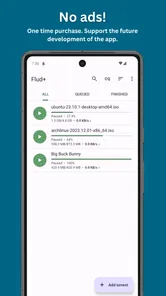
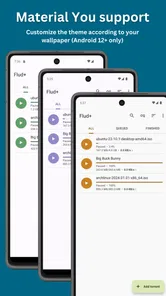
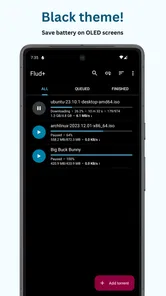
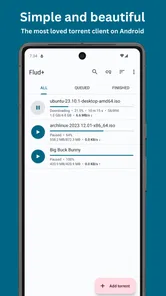
Analysis by Reviewed
My first-week impression of Flud+ is that it makes a technical task feel manageable on a phone. Rather than treating a torrent queue like a desktop control panel squeezed onto a small screen, it gives me a clear place to add and sort downloads. That matters when I only want to check progress quickly and get back to whatever I was doing. Whether it earns a permanent spot depends less on its novelty than on how often I actually need BitTorrent on Android.
A calm start, with room to take control
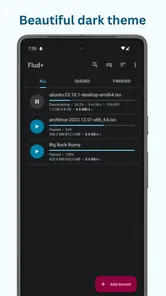
The first few sessions are approachable even if you are new to torrent clients: I can see what is active and sort items by status or name instead of hunting through an untidy list. Once I have several files queued, prioritizing the one I need first becomes more useful than simply watching a speed figure. For example, if I want one particular file available before leaving home, I can give it priority rather than letting a larger download dominate my attention.
That sort of control is where Flud+ feels more practical than a bare-bones downloader. It supports DHT, UPnP and NAT-PMP, which are useful pieces of BitTorrent networking, while the everyday workflow stays fairly simple. I would still treat a torrent as something to manage deliberately: choose material you have the right to download, check which files are included, and think about where they will sit on your device.
Getting to Know Flud
So, what exactly is Flud? It's a simple and elegant BitTorrent client for Android. With its clean interface, it allows you to download files directly onto your smartphone or tablet. The app supports a wide range of protocols, including DHT, UPnP, and NAT-PMP, making it a versatile choice for torrent enthusiasts.
User Experience
From the moment I launched the app, I found it incredibly user-friendly. The interface is intuitive, which means even if you're new to torrenting, you won't feel lost. It’s like the app holds your hand through the process, making it super easy to manage downloads. You can sort your downloads by status and name, which is pretty neat.
For a realistic everyday use, imagine adding a permitted large file while you are on a home connection, then checking its place in the queue later instead of repeatedly reopening a laptop. The useful habit is to review the list before you start: prioritize the file you need, and move completed material somewhere sensible when storage becomes tight. Flud supports moving files during a download, which can help with space management, but it does not make limited phone storage disappear. I would avoid treating a phone as an unlimited archive.
Performance and Features
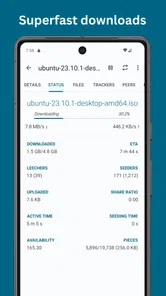
Now, let's dive into the performance. I tested Flud with several files, and it handled them like a champ. The download speeds were impressive, and I didn't experience any crashes or lags. One feature that stood out to me was the ability to prioritize downloads. This means you can decide which files to download first, a lifesaver when you're in a hurry.
More From Our News Desk

 Gmail
GmailGmail in a Busy Inbox: Who Benefits Most?
From first account to crowded workday, Gmail earns its place through dependable search and flexible sorting—but its best fit depends on how much inbox maintenance you can tolerate.

 Prime Video
Switching to Prime Video: What Changes in Your Viewing Routine
Prime Video can make a compelling second home for streaming, but switching means learning a different catalog, rental layer, and route from browsing to playback.

 Universal TV Remote Control
Universal TV Remote Control Works Best as a Reliable Backup
A phone remote earns its place through quick setup and reliable habits. Here is how to get more from Universal TV Remote Control—and where its limits show.

 Weather - By Xiaomi
Weather by Xiaomi Review: Clear at a Glance, Less Clear Up Close
Xiaomi’s weather app makes everyday forecasts quick to scan, but its calm surface can leave useful details and recovery paths harder to find than they should be.

 X
XX Under Pressure: Can It Recover When Posting Goes Wrong?
A resilience-focused review of X, examining setup, mistaken posts, interruptions, weak connections, and the gaps that matter when recovery needs to be dependable.

 Clash of Clans
Clash of Clans Is Won Between the Battles
Its raids are quick; its community is a long-term project of coordination, teaching, rivalry, and shared responsibility—with all the friction that entails.
Latest News



Moreover, Flud supports large files, so no worries if you're downloading that full season of your favorite show. And let's not forget the no speed limits on downloads/uploads, which is something every torrent user dreams of. It also allows you to move files while downloading, which adds flexibility to manage your storage space.
Performance is only part of the routine
In my view, the stronger test comes after the first successful download: does the queue stay useful without constant attention? A mobile torrent client is best suited to occasional, intentional transfers, not as a substitute for a streaming service or a general-purpose file manager. Those alternatives are easier when you want instant playback or already have the file; a BitTorrent client makes more sense when a legal torrent is the source and you want control over the transfer.
One practical trade-off is that a queue asks for a little housekeeping. I would remove finished items I no longer need, keep an eye on available device space, and avoid leaving uploads or downloads running by habit when I am not using them. Prioritization helps decide what finishes first, but it cannot solve a crowded queue or a weak connection. If I only download now and then, this small routine is manageable; if I want everything handled automatically with no checking, the format itself may feel like work.
Why Choose Flud?
What makes Flud stand out in a sea of torrent apps? First off, its ad-free experience in the pro version is a huge plus. Ads can be quite disruptive, and having an option to go ad-free is something I appreciate.
Flud+ is a paid Android app from Delphi Softwares, priced at $3.99, and the ad-free experience is a clear part of its appeal. I see that purchase as most sensible for someone who already uses torrents often and would rather have a cleaner client than keep relying on an ad-supported alternative. If you only need a one-off download, a free option may be enough; if you want torrents to play immediately without waiting, a streaming app is the more fitting choice. Its Everyone age rating and its 4.8 average across around 16,000 ratings suggest broad approval, though ratings alone cannot tell you whether its workflow suits your habits.
For long-term value, I would ask whether I still use the queue after the first week, not whether the interface initially feels polished. Regular users can benefit from the combination of sorting, prioritizing, large-file support and moving files during a transfer. The app has passed 100,000 installs, and its history goes back to May 10, 2014; those details give it a visible track record, while the feature that matters day to day is still a tidy, manageable queue. Delphi Softwares is the developer behind it, and Flud+ sits in the video-player and editing category even though its role is specifically torrent downloading.
Furthermore, the app is continuously updated, ensuring you get the latest features and improvements. The developers seem committed to providing a stellar experience, which is reflected in the app's performance and user feedback.
Where the shine can wear off
The main source of fatigue is not a complicated screen; it is the repeated attention that torrent transfers can require. You need to decide what belongs in the queue, choose priorities, and make room for completed files. If you prefer a hands-off way to consume media, or do not want downloads occupying local storage, this is not the right tool. I would also choose a desktop client when I need a larger workspace for managing many transfers, rather than expecting a phone interface to replace that setup.
The paid version makes the most sense when the absence of ads and the app’s mobile workflow are worth paying for repeatedly, not just when I am curious about torrenting. The included controls give me useful ways to manage transfers, but they do not remove the need to make sensible choices about file sources, device space and when to keep a transfer active. That balance is the difference between a helpful utility and another app I forget to maintain.
In conclusion, if you're looking for a reliable and efficient torrent downloader for Android, Flud is definitely worth considering. It combines ease of use with powerful features, making it a go-to choice for anyone who frequently downloads torrents on their mobile devices. Give it a try, and you might just find it becomes an indispensable part of your media toolkit.
Choosing the right place in your routine
I would think of Flud+ as a tool for a specific gap between a computer-based torrent client and a streaming app: you have a legitimate torrent available, want to manage the transfer on Android, and do not need a broad desktop workspace. It is especially useful for someone who already understands why a transfer may take time and is comfortable checking a queue. The simple list and priority controls make the phone practical for supervision, but the app cannot make a slow or unavailable source behave like an instant download.
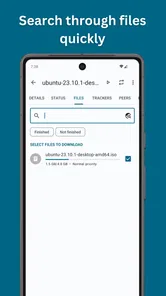
A good everyday pattern is to add a file when you have time to check its source and destination, then revisit the queue when you can decide whether its progress still matters. If a transfer is no longer useful, clearing it is better than letting it quietly occupy attention and storage. For a bundle containing several files, looking through the contents before committing can also prevent downloading material you do not need. That small decision can matter more on a phone, where every saved file competes with photos, apps and offline media.
What the mobile format gives up
Compared with other torrent clients, Flud+’s strongest case is its approachable phone workflow rather than a claim that mobile is the best environment for every transfer. A desktop client is preferable when I need to inspect and organize many active downloads at once, or want a larger screen for repeated management. A conventional browser download is simpler for a direct file link, while streaming is more convenient when I only want to watch or listen and do not need a local copy. Flud earns its place when the torrent source and mobile control are both genuinely useful.
There is also a practical distinction between controlling a download and managing the file afterward. The app can help me prioritize and move a transfer, but I still need to decide where the finished material belongs and which app will open it. That makes it a poor fit for someone expecting one all-in-one media library. Its placement among video players and editors does not change its central job: handling BitTorrent transfers, not replacing a dedicated player or editor.
Questions I would settle before relying on it
If you are wondering whether Flud+ is suitable for occasional use, I think it can be, provided you are comfortable with the paid, ad-free version and the modest upkeep of a queue. If you only expect a single download, compare that purchase with an ad-supported alternative or a direct download method before paying. The value is clearer when you return to torrent transfers often enough that a cleaner mobile client saves repeated annoyance.
For someone new to torrents, the interface may make the mechanics less intimidating, but it does not remove the need to make careful choices. I would start with a source I trust, check the included files, and avoid filling the queue faster than I can review it. For a user who wants unattended media access, instant playback, or minimal local storage management, a streaming service or another delivery method is simply a better match.
My lasting judgment is that Flud+ is most convincing as a focused utility, not an app that needs to stay open in everyone’s daily routine. Its sorting, priorities and file-moving support offer recurring value when I regularly handle legal torrents from my phone. If that need fades, there is little reason to keep inventing uses for it; if the need remains, the tidy workflow can justify its place without turning torrenting into a second job.
Flud+ Frequently Asked Questions
Can I use Flud+ on an iPhone or iPad?
Flud+ is an Android app, so it is intended for Android devices rather than iPhone or iPad. If you are choosing a torrent client for an Apple device, check that the app is available for your specific platform before downloading. Flud+ is best considered by Android users looking for a BitTorrent client.
Who develops Flud+, and what is its age rating?
Flud+ is developed by Delphi Softwares and has an Everyone content rating. That rating makes it broadly suitable from an age-classification perspective, but torrent files can contain many kinds of material, so users and families should still make thoughtful choices about what they download. The app itself is a BitTorrent client, not a source of curated content.
What does Flud+ cost, and what kind of app is it?
Flud+ is a paid app in the Video Players & Editors category, developed by Delphi Softwares. It is the premium version of Flud, a simple BitTorrent client for Android, and costs $3.99. If you are comparing it with the free Flud app, consider whether an ad-free experience and the additional options described below are worth the purchase for your needs.
What is Flud+ and how does it differ from other torrent clients?
Flud+ is a premium version of the popular Flud torrent client for Android. It offers an ad-free experience along with additional features not available in the free version, such as a more customizable user interface and advanced downloading settings. Flud+ is designed to enhance user experience with faster download speeds and better stability.
Is Flud+ safe to use for downloading torrents?
Yes, Flud+ is considered safe to use. The app itself does not contain any harmful software, but it's crucial to ensure that the torrents you download are from reputable sources to avoid malware. Flud+ also allows you to enable encryption and use a proxy for added security when downloading torrents.
Pros
- User-friendly interface
- Fast download speeds
- Supports magnet links
- No ads in the pro version
- Customizable settings
Cons
- Limited features in free version
- Occasional crashes
- No built-in search engine
- Requires manual tracking
- In-app purchases required for full features












