Flud - Torrent Downloader
- 12.41K
- 4.6
- Installs
- 10.00M
- Price
- Free

Screenshots
Analysis by Reviewed
I first reach for a phone torrent client when I want a file to keep downloading while I get on with the rest of the day, rather than babysitting a desktop. Flud - Torrent Downloader is aimed squarely at that job: it is an Android app from Delphi Softwares in the Video Players & Editors category, and its appeal is having torrent controls on a phone instead of relying on a computer. I’d recommend it most to people who already understand torrents and want to manage them on the go; someone who only wants to stream a video or download ordinary files will probably be happier with a simpler app.
Where a phone torrent client fits
A phone is handy for starting a transfer when I’m away from my computer, but it also changes how I think about downloads. I’m more conscious of storage, battery, and whether I want my connection busy while I’m doing something else. Flud makes sense when I have a specific file and a reason to manage its transfer, rather than when I’m simply looking for something to watch immediately.
For example, if I’m heading out and have a legitimate file to collect for later, I can add it while connected to Wi-Fi, give it priority over less urgent items, and check its progress when convenient. I would still plan the destination and available space first. On a phone, discovering halfway through that I have nowhere useful to keep a large file is an avoidable annoyance.
Getting Started with Flud
First off, the installation process is a breeze. You can grab Flud - Torrent Downloader from the Google Play Store, and within minutes, you're all set to dive into the world of torrents. The user interface is clean, intuitive, and, most importantly, user-friendly. Trust me, even if you're new to torrenting, you'll get the hang of it pretty quickly.
Speed Expectations and Everyday Use
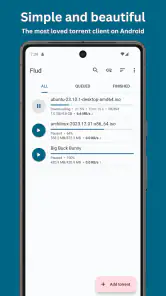
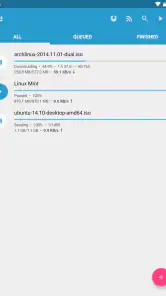
First, it helps to set realistic expectations: a torrent client can manage a transfer, but it cannot make a slow connection or a poorly shared torrent fast. In my view, Flud’s practical strength is control. Rather than treating every download as equally urgent, I can use its queue and priority options to decide what should finish first. That makes it useful for a real everyday situation: I can start a large, legitimate file while connected to Wi-Fi, put the item I need soonest at the top, and leave the rest queued instead of letting everything compete at once.
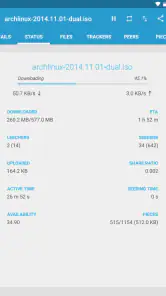
That workflow is more useful than chasing a speed claim. If a transfer seems stalled, I’d first check whether the torrent has active peers and whether my connection is behaving normally, before blaming the app. I’d also avoid starting several demanding transfers on a weak connection and expecting each one to move quickly. The trade-off is clear: Flud offers more hands-on management than a basic download manager, but that flexibility asks the user to understand what a torrent is doing.
That is also why I would not judge a torrent client by the first few minutes of a single download. The source, network conditions, and competition from other transfers all matter. If I need one file quickly, I would keep the queue focused instead of starting several items and hoping the app can make them all finish sooner. When speed is the priority, removing unnecessary competition is a more useful first step than repeatedly pausing and restarting transfers.
More From Our News Desk

Clash of Clans Is Won Between the Battles

Android Auto Makes the Case for Quieter Car Software

MobiOffice: Transforming Mobile Productivity with Seamless Integration

EA SPORTS FC™ Mobile Soccer: Redefining Mobile Sports Gaming

How Microsoft OneDrive Became a Mobile Productivity Giant

How Google Translate Breaks Language Barriers Effortlessly
Features That Make a Difference
One of the standout features of Flud is its ability to handle large files without breaking a sweat. Whether it's movies, games, or software, this app doesn’t flinch. Plus, it supports a wide range of protocols, including DHT, UPnP, and NAT-PMP, making it versatile enough for just about any torrent enthusiast.
Another cool feature is the option to prioritize and queue torrents. This means you can manage your downloads more efficiently, ensuring that the most important files are ready when you need them. It’s like having your own personal download assistant!
A less obvious benefit of that queue is that it can help me keep a phone’s storage plan deliberate. I can begin with the file I actually need, then let lower-priority items wait until I have checked available space. Choosing a storage location also matters: before starting a large transfer, I’d make sure the destination is one I can find later and has room for the intended files. That small bit of planning is more valuable on a phone than on a desktop, where storage is often easier to inspect and manage.
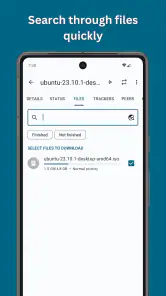
When a torrent contains more than one file, I’d take a moment to consider what I actually need before letting the transfer occupy phone storage. The useful habit is to treat the queue as a plan, not just a waiting list: start the essentials, check that the destination makes sense, and avoid leaving forgotten items active. That keeps mobile downloading intentional and makes it easier to tell which transfer deserves attention if the connection slows.
Heavy Use, Reliability, and Device Limits
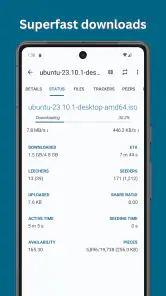
Performance-wise, Flud is a beast. Downloads are swift, and the app doesn’t hog your device’s resources, which is a huge plus. While testing, I noticed that even when multiple torrents were downloading simultaneously, my phone's performance remained smooth as butter.
The app also offers a range of customization options. You can tweak settings to suit your needs, from download and upload limits to choosing your preferred storage location. It’s these little touches that make Flud not just an app, but a personalized torrenting experience.
For heavier use, I would still treat a phone differently from a desktop: several active transfers can mean more network activity, storage use, and time spent managing what is running. Upload limits are worth considering if I want downloads to coexist more comfortably with other internet use. If the phone becomes busy or a transfer pauses, I’d check the queue and connection before restarting everything; restarting can waste time when the issue is simply that a torrent has little activity.
That pause-and-check approach is the part I value most when a transfer seems unreliable. I’d look at whether the item is still queued, whether the connection has changed, and whether there is a sensible reason to wait before taking action. A mobile client cannot remove the uncertainty that comes with peer-to-peer transfers, so a calm check is better than repeatedly altering settings without knowing what caused the slowdown.
Flud is free, carries an Everyone age rating, and has been available since Aug 29, 2013. Its current version is 1.12.0, and Android 7.0 is the minimum requirement. The scale of its audience is notable: it has over 10 million installs, an average rating of 4.6 from around 441,000 ratings, and roughly 12,000 written reviews. Those figures suggest a well-established choice, but they do not guarantee that every transfer will behave the same on every device or network.
On a device running an older supported version of Android, I’d be especially deliberate about how much I ask it to do at once. The minimum requirement makes the app accessible to a range of phones, but a long transfer still competes with ordinary phone use for attention and storage. If a handset is already short on space or I need it free for other tasks, a desktop can be the more comfortable place to handle a large batch.
Compared with a standard browser download, Flud is better suited to torrent files that benefit from queuing and priority control; a browser is usually more straightforward for a single direct download. Compared with using a desktop torrent client, the phone version is convenient when I want to start or monitor a transfer away from my computer, but a larger screen is easier for sorting many files and managing a busy library. I’d choose Flud for occasional, purposeful phone-based torrenting, not as a replacement for every kind of download tool.
There is a practical middle ground between using a browser and running a desktop client: Flud suits someone who wants to manage a few purposeful transfers without turning a phone into a full-time download station. If I had many files to organize, needed to inspect them closely, or wanted a larger workspace for routine management, I would choose a desktop client instead. For one or two planned downloads while away from a computer, the phone format is the point.
Privacy and Security
In today's digital age, privacy is a big deal, and Flud doesn’t disappoint in this department either. The app supports encryption, ensuring that your downloads are safe from prying eyes. While no service can offer 100% anonymity, Flud comes pretty close, giving you peace of mind as you download your favorite content.
I would not treat encryption as a promise of anonymity, though. It is one part of a torrent connection, not a substitute for careful choices about what I download or how I use a network. For anyone who wants a one-tap, no-settings experience, that distinction may feel like extra homework; a conventional streaming app is a better fit when the goal is simply to watch something without managing files or transfers.
My advice is to decide what you want from the app before opening a torrent: a client can organize a transfer, but the user still needs to make sensible choices about files and networks. That distinction matters most to newcomers, who may see encryption and assume they no longer need to think about their own habits. I’d use it as one consideration, not as a reason to be careless.
Who Should Choose It
If you already use torrents and want a mobile client with queue controls, priorities, and adjustable limits, Flud makes a practical case for itself. It is also a reasonable option for someone who occasionally needs a legitimate large file and would rather let it transfer on a phone than keep a computer running. Newcomers can learn the basics, but they should expect to make choices about queues, storage, and network use rather than just tapping a download button and forgetting about it.
I’d skip it if I mainly stream media, rarely handle torrent files, or want a tool that hides all transfer decisions. In those cases, a streaming service, a browser, or a simpler download manager is more direct. Flud’s advantage is not that it removes every complication; it is that it puts useful torrent controls in reach when those controls are actually what you need.
For a first-time user, I’d start with one familiar, legitimate torrent rather than loading a long queue immediately. That makes it easier to understand how priorities, storage choices, and connection conditions affect the experience without having several transfers to diagnose. Someone who is comfortable with those basics can then decide whether keeping a mobile client within reach is genuinely useful in their routine.
It is less suitable if a phone must remain available for other network-heavy activity, if storage is already tight, or if the user does not want to monitor a transfer at all. In those situations, direct downloads and streaming services avoid the extra decisions that come with torrenting. I see that as a meaningful boundary, not a failing: Flud is most useful when its specific controls solve a real problem.
In conclusion, if you're in the market for a torrent downloader that's reliable, efficient, and packed with features, Flud is a solid choice. It's got the performance, the flexibility, and the security that make it stand out in a crowded field. So go ahead, give it a whirl, and unleash the power of torrents right from your smartphone!
Flud - Torrent Downloader Frequently Asked Questions
Is Flud available for iPhone or iPad?
Flud - Torrent Downloader is designed for Android devices, including phones and tablets. If you are considering installing it on an iPhone or iPad, check the app store for your device rather than assuming the Android app will work on iOS. Its Android version requires Android 7.0 or later, so it is worth checking your device’s operating system before downloading.
How much does Flud - Torrent Downloader cost to download?
Flud - Torrent Downloader is free to download, so you can try its torrent-management features without paying for the app itself. The free version includes advertisements, while an ad-free version is also available. Consider whether ads matter to you before installing, and check the purchase details shown in the store if you are interested in the ad-free option.
Who develops Flud, and what kind of app is it?
Flud - Torrent Downloader is an app from Delphi Softwares in the Video Players & Editors category. It is built for handling torrent downloads on Android, so it may appeal to people who want to manage downloads directly on a mobile device. The app is free, and its store summary describes it as fully featured, with no limits.
Can Flud - Torrent Downloader be used on an Android device?
Yes. Flud - Torrent Downloader is designed for Android devices, including phones and tablets, and its minimum operating system requirement is Android 7.0. Before installing, check the Android version on your device to make sure it meets that requirement. The app is free to download, so Android users can try its torrent-management features without paying for the app itself.
What is Flud - Torrent Downloader and how does it work?
Flud - Torrent Downloader is a BitTorrent client for Android devices that allows users to download and manage torrent files directly on their smartphones or tablets. The app provides a user-friendly interface with features such as simultaneous downloads, magnet link support, and the ability to prioritize and manage files within a torrent. It's designed to offer a seamless torrenting experience, making it easy to download large files without needing a computer.
Pros
- Fast download speeds
- Supports large file downloads
- User-friendly interface
- No download speed limits
- Free with no ads
Cons
- No built-in media player
- Limited customer support
- Occasional stability issues
- No VPN included
- Requires manual search for torrents
- Category
- Video Players & Editors
- Version
- 1.12.0












