Flow Weather - Live Radar Home
- 66.00
- 4.3
- Installs
- 1.00M
- Price
- Free
Screenshots
Analysis by Reviewed
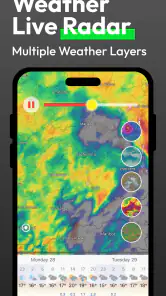
I usually want a weather app to answer a few practical questions quickly: Will rain reach me soon, how long will it last, and should I change my plans? Flow Weather - Live Radar Home takes that focused approach by combining a forecast with a live radar map. After spending time with it, I found the app most appealing when I treated it as a visual planning tool rather than as an all-purpose weather dashboard.
That distinction matters. A radar map can be more useful than a row of temperatures when I am deciding whether to walk, cycle, drive, or wait before leaving. At the same time, a map alone does not replace the broader context some people expect from a mature weather service. My overall impression is that Flow Weather is a clean, approachable choice for people who want to see weather movement without building their routine around a crowded collection of extras.
How Flow Weather feels in everyday use
The app comes from ArgonIsBlue and belongs squarely in the weather category. It is free to use, carries an Everyone age rating, and supports devices running Android 6.0 or later. Those details make it easy to consider for an older spare phone, a family device, or anyone who does not want to pay before trying a new forecast tool.
The first useful habit I developed was checking the radar before checking the forecast text. If I saw a band of rain moving toward my area, the map gave me a more immediate sense of timing and direction. That is different from reading “rain likely” and guessing whether the shower is a brief inconvenience or a reason to postpone an errand.
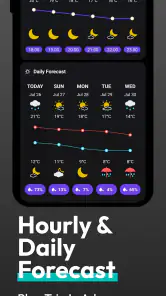
For a normal morning, I would use the forecast to decide what kind of day I was facing, then open the radar when I needed a more local answer. That two-step workflow keeps the app from becoming a constant stream of weather information. I could glance at the general outlook, inspect the map only when a decision depended on it, and close the app without sorting through unrelated panels.
The strongest part of Flow Weather is the connection between a forecast and a moving weather picture. Many weather apps provide both, but they do not always make the relationship feel natural. Here, the radar is not just an extra screen I would forget exists; it is central to the reason I would install the app in the first place.
A realistic rainy-day routine
Imagine I am preparing to leave for work and have a short walk to a bus stop. The forecast suggests unsettled weather, but that phrase does not tell me whether leaving immediately is sensible. I can look at the radar and judge whether precipitation is already nearby, approaching, or moving away. If the map suggests a short delay could help, I might make coffee, pack a light jacket, and check again before heading out.
More From Our News Desk

Clash of Clans Is Won Between the Battles

Android Auto Makes the Case for Quieter Car Software

MobiOffice: Transforming Mobile Productivity with Seamless Integration

EA SPORTS FC™ Mobile Soccer: Redefining Mobile Sports Gaming

How Microsoft OneDrive Became a Mobile Productivity Giant

How Google Translate Breaks Language Barriers Effortlessly
This is a small use case, but it shows where the app earns its place. It does not need to replace every weather tool on my phone. It only needs to help me make a better near-term decision than a static temperature and a vague rain icon would allow.
The same workflow can help with outdoor exercise, school runs, gardening, or a weekend market. I would still use common sense and local conditions, especially when weather changes quickly, but the visual movement on the map gives me something actionable to inspect. That is more useful than repeatedly refreshing a forecast that may not explain what is happening overhead right now.
What the current version says about the app’s direction
The current release is version 1.1.5, and the app was released on June 5, 2025. Because it is still a relatively young product, I see this version as an indication of an early, focused stage rather than a finished attempt to cover every weather need. The emphasis remains clear: forecast information and live radar are the foundation.
I appreciate that focus because weather apps often become overloaded. They may add news, lifestyle cards, health indexes, promotional panels, and layers of settings until the main question becomes harder to answer. Flow Weather appears to be moving in the opposite direction by making the map and forecast the main experience.
Still, a recent release also changes how I judge the app. I am less interested in whether it already matches every long-established competitor and more interested in whether its core tools feel dependable and easy to revisit. A young app can be pleasant precisely because it avoids years of accumulated clutter, but it may also need more refinement before it becomes the only weather app someone relies on.
The public response is encouraging without being definitive. Flow Weather has an average rating of 4.3 from around 3.9 thousand ratings, along with 66 written reviews. It has also passed one million installs, which suggests that the concept has reached a meaningful audience. I would treat those figures as signs of useful momentum, not as proof that the app will suit every location or personal routine.
How existing users may notice the evolution
For someone who installed an earlier build, version 1.1.5 is best understood as part of an ongoing product rather than a dramatic reinvention. The important question is whether the central experience feels more mature: can I get to the map quickly, understand what I am seeing, and move between immediate radar context and the wider forecast without friction?
That is also the right way to evaluate updates here. A weather app does not need a long list of visible changes to improve. Small adjustments to map readability, screen transitions, location handling, or forecast presentation can make a repeated daily task noticeably easier. I would pay attention to those details because I may open the app for only a few seconds at a time.
Existing users should not expect a new version number alone to transform the app into a full replacement for every established weather service. The value of the update is more likely to be felt in consistency and convenience than in a completely different identity. If the radar remains easy to reach and the forecast stays understandable, that is a worthwhile direction for a product built around quick decisions.
New users also benefit from approaching it with the right expectations. I would install Flow Weather because I want a straightforward radar-centered experience, not because I want a huge ecosystem of weather information. Starting with one location and using the map during real situations is a better test than browsing every screen once and judging it as a general information portal.
Small habits that make the radar more useful
My first tip is to compare the radar with the actual sky instead of treating the animation as an unquestionable answer. A map helps show movement and coverage, but local conditions can differ from what the display suggests. I would use it to improve timing, not to assume that a clear-looking route guarantees a dry walk.
My second tip is to check the radar at decision points rather than constantly. Before leaving, before starting an outdoor activity, and before committing to a longer trip are more useful moments than repeatedly watching the screen. This keeps the app practical and reduces the temptation to overinterpret every small change.
A third useful habit is to read the forecast and radar as different types of information. The forecast helps me plan the shape of the day; the radar helps me react to what may happen soon. Confusing those roles can lead to disappointment. A radar view is valuable for immediate movement, while a broader forecast is better for deciding whether an outdoor plan makes sense hours from now.
I would also avoid judging the app only by how attractive the map looks. A weather map can be visually impressive and still be awkward if location context, movement, or forecast access is unclear. The real test is whether I can answer a question quickly when I am standing at the door with a limited amount of time.
Where it differs from familiar weather alternatives
Compared with the default weather app that comes with a phone, Flow Weather is more interesting when I want to inspect precipitation visually. Default tools are often convenient because they are already installed and usually provide basic conditions immediately. If I only need the current temperature and a simple outlook, switching may not be necessary.
Compared with large weather platforms, Flow Weather feels more specialized. Bigger services may offer a wider range of layers, alerts, location tools, long-range information, or extra environmental details. That breadth can be valuable for frequent travelers, outdoor professionals, or people who want one app to cover every weather-related question.
Flow Weather makes more sense for someone who finds those alternatives too busy. Its appeal is not that it wins every category; it is that the forecast-and-radar combination can be easier to approach. I would choose it when quick visual context matters more than a deep archive of weather information or a large set of secondary indicators.
There is a trade-off in that simplicity. If I need highly specialized planning, detailed historical comparisons, or a broad collection of environmental readings, a more established and feature-heavy service may be the better tool. Flow Weather should not be judged harshly for being focused, but I should be honest about what that focus means before making it my only source.
The gaps I would consider before relying on it
The main limitation is not a single missing button; it is the risk of expecting a young, radar-focused app to behave like a complete weather command center. My confidence would depend on how well its presentation matches my local needs and how quickly I can interpret the information. Weather is regional, and a useful map in one routine may be less helpful in another.
I would be cautious if my decisions depend on detailed weather analysis rather than everyday planning. Hikers heading into changing terrain, people managing outdoor work, and travelers crossing several areas may need more specialized information than a simple forecast-and-radar workflow provides. In those cases, Flow Weather could be a helpful second opinion rather than the sole app to carry.
There is also a learning curve, even with a clean design. Radar maps are not automatically self-explanatory to everyone. A new user may need a little time to understand movement, coverage, and the difference between what is happening now and what may happen next. I consider that a normal trade-off for visual information, but it means the app is not necessarily the best choice for someone who wants only a single, plain-language answer.
Another practical consideration is habit. If my phone’s existing weather widget already gives me everything I need, Flow Weather has to earn an extra place on the home screen. Its strongest argument is not convenience through preinstallation; it is the ability to make radar checking part of a quick decision. Without that need, the change may feel unnecessary.
Who should install it, and who should skip it
I would recommend Flow Weather to commuters, casual outdoor enthusiasts, parents planning short trips, and anyone who often asks whether rain is about to affect a nearby plan. It is also a sensible trial for people who dislike weather apps filled with unrelated content. The free price lowers the barrier to testing that workflow for yourself.
I would be more selective for users who need advanced forecasting as part of work or safety-critical planning. They may prefer a service with a broader set of specialist tools and a longer track record in the areas that matter to them. Flow Weather can still sit alongside that service, but I would not assume that its simple presentation covers every professional requirement.
It may also be the wrong fit for someone who wants a weather app to function mainly as a passive notification system. The reason to open this one is to look at the forecast and radar together. If I never intend to inspect a map, I may get more value from a simpler app that puts current conditions and alerts first.
What I would watch as the app develops
Since version 1.1.5 is part of a young product’s early evolution, I would watch how ArgonIsBlue handles refinement without losing the app’s directness. The best future progress would make the current workflow faster and clearer, not bury the radar under additional screens. Improvements should support the basic question: what is the weather doing near me, and what should I do next?
I would also watch how well the app serves both first-time users and people who open it every day. New users need immediate orientation, while regular users need speed. Those goals can conflict if an interface adds too many explanations or settings. The strongest direction would preserve a quick entry point while making the map understandable for anyone who has never used radar before.
For existing users, the practical sign of healthy development will be whether updates improve trust and routine. A weather app becomes valuable when I know where to look and can interpret the result without hesitation. That feeling comes from repeated, consistent use more than from a long feature list.
The app’s growing audience gives it room to mature, but popularity should not replace personal testing. Weather needs vary by location, schedule, and tolerance for detail. I would use Flow Weather during the kinds of days when radar matters, compare its guidance with what actually happens, and then decide whether it deserves a permanent role in my routine.
My final take
Flow Weather - Live Radar Home is a focused weather app with a clear reason to exist. I like it most as a quick visual companion to the forecast: open it when I need to judge nearby rain, understand movement, or make a better short-term outdoor decision. The free access and broad device compatibility make trying it straightforward, while the Everyone rating keeps it approachable for general household use.
Its limitations are tied to the same focus that makes it appealing. It is not the obvious choice for someone seeking every possible weather metric, specialist planning tool, or deeply established all-in-one service. But if my usual weather app feels too static or crowded, the radar-centered workflow gives Flow Weather a convincing advantage.
My recommendation is to treat it as a practical decision tool rather than a promise of complete meteorological coverage. For daily errands, commutes, walks, and short outdoor plans, that is often enough. If seeing weather move is more useful to you than reading another row of numbers, Flow Weather is worth trying.
Flow Weather - Live Radar Home Frequently Asked Questions
Who develops Flow Weather - Live Radar Home, and is it suitable for everyone?
Flow Weather - Live Radar Home is a weather app developed by ArgonIsBlue. Its content rating is Everyone, so it is presented as suitable for a general audience. It may be useful for anyone who wants weather forecasts and radar information on a phone, whether checking conditions at home or preparing for outdoor plans.
Will Flow Weather - Live Radar Home work on my Android device?
The app requires Android 6.0 or later, so check your device’s operating system before downloading. If your phone meets that requirement, you can install it and explore its weather forecast and live radar map features. The app is free to download, making it possible to try it without an upfront purchase.
What is Flow Weather - Live Radar Home?
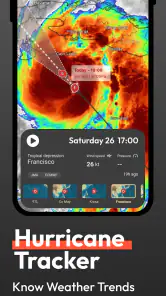
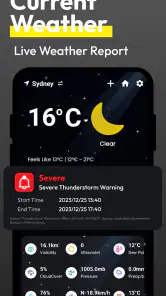
Flow Weather - Live Radar Home is a weather app designed to provide current conditions, forecasts, radar imagery, and weather information directly on your mobile device. It can help you monitor rain, storms, temperature changes, wind, and other local conditions. The app is especially useful for checking the weather before commuting, traveling, exercising outdoors, or planning daily activities.
Does Flow Weather - Live Radar Home provide live weather radar and accurate forecasts?
The app offers radar-based weather visualization and forecast information intended to help users follow changing conditions in their selected locations. Radar data can be useful for spotting approaching rain or storms, but it should not be treated as a guarantee. Forecast accuracy may vary depending on your region, available weather data, update frequency, and the severity or speed of changing weather systems.
Can I use Flow Weather - Live Radar Home for multiple locations?
Flow Weather - Live Radar Home is intended to let users check weather conditions for locations that matter to them, such as their home, workplace, travel destination, or a family member’s city. Location features may depend on the app version and device settings. Before downloading, check whether the current release supports saving multiple locations and whether automatic location detection can be enabled or disabled.
Pros
- Clean interface makes current conditions easy to check at a glance.
- Live radar helps track approaching rain and storms visually.
- Home screen widgets provide quick weather updates without opening the app.
- Supports multiple locations for monitoring home
- work
- or travel destinations.
- Forecast details include useful information beyond basic temperature readings.
Cons
- Some advanced radar or forecast tools may require a premium subscription.
- Radar accuracy can vary depending on location and available weather data.
- Frequent notifications may feel excessive unless carefully customized.
- Animated weather maps can use extra battery and mobile data.
- Forecast reliability decreases several days ahead
- especially during unstable weather.
- Category
- Weather
- Version
- 1.1.5