

Float Tube- Float Video Player
- 1.36K
- 4.4
- Installs
- 5.00M
- Price
- Free
Screenshots

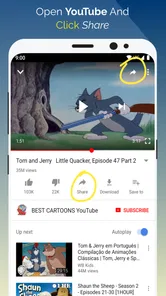
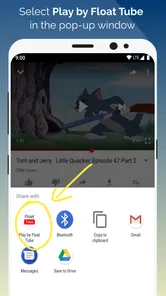
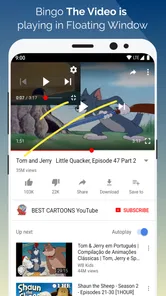
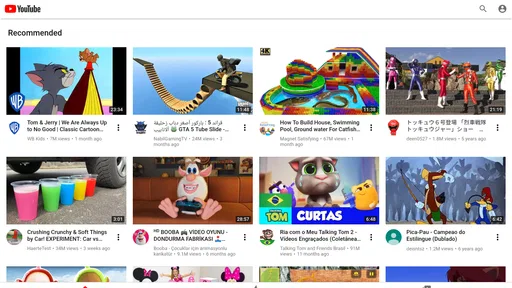
Analysis by Reviewed
I often reach for a floating video player when I want to keep a clip in view without giving up the rest of my screen. Float Tube- Float Video Player is built around that simple habit: it lets video sit in a movable window while I switch to other tasks. That makes it useful for casual multitasking, though it isn’t automatically the best choice for every kind of viewing.
What the free option means in practice
The app is free to install, with in-app purchases listed from $0.99 to $9.99 per item. I’d start with the free version and see whether its floating-player workflow suits your routine before spending anything. The existence of optional purchases doesn’t tell me which extras matter to a particular viewer, so I wouldn’t treat a purchase as necessary without first checking what it offers in the app.
That distinction matters if you’re comparing it with a standard video app: the key reason to try Float Tube is the floating window, not a promise that every viewing feature is free or that buying something will improve playback. It’s rated for Everyone, and it comes from developer goyourfly. Its average rating is 4.4 from around 91,000 ratings, with more than 5 million installs, suggesting plenty of people have tried this focused approach to watching video.
Where a floating player earns its space
For me, the practical value is in keeping a video visible while I do something that doesn’t need my full attention. A tutorial can stay in a corner while I make notes, or a longer discussion can play while I reply to a message. The useful question isn’t simply whether the window floats; it’s whether the video remains large enough to follow without covering the controls or text I need in the other app.
A better fit for some viewing habits
This is most appealing when I’m listening and glancing at the screen now and then, rather than watching every detail. I’d place the window near an edge, then move or resize it when another app’s buttons or text sit underneath. That small adjustment is worth doing before settling in, because a floating video can make multitasking feel easier but can also obstruct the very task I opened the phone to complete.
For close viewing, a regular full-screen player is usually the better choice: it gives the video the whole display and avoids the compromise of a smaller window. For audio-first content, a dedicated audio app may be more comfortable if I don’t need the picture at all. Float Tube sits between those familiar options, offering a picture that stays available while I work elsewhere rather than replacing a conventional player for every situation.
Everyday trade-offs and practical checks
A realistic use is following a cooking video while checking a recipe or timer in another app. I’d first make the floating window compact enough not to hide the recipe, then enlarge it briefly when I need to inspect a step. For a language lesson, I might instead keep it a little larger so captions or visual examples are easier to follow. These are different window choices for different tasks, not a reason to leave the video at one size all day.
More From Our News Desk

 Instagram
Instagram’s Power Comes From Its Place in Your Phone
A close look at how Instagram turns Meta’s reach, recommendation systems and everyday camera habits into durable platform power—and what that costs users.

 Gmail
GmailGmail in a Busy Inbox: Who Benefits Most?
From first account to crowded workday, Gmail earns its place through dependable search and flexible sorting—but its best fit depends on how much inbox maintenance you can tolerate.

 Prime Video
Switching to Prime Video: What Changes in Your Viewing Routine
Prime Video can make a compelling second home for streaming, but switching means learning a different catalog, rental layer, and route from browsing to playback.

 Universal TV Remote Control
Universal TV Remote Control Works Best as a Reliable Backup
A phone remote earns its place through quick setup and reliable habits. Here is how to get more from Universal TV Remote Control—and where its limits show.

 Weather - By Xiaomi
Weather by Xiaomi Review: Clear at a Glance, Less Clear Up Close
Xiaomi’s weather app makes everyday forecasts quick to scan, but its calm surface can leave useful details and recovery paths harder to find than they should be.

 X
XX Under Pressure: Can It Recover When Posting Goes Wrong?
A resilience-focused review of X, examining setup, mistaken posts, interruptions, weak connections, and the gaps that matter when recovery needs to be dependable.
Latest News



There is a trade-off: the small player competes for screen space, and streaming while using other apps can add battery strain. It also depends on the phone’s ability to allow a floating window, so if it stops appearing after you switch apps, I’d check the device’s relevant display or multitasking settings before assuming the video itself is at fault. If uninterrupted, detailed viewing matters more than doing something else at the same time, I’d close the floating window and use a normal full-screen player.
Who should try it, and who can skip it
I’d recommend trying it if you regularly keep video on while messaging, browsing, or following a visual guide. It is less compelling if you usually watch in full screen, mainly listen with the display off, or find any overlay distracting. The app is in the video player and editing category, runs on Android 7.0 and newer, and its current version is 1.9.0. It was released on January 12, 2020, so I’d also make sure it behaves well with your particular device and current multitasking setup rather than assuming every phone handles overlays identically.
Making a small player useful rather than intrusive
One practical habit I’d use is to decide what the second task actually requires before opening the video. If I’m replying to a short message, a small window tucked to the side is enough; if I’m following a demonstration, I’d keep the video larger and accept that less of the other app will be visible. Treating the window as something to adjust for each task makes the feature feel purposeful instead of like a permanent screen ornament.
It also helps to think about whether the video needs continuous visual attention. A conversation, lecture, or long explanation can work well when I mostly listen and occasionally glance over. A fast tutorial with small details is different: repeatedly looking between a reduced video and another app can make it harder to follow than simply watching full screen, pausing when needed, and then returning to the task. The floating format is a convenience, not a shortcut around attention.
How it compares with familiar alternatives
Compared with keeping a standard player open, Float Tube’s appeal is that the video can remain visible while I move to another app. That is a narrow but useful distinction; it doesn’t make a small window better for watching a film or studying details on screen. A phone’s own picture-in-picture option, when available and supported by the player being used, may also cover this kind of casual multitasking. I’d choose whichever route is simpler on my device rather than running two overlapping approaches.
Compared with audio-only listening, the floating window earns its place when visuals matter: seeing a cooking technique, a chart, or a speaker’s demonstration can make a clip more useful. If I only need the sound, though, keeping a video visible takes up space without adding much. And compared with a full-screen video editor, this app’s purpose is watching while doing something else, not changing clips or building a finished video. That difference is worth keeping in mind when browsing a broad video-app category.
A routine that shows both the benefit and the friction
Picture a quick weekday lunch: I start a recipe video, move it to an edge, and switch to the recipe notes to check ingredients. When the cook demonstrates a step, I enlarge the player long enough to see the technique, then shrink it again to read the next instruction. This is where the floating format makes sense: I don’t have to keep switching back and forth just to check a brief visual cue.
The same routine also exposes the limitation. If the notes are long, the video can cover text or force me to keep rearranging windows; if the phone is already busy streaming and running other apps, battery use may become more noticeable. For a recipe I already know, audio may be enough. For a delicate technique, full screen is clearer. I’d use the floating player selectively instead of assuming every video belongs in a corner.
Small checks before relying on it
If the window doesn’t appear after switching apps, I’d first look at the phone’s multitasking or display settings and confirm that the app is allowed to show over other content. I’d also test the setup with the apps I actually use, because a window that works beside a messaging screen may be awkward over a form, map, or page with controls near the edge. A quick test before settling into a longer session can prevent the annoying discovery that the player is blocking something important.
For lessons, I’d check legibility at the size I plan to use before relying on captions or small visual details. If they are difficult to read in the reduced view, I’d switch to full screen for that section instead of continually enlarging and shrinking the window. That simple choice keeps the floating player useful for listening and reference while reserving detailed viewing for the format that handles it best.
What to expect from the app itself
The app’s focus is easy to understand: it is a video player built around a floating viewing window. That makes it a focused addition to a phone rather than a replacement for every video service or media tool. I’d approach it as a way to change how I keep video on screen, not as an all-purpose solution for editing, organizing, or improving every part of watching.
Its age rating is Everyone, and it is free to install, which makes trying the basic idea a low-commitment decision. The listed purchases range from $0.99 to $9.99 per item, but I would judge any paid option by the specific benefit shown in the app and whether I use the player often enough to care. The price range alone is not a reason to buy; the practical test is whether the free workflow already solves the problem I have.
Multitasking Like Never Before
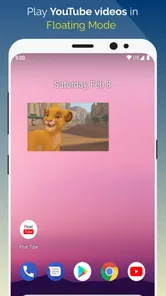
The first thing I noticed about the Float Tube- Float Video Player is how seamlessly it integrates with your phone’s multitasking abilities. Imagine watching your favorite YouTube videos while texting your friends or browsing social media. It’s all possible without any hiccups. The app allows the video to float on your screen, so you can resize it, move it around, or even hide it temporarily. It’s incredibly intuitive and makes multitasking feel natural.
Simple and User-Friendly Interface
One of my favorite features is the app's interface. It’s clean, straightforward, and doesn’t bombard you with unnecessary options. Right from the get-go, you can tell that the developers focused on giving users a smooth experience. There’s no steep learning curve here. You just install the app, grant the necessary permissions, and you’re all set to start floating videos!
Customizable Floating Window
Another cool feature is the customizable floating window. You can adjust the size of the video screen to your liking, which is perfect for those times when you want to focus more on the video or, conversely, when you need more screen space for other apps. Plus, it supports HD videos, ensuring you don't compromise on quality while multitasking. It’s like having your cake and eating it too!
Seamless Performance
I was quite impressed with how smoothly Float Tube- Float Video Player runs. Whether I was switching between apps, resizing the video window, or streaming in HD, there were no lags or crashes. The app is optimized to run efficiently, which is crucial for an uninterrupted experience.
However, remember that keeping multiple apps open can drain your battery faster, so it’s always a good idea to keep an eye on your phone’s battery usage. But for the convenience this app offers, it’s a small price to pay.
Final Thoughts
In conclusion, if you’re someone who loves watching videos but hates being tied down to a single app, the Float Tube- Float Video Player is a must-have. It’s a simple yet powerful tool that enhances your smartphone’s multitasking capabilities. Whether you’re a productivity junkie or just someone who loves streaming content, this app is worth checking out. Give it a try, and you might find it quickly becoming one of your favorite apps!
Float Tube- Float Video Player Frequently Asked Questions
What is Float Tube - Float Video Player used for?
Float Tube - Float Video Player is an app for watching videos in a floating window, letting you keep video visible while using other apps. Its central appeal is multitasking: rather than leaving a video to switch tasks, you can keep playback on screen in a movable overlay. The app is listed in the Video Players & Editors category.
Who develops Float Tube, and what kind of app is it?
Float Tube is a video player app from goyourfly, in the Video Players & Editors category. It is designed around playing videos in a floating window, so you can keep a video visible while switching to other apps. Its short description is simply “Float Tube,” while its store summary highlights playing video and music in a floating window.
What is Float Tube - Float Video Player?
Float Tube - Float Video Player is an innovative app designed for Android and iOS that allows users to watch videos in a floating window. This means you can multitask on your device while watching your favorite videos. The app supports all popular video formats and provides a seamless experience for those who like to browse the internet, chat, or do other tasks while keeping their videos playing in the background.
How does the floating video feature work in Float Tube?
The floating video feature in Float Tube enables users to play videos in a small, resizable window that can float on top of other apps. This allows users to continue watching their videos while using other applications on their device, enhancing multitasking. You can move the floating window around the screen and adjust its size to suit your preferences, providing a flexible and user-friendly viewing experience.
Can I use Float Tube while doing other things on my device?
Yes, the floating window is intended to keep a video on screen while you switch to other apps, making it useful for multitasking. You can move the player overlay and resize it to fit your screen and the task you are doing. This can suit activities such as browsing or chatting while watching, although the experience depends on having the floating playback available on your device.
Pros
- Seamless floating video playback.
- Supports multiple video resolutions.
- Lightweight and fast performance.
- User-friendly interface.
- Easy multitasking with other apps.
Cons
- Ads can be intrusive at times.
- Limited offline functionality.
- Requires stable internet connection.
- No playlist feature available.
- Occasional minor bugs.











