

FlightView: Flight Tracker
- 4.07K
- 1.5
- Installs
- 1.00M
- Price
- Free

Screenshots



Analysis by Reviewed
I found FlightView: Flight Tracker most useful when I treated it as a live travel companion rather than a complete replacement for an airline’s own app. It sits in the Travel & Local category and focuses on the moments when a journey is changing: checking whether a flight is still moving on schedule, seeing airport information, following a route on a map, or looking at weather around the trip. That makes it appealing to people who want one place to watch several parts of a flight.
The app is free to install, which makes it easy to try before a busy travel day. It is published by OAG Aviation Worldwide Limited, a name associated with aviation information, and it has been available since July 23, 2010. The long history is noticeable in the idea behind the app: this is built around practical flight monitoring, not around social travel planning or hotel discovery.
My overall impression is mixed. The concept is still valuable, especially when I am tracking a flight that belongs to someone else or checking an airport without wanting to move between several airline pages. At the same time, the experience depends heavily on current connectivity and on the quality of the live information reaching the app. When the network is slow or the flight data changes faster than the display, the convenience can quickly turn into uncertainty.
How FlightView behaves when the network matters
I find that network quality changes how I use a flight tracker more than any map or status screen does. This section looks at a practical way to keep a weak connection from turning an ordinary check into a rushed decision, then considers what to do when an update still feels unclear. Checking at decision points is more useful than repeatedly reopening the app without a specific question.
Live information is useful only when it is genuinely current
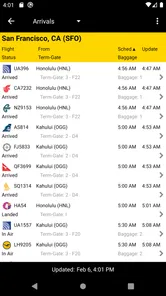
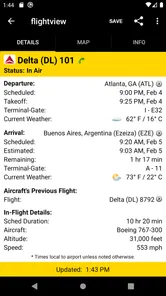
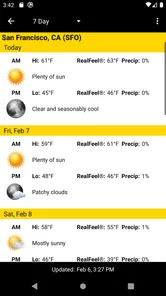
The central appeal is the live flight-tracking view. I can use it to follow a flight’s status, inspect its position on a map, and combine that with airport and weather information. That combination is more useful than a simple “on time” label because it gives context. A delay becomes easier to understand when I can also see the airport involved and the broader travel conditions around it.
There is an important practical distinction here: a tracking app is not the same as a static timetable. The value comes from updates, so connectivity shapes the whole experience. With a reliable mobile connection, checking a flight shortly before leaving home feels quick and reassuring. With weak service, I would be careful about treating an old screen as proof that nothing has changed. I use the app as a current view, not as a permanent record.
This is especially important for people meeting arrivals. If I am collecting a friend, I do not want to leave for the airport based only on the original landing time. I would check the flight again shortly before driving, then check once more when I am close to the terminal. That workflow reduces wasted waiting, but it only works if I remember that each check is a fresh request for information rather than a guarantee about what will happen next.
More From Our News Desk

 Weather - By Xiaomi
Weather by Xiaomi Review: Clear at a Glance, Less Clear Up Close
Xiaomi’s weather app makes everyday forecasts quick to scan, but its calm surface can leave useful details and recovery paths harder to find than they should be.

 X
XX Under Pressure: Can It Recover When Posting Goes Wrong?
A resilience-focused review of X, examining setup, mistaken posts, interruptions, weak connections, and the gaps that matter when recovery needs to be dependable.

 Clash of Clans
Clash of Clans Is Won Between the Battles
Its raids are quick; its community is a long-term project of coordination, teaching, rivalry, and shared responsibility—with all the friction that entails.

 Android Auto
Android Auto Makes the Case for Quieter Car Software
The car interface is no longer judged by how much it can do, but by how quietly it helps. Android Auto shows what drivers now expect—and what still gets in the way.

 MobiOffice: Word, Sheets, PDF
MobiOffice: Transforming Mobile Productivity with Seamless Integration
MobiOffice: Word, Sheets, PDF is redefining mobile productivity with a surprising blend of functionality and innovation.

 EA SPORTS FC Soccer Mobile 26
EA SPORTS FC™ Mobile Soccer: Redefining Mobile Sports Gaming
Dive into EA SPORTS FC™ Mobile Soccer, where immersive gameplay and strategic depth transform mobile sports gaming.
Latest News



A realistic airport-day workflow
Imagine a family member flying into a busy airport while I am still at work. I can open the app during a break, look up the flight, review the status, and use the map to understand where the aircraft is in relation to the destination. Before leaving, I can check the airport information and weather view as well. This is a much calmer process than asking the traveler to send repeated messages while dealing with boarding, landing, and baggage.
For my own trip, I would use it in stages. First, I would check the flight before leaving for the airport. Next, I would look again after arriving, particularly if the terminal is crowded or the departure board is difficult to read from where I am standing. Later, I would use the tracker to keep an eye on the return flight or on a connecting journey. The app is strongest in these short, purposeful checks.
I would not keep the map open continuously just because it is available. That uses attention without necessarily improving my decisions. The most sensible habit is to open the relevant flight when I need an update, confirm the time and airport details, and then close the app. This also makes the experience less dependent on a constant data connection.
Maps and weather add context, but they do not remove uncertainty
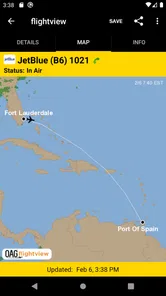
The map view is more engaging than a plain status message because it helps me see the journey as a route. It can be useful when explaining progress to someone waiting at home, or when I want a quick visual sense of where a flight is. Still, I would not confuse a moving aircraft symbol with a promise about the exact arrival experience. Taxiing, airport congestion, gate availability, and baggage collection can all affect what happens after the flight reaches its destination.
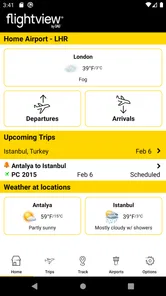
The weather information is similarly helpful as context. It gives me another reason to open the app before a journey, particularly when I am deciding whether to allow extra time. But weather data should support planning rather than replace official airport instructions. A storm shown in the app does not automatically tell me whether my airline has changed boarding arrangements, and a clear view does not guarantee that a flight will operate normally.
Using it across different mobile situations
FlightView fits several mobile contexts, but each one has a different level of reliability. At home on Wi-Fi, I can take time to search and inspect the map. On the way to the airport, I am more interested in a fast status check. Inside a terminal, I may be dealing with crowded spaces, weak reception, or a nearly empty battery. The app is most convenient when I adapt my expectations to the situation instead of demanding the same smooth behavior everywhere.
Before leaving, I would open the flight while connected to a dependable network and note the important details in my own travel plan. I would not assume that a screen I viewed earlier will remain current after the connection disappears. This is one of the most important habits for using a live tracker responsibly: prepare while connected, then verify again when a decision actually matters.
For travelers who regularly move between countries, the app’s broad flight-monitoring focus can be more convenient than installing a separate airline app for every carrier. That is a real advantage when a journey includes different airlines or when I am tracking another person’s flight. The trade-off is that the airline’s own app may still be the better place for actions tied directly to a booking, such as managing a reservation or following carrier-specific instructions.
What happens when information is delayed or a connection fails
The most frustrating part of any live tracker is the gap between what is happening and what the phone can display. If the network is slow, the app may take longer to refresh, and I may be left wondering whether the flight has changed or whether the screen simply has not caught up. That uncertainty is not unique to this app, but it matters because the whole product is organized around timely information.
My response is to avoid making a major decision from one glance. If the status looks unusual, I would refresh through a stable connection and compare it with the airport’s official displays or the airline’s communication. If I am picking someone up, I would wait for a consistent update before starting a long drive. If I am the passenger, I would prioritize instructions from the airline and airport staff over a third-party tracking screen.
This layered approach is one of the best ways to recover from a confusing update. The app can tell me that something deserves attention, while the airline can tell me what I should do about it. In practice, FlightView works better as an early-warning and planning tool than as the only authority during cancellations, gate changes, or complicated connections.
Connectivity and battery-conscious habits
Live maps and repeated status checks naturally invite frequent screen use. I would avoid leaving the tracker running throughout an entire journey, especially when the phone is already handling boarding passes, messages, navigation, and camera use. Opening it for a specific question is more sensible than turning a travel day into a constant monitoring session.
A simple routine helps. Check the flight before leaving, check it again before committing to a trip to the airport, and use the map only when its visual context adds something. If the signal is unreliable, do not repeatedly tap refresh without a clear reason. That rarely creates better information and can make the phone experience feel more stressful.
I also prefer to keep a written or saved note of essential travel details while I have a strong connection. That is not a claim that the app provides an offline mode; it is simply good travel practice. A live service should be treated as something I consult when connected, while critical details should not exist only inside one changing screen.
Who will get the most from it?
I think the app is a good fit for travelers who want a dedicated flight monitor with airport, map, and weather context in the same place. It is particularly useful for people who meet arrivals, coordinate family travel, watch several flights, or travel with different airlines. The free entry point also makes sense for occasional travelers who do not want to build a more elaborate travel-management system.
It may also suit aviation-minded users who enjoy watching a route develop visually rather than checking only a departure or arrival label. The map gives the experience more detail than a basic airline notification, while the airport and weather views make it easier to connect the flight with the wider journey.
I would be more cautious recommending it to someone who wants a single app to manage everything. It is not the first tool I would choose for booking, changing reservations, storing every travel document, or handling airline-specific service requests. For those tasks, the airline’s own app or a broader itinerary organizer may be a better fit. FlightView is narrower, and that focus is both its strength and its limitation.
Rating, support, and the paid layer
The app has passed one million installs, so it has clearly reached a substantial audience. However, its average rating is 1.5 from about twelve thousand ratings, with roughly 4.1 thousand written reviews. I would not ignore that signal. A low average suggests that many people have encountered enough friction to leave disappointed, even though the underlying idea remains useful.
Ratings for live travel tools can be strongly affected by moments outside the app’s control, such as delayed data, missed expectations, or stressful airport situations. That does not make the criticism irrelevant. In this category, reliability and clarity are the product, so a confusing update or an unhelpful failure matters more than it would in a casual app.
The app is free, with optional in-app purchases ranging from $1.99 to $17.99 per item. I would begin with the no-cost experience and decide only after understanding whether it fits my travel habits. Occasional travelers may not need to pay for extra functionality, while frequent users may consider it if the additional tools solve a specific problem. I would avoid paying simply because I am hoping purchases will fix a weak connection or replace official airline communication.
It is rated for Everyone, and the current version is 5.0.13. The minimum operating system is Android 7.0, which keeps it accessible to people using older compatible Android phones. That is useful for travel because not everyone carries a new device, although overall performance will still depend on the phone, the network, and how much else is running during a busy airport day.
How it compares with the usual alternatives
The closest alternative for many travelers is the airline’s own app. That option usually has the advantage when I need booking details, boarding information, carrier messages, or direct action on a reservation. FlightView is more appealing when I want a neutral place to watch a flight without being tied to one airline, or when I am tracking someone else’s journey.
Airport websites and terminal displays are stronger for local, official instructions. They are the places I would trust most for gate information, security guidance, and immediate airport announcements. FlightView is more convenient for a broad view of the flight and its route, especially before I arrive at the terminal.
General travel organizers can be better for keeping confirmations and plans together. Their advantage is organization; FlightView’s advantage is the dedicated focus on live flight movement, airport context, maps, and weather. I would use the two types together if I needed both a complete itinerary and a focused tracker.
My connectivity verdict
After using it as a practical travel tool, I see FlightView as a useful but imperfect layer between a traveler and the official airport or airline sources. Its live tracking, map, airport information, and weather view make everyday coordination easier, particularly when I am watching a flight from a distance. The experience is most convincing when I have a clear question and a reliable connection.
The app is not the right choice if I expect it to manage my booking, guarantee uninterrupted updates, or settle a disruption by itself. I would also think twice if the low average rating makes reliability my only priority and I already have a strong airline app that covers my needs. In that case, adding another tracker may create more screens rather than more certainty.
For me, the best use is selective: check before leaving, verify before driving to meet someone, use the map for context, and confirm serious changes through official channels. That workflow respects the limits of network-dependent information while still taking advantage of what the app does well. FlightView is worth trying for independent flight monitoring, but I would keep it as a helpful companion rather than my sole source of travel truth.
FlightView: Flight Tracker Frequently Asked Questions
What should I check before relying on a flight-tracking app while traveling?
Flight-tracking apps are helpful for keeping an eye on a journey, but they should complement—not replace—airline and airport announcements. Make sure you have the correct flight number and travel date, and check that the app’s notifications are enabled if you want alerts. For time-sensitive decisions such as boarding or a connection, confirm the latest details with the airline or airport as well.
Which devices can run FlightView: Flight Tracker?
FlightView: Flight Tracker is available for Android and iOS, so it can suit travelers using either platform. On Android, the stated minimum operating-system requirement is version 7.0. Before installing, check the app’s page in your device’s app store to ensure your particular device and software version are supported, and allow enough storage for the download and any updates.
Who develops FlightView: Flight Tracker, and is it intended for all ages?
FlightView: Flight Tracker is developed by OAG Aviation Worldwide Limited and is categorized as a Travel & Local app. Its content rating is Everyone, so it is presented as suitable for a general audience. It focuses on flight status, airport details, map and weather information, making it relevant to passengers as well as people monitoring someone else’s journey.
What is FlightView: Flight Tracker used for?
FlightView: Flight Tracker is designed to help travelers monitor commercial flights before and during a journey. After entering a flight number or route, the app can provide scheduled and estimated departure and arrival times, airport information, terminal details, delays, cancellations, and other status updates. It also includes tools for organizing trips, making it useful for both passengers and people waiting to pick someone up.
How accurate are FlightView’s flight status updates?
FlightView gathers flight information from aviation and airport data sources, so its updates are generally useful for checking a flight’s progress, gate information, delays, and estimated arrival time. However, data can occasionally lag behind announcements made directly by an airline or airport. For important travel decisions, especially boarding, cancellations, or connections, it is wise to compare the app’s information with the airline’s official app, website, or airport displays.
Pros
- Tracks flights by route
- airport
- or flight number
- Provides useful airport delay and cancellation information
- Offers gate
- terminal
- and baggage claim details when available
- Flight alerts help users monitor schedule changes
- Clean interface makes essential flight data easy to find
Cons
- Some flight information may be delayed or unavailable
- Advanced features and ad removal require a paid subscription
- Coverage and accuracy can vary between airlines and airports
- Frequent alerts may become distracting during busy travel days
- Consumes extra battery when location and notifications stay enabled











