

Flight Tracker: Live Radar
- 0.00
- 0.0
- Installs
- 10.00K
- Price
- Free
Screenshots
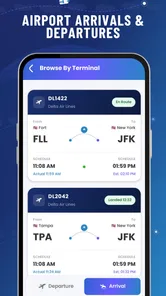
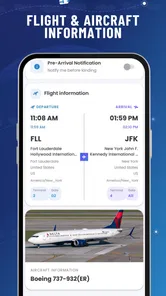
Analysis by Reviewed
Flight Tracker: Live Radar is the kind of travel app I open when a flight is no longer just a line on an itinerary but a moving part of someone’s day. It is made for checking a flight’s progress, watching the route on a radar-style map, and keeping an eye on delays, arrivals, departures, and alerts in one place. I found it most useful when I wanted a quick answer without moving between an airline app, an airport page, and a general map.
The app comes from GPS soft Labs and sits in the Travel & Local category. It is free to install, rated for Everyone, and supports Android devices running version 8.0 or later. The current release is 3.0.5, and the app has passed the ten-thousand-install mark. There are optional in-app purchases ranging from $4.99 to $99.99 per item, so I would treat the free starting point as a chance to test the workflow before paying for anything.
My main advice for a first-time user is simple: begin with one real flight, not the whole trip. Searching for a specific departure or arrival gives the radar and status tools a clear purpose. Once that first lookup makes sense, the rest of the app becomes easier to judge.
What the first use feels like
At its best, this is a focused flight-checking tool rather than a complete travel organizer. I would not install it expecting hotel bookings, ticket management, packing lists, or a replacement for an airline account. Its value is narrower and more immediate: it helps me understand where a flight is, whether its schedule has changed, and what is happening around an airport.
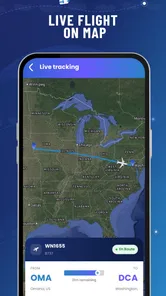
The radar view is the most distinctive part of the experience. A list can tell me a flight’s status, but a map gives that status context. I can see the relationship between the aircraft’s route and the airports involved, which is especially helpful when I am meeting someone and want to know whether “on time” still means they are far away or nearly ready to land.
I also like the separation between several travel moments. Departures matter before a journey, live tracking matters once the aircraft is moving, and arrivals matter when I am waiting at the other end. Delay information connects those moments, while alerts can reduce the need to reopen the app repeatedly. That combination makes the app more practical than a radar display that is interesting for a minute but not useful for planning.
There is still an important limitation to keep in mind. A flight tracker is an information aid, not the final authority for boarding, gate changes, baggage collection, or airline instructions. I would use this app for awareness and timing, then check the airline or airport directly when a decision involves check-in, security, boarding, or a missed connection.
More From Our News Desk

 Weather - By Xiaomi
Weather by Xiaomi Review: Clear at a Glance, Less Clear Up Close
Xiaomi’s weather app makes everyday forecasts quick to scan, but its calm surface can leave useful details and recovery paths harder to find than they should be.

 X
XX Under Pressure: Can It Recover When Posting Goes Wrong?
A resilience-focused review of X, examining setup, mistaken posts, interruptions, weak connections, and the gaps that matter when recovery needs to be dependable.

 Clash of Clans
Clash of Clans Is Won Between the Battles
Its raids are quick; its community is a long-term project of coordination, teaching, rivalry, and shared responsibility—with all the friction that entails.

 Android Auto
Android Auto Makes the Case for Quieter Car Software
The car interface is no longer judged by how much it can do, but by how quietly it helps. Android Auto shows what drivers now expect—and what still gets in the way.

 MobiOffice: Word, Sheets, PDF
MobiOffice: Transforming Mobile Productivity with Seamless Integration
MobiOffice: Word, Sheets, PDF is redefining mobile productivity with a surprising blend of functionality and innovation.

 EA SPORTS FC Soccer Mobile 26
EA SPORTS FC™ Mobile Soccer: Redefining Mobile Sports Gaming
Dive into EA SPORTS FC™ Mobile Soccer, where immersive gameplay and strategic depth transform mobile sports gaming.
Latest News



Who will get the most from it
This app suits occasional travelers who want a straightforward way to follow a flight without learning a complicated aviation service. It is also a good fit for people collecting someone from an airport. Instead of asking for updates every few minutes, I can follow the flight and make a better decision about when to leave home.
Families may find the live view reassuring during a long journey, particularly when one person is traveling and another is waiting. The same applies to work trips: a colleague can monitor an arrival while preparing a meeting, without needing access to the traveler’s booking account.
I would be more cautious about recommending it as the only tool for frequent flyers, aviation enthusiasts, or passengers managing several connections. Those users may prefer a mature airline application or a specialist service with deeper airport information, booking integration, and more advanced history. Flight Tracker: Live Radar is appealing because it keeps the main task approachable, but that simplicity can feel limited when the trip becomes complicated.
From installation to a useful first result
I’d begin with one current flight and a clear reason for checking it, such as planning an airport pickup or keeping tabs on a traveler. That makes it easier to judge whether the status, route view, and alerts help with a real decision rather than simply adding another screen to browse. Once the first result is clear, the next step is using it thoughtfully.
Start with a flight you can verify
After installing the app, I would choose a flight that is scheduled for the same day or the next day and keep the flight number nearby. That is a better first test than searching for an old journey or trying to explore the map without a destination. A current flight lets me compare what the app shows with the itinerary or airport information I already have.
If I am meeting a friend, I would ask for the flight number rather than relying only on the departure city and destination. City names can be ambiguous, especially when an area has more than one airport. A precise flight reference gives the app a cleaner starting point and makes the result easier to recognize.
Once the flight appears, I would pause before opening every available view. First I would identify the departure and arrival airports, then check the displayed status, and only afterward move to the radar. This order prevents a common beginner mistake: treating the moving map as proof that every schedule detail is current. The status and timing information are the practical part; the map is the visual confirmation.
Turn a status check into a real decision
The first meaningful success is not simply finding an aircraft icon. It is using the result to answer a real question. For example, if I am collecting someone, I can compare the flight’s progress with my driving time and decide when to leave. If I am the passenger, I can use the departure status as one more check before heading to the airport, while still following the airline’s instructions.
For a family member waiting at home, the useful workflow is even simpler. Search the flight, inspect its current position and status, and then rely on alerts rather than constantly refreshing the screen. That reduces the temptation to interpret every small change on the map as a major event.
For a delayed flight, I would record the latest situation mentally rather than assuming the first delay estimate will remain unchanged. Travel schedules can move again, and a tracker is most helpful when it gives me a current picture, not when I treat one update as a promise. The app can improve awareness, but it cannot remove the uncertainty built into air travel.
Use the radar for context, not decoration
The live radar is most valuable when I connect it to geography. If I am waiting for an arrival, the aircraft’s position helps me understand whether the flight is still early in the journey or approaching the destination. If I am watching my own flight, the map can make a vague status feel more concrete by showing the route in motion.
There is a useful trade-off here. A map is faster to understand than a dense timetable when I want a broad sense of progress, but it is not always the best place to compare several flights. For that job, I would start with the status and arrival or departure information, then use the radar only for the flight that matters most.
I also recommend checking the airport names carefully before drawing conclusions. Nearby airports can serve the same metropolitan area while being far apart in practical terms. A flight arriving at the wrong airport for your pickup plan can create more trouble than a modest delay, so the airport detail deserves more attention than the animation.
Alerts are useful when they support a plan
Alerts can make the app less demanding during a busy day. Instead of opening it repeatedly, I can set up my attention around a flight and wait for relevant changes. This is particularly helpful when I am working, driving to meet someone, or handling another part of a trip.
At the same time, I would not use alerts as my only source of urgent travel information. Notifications can arrive at an inconvenient moment, and airport instructions can change faster than a person expects. My preferred approach is to let Flight Tracker: Live Radar provide convenient updates, then use the airline or airport as the final check before acting.
A less obvious benefit is psychological rather than technical: alerts help separate useful monitoring from anxious refreshing. When I am waiting for a delayed traveler, repeatedly reopening a map rarely improves the outcome. A sensible alert-based routine gives me a better chance of staying informed without turning the flight into a full-time task.
Where first-time users may get confused
The word “live” can create unrealistic expectations. In practice, a live flight view should be read as an evolving status picture, not a guarantee that every position, estimate, or airport event changes at the exact instant it happens. If the aircraft icon and the timetable seem slightly out of step, I would avoid making a rushed decision from one screen alone.
Another source of confusion is the difference between flight movement and passenger readiness. An aircraft can be close to an airport while the passenger still needs to taxi, collect baggage, pass through the terminal, and reach the pickup point. For meetups, I would build in that ground time rather than driving toward the airport the moment the map shows the approach.
Departure information deserves the same care. A displayed departure status does not replace the passenger’s responsibility to arrive, check in, and follow boarding instructions. I see the app as a timing companion, not a boarding pass or an official travel document.
There is also a difference between tracking one flight and understanding an entire itinerary. If a journey includes connections, I would check each important segment separately and compare the timing with the connection plan. A tracker can show what is happening to an individual flight, but the passenger still has to judge whether the overall trip remains workable.
How it compares with the usual alternatives
The airline’s own app is usually better for booking details, check-in, boarding documents, gate notices, and account-specific travel information. If I am already inside that app, I would not replace it with Flight Tracker: Live Radar. The dedicated tracker earns its place when I want a quick public-facing view of flight movement or when I am monitoring another person’s journey.
Airport websites are often the stronger choice for terminal-level information, such as local departure and arrival boards. I would turn to them when I need to confirm what is happening at one airport rather than follow an aircraft across its route. Flight Tracker: Live Radar is more attractive when the route itself is the question.
General map applications can show directions to an airport, but they are not designed around flight status and aircraft progress. They help me decide how to get there; this app helps me understand the flight I am going to meet or take. The two tools complement each other, although I would avoid switching between them while driving.
Specialist aviation services may be a better match for users who want extensive aircraft details, historical tracking, or a highly technical interface. The advantage here is approachability. I can open it with a practical question and get to a flight-focused answer without committing to an enthusiast’s dashboard.
When the free starting point is enough
Because the app is free to install, I would begin without assuming that an upgrade is necessary. For an occasional trip or a single airport pickup, the basic experience may be all I need. The optional purchases, priced from $4.99 to $99.99 per item, make it especially sensible to test the routine first: find a flight, understand the status, inspect the radar, and decide whether alerts fit the way I travel.
I would only consider paying if the extra value clearly matches a repeated need. Someone tracking flights several times a week may judge that differently from someone taking one holiday a year. The important point is not to buy because a map looks impressive; buy only if the additional convenience solves a problem you actually have.
For privacy and battery-conscious users, I would also keep the workflow focused. Search for the relevant flight, review the information, and close the app when the task is done. Live maps and alerts are useful in context, but there is no reason to keep watching a flight after the arrival information has answered your question.
My practical routine for a travel day
On a departure day, I would check the flight before leaving for the airport, then verify it again closer to the time I plan to enter the terminal. I would use the app to notice a broad change in status, but I would still follow the airline’s arrival guidance. This prevents the common mistake of interpreting an on-time status as permission to arrive late.
For an airport pickup, I would search the flight early, note the scheduled arrival, and use the radar and alerts to watch progress. I would not aim to reach the curb at the exact landing moment. Instead, I would allow time for the aircraft to reach the stand and for the passenger to walk through the terminal. That is where the app’s information becomes genuinely useful: it improves the timing of my plan without pretending to know every step after landing.
For a delayed connection, I would track the affected flight and then check the airline for rebooking or connection instructions. The tracker can tell me that the situation has changed; it cannot decide what the passenger should do next. That division of labor is important and keeps expectations realistic.
My final recommendation
I enjoyed Flight Tracker: Live Radar most when I treated it as a calm, focused companion for one flight at a time. Its combination of radar, status, delays, arrivals, departures, and alerts covers the questions I usually have when traveling or waiting for someone. The app is easy to place in a real routine, especially for airport pickups and quick progress checks.
I would not make it my only travel app. Airline instructions, airport information, boarding documents, and connection decisions still belong with official sources. Users who want deep aviation analysis may also outgrow its straightforward approach. Those are not deal-breakers; they simply define where this app fits.
For a first-time user, the best path is reassuringly short: install it, search for a current flight, confirm the airports and status, use the radar to understand the route, and set alerts only if they support a real plan. If that workflow answers your travel questions, Flight Tracker: Live Radar is a practical free starting point. In my experience, its biggest strength is not showing more information than everything else, but bringing the right flight information together when I need a quick, understandable answer.
Flight Tracker: Live Radar Frequently Asked Questions
What devices and operating systems can run Flight Tracker: Live Radar?
Flight Tracker: Live Radar is a mobile app in the Travel & Local category, developed by GPS soft Labs. On Android, it requires version 8.0 or later, so check your device’s system version before downloading. If you use an iPhone or iPad, review the app’s App Store compatibility details for your device before installing, as requirements can differ between platforms.
Who might find Flight Tracker: Live Radar useful?
The app is intended for travelers, people waiting to meet arriving passengers, and aviation enthusiasts who want to check flight activity from a phone. Its focus is tracking flights live, with information such as status, delays, arrivals, departures, and alerts. It can be a handy companion when planning around an airport visit, while official airline and airport updates remain useful for time-sensitive travel decisions.
What is Flight Tracker: Live Radar, and what can I use it for?
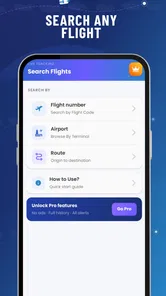
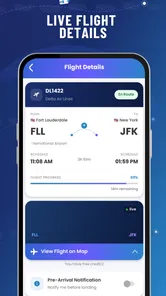
Flight Tracker: Live Radar is designed to help travelers follow flights in real time and check important journey details from a mobile device. Depending on the route and available data, you can usually search by flight number, airline, airport, or destination, then view departure and arrival information, estimated times, terminals, and possible delays. It is useful for passengers, people meeting someone at the airport, and aviation enthusiasts who want a convenient overview of air traffic and flight status.
How accurate is the live flight information shown in the app?
The app can provide helpful real-time updates, but flight information should not be treated as an absolute guarantee. Data may come from airlines, airports, air-traffic sources, or third-party tracking systems, and updates can sometimes be delayed because of connectivity problems, transponder limitations, airport changes, or airline reporting delays. For important trips, compare the information in Flight Tracker: Live Radar with the airline’s official website, airport displays, and boarding announcements.
Does Flight Tracker: Live Radar require an internet connection or location access?
An internet connection is generally needed to load current flight statuses, radar information, airport details, and map data. Without mobile data or Wi-Fi, previously loaded information may be unavailable or outdated. Location access may be requested to show nearby airports or center the map around your current position, but it is not always necessary to search for a specific flight manually. Review the permission requests and disable location access if you prefer not to use location-based features.
Pros
- Real-time flight positions are easy to follow on a clear interactive map.
- Useful airport search helps you check arrivals and departures quickly.
- Flight details include routes
- aircraft information
- and estimated timings.
- Push alerts can help you stay updated on delays and schedule changes.
- The interface is simple enough for occasional travelers to navigate.
Cons
- Some live tracking features may require a paid subscription.
- Radar data can occasionally lag or show inaccurate aircraft positions.
- The app may use significant battery and mobile data during active tracking.
- Ad interruptions can make browsing less convenient for free users.
- Coverage and flight details may vary between airports and regions.











