

Flight Tracker - Flights25
- 360.00
- 4.5
- Installs
- 100.00K
- Price
- Free

Screenshots

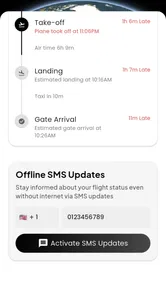
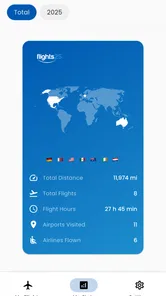
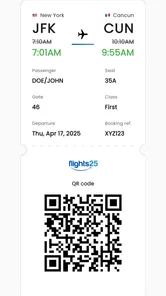
Analysis by Reviewed
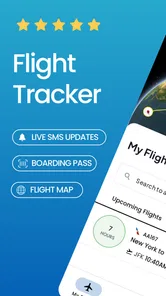
Ever found yourself at the airport, anxiously scanning the departure board, or maybe you’re just a curious wanderlust, tracking flights across the globe? Well, folks, let me introduce you to Flight Tracker & Flight Radar. This nifty app is like having a virtual control tower right in your pocket, and trust me, it’s a game-changer for frequent flyers and armchair travelers alike!
A flight check the whole household can use
I can see this being useful when several people are following the same trip for different reasons. One person may be collecting a traveler, another may want to know whether dinner plans need to shift, and a child might simply enjoy watching a plane move across the map. Instead of asking the traveler to send repeated updates, someone at home can check the flight’s progress and use that as one part of the plan.
A realistic example: a relative is due to arrive while you are still at work. You can check the flight before leaving, then look again closer to pickup time rather than waiting at the airport for the original scheduled arrival. I would still treat the airline or airport’s own instructions as the final word for gate and pickup arrangements; a tracker helps with awareness, but it is not a substitute for local airport guidance.
Make shared use simple, not confusing
For a shared phone or tablet, I would keep the setup modest. Each person can take turns checking the flight, but it is worth agreeing on which flight or traveler is being followed so nobody mistakes one journey for another. If you use alerts, decide who actually needs them; several people receiving the same update can create noise rather than better coordination. I would also avoid treating a shared device as a place to store information that everyone in the household should not see.
This is a practical distinction from using a family group chat or a general travel app. A chat is better for messages such as “I’m through security” or “meet me outside,” while a tracker is useful for checking the aircraft’s progress. Neither replaces the other. The smoothest arrangement is to use flight status to time a check-in, then communicate directly when plans or meeting points change.
What's the Buzz?
So, what’s the deal with Flight Tracker & Flight Radar? Imagine being able to track flights in real-time, get updates on departure and arrival times, and even see the aircraft’s current position. Yep, it’s as cool as it sounds! Whether you’re picking up family from the airport or just curious about where that plane overhead is headed, this app has got you covered. The interface is super user-friendly, making it easy to navigate even for those who aren’t tech-savvy.
Features that Take Off!
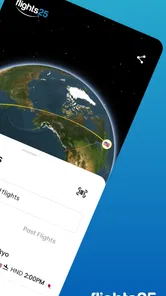
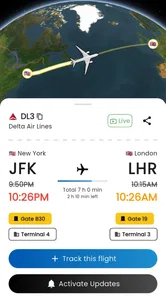
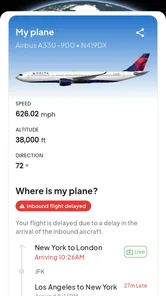
First off, let’s talk about the real-time tracking. You can literally see the flight’s journey from start to finish. It’s like having a window seat on every plane in the sky! Plus, the app provides detailed information about the aircraft, including its type, altitude, and speed. This is perfect for aviation enthusiasts who love to geek out over flight details.
More From Our News Desk

 Weather - By Xiaomi
Weather by Xiaomi Review: Clear at a Glance, Less Clear Up Close
Xiaomi’s weather app makes everyday forecasts quick to scan, but its calm surface can leave useful details and recovery paths harder to find than they should be.

 X
XX Under Pressure: Can It Recover When Posting Goes Wrong?
A resilience-focused review of X, examining setup, mistaken posts, interruptions, weak connections, and the gaps that matter when recovery needs to be dependable.

 Clash of Clans
Clash of Clans Is Won Between the Battles
Its raids are quick; its community is a long-term project of coordination, teaching, rivalry, and shared responsibility—with all the friction that entails.

 Android Auto
Android Auto Makes the Case for Quieter Car Software
The car interface is no longer judged by how much it can do, but by how quietly it helps. Android Auto shows what drivers now expect—and what still gets in the way.

 MobiOffice: Word, Sheets, PDF
MobiOffice: Transforming Mobile Productivity with Seamless Integration
MobiOffice: Word, Sheets, PDF is redefining mobile productivity with a surprising blend of functionality and innovation.

 EA SPORTS FC Soccer Mobile 26
EA SPORTS FC™ Mobile Soccer: Redefining Mobile Sports Gaming
Dive into EA SPORTS FC™ Mobile Soccer, where immersive gameplay and strategic depth transform mobile sports gaming.
Latest News



Another fantastic feature is the push notifications. You’ll get instant alerts on any changes in flight status. No more refreshing the airline’s website every five minutes! The app also offers a handy airport board feature, where you can view the status of all flights at a specific airport. This is super useful if you’re at a busy airport and want to avoid the crowds.
Using flight details without over-relying on them
One useful habit is to check the airport board before heading out, then follow only the flight you care about. That keeps a broad airport view from becoming a stream of information you do not need. For pickup plans, the aircraft’s position can add context, while the departure and arrival status gives a quicker practical snapshot. I would use those views together rather than assuming one signal alone settles the plan.
There is also a trade-off between alerts and manual checks. Notifications are handy when you are busy, but if you are coordinating a household, too many alerts can make people tune them out. I would enable them for the person responsible for pickup and let everyone else check when they need to. If you are already inside an airline’s own app and mainly need booking-specific updates, staying there may be simpler; this tracker makes more sense when you want a broader view of aircraft movement or an airport’s activity.
Friendly Skies and Smooth Landings
One of the things I love about this app is how it makes travel planning a breeze. You can check the weather conditions at your destination right from the app, ensuring you pack appropriately and know what to expect upon arrival. Plus, if you’re a frequent traveler like me, you’ll appreciate the app’s ability to save your flight history for easy access later.
And let’s not forget the fun factor! Even if you’re not traveling, it’s fascinating to explore the skies, see where planes are headed, and maybe even dream about your next adventure. Who knew flight tracking could be so entertaining?
Who it suits, and where I would be cautious
The app is a good fit for people who regularly meet arriving travelers, keep an eye on several journeys, or enjoy exploring aviation details. It is less compelling if you only need a single airline’s booking information, or if you do not want another source of travel notifications. Flight progress is helpful context, not a promise that every ground arrangement will run to schedule, so I would still confirm important changes with the airline and the person traveling.
For younger users, watching aircraft can be an engaging way to spark questions about routes and destinations. The app is rated for Everyone, but I would still guide a child using a shared device and explain that a plane’s tracked position is not the same as personal communication from its passengers. That keeps the experience interesting without encouraging anyone to infer where a person is beyond the trip information they have chosen to share.
What to expect before installing
Rocketech sp. z o.o. develops this free travel app, which has a 4.5 average from around 9,200 ratings and more than 100,000 installs. It first appeared on March 7, 2024, and version 1.2.2 requires Android 7.0 or later. The basic download costs nothing, while in-app purchases range from $8.49 to $89.99 per item, so I would check what an optional purchase offers before paying rather than assuming every useful part requires an upgrade.
That pricing range is worth keeping in mind for a household: decide whether one person’s occasional checks are enough before considering a purchase, and do not assume that paying gives everyone separate access or shared controls. I would install it first for a specific trip, test whether its flight view and airport board fit the way your household coordinates, and only then decide whether it deserves a permanent place on the device.
Choosing the right source for each travel question
Flight trackers, airline apps, airport boards, and group messages answer different questions. I find this app most useful when I want to connect a plane’s progress with a practical plan, such as deciding when to leave home for a pickup. An airline app is usually the more direct place to check a booking or a message tied to a passenger’s reservation. An airport board is useful once you are dealing with terminal information, while a message from the traveler is still the clearest way to confirm where to meet.
That division matters when plans are changing quickly. I would not keep switching between several sources just to chase every small status change; instead, I would use the tracker to see whether the trip is broadly on schedule, then check the airline or airport for the detail that affects my next action. The aircraft map can make the situation easier to picture, but it should not be treated as a guarantee of touchdown time or an instruction about where to wait.
A calmer routine for pickup day
For a household coordinating an arrival, I would choose one person to monitor the flight and share only the useful change with everyone else. For example, the person driving can check the status before setting off, while someone at home handles messages with the traveler. This avoids asking several family members to interpret the same map and reduces the chance that an alert is mistaken for a confirmed change to the meeting point.
If the traveler has a connection or a long journey, I would also keep the flight number or airport details easy to find before the day becomes busy. That small bit of preparation makes it easier to distinguish the intended trip from other activity on an airport board. It is a simple workflow rather than a special feature, but it makes a flight tracker more useful and helps prevent last-minute confusion on a shared device.
What I would test on the first trip
Before relying on the app for an important pickup, I would try it with a journey whose details I already know. Search for the flight, compare its status with the airline’s information, and see whether the map, airport board, and alerts are presented in a way that makes sense to you. This is especially worthwhile if more than one person will use the same phone; a quick trial helps everyone agree on what the displayed information means before time pressure enters the picture.
I would also decide whether I prefer a notification or a deliberate check. Alerts can be useful when work or errands keep me away from the screen, but manual checks may feel less distracting for a casual observer. The right choice depends on the job: a pickup driver may value a timely prompt, while someone following planes for interest may prefer to open the app only when curious. Either way, I would keep the airline’s instructions in reach for decisions that depend on official travel arrangements.
When a different approach is better
If you rarely travel and only need to know whether one booked flight has changed, this may be more app than you need. The airline’s own service can be a more focused option for reservation details, and a direct text from the traveler is better for confirming personal plans. On the other hand, people tracking arrivals for relatives, checking more than one journey, or exploring aircraft movement may appreciate having a dedicated flight view and an airport-wide board together.
I would be cautious about turning a household tablet into a permanent display that everyone assumes is authoritative. A tracker can make flight information visible, but that does not mean everyone has the same context or that each person should act on a status change independently. Agreeing who makes the final pickup decision is more valuable than adding more screens or notifications. For a shared device, a clear routine and sensible account boundaries matter more than trying to make the app serve as a family messaging tool.
In a nutshell, Flight Tracker & Flight Radar is a must-have for anyone who travels or just loves to keep an eye on the aviation world. It's packed with features that make it more than just a flight tracker—it's a travel companion that fits right in your pocket. So, whether you're a jet-setter or a curious onlooker, give it a whirl and watch your travel experience soar to new heights!
Flight Tracker - Flights25 Frequently Asked Questions
Can I use Flight Tracker & Flight Radar without creating an account?
Flight Tracker & Flight Radar is a flight-tracking app in the Travel & Local category, and its store summary describes it as a Flighty alternative. If you are considering a download, check the app’s current setup and permissions on your device before getting started. The app is free to download, with optional in-app purchases available.
What is Flight Tracker & Flight Radar and how does it work?
Flight Tracker & Flight Radar is a real-time flight tracking app that allows users to monitor airplane movements across the globe. The app uses advanced radar technology to provide accurate flight information, including departure and arrival times, flight paths, and aircraft details. It is designed for aviation enthusiasts, travelers, and anyone interested in tracking flights.
Is the Flight Tracker & Flight Radar app free to use?
The Flight Tracker & Flight Radar app offers a free version with basic features, allowing users to track flights and view general flight information. However, for more detailed insights and additional features such as alerts, historical data, and ad-free experience, users can opt for a premium subscription, which comes at a cost. Optional in-app purchases range from $8.49 to $89.99 per item.
How accurate is the flight tracking information provided by the app?
The app is known for its high level of accuracy in tracking flights, as it uses real-time data sourced from various aviation authorities and radar systems. While it strives to provide the most up-to-date information, users should note that some discrepancies can occur due to factors like weather conditions and air traffic control decisions.
Can I track flights worldwide using this app?
Yes, the Flight Tracker & Flight Radar app covers flights worldwide. It provides global coverage, allowing users to track flights from any location around the globe. Whether you're interested in domestic flights or international routes, the app offers comprehensive flight data, making it suitable for a wide range of users.
Pros
- Real-time flight updates enhance planning.
- Easy-to-use interface improves navigation.
- Comprehensive airport and airline info.
- Customizable alerts for flight changes.
- Offline access available for convenience.
Cons
- Limited free features restrict functionality.
- In-app ads can be distracting.
- Occasional data refresh delays.
- Subscription required for premium features.
- Interface may feel cluttered at times.











