

First View
- 316.00
- 4.6
- Installs
- 100.00K
- Price
- Free

Screenshots


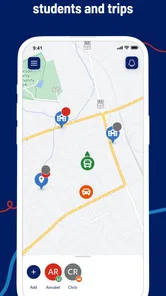
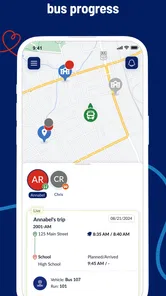
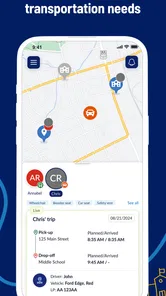
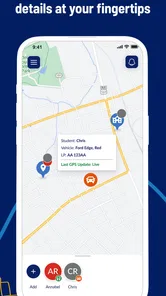
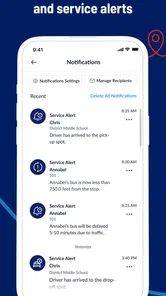
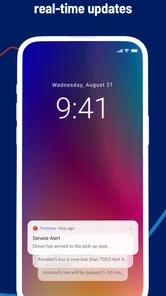
Analysis by Reviewed
When a child travels to school by bus, the hardest part for a parent is often the waiting. First View, the Travel & Local app from First Student Inc., is designed to make that wait more manageable by helping families follow a student’s journey. After spending time with it, my view is straightforward: this is a focused companion for school transportation, not a general travel planner, and it works best when you want a clearer picture of the trip between home and school.
The app is free, carries an Everyone age rating, and has reached over one hundred thousand installs. Its average rating sits at 4.6 from around 4.8 thousand ratings, with more than three hundred written reviews. Those figures suggest that the central idea is landing well with many families, but they do not change the main question I would ask before installing it: does your child’s school transportation setup actually work with First View? If the answer is yes, the app has a useful role. If not, it is not something I would keep merely as a spare travel app.
What First View does well for school-day travel
I find First View most useful when it gives a family a shared point of reference for the school trip, rather than another reason to watch a screen. In this section, I’ll look at the practical strengths that matter during ordinary mornings and pickups, then consider how to make journey information helpful without treating it as a guarantee.
A calmer way to follow the daily journey
The strongest part of First View is its narrow purpose. Instead of trying to be a map app, a rideshare service, a public-transit planner, and a vacation guide at the same time, it concentrates on a student’s school transportation. That focus makes sense for the real situation parents face: checking whether a child is still on the way, preparing for pickup, or getting a better sense of the trip home.
I find this more useful than relying on a chain of messages between family members. A student may not have a phone, may be unable to answer during the ride, or may simply forget to send an update. A dedicated school-journey tool gives the parent a separate place to check rather than turning the child into the person responsible for reporting every movement.
That does not mean I would treat the screen as a substitute for judgment. A journey display is most helpful as a planning aid. Weather, traffic, loading delays, school events, and changes in transportation can all affect the practical timing of a trip. My recommendation is to use First View to reduce uncertainty, not to plan a pickup down to the exact minute.
Useful in the morning rush and at the end of the day
The most convincing everyday scenario is a parent working from home while a child is returning from school. Rather than repeatedly looking out the window or asking the child to call, the parent can check the journey and decide when to step away from work. The same approach can help a caregiver coordinate with another adult, especially when the person meeting the student is not the person who normally handles the school run.
More From Our News Desk

 Weather - By Xiaomi
Weather by Xiaomi Review: Clear at a Glance, Less Clear Up Close
Xiaomi’s weather app makes everyday forecasts quick to scan, but its calm surface can leave useful details and recovery paths harder to find than they should be.

 X
XX Under Pressure: Can It Recover When Posting Goes Wrong?
A resilience-focused review of X, examining setup, mistaken posts, interruptions, weak connections, and the gaps that matter when recovery needs to be dependable.

 Clash of Clans
Clash of Clans Is Won Between the Battles
Its raids are quick; its community is a long-term project of coordination, teaching, rivalry, and shared responsibility—with all the friction that entails.

 Android Auto
Android Auto Makes the Case for Quieter Car Software
The car interface is no longer judged by how much it can do, but by how quietly it helps. Android Auto shows what drivers now expect—and what still gets in the way.

 MobiOffice: Word, Sheets, PDF
MobiOffice: Transforming Mobile Productivity with Seamless Integration
MobiOffice: Word, Sheets, PDF is redefining mobile productivity with a surprising blend of functionality and innovation.

 EA SPORTS FC Soccer Mobile 26
EA SPORTS FC™ Mobile Soccer: Redefining Mobile Sports Gaming
Dive into EA SPORTS FC™ Mobile Soccer, where immersive gameplay and strategic depth transform mobile sports gaming.
Latest News



Morning use has a different benefit. If a family is trying to avoid an unnecessarily early wait outside, checking the journey can help them organize the final few minutes before departure. That is a small convenience, but school mornings are made up of small conveniences. A tool that removes even one repeated check or anxious message can earn its place on a parent’s phone.
I also see value for families managing more than one child. The app is not a replacement for a household calendar, but having school transportation information in a dedicated context can be less confusing than mixing it with unrelated appointments, public transit routes, and location sharing. The practical gain is organization rather than entertainment.
Its identity is clear rather than overloaded
First View’s store short description is simply “First View,” while its broader summary presents the idea of tracking a student’s journeys. That wording reflects the app’s main appeal: it is meant to answer a specific school-day question. I prefer that clarity to an app that promises every possible family-management feature and makes the important action difficult to find.
Because it belongs to the Travel & Local category, some readers may initially expect ordinary navigation tools. That would be the wrong expectation. I would not install it to compare routes across a city, find restaurants, plan a holiday, or monitor a family member’s general location. Its usefulness depends on the school transportation connection, so the category describes the setting more than the complete experience.
The developer, First Student Inc., is also relevant to how I would judge the app. This is not an independent mapping utility that happens to show a school bus. It is tied to the school transportation context represented by the developer. That makes it more purposeful for the right families, while also making it less broadly useful than Google Maps, Apple Maps, or a local transit application.
Small habits that make the app more practical
One tip I would give a new user is to check the app before the moment of pickup rather than opening it only when the child is already late. The first check establishes a normal routine and makes unusual movement easier to notice. I would also keep a simple backup plan for days when the information does not match what is happening on the street. Technology should support the family’s routine, not become the only source of truth.
A second useful habit is to agree on what the app is for inside the household. One adult may use it for timing, while another may use it for reassurance. If everyone expects it to provide a precise arrival promise, disappointment is more likely. If everyone treats it as a journey-status aid, the information becomes easier to use sensibly.
A third insight is that the app can reduce unnecessary communication without eliminating communication altogether. I would still tell a child what to do if the normal pickup arrangement changes, and I would still keep the school’s contact route available. First View is strongest when it handles routine visibility while people handle exceptions.
The meaningful limitation: usefulness depends on the transportation setup
The central weakness is not necessarily the interface; it is dependence. First View only makes sense when the student’s transportation arrangement is supported in the way the app expects. A parent cannot solve an unsupported school, route, or service arrangement simply by installing the application. That dependency is more important than any individual convenience.
This also affects how widely I can recommend it. A family that uses several transportation providers, public buses, walking, cycling, and occasional car rides may find the app too narrow to become the household’s main travel tool. It can still be relevant to the school-bus portion of the routine, but it will not unify every journey. For that broader job, a standard mapping or transit app is a better fit.
I would also avoid treating a digital journey view as proof that a child has safely arrived at the final destination. Tracking a trip and confirming a child’s handoff are different things. Families should keep their normal safety arrangements, particularly when a child is young, the pickup location is busy, or a different adult is collecting them.
What the app cannot replace
First View does not replace direct communication with a school, transportation office, or driver when there is a serious problem. If a bus does not appear, a route changes unexpectedly, or a child is not where they should be, the app may help you understand the situation, but it is not the same as contacting the responsible organization.
It also does not replace a general navigation app. Google Maps and Apple Maps are more appropriate when I want turn-by-turn directions, walking instructions, local places, or a route that is unrelated to school transportation. A public-transit app may be better for a student who regularly travels by city bus or train. First View’s advantage is specialization, and specialization naturally means giving up breadth.
That trade-off is worth explaining because a high rating can create the impression that an app is universally useful. In this case, the rating is encouraging, but the product still has a defined audience. I would rather see a parent choose it for the right reason than download it expecting a complete family location platform.
Who should use First View
I would recommend First View to parents and caregivers whose children use a compatible school transportation service and who want a more convenient way to follow the trip. It is especially suitable for households where pickup timing is difficult, adults share responsibility, or a child is old enough to travel independently but still benefits from routine oversight.
It may also help relatives or temporary caregivers who need context during the school day. Someone collecting a child for the first time may feel more comfortable having a dedicated journey view instead of depending entirely on a parent’s text message. The app can make the handoff routine easier to coordinate, provided everyone understands its limits.
I would be more cautious about recommending it to families who already have a reliable, direct communication system and no difficulty with pickup timing. If the school’s existing process is simple and dependable, First View may add another screen without solving a real problem. The fact that it is free removes a financial barrier, but it does not remove the need to decide whether the extra step is worthwhile.
I would also skip it as a primary choice if your main need is general family location sharing. A broader family-safety service may be more suitable for that purpose, while a navigation app will be more useful for independent travel planning. First View is not weaker because it lacks those roles; it is simply built around a different question.
Version, availability, and day-to-day expectations
The current version is 8.1.0, and it requires Android 10 or later. That requirement matters if you are trying to install it on an older phone used by a grandparent, babysitter, or backup caregiver. Before making it part of the household routine, I would check the device that person actually uses, not only the newest phone in the family.
The app is available at no purchase price, which makes testing the workflow relatively easy. I would still spend a few school days evaluating it instead of deciding after one look. The real test is whether it reduces repeated checking, improves coordination, and fits naturally around the school’s transportation routine.
Since it is rated for Everyone, it is presented as suitable for a broad audience. That does not mean every child should manage the app independently. In my view, parents or caregivers should decide how much responsibility a student has for using or interpreting journey information. The app can support independence, but the level of independence should match the child and the family’s safety plan.
My final view after weighing the trade-offs
First View succeeds because it avoids pretending to be something larger than it is. It gives school-bus families a dedicated way to stay informed about a student’s journey, and that can make ordinary mornings and afternoons less stressful. The strongest benefit is not flashy functionality; it is the practical relief of having a consistent place to check before sending another message or waiting without context.
Its limitation is equally clear: the experience depends on the relevant transportation arrangement and does not cover every kind of travel. I would not choose it instead of a general map, a public-transit planner, or a broader family-location service. I would choose it alongside those tools when school transportation is the specific gap in the family’s routine.
My recommendation is therefore positive but targeted. If your child’s school transportation is supported and you regularly wonder where the journey stands, First View is worth trying. If your needs are broader than school travel, look elsewhere or use it only as a small part of a larger setup. For the right household, the app’s real strength is turning school-bus uncertainty into a more manageable daily routine.
After using it, I would describe First View as a practical utility rather than an essential app for everyone. It earns that description by staying focused, and its free availability makes the decision low-risk. Just keep a backup communication plan, treat journey information as guidance rather than a guarantee, and judge it by whether it genuinely makes pickup and drop-off easier for your family.
For parents looking specifically for student journey tracking, First View is a sensible, focused choice. For everyone else, the better option may be the mapping or family-safety tool that matches the wider problem they are actually trying to solve.
First View Frequently Asked Questions
Who is First View intended for?
First View is a Travel & Local app from First Student Inc., intended for families who want to keep track of a student’s journeys. Its central purpose is reflected in the phrase “Track Your Student’s Journeys.” Before downloading, consider whether that travel-focused function suits your needs and review the app’s description to understand how it fits into your routine.
What is First View and what can I use it for?
First View is an app designed to help users discover and view selected content through a streamlined mobile experience. Its usefulness depends on the version and region, but it generally focuses on presenting information, media, or featured content in an easy-to-browse format. Before downloading, check the store description to confirm that its current features match your expectations.
Is First View free to download and use?
First View is free to download. As with any app, review the app’s store listing and any purchase terms before confirming a payment. The free price makes it easier to try the app, but it is still sensible to check the details shown in the store for your device and region before installing or using any optional services.
Does First View require an account or personal information?
Depending on how you use First View, the app may allow limited access without registration but request an account for personalized features, saved content, notifications, or synchronized settings. During installation, review the permissions and privacy policy carefully. Avoid providing more information than necessary, and verify how the developer collects, stores, and shares your personal data.
Is First View safe to install on Android and iPhone?
First View should be downloaded only from the official Google Play Store or Apple App Store to reduce the risk of modified or harmful copies. Check the developer name, recent reviews, update history, and requested permissions before installing. No app can be considered completely risk-free, so keep your device updated and remove access that is not necessary.
Pros
- Shows a clear preview of upcoming appointments and tasks.
- Useful for quickly checking daily plans at a glance.
- Simple layout makes essential information easy to find.
- Can help reduce missed events through timely reminders.
- Convenient for users who prefer visual schedule overviews.
Cons
- Some features may require access to calendar or personal data.
- The app’s usefulness depends on keeping schedules updated.
- Limited value for users who rarely plan events in advance.
- Notifications may become distracting if too frequent.
- Compatibility may vary across devices and calendar services.











