Fire Wallpaper Theme Lone Wolf
- 704.00
- 4.6
- Installs
- 10.00M
- Price
- Free

Screenshots
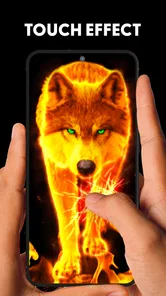
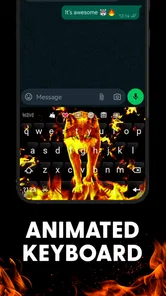
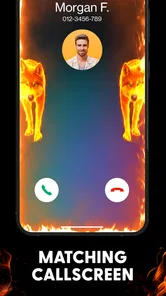
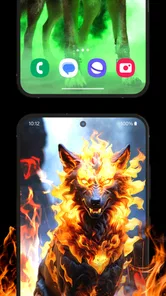
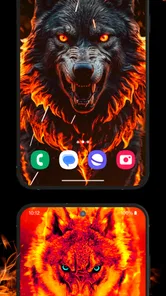
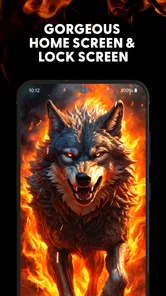
Analysis by Reviewed
I usually notice my phone’s wallpaper most when I’m waiting in line or checking a notification for the tenth time. A bold screen can make those little moments feel less routine, which is the appeal of Fire Wallpaper Theme Lone Wolf. It’s a free Android personalization app from Gif Keyboard Themes for Android, built around fiery imagery and a lone-wolf look. I’d consider it for someone who wants a strong visual theme without paying for one, though I’d approach its customization claims with care and check what the app actually offers on my device.
What the theme is best suited to
The wolf-and-fire style is quite specific: it suits someone who likes dramatic, high-contrast art more than soft gradients, nature photography, or a minimal home screen. If you change your wallpaper often because you enjoy a new mood, this theme gives you a clear visual direction rather than a huge collection of unrelated styles. It may be less appealing if you prefer a restrained screen or want artwork that stays subtle behind app icons.
A practical way to judge it is to try the background on both your home and lock screens before settling on it. Busy flames and detailed wolf art can look striking by themselves but compete with icons or make text harder to pick out. I’d choose the image that remains readable at a glance, not simply the one that looks most impressive in a preview.
Making the look work in daily use
For example, if I were refreshing my phone before a weekend trip, I’d pick a wolf image that still leaves a clear area for the clock and notifications, apply it, then use the phone normally for a day before deciding whether it’s a keeper. That small test catches a common wallpaper mismatch: an image can look great when selected and feel visually crowded once everyday icons are layered over it.
Choosing a background with a purpose
I’d make the selection based on where I look first on my screen, not only on the artwork’s subject. If I keep the clock near the top, a bright flame or the wolf’s face in that area can make the time harder to scan. A darker, less detailed patch behind the clock and notification previews can be more useful than an image with maximum contrast everywhere. This is a small but worthwhile trade-off: the most dramatic preview may not be the most practical daily wallpaper.
It also helps to think about how the image will sit alongside widgets. A weather panel, calendar, or music control can cover part of the design, so I’d avoid choosing a background whose main focal point lands exactly where those elements appear. I would apply the image, arrange my usual screen, and only then decide whether it works. That workflow is more reliable than judging the wallpaper in isolation.
Trust, choices, and a careful first run
Because this is a personalization app, I’d keep the decision focused on what I can see and control while using it. Before applying anything, I’d read the prompts the app presents and consider whether each requested access makes sense for the task on screen. I wouldn’t treat a theme or wallpaper as a reason to grant access unrelated to choosing or setting a background. If a prompt feels unclear, pausing to review it is a sensible choice.
More From Our News Desk

 Gmail
Gmail in a Busy Inbox: Who Benefits Most?
From first account to crowded workday, Gmail earns its place through dependable search and flexible sorting—but its best fit depends on how much inbox maintenance you can tolerate.

 Prime Video
Switching to Prime Video: What Changes in Your Viewing Routine
Prime Video can make a compelling second home for streaming, but switching means learning a different catalog, rental layer, and route from browsing to playback.

 Universal TV Remote Control
 Works Best as a Reliable Backup
A phone remote earns its place through quick setup and reliable habits. Here is how to get more from Universal TV Remote Control—and where its limits show.

 Weather - By Xiaomi
Weather by Xiaomi Review: Clear at a Glance, Less Clear Up Close
Xiaomi’s weather app makes everyday forecasts quick to scan, but its calm surface can leave useful details and recovery paths harder to find than they should be.

 X
X Under Pressure: Can It Recover When Posting Goes Wrong?
A resilience-focused review of X, examining setup, mistaken posts, interruptions, weak connections, and the gaps that matter when recovery needs to be dependable.

 Clash of Clans
 Is Won Between the Battles
Its raids are quick; its community is a long-term project of coordination, teaching, rivalry, and shared responsibility—with all the friction that entails.
Latest News



I’d also check the result after applying a theme: make sure the wallpaper is the one I selected, and confirm that the phone still feels comfortable to use. A dramatic image can change the screen’s mood, but it shouldn’t make routine actions harder. This is especially worth checking if you use your phone outdoors, rely on lock-screen notifications, or keep many shortcuts on the home screen.
Permissions and data-sensitive moments
When I try a new wallpaper tool, I treat each access prompt as a separate decision rather than accepting everything just to reach the artwork. The useful question is whether the permission is clearly connected to the action I’m taking at that moment. If I’m only browsing images, I would not assume that every request is necessary; I’d read the wording and decide whether to continue, deny it, or leave that part of the app unused.
I also keep in mind that applying a background is a visible change, while permissions and account choices are separate matters. I wouldn’t infer a privacy guarantee from the app’s visual purpose, nor would I assume that a particular account system or data control exists without seeing it. My practical approach is to use the choices the app and Android actually show, avoid granting access casually, and revisit device settings if I later want to change a permission.
How it compares with simpler alternatives
Compared with choosing a single image in your phone’s built-in wallpaper settings, a themed app can offer a more cohesive visual idea. The trade-off is that the built-in option is usually the more direct route if all you want is one picture and no extra theme elements. Likewise, a general wallpaper app may suit you better if you want a wide variety of styles instead of committing to fire and wolf artwork.
There’s another useful distinction: a built-in wallpaper picker keeps the task focused on setting an image, while an app centered on a particular aesthetic may encourage you to explore its own presentation and related styling. That can be enjoyable if you want the wolf-and-fire look to feel intentional. If you value fewer steps and already have a suitable picture saved, your phone’s own settings are likely the simpler choice.
I’d avoid assuming every customization option will be useful just because it sounds appealing. The strongest reason to try this one is its distinct look; if you only want a clean background, extra styling may be unnecessary. And if you prefer to keep your home screen visually quiet, a simple photograph or plain color is likely a better fit.
A realistic everyday test
Imagine checking a message while walking between classes or stepping outside on a bright afternoon. In those moments, a wallpaper has to do more than look striking in a preview: icons, time, and notification text need to stay easy to distinguish. I’d use the phone in the lighting and layout I normally encounter before deciding to keep the theme. If the artwork makes the screen feel cluttered, I’d switch to a calmer image rather than reorganize everything around it.
For someone who likes to change their phone’s appearance with the season or a new interest, this can be a low-commitment experiment: try one image, live with it, and revert if it becomes distracting. It is less compelling for someone who wants a large, carefully filtered library across many unrelated styles, or for anyone who regards the home screen primarily as a clean workspace.
Ever found yourself scrolling through your phone, feeling like it needs a fresh new vibe? Well, let me introduce you to the Fire Wallpaper Theme Lone Wolf app. It’s one of those apps that makes you feel like your phone has just been through a major makeover, and trust me, it’s quite the transformation! This app is available for both Android and iOS, which is super convenient for all of us who like to switch things up every now and then.
Unleashing the Lone Wolf
When I first installed the Fire Wallpaper Theme Lone Wolf, I was immediately struck by the sheer variety of wallpapers it offers. From fiery backgrounds that make your screen pop to more subtle, wolf-themed artwork that brings a sense of calm and mystery, there's something for every mood. The app doesn’t just stop at wallpapers; it also offers a range of themes that can change the entire look of your phone interface. It’s like giving your phone a personality that resonates with your own.
Customization Galore
One of the things I totally dig about this app is the level of customization it offers. You can tweak almost everything! Whether it’s adjusting the brightness of the wallpapers or setting up a schedule for your themes to change automatically, this app is all about making your phone reflect your personal style. And let’s be honest, who doesn’t love a bit of customization?
Easy to Navigate
Now, I’ve tried a bunch of wallpaper apps before, and one thing that really grinds my gears is when they’re a nightmare to navigate. Thankfully, the developers of this app seem to have taken this into account. The app is super user-friendly, with a clean interface that makes finding and applying new themes a breeze. Plus, the download speeds are pretty impressive, so you won’t be left hanging when you’re eager to see your new look.
Making personalization manageable
One thing I find helpful with any strongly themed wallpaper is to change one visual element at a time. I’d start with the background and leave my icons and widgets as they are, then check whether the screen feels balanced. If I change several things at once, it becomes harder to tell what is making the display feel busy. This gradual approach is especially useful for a theme built around vivid flames and a prominent animal image, where small layout differences can affect readability.
I’d also keep a note of what I liked about the chosen image before browsing for another. Was it the wolf silhouette, the warmer colors, or the darker space behind the clock? That simple preference check can make the next choice faster and keep me from repeatedly picking an impressive-looking image that does not suit my actual screen. The app’s appeal is strongest when the art matches how I use my phone, rather than when I treat customization as a checklist.
Why You'll Love It
Aside from its stunning graphics and ease of use, what really makes this app stand out is the way it can transform the mundane into something extraordinary. Your phone is something you look at countless times a day, so why not make it a reflection of something you love? Whether you’re a fan of the lone wolf aesthetic or just love a good fiery wallpaper, this app has got you covered.
In conclusion, if you’re looking to spice up your phone with some seriously cool visuals, this app is definitely worth checking out. It’s easy to use, offers a ton of customization, and most importantly, it makes your phone look awesome. So go ahead, give your phone the makeover it deserves!
Who should try it, and what to expect
The app has a 4.6 average from around 110,000 ratings, and it has passed 10 million installs. That level of uptake suggests the fiery wolf aesthetic has found an audience, but popularity doesn’t tell me whether it will suit your screen or preferences. It’s rated Teen, is currently at version 5.28.9, and supports Android 5.0 and later. I’d recommend it most to Android users who want a coordinated, expressive look and are comfortable reviewing the available choices as they set it up.
If your main question is whether you have to pay to try it, it’s free. If you’re wondering whether it’s for iPhone, the version considered here is an Android app, so iOS users should look for an option specifically available for their device rather than expect this one to work there. The developer is Gif Keyboard Themes for Android, a name that also hints at a broader keyboard-theme focus, but I’d judge this particular app by the wallpaper and theme options I can actually access.
A measured recommendation
My cautious recommendation is to try it if the lone-wolf-and-fire aesthetic genuinely appeals to you, then judge the result by how your phone feels during ordinary use. I’d check the prompts carefully, pick a background that preserves legibility, and avoid treating a dramatic preview as proof that every extra styling option is worth enabling. If you want a quiet screen, a broad range of unrelated artwork, or the most direct way to set one saved image, the standard wallpaper settings or a more general alternative may fit better. For an Android user who wants a distinctive look and is happy to make the final choices deliberately, it is a reasonable free option to explore.
Fire Wallpaper Theme Lone Wolf Frequently Asked Questions
Can I use Fire Wallpaper Theme Lone Wolf without changing my keyboard?
The app is presented as a fire wallpaper and keyboard theme, so it may appeal if you want a coordinated look for more than one part of your phone’s interface. You can decide whether its wallpaper or keyboard styling suits you as you set it up, and keep in mind that applying a theme can change the appearance of your device.
What should I check before installing Fire Wallpaper Theme Lone Wolf?
Before downloading, check that your phone runs Android 5.0 or later and consider whether a bold wolf-and-fire design is the style you want. The app is free and has a Teen content rating. Those details can help you decide whether it is a suitable choice for your device and for the person who will use it.
Will Fire Wallpaper Theme Lone Wolf work on my Android phone?
Fire Wallpaper Theme Lone Wolf is an Android personalization app for customizing your phone with a fire-themed design. It requires Android 5.0 or later, so check your device’s operating system before downloading. The app is free and has a Teen content rating, details worth considering when deciding whether it suits your device and preferences.
Who is Fire Wallpaper Theme Lone Wolf designed for?
The app is aimed at people who enjoy bold, dramatic phone styling and want a wolf-and-fire look. It is listed in the Personalization category and is developed by Gif Keyboard Themes for Android. Its Teen content rating may also help families decide whether the app is appropriate for a particular user.
What is Fire Wallpaper Theme Lone Wolf?
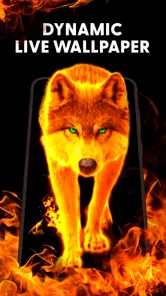
Fire Wallpaper Theme Lone Wolf is a visually striking app designed to enhance your phone's appearance with high-quality, dynamic wallpapers featuring a fierce lone wolf surrounded by flames. It's perfect for users who appreciate bold, eye-catching designs and want to personalize their devices with a unique look that stands out.
Pros
- Stunning high-resolution graphics.
- Easy to navigate user interface.
- Regular updates with new wallpapers.
- Minimal impact on battery life.
- Varied customization options.
Cons
- Ads can be intrusive at times.
- Limited free wallpaper options.
- Requires internet for downloading themes.
- Occasional lag on older devices.
- Customization options locked behind paywall.