

Fine Lock (only for Samsung)
- 1.06K
- 4.4
- Installs
- 10.00M
- Price
- Free

Screenshots
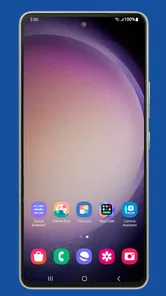
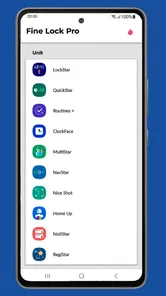
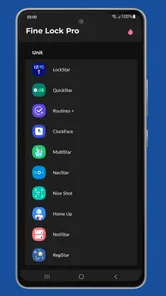
Analysis by Reviewed
I find Fine Lock most useful for one specific job: giving Samsung owners a convenient way to reach Good Lock and Good Guardians modules when those tools aren’t directly available to them through the usual route. It is a personalization app from YUH APPS, but it isn’t itself a collection of deep phone tweaks. Think of it as a launcher and organizer for Samsung’s modules, which do the actual customizing. That distinction matters: installing it is a starting point, not a shortcut that automatically changes your device.
A gateway, not a customization module
The practical benefit is having a place to find and open the modules you choose instead of hunting for each one separately. Fine Lock’s role is especially relevant to Samsung users whose region or device setup makes Good Lock harder to access. You still need to install the modules themselves, and their availability and behavior depend on Samsung’s own software and compatibility. I’d treat Fine Lock as a useful doorway, not as a replacement for Samsung’s tools.
That arrangement also shapes what you should expect after installation. If you open Fine Lock and see a module you want, you may need to follow its route to obtain that module before you can use its settings. The app makes discovery and access more straightforward, but it does not remove every step. If you were expecting one download to unlock a complete suite of controls instantly, that’s not how this setup works.
What the launcher changes—and what it doesn’t
The useful distinction is between finding a control and actually applying it. Fine Lock brings the module route into one place; the module remains the tool that presents and applies its own settings. I find that division sensible because it keeps the app’s job focused, but it also means the experience is not a single, seamless customization panel. You move from the launcher to a separate module, and sometimes need to deal with a separate installation first.
That makes it worth asking what you want to customize before you begin. If your aim is to change one specific part of Samsung’s interface, Fine Lock can help you get to the relevant tool without turning the search into a project. If your goal is simply to make the phone feel new, with no particular setting in mind, the module list may leave you wondering where to start. I’d approach it with a small, concrete goal rather than browsing until I’ve changed several things at once.
Discovering the Magic of Fine Lock
Let’s dive into the world of Fine Lock. This nifty app is basically a gateway to Samsung’s Good Lock modules. You might be wondering, what the heck are Good Lock modules? Well, these are Samsung’s secret sauce for making your phone truly yours. They let you customize everything from the lock screen to the notification panel, offering options that Android enthusiasts dream about.
Getting Started
First things first, getting Fine Lock up and running is a breeze. You just download it from the Play Store, and you’re halfway there. One thing to note is that since it’s a third-party app, you’ll need to manually install the Good Lock modules. But don’t sweat it, the app provides handy links to get you sorted in no time. Just a few taps, and you’re golden!
More From Our News Desk

 Gmail
GmailGmail in a Busy Inbox: Who Benefits Most?
From first account to crowded workday, Gmail earns its place through dependable search and flexible sorting—but its best fit depends on how much inbox maintenance you can tolerate.

 Prime Video
Switching to Prime Video: What Changes in Your Viewing Routine
Prime Video can make a compelling second home for streaming, but switching means learning a different catalog, rental layer, and route from browsing to playback.

 Universal TV Remote Control
Universal TV Remote Control Works Best as a Reliable Backup
A phone remote earns its place through quick setup and reliable habits. Here is how to get more from Universal TV Remote Control—and where its limits show.

 Weather - By Xiaomi
Weather by Xiaomi Review: Clear at a Glance, Less Clear Up Close
Xiaomi’s weather app makes everyday forecasts quick to scan, but its calm surface can leave useful details and recovery paths harder to find than they should be.

 X
XX Under Pressure: Can It Recover When Posting Goes Wrong?
A resilience-focused review of X, examining setup, mistaken posts, interruptions, weak connections, and the gaps that matter when recovery needs to be dependable.

 Clash of Clans
Clash of Clans Is Won Between the Battles
Its raids are quick; its community is a long-term project of coordination, teaching, rivalry, and shared responsibility—with all the friction that entails.
Latest News



In everyday use, I’d start with one module that solves a problem I actually have rather than installing several just because they’re available. For example, if I keep reopening the same apps and find the recent-apps screen awkward, a task-switching module is a more focused first test than changing multiple parts of the interface at once. That makes it easier to tell whether a customization genuinely helps or simply makes the phone feel unfamiliar.
Features That Shine
What really stands out with Fine Lock is its ability to let you cherry-pick the modules that suit your style. Whether you’re into tweaking your task manager for efficiency or jazzing up your home screen, there’s something for everyone. I personally loved the Task Changer module—it’s like giving your recent apps a complete makeover. Plus, the LockStar module is a game-changer for those who like to switch up their lock screen aesthetics.
One useful habit is to check whether a module fits your particular Samsung device and software before building your setup around it. Samsung’s modules are separate from the launcher, so an option appearing in Fine Lock doesn’t mean every phone will support it in the same way. I’d also make one change at a time and use the phone normally for a while; that gives you a clearer sense of whether a new layout or behavior is an improvement you’ll keep.
A realistic use case is a busy morning: I unlock my phone, move between a calendar, messages, and a work app, then lock it again while heading out. If the recent-apps view is the part that slows me down, changing that experience can make a small repeated task feel smoother. Fine Lock helps me get to the relevant module, but the payoff comes from choosing a setting that matches my routine—not from customizing every screen for its own sake.
Testing a change without making the phone harder to use
For practical experimentation, I’d keep a simple mental note of the original behavior before changing anything. That gives me a reference point when I’m deciding whether a different lock screen or task-switching layout is genuinely easier. If the change feels distracting after a day of normal use, I can return to the module and undo it rather than layering another adjustment on top. This is a small discipline, but it helps keep personalization from becoming a confusing collection of settings.
It also helps to separate “looks different” from “works better.” A striking interface change can be fun for a while, but the most lasting benefit is usually a control that fits a repeated habit, such as moving between apps or finding the information you want on the lock screen. I’d try a visual change when I’m curious, but judge it by how it feels during ordinary use rather than by the first impression.
Features, limits, and the right fit
Another highlight is the user-friendly interface. Even if you’re not a tech wizard, Fine Lock makes it super easy to navigate and find what you’re looking for. The app does a stellar job at keeping things simple and straightforward.
Compared with a typical Android launcher, Fine Lock takes a narrower route. A general launcher usually changes the home screen experience across a wider range of Android phones; Fine Lock is specifically useful for reaching Samsung’s own customization modules. If you want a different icon layout or a broad home-screen makeover, your existing launcher or another launcher may be the better place to start. If you want Samsung-specific controls, this app’s focused approach makes more sense.
There are trade-offs. Manual module installation adds a step, and a Samsung software update can affect whether a module behaves as expected. Fine Lock can make access easier, but it cannot guarantee that every module will suit every device or remain compatible after changes from Samsung. If a feature stops working, I’d check the module and device compatibility before assuming the launcher itself is the cause. People who want a set-it-and-forget-it phone with no extra setup may prefer to leave these tools alone.
Where the extra setup pays off
The access model is best understood as a small chain: Fine Lock helps you locate a module, you obtain that module separately, and then you use its controls. If the result is a setting you’ll rely on every day, those steps can feel worthwhile. If you only want a one-off cosmetic change, the extra handoff may feel like more effort than the result deserves. That is why I’d decide on the desired outcome first, then see whether a module supports it.
When something does not behave as expected, I would troubleshoot in that same order. First, check whether the module itself is installed and opens; next, consider whether it supports the device and software currently in use. That is more useful than repeatedly reopening Fine Lock, because the launcher is not the component applying the customization. Keeping that distinction in mind can save time and avoid blaming the wrong part of the setup.
Why It’s Worth It
Now, you might be wondering, “Do I really need this app?” Let me tell you, if you’re a fan of customization, Fine Lock is worth every megabyte. It’s like having a buffet of options at your fingertips, allowing you to change the look and feel of your Samsung device as often as you change your socks. And hey, who doesn’t love a bit of variety?
For a Samsung owner deciding whether to try it, the key question is whether you want access to those modules enough to accept a little hands-on setup. Fine Lock is free, rated for Everyone, and has a 4.7 average from around 52,000 ratings, with over 10 million installs. It also offers in-app purchases at $1.99 per item. Those figures suggest a well-used app, but I’d still judge it by the practical fit: it is most rewarding for someone who enjoys testing Samsung-specific adjustments and keeping only the ones that help.
It is less compelling if you only want a fresh wallpaper, a few icons, or a complete launcher replacement. Those needs are usually easier to handle with Android’s built-in personalization or a conventional launcher, without managing separate Samsung modules. Fine Lock’s strength is not that it does everything; it is that it gives interested Samsung users a more convenient path to a particular family of tools.
What to expect when a module changes
A module can be a more specific answer than switching launchers, but that specificity comes with a dependency: Samsung’s own software and the module’s compatibility shape the outcome. If an update changes how a setting behaves, Fine Lock cannot make the underlying module independent of those changes. I would therefore avoid treating a carefully customized layout as permanent. Keep the setup simple enough that you can adjust it again if a module no longer behaves as you expect.
That caution matters most for changes that affect routines rather than appearance. A different recent-apps arrangement can influence a task you perform many times a day, while a lock-screen adjustment may change what you notice at a glance. I’d give each meaningful change a little time in normal use, and remove it if it creates hesitation or extra taps. Personalization is only useful when it makes the phone feel more natural to you.
Of course, Fine Lock isn’t without its quirks. Being a third-party app, it relies on Samsung’s updates for the Good Lock modules to keep everything running smoothly. But in my experience, the developer does a fantastic job at keeping the app updated and compatible with the latest Samsung firmware.
Who benefits most from the extra control
The app makes the most sense for people who already know which part of their Samsung experience they want to adjust, or who are comfortable exploring modules one by one. It can also suit someone who enjoys personalizing a phone gradually: try a lock-screen change, live with it, then decide whether another module is worth adding. That measured approach keeps the setup useful rather than turning it into a collection of tweaks you forget how to undo.
If you share a device or depend on a familiar interface for accessibility or routine, be conservative with changes that affect navigation and screen layout. Before experimenting, note which module you changed so you can retrace your steps if the phone feels less convenient. Fine Lock is best when customization remains reversible and purposeful, not when every available option becomes a reason to alter something.
When another option is the better one
I would skip Fine Lock if what I really wanted was a broad makeover with minimal effort, or if I did not want to manage Samsung modules separately. Built-in Android settings are a simpler starting point for basic personalization, while a conventional launcher is more appropriate when the goal is to reshape the home screen itself. Neither is a direct substitute for the Samsung-specific module route, but they may be a better match for someone who wants fewer steps and less experimentation.
For someone who enjoys learning how a phone’s interface fits together, the separate pieces are less of a drawback. They make it possible to focus on one area and leave the rest alone. The best fit is not necessarily the person who changes the most; it is the person who has one or two adjustments in mind and is willing to check that each one works well on their own Samsung device.
Final Thoughts
In conclusion, Fine Lock is a must-have for any Samsung user who loves to tinker and tweak. It opens up a world of possibilities that can turn your device from ordinary to extraordinary. So, if you’re ready to take your customization game to the next level, give Fine Lock a whirl. Trust me, your phone will thank you.
Fine Lock (only for Samsung) Frequently Asked Questions
Who develops Fine Lock, and what kind of app is it?
Fine Lock is a personalization app developed by YUH APPS. It serves as a launcher for Samsung Good Lock and Good Guardians modules, giving users a place to open those tools. It is not the modules themselves; its main role is to help Samsung users access them. That distinction is useful to understand before downloading, since the available customization depends on the modules and device.
What is Fine Lock, and what does it do?
Fine Lock is a launcher for Samsung Good Lock and Good Guardians modules. After installing it, users can use its interface to access compatible modules that provide device-personalization options. Fine Lock does not replace those modules or independently provide all of their customization features. Its practical value is in making the modules easier to reach, particularly for Samsung owners who want to organize and launch their supported tools from one app.
Can I use Fine Lock if Good Lock is unavailable in my region?
Fine Lock can provide a way to access Good Lock modules in regions where the standard Good Lock app is not officially available. It acts as a launcher rather than replacing the modules themselves, so the experience still depends on whether your Samsung device supports the relevant modules. It may be a useful option for Samsung owners looking to personalize their devices when the usual app is unavailable.
Is Fine Lock compatible with all Samsung devices?
Fine Lock is specifically designed for Samsung devices that support Good Lock. It is important to note that not all Samsung models support Good Lock, so users should verify their device compatibility before downloading Fine Lock. Checking the device's eligibility can save users from unnecessary trouble and ensure a smooth experience.
What features does Fine Lock offer for Samsung users?
Fine Lock acts as a launcher for Samsung's Good Lock and its modules. It offers a user-friendly interface to manage and access various Good Lock modules such as LockStar, QuickStar, and others. This app simplifies the process of customizing a Samsung device, enhancing the user's ability to personalize their experience efficiently.
Pros
- Seamless integration with Samsung devices
- User-friendly interface
- Customizable lock screen features
- Supports various widgets
- Fast performance
Cons
- Limited to Samsung devices only
- Paid features can be expensive
- Occasional bugs with updates
- Requires frequent app permissions
- No support for non-Samsung devices











