Find my phone・Location tracker
- 36.00
- 3.7
- Installs
- 1.00M
- Price
- Free
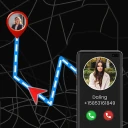
Screenshots

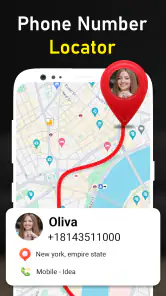
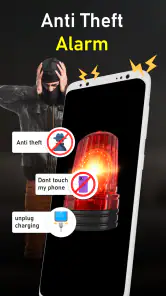
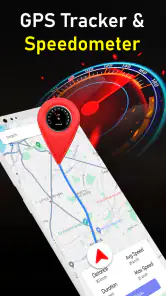
Analysis by Reviewed
Before installing a phone locator, I’d think about the problem I actually want it to solve. If my phone slips between couch cushions, a sound may be all I need; if I leave it at a café, a map and recent location clues matter more. Find my phone・Location tracker is a free Travel & Local app from Habile Dev GPS Camera & Blood Pressure Health Apps, focused on helping with those everyday searches. It has a 3.7 average from around 3,400 ratings and over a million installs. That makes it a widely used option, while the rating is a reminder that setup and results may not feel equally smooth for everyone.
Getting Started with the App
First things first, downloading and installing the app is a breeze. Just a quick trip to the app store, a couple of taps, and you're ready to roll. The user interface is clean and intuitive, which is always a plus in my book. I was up and running in no time, without having to wade through a tedious setup process. The app guides you through enabling the necessary permissions to ensure it can function properly, which is crucial for an app like this.
Set It Up Before You Need It
My practical advice is to complete setup while your phone is in your hand and you have time to read each prompt. Check that the app’s location access is enabled as requested, and make sure the device has a working internet connection. A location tool can only help if it has the access and connectivity it needs; installing it after a phone disappears is too late to sort out those basics. The app is rated for Everyone, runs on Android 7.0 and up, and version 1.58 is the current version.
Before relying on it, try the basic locating process in a low-stress setting. Keep the phone somewhere nearby, use the app’s available locating option, then compare the result with where you know the device is. This simple check helps you learn which screen or map marker to look for and whether your permissions are in place. It also avoids the common mistake of assuming that installing a tracker automatically means another device can see this phone; follow the app’s own setup prompts rather than guessing how its connection works.
Make the First Test Useful
I’d do the first trial in two stages rather than treating one successful map result as proof that every situation is covered. First, check the location while the phone is in a familiar place. Then, when you are ready, try the ringing option with the phone nearby but out of sight. Those tests answer different questions: whether you can interpret the location display, and whether sound helps you find a device you cannot see.
There is a practical trade-off here: testing at home is reassuring, but it does not reproduce every condition you might face outdoors. A phone in a building, a weak connection, or a change in location access can affect what you see. I’d use the test to learn the controls and confirm the basic workflow, not as a promise that the app will always show a precise live position.
Main Features
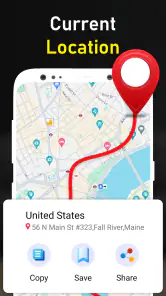
The Find my phone・Location tracker app is packed with features designed to ease your mind when your phone decides to play hide and seek. The standout feature, of course, is the real-time location tracking. It's surprisingly accurate, allowing you to pinpoint your device's location on a map with impressive precision. I tested it out by "losing" my phone around the house, and sure enough, the app led me straight to it.
More From Our News Desk

Clash of Clans Is Won Between the Battles

Android Auto Makes the Case for Quieter Car Software

MobiOffice: Transforming Mobile Productivity with Seamless Integration

EA SPORTS FC™ Mobile Soccer: Redefining Mobile Sports Gaming

How Microsoft OneDrive Became a Mobile Productivity Giant

How Google Translate Breaks Language Barriers Effortlessly
Another handy feature is the ability to make your phone ring at full volume, even if it's on silent. This was a lifesaver for me, as my phone often finds its way into the most obscure places. Additionally, the app offers a location history, so you can see where your phone has been—ideal for those of us who are a bit forgetful about where we last had our device.
Choose the Right Clue for the Search
For a realistic everyday test, imagine leaving your phone under a sofa cushion after getting home. The ring option is more useful than staring at a map in that moment: it gives you a sound to follow, even if you normally silence your phone. I’d check that this action works before depending on it, and I’d keep the phone’s battery in mind. A tracker is not a substitute for a charged device, and a map can’t make a phone reachable if it is switched off or unable to connect.
If you left the phone somewhere outside the house, location history can help you retrace where it was last seen, but it should be treated as a clue rather than a guarantee of its present position. Connectivity, location access and time all matter when interpreting a map. If the displayed point seems stale or imprecise, I’d first check the phone’s connection and permissions, then try again instead of repeatedly refreshing and assuming the app has failed.
How I’d Use It on a Busy Day
One useful routine is to make the last known point part of a quick search plan. Suppose I notice on the bus that my phone is missing: I would avoid assuming the marker shows where it is at that exact moment, and instead use the history as a lead. I’d think back to the last place I remember using it, check that location against the app’s indication, and contact the venue or transit service if that makes sense. The app can narrow the search, but it cannot retrieve the device or establish who has it.
That distinction is important because a map can feel more certain than it is. A marker is information to act on, not proof that the phone remains there. If the device may be in someone else’s hands, I would switch from ordinary misplaced-phone steps to protecting my accounts and using the phone’s built-in security options. This app is most useful when it helps me choose the next sensible action, not when I expect it to handle the whole recovery process.
User Experience
Using the app is a smooth experience, which is something I really appreciated. Navigating through the different features is straightforward, and I didn't encounter any hiccups or bugs during my time with it. The app also provides a helpful FAQ section, which answers most of the common questions users might have. It's clear that the developers put a lot of thought into making the app as user-friendly as possible.
One thing to note is that the app does require a stable internet connection to function optimally. This might be a slight drawback if you're in an area with poor connectivity, but I found that it worked well in most situations I tested it in.
Permissions, Connection, and Expectations
If the location does not appear as expected, I would troubleshoot in a calm order rather than immediately reinstalling. I’d check whether the phone has internet access, revisit the location permission requested during setup, and confirm that I am following the app’s own process for locating it. This order matters: repeatedly tapping the same control will not fix a disabled permission or a disconnected device.
For a first-time user, it is also worth deciding what “success” means before an urgent moment. Finding a phone in the same room by sound is a different result from seeing a useful location clue after leaving it elsewhere. I’d test both functions separately, then remember their limits. A successful nearby ring does not guarantee that a phone with no connection can be located remotely, and a map result does not guarantee that the phone is still at that point.
What It Can—and Cannot—Replace
I’d consider this a convenient extra for someone who regularly misplaces a phone and wants location, ringing and a history view in one place. It is less suited to someone who needs a dependable recovery plan for a stolen device, wants extensive remote security controls, or often travels through areas with unreliable service. In those cases, I would compare it with the phone’s built-in finding service and security tools rather than relying on one app alone. Those system-level options may fit better if your priority is account-based recovery or broader device protection; this app’s appeal is its straightforward locating focus.
A common point of confusion is expecting a tracker to find a phone just because the app is installed. The setup and access on the device matter, as does a connection when you try to locate it. I’d also distinguish a phone that is merely hidden nearby from one that is genuinely unreachable: ringing can help with the first, while a map or history may offer context for the second. Neither removes the need to secure your accounts and contact the relevant authorities if you believe the device was stolen.
Who Will Get the Most from It
I think this is a better fit for someone whose main problem is forgetfulness than for someone planning for a high-risk theft scenario. If I often leave my phone in a different room, misplace it at home, or want a location clue after setting it down somewhere familiar, the combination of ringing and a map-based view makes practical sense. It can also suit a first-time user who prefers to learn a small set of locating actions rather than manage a complicated security setup.
I’d be more cautious if I relied on a phone for work while moving through places with inconsistent internet, or if losing it would require remote locking and account-management tools. In that case, I’d first configure the device’s built-in recovery and security features, then decide whether this app adds enough convenience to justify maintaining a second option. A tracker is only helpful when the permissions, connection and recovery workflow are already in place.
Cost and Fit
The app is free to install, with in-app purchases ranging from $7.99 to $23.99 per item. I’d try the core experience first and decide whether any paid option is worth considering only after checking what it offers in the app. That keeps the decision grounded in your own needs instead of paying in advance for a feature you may not use. With 36 reviews alongside its broader rating count, I’d also treat individual opinions as useful context, not a guarantee that every setup will behave identically.
Before considering a purchase, I’d identify the specific limitation I am trying to solve and check whether an in-app option addresses it. If my concern is a weak connection or a phone that is switched off, paying for an extra would not change those basic conditions. If I only need occasional help finding a phone around the house, I would first see whether the free experience already fits that routine. That keeps the choice practical rather than letting anxiety about a possible loss drive it.
Final Thoughts
All in all, Find my phone・Location tracker delivers on its promise to help you keep track of your phone. It's a reliable tool for those of us prone to misplacing our devices, offering peace of mind and an easy way to locate a lost phone. While it may not be a replacement for more robust tracking solutions, it's definitely a handy app to have in your arsenal.
So, if you're like me and tend to misplace your phone more often than you'd like to admit, give this app a try. It might just save you from a few panic attacks!
My recommendation is to install it, work through setup, and test locating and ringing while the phone is still nearby. That gives you a realistic sense of whether it suits your routine and helps avoid learning the controls during a stressful search. If you need a simple aid for everyday misplacement, that preparation is worthwhile; if you need stronger theft recovery or robust security features, pair it with the built-in tools on your phone or choose a more comprehensive option.
Find my phone・Location tracker Frequently Asked Questions
Is Find My Phone・Location Tracker free to download, and are there any paid features?
Find My Phone・Location Tracker is free to download, so you can try its phone-finding tools without paying upfront. It also offers in-app purchases, with listed items ranging from $7.99 to $23.99. Check the purchase details in your app store before confirming anything, especially if you plan to use the app regularly or let someone else use your device.
Who is Find My Phone・Location Tracker intended for, and what should I know before installing it?
This is a Travel & Local app from Habile Dev GPS Camera & Blood Pressure Health Apps, intended for people who want help locating a phone. It is rated for Everyone, and its short description is simply “Find my phone.” The app has a 3.7 average from around 3.4 thousand ratings, with over one million installs, which can help you gauge its general reach before downloading.
What is the primary function of Find My Phone・Location Tracker?
Find My Phone・Location Tracker is designed to help users locate their lost or stolen smartphones with ease. It utilizes GPS technology to provide real-time location updates, ensuring you can track your device's whereabouts. This app is particularly useful for people who frequently misplace their phones or worry about theft.
Is Find My Phone・Location Tracker compatible with both Android and iOS devices?
Yes, Find My Phone・Location Tracker is available for both Android and iOS platforms. Users can download it from the Google Play Store for Android devices and the Apple App Store for iOS devices. The app is designed to work seamlessly across both platforms, allowing users to track their devices regardless of the operating system.
Does Find My Phone・Location Tracker require an internet connection to function?
While Find My Phone・Location Tracker primarily uses GPS technology to locate devices, it does require an internet connection to provide real-time updates and to send notifications to the user. Without an internet connection, the app may only provide the last known location of the device, limiting its effectiveness.
Pros
- Easy to use interface.
- Fast location updates.
- Works globally with any network.
- Battery-efficient tracking.
- Supports multiple devices.
Cons
- Requires internet for tracking.
- Limited features in free version.
- Can drain battery quickly.
- Privacy concerns with data sharing.
- Subscription can be expensive.
- Category
- Travel & Local
- Version
- 1.58