

FFL Plants & Pollinators
- 14.00
- 4.3
- Installs
- 10.00K
- Price
- Free
Screenshots
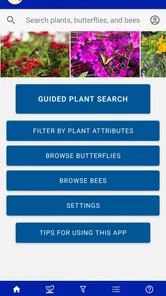
Analysis by Reviewed
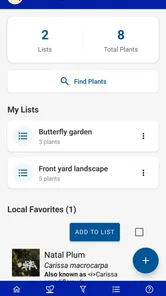
Choosing a plant for a Florida yard can be surprisingly difficult. A plant that looks perfect at a garden center may struggle in your soil, attract little wildlife, or demand more water than you expected. FFL Plants & Pollinators is designed to make that decision more practical by focusing on Florida-friendly planting and pollinator value. I found it most useful as a planning companion rather than a complete gardening course: it helps narrow the field, gives beginners a clearer starting point, and encourages choices that fit the local environment.
The app comes from UF/IFAS IT and sits in the House & Home category. It is free to use, rated for Everyone, and supports devices running Android 7.0 or later. Its current version is 4.0.30, and the app has reached over ten thousand installs. Those details matter because this is not a niche tool limited to recent phones or paid subscribers; it is an approachable resource for someone standing in a nursery aisle, sketching a new bed, or simply trying to replace a struggling shrub.
What to expect before you start
The main idea is simple: instead of choosing plants only by flower color or appearance, you can use the app to think about how a plant belongs in a Florida landscape. That change in mindset is the real benefit. I would not open it expecting a full landscape-design program, a watering timer, or a social network for gardeners. Its value is more focused: helping you investigate plant choices and consider pollinators as part of the decision.
That focus makes it especially suitable for first-time homeowners, renters with permission to improve a patio or shared garden, families introducing children to native wildlife, and experienced gardeners who want a convenient reference while comparing candidates. It can also help someone who has inherited a yard without knowing what is already growing there. Rather than removing all uncertainty, it gives you a more sensible way to ask questions before spending money.
The pollinator angle is important, but I would avoid treating it as a promise that every recommended plant will instantly transform a garden. Pollinators need more than one attractive flower. They benefit from suitable bloom timing, shelter, water, and a landscape that avoids becoming a single-season display. The app is most valuable when I use it as one part of a broader plan: selecting several compatible plants instead of buying one isolated specimen because its picture caught my eye.
Compared with a general web search, the experience feels more purposeful. A search engine may return nursery pages, personal blogs, old forum discussions, and advice from completely different climates. That can be useful, but it also makes it easy to confuse advice for another region with guidance relevant to Florida. Compared with a printed gardening book, the app is easier to carry into a store and quicker to consult when I am comparing several possibilities. Its trade-off is that a book may provide more background, diagrams, and long-form explanation.
Who will get the most from it
I think the strongest audience is someone who wants to make a better first choice, not someone looking for a complete diagnosis of an existing garden. If you are unsure whether a plant belongs in your yard, the app can help you move from vague enthusiasm to a more informed shortlist. It is also useful for community planting projects, school gardens, and small pollinator beds where the goal is to explain why particular plants were selected.
More From Our News Desk

 Gmail
GmailGmail in a Busy Inbox: Who Benefits Most?
From first account to crowded workday, Gmail earns its place through dependable search and flexible sorting—but its best fit depends on how much inbox maintenance you can tolerate.

 Prime Video
Switching to Prime Video: What Changes in Your Viewing Routine
Prime Video can make a compelling second home for streaming, but switching means learning a different catalog, rental layer, and route from browsing to playback.

 Universal TV Remote Control
Universal TV Remote Control Works Best as a Reliable Backup
A phone remote earns its place through quick setup and reliable habits. Here is how to get more from Universal TV Remote Control—and where its limits show.

 Weather - By Xiaomi
Weather by Xiaomi Review: Clear at a Glance, Less Clear Up Close
Xiaomi’s weather app makes everyday forecasts quick to scan, but its calm surface can leave useful details and recovery paths harder to find than they should be.

 X
XX Under Pressure: Can It Recover When Posting Goes Wrong?
A resilience-focused review of X, examining setup, mistaken posts, interruptions, weak connections, and the gaps that matter when recovery needs to be dependable.

 Clash of Clans
Clash of Clans Is Won Between the Battles
Its raids are quick; its community is a long-term project of coordination, teaching, rivalry, and shared responsibility—with all the friction that entails.
Latest News



There are situations where I would choose another tool first. If your immediate problem is a diseased leaf, an unknown pest, irrigation failure, or a detailed soil amendment plan, a specialist extension article or direct local advice may be more suitable. Likewise, anyone expecting precise construction plans, automatic plant recognition, or a shopping cart will probably find this app too narrow. Its strength is informed selection, not replacing every other gardening resource.
Getting started without feeling lost
The first setup is pleasantly low-pressure. I recommend opening the app before you visit a nursery and giving yourself a few quiet minutes to understand how its plant information is organized. Do not begin by trying to memorize names. Start with the question you actually need to answer: am I looking for a flowering plant, a structural shrub, a groundcover, or something that can support pollinators in a particular part of the yard?
A useful first step is to make a short note on your phone or on paper describing the intended spot. Record whether it receives strong sun, filtered light, or shade; whether the soil stays damp or dries quickly; and whether the location is exposed to wind, foot traffic, pets, or children. The app becomes much more helpful when I compare its plant information with those observations instead of browsing randomly.
One practical tip is to separate “plants I like” from “plants that can work.” I usually save or note attractive candidates in one group, then check them again against the actual conditions at home. This prevents a common mistake: choosing a plant for its bloom while ignoring the fact that the planting bed is shaded for most of the day. The app cannot make that observation for you, so the best results come from combining its guidance with a quick inspection of the site.
Another useful habit is to use the app before buying rather than after planting. A rushed purchase often creates a chain of compromises: the wrong light level leads to weak growth, weak growth encourages extra watering, and extra watering can affect neighboring plants. Spending a few minutes comparing suitable choices is cheaper and less frustrating than trying to rescue an unsuitable plant later.
Because the app is free, there is little risk in installing it as a reference even if you are only planning a small project. Its Everyone content rating also makes it comfortable to explore with younger family members. I can imagine using it with a child to discuss which flowers might attract insects, while still treating the activity as observation rather than promising that wildlife will appear on a fixed schedule.
Making the first useful decision
The first meaningful success is not simply opening a plant entry. It is leaving the app with a realistic shortlist for one specific location. To get there, I would choose a single bed or container, describe its conditions, and investigate several candidates rather than stopping at the first appealing result. Then I would remove any plant that conflicts with the site’s light, moisture, or available space.
This workflow exposes a subtle but important trade-off. A plant may be excellent for pollinators and still be wrong for a narrow walkway, a dry corner, or a place where its mature size would create maintenance problems. I try to judge each candidate on two levels: does it support the ecological goal, and can I live with its behavior in this particular spot? A good recommendation has to pass both tests.
When I reach a shortlist, I write down the plant names and take the list with me to the nursery. I do not rely on a photo alone, because labels and cultivars can vary. Instead, I use the app to guide the conversation and ask the nursery staff whether the available plant matches the kind of plant I researched. This is a more reliable workflow than buying a lookalike and assuming it has identical value.
For a first project, I would begin with a modest grouping rather than redesigning the entire yard. A small bed lets you observe how the plants handle the location and how much care the arrangement really requires. It also makes it easier to adjust spacing, watering, and placement without turning an experiment into an expensive landscape overhaul.
The most useful first win is a plant choice that fits both your yard and your routine. If you travel often, forget irregular watering, or have limited time for pruning, those practical limits should influence the shortlist. A pollinator-friendly plant that needs constant attention may be less successful for you than a lower-maintenance option that you can keep healthy over time.
Common points of confusion
New users may wonder whether the app tells them exactly what to buy. I would treat it as guidance, not a command. Planting success still depends on conditions outside the screen, including the specific microclimate around your home, the quality of the plant at purchase, and how it is established after planting. The app improves the decision, but it cannot guarantee the result.
It is also easy to confuse “Florida-friendly” with “maintenance-free.” Those ideas are not the same. A well-suited plant may still need appropriate watering while it establishes, occasional pruning, space to mature, and protection from damage. I find the app most useful when it helps me avoid obvious mismatches, while I continue to handle ordinary garden care responsibly.
Pollinator support can create another misunderstanding. Seeing a plant associated with pollinators does not mean that every insect will visit every garden immediately. Wildlife activity changes with season, weather, surrounding habitat, and the availability of other food sources. I would use the app to build a more welcoming mix, then give the garden time to develop instead of judging it after one quiet afternoon.
Plant names can also be confusing, especially when common names are shared by different species. My advice is to copy the complete name shown in the app and compare it carefully with the nursery label. If the names do not match clearly, pause before buying. This small check is one of the simplest ways to avoid selecting a visually similar plant with different needs.
Another limitation is that an app reference cannot see your entire property. A sunny front yard may have a shaded side path only a few steps away. Drainage can change across the same bed, and reflected heat near a wall can make conditions harsher than they appear. I use the app to narrow possibilities, then inspect the exact planting spot at different times of day. That extra effort makes the advice much more useful.
Some readers may ask whether they need technical gardening knowledge to benefit from it. In my experience, no. Beginners can start with basic observations and learn gradually. The app is not only for people who already know botanical terminology. At the same time, experienced gardeners may appreciate it more as a quick planning reference than as a deep technical manual. That difference in audience is worth recognizing before you install it.
How it fits into a realistic routine
Imagine arriving home with a blank strip beside a walkway. You know you want more flowers and would like to help pollinators, but you do not know which plants can handle the light or how large they may become. I would photograph the space for my own reference, note the conditions, open the app, and create a shortlist. At the nursery, I would compare the available plants with that shortlist rather than choosing from the display alone.
After planting, I would keep the app available for the next decision instead of repeatedly checking the same entry. The next decision might involve filling a nearby gap, extending the flowering period with another type of plant, or choosing something for a container with different conditions. This turns the app into a planning habit rather than a one-time lookup.
A second scenario is a family garden project. A child can help identify the desired colors and observe visiting insects, while an adult uses the app to keep the final choice grounded in Florida conditions. The educational value comes from connecting the screen with the living garden: choose carefully, plant responsibly, watch what happens, and adjust expectations based on observation.
For a rental home or apartment balcony, I would be more selective. Containers dry out faster and offer less room for error, so I would use the app for ideas but pay extra attention to the actual container size, exposure, and watering routine. If your landlord or building rules restrict planting, the app can still inform your choices, but it cannot solve those practical limitations.
What to do after the first shortlist
Once I have identified suitable candidates, I would group them by purpose instead of buying a random collection. One plant might provide height, another might fill the middle, and another might cover the edge. Thinking in layers helps a small garden feel intentional and may create a more useful habitat than placing several identical plants in a row.
I would also plan for observation. Take a quick note of when each plant flowers, how quickly it settles in, and whether the location stays as wet or dry as expected. These notes make the next visit to the app more productive because you are no longer planning from assumptions. You are building a personal record of what works in your yard.
A less obvious benefit is that the app can reduce impulse buying. Garden centers are designed to make attractive plants hard to resist, especially when they are in bloom. I prefer to check a candidate against my shortlist and walk away if it does not suit the intended location. That restraint is not as exciting as an unplanned purchase, but it saves space, money, and future maintenance.
There is also a useful distinction between replacing a failed plant and expanding a successful bed. If something dies, I would not automatically buy the same type again or blame myself. I would revisit the site conditions and ask whether the plant was mismatched, poorly established, damaged, or exposed to an unusual problem. The app can support the replacement decision, but diagnosis may require a different resource.
The app’s version 4.0.30 shows that it is an actively maintained reference rather than an abandoned installation, and its average rating is 4.3 from around thirty ratings. I would read that as encouraging but not decisive. A small review base cannot predict every user’s experience, so I would judge it by whether its plant guidance fits my own Florida gardening needs.
FFL Plants & Pollinators was released on May 6, 2021, and its continued presence makes it a practical option for people who want a focused, no-cost starting point. I like that it does not require me to turn gardening into a complicated project. It gives me a reason to slow down, check the location, and choose with pollinators and long-term care in mind.
My final recommendation is straightforward: install it if you are choosing Florida plants for a yard, patio, school space, or small wildlife-friendly bed and want more direction than a nursery label provides. Begin with one real planting spot, create a short list, verify the match at the point of purchase, and observe the result after planting. Skip it if you need plant disease diagnosis, detailed landscape drawings, or an all-in-one garden management system. For everyone else, it is a useful first step toward making plant choices that look good, make sense locally, and are easier to care for.
FFL Plants & Pollinators Frequently Asked Questions
Is FFL Plants & Pollinators free to download?
Yes. FFL Plants & Pollinators is free to download, so it offers a way to explore its educational content without an upfront purchase. It is listed for a general audience and is intended for anyone interested in Florida-friendly plants and pollinators. As with any app, check the relevant app store page before installing to make sure you are selecting the intended app.
Which devices and operating systems can run FFL Plants & Pollinators?
FFL Plants & Pollinators is available for Android devices running Android 7.0 or later. Before downloading, check your device’s operating system version and make sure it meets that requirement. This can help avoid installation problems on older phones or tablets. The app is an educational resource, so a compatible device lets you explore its plant and pollinator material wherever you use it.
What is FFL Plants & Pollinators?
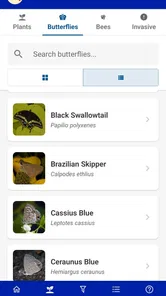
FFL Plants & Pollinators is an educational app focused on the relationship between flowering plants and pollinating animals. It helps users explore plant and pollinator information, understand how pollination works, and learn why biodiversity matters. The app is suitable for students, teachers, gardeners, nature enthusiasts, and anyone interested in identifying or protecting pollinator-friendly plants.
Who can benefit from using FFL Plants & Pollinators?
The app is useful for a wide range of users, including children learning basic science, students researching ecosystems, educators preparing classroom activities, and gardeners choosing plants that attract bees, butterflies, or other pollinators. Beginners should find the information approachable, while nature lovers can use it as a convenient reference when exploring gardens, parks, or outdoor habitats.
What kind of information does the app provide?
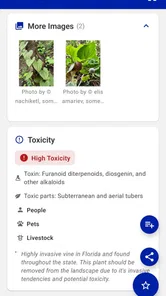
FFL Plants & Pollinators generally presents educational details about plants, pollinators, their interactions, and the environmental conditions that support them. Depending on the available content and app version, users may find descriptions, images, species-related facts, habitat information, and guidance about creating pollinator-friendly spaces. It is best viewed as an educational reference rather than a replacement for expert identification.
Pros
- Clear plant and pollinator information for beginners
- Encourages awareness of local biodiversity and conservation
- Useful visual references for identifying species
- Educational content suits classroom and family learning
- May inspire pollinator-friendly gardening projects
Cons
- Coverage may be limited to selected regions or species
- Some information could require prior botanical knowledge
- Not a replacement for professional plant identification
- Content may feel basic for experienced gardeners
- Offline access and update frequency may be limited







