

FerryFriend
- 11.00
- 4.7
- Installs
- 10.00K
- Price
- Free

Screenshots
Analysis by Reviewed
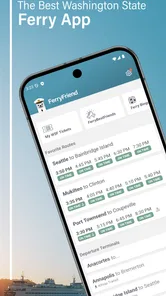
FerryFriend is the kind of travel app I appreciate most when a trip depends on timing rather than sightseeing. Its focus is simple: helping me check Washington ferry schedules without digging through several pages or trying to remember which route information belongs to which sailing. I found it most useful as a quick planning companion for regular ferry users, occasional visitors, and anyone who wants to verify a departure before leaving home.
Developed by True Course LLC, this free Travel & Local app has a 4.7 average from around 33 ratings and has passed 10K installs. Those figures suggest a focused audience rather than a huge general-purpose travel platform, and that is exactly how the app feels in use: narrower than a full navigation suite, but more direct when the question is, “Which ferry should I be thinking about?”
The important distinction is that FerryFriend is not trying to replace every travel tool on my phone. I would still use a map app for driving directions, a broader trip planner for hotels or flights, and official travel information when I need the most authoritative operational notice. Its value is in reducing the effort involved in checking ferry schedules repeatedly. For ferry-dependent journeys, a small amount of preparation can prevent a very expensive and frustrating detour.
How I use FerryFriend for a normal ferry trip
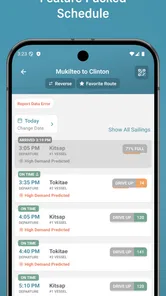
My baseline workflow starts before I get in the car. I first decide which crossing makes sense for the journey, then use FerryFriend to look at the available schedule rather than treating the ferry as an afterthought. That change in order matters. A road route can look quick on a map while the next sailing is far away, and a later departure can affect parking, traffic, arrival time, and the rest of the day.
I like checking the schedule once while planning and again shortly before leaving. The first check helps me choose a realistic target. The second is a practical reminder that ferry travel needs more attention than simply entering a destination and following a blue line. I do not read the schedule as a guarantee that I will board a particular sailing; I use it to build a sensible window and leave room for the drive to the terminal.
A realistic example would be a weekend visit where I need to cross from the mainland to an island and arrive for a reservation in the afternoon. I would open FerryFriend while having coffee, identify a suitable sailing, and work backward from the terminal rather than from the final destination. Later, before starting the car, I would check again and compare that intended sailing with the time needed to reach the terminal. This two-stage habit is more useful than checking once and assuming the rest of the journey will unfold perfectly.
The app is especially convenient for people who already know their usual route. If I take the same crossing regularly, the schedule becomes a quick reference instead of something I have to reconstruct from memory. That is where the app’s focused design makes sense. It does not ask me to turn a simple commute into a full travel project.
More From Our News Desk

 Weather - By Xiaomi
Weather by Xiaomi Review: Clear at a Glance, Less Clear Up Close
Xiaomi’s weather app makes everyday forecasts quick to scan, but its calm surface can leave useful details and recovery paths harder to find than they should be.

 X
XX Under Pressure: Can It Recover When Posting Goes Wrong?
A resilience-focused review of X, examining setup, mistaken posts, interruptions, weak connections, and the gaps that matter when recovery needs to be dependable.

 Clash of Clans
Clash of Clans Is Won Between the Battles
Its raids are quick; its community is a long-term project of coordination, teaching, rivalry, and shared responsibility—with all the friction that entails.

 Android Auto
Android Auto Makes the Case for Quieter Car Software
The car interface is no longer judged by how much it can do, but by how quietly it helps. Android Auto shows what drivers now expect—and what still gets in the way.

 MobiOffice: Word, Sheets, PDF
MobiOffice: Transforming Mobile Productivity with Seamless Integration
MobiOffice: Word, Sheets, PDF is redefining mobile productivity with a surprising blend of functionality and innovation.

 EA SPORTS FC Soccer Mobile 26
EA SPORTS FC™ Mobile Soccer: Redefining Mobile Sports Gaming
Dive into EA SPORTS FC™ Mobile Soccer, where immersive gameplay and strategic depth transform mobile sports gaming.
Latest News



For an occasional visitor, the first session requires a little more care. I would confirm the route direction, look at the surrounding departures, and make sure I am reading the schedule for the correct terminal. Ferry names and terminal names can blur together when I am in a hurry, so the safest workflow is to pause long enough to verify the complete route before driving.
One useful habit is to treat the displayed schedule as a planning layer, not as a substitute for every live travel decision. If a journey is critical, I would use FerryFriend to organize my timing and then check current official notices or terminal information as well. That is not a criticism of the app; it is simply the right division of labor between a schedule-focused tool and the source responsible for operational updates.
Settings and small checks that improve the experience
There is no reason to change every available option in a travel app just because the options exist. I get more from FerryFriend by checking the parts that affect how quickly I can read a route. The first thing I pay attention to is whether the selected schedule matches the direction of travel. A return crossing may use the same general place names but represent a completely different decision for the day.
I also check the date and time context before relying on a departure. This sounds obvious, but it is the kind of detail that causes real problems when I look at a schedule late at night, plan a trip for the next morning, or reopen an old route view after a change of plans. My rule is simple: every time I make a final travel decision, I confirm that I am looking at the intended day and direction.
Because the app is available at no charge, it is easy to install it before a trip and remove it afterward, but keeping it available can be worthwhile for repeat travelers. The current version is 5.6.1, and the app supports Android 7.0 and later. That broad compatibility is helpful if I use an older spare phone for travel or do not upgrade devices frequently.
FerryFriend is rated for Everyone, which fits its straightforward purpose. I would still avoid handing a phone to a child and asking them to make the final travel decision alone, not because the app is difficult, but because route direction, terminal arrival, and schedule interpretation require adult judgment in a real journey.
There are in-app purchases ranging from $2.99 to $599.99 per item. That is the one area where I would slow down and inspect the purchase screen carefully before confirming anything. The app itself is free to start using, but free access and optional purchase items are not the same thing. I would never assume that an item is necessary for basic schedule checking without first understanding what it changes.
My practical setup is deliberately modest: keep the app easy to reach, use it for the route decision, and avoid building a complicated routine around settings that do not improve the specific trip. The best configuration is the one that lets me answer three questions quickly: which crossing, which direction, and which departure window.
Faster patterns for commuters and repeat travelers
Experienced users can make FerryFriend faster without pretending it has features that are not part of its confirmed role. The biggest improvement comes from creating a repeatable sequence. I open the app, identify the route, scan the relevant departures, note the target window, and then switch to my navigation app for the drive. Repeating those steps in the same order reduces the chance that I will confuse the ferry schedule with the road journey.
For a regular commute, I would check the schedule at a consistent point in the morning rather than constantly refreshing it. That keeps the app useful without turning it into a source of anxiety. If the day is flexible, I can choose a comfortable departure window. If the day is fixed, I can use the schedule to decide when to leave for the terminal and what backup plan makes sense.
A second efficient pattern is to separate planning from confirmation. During planning, I look at several departures and consider what happens if I miss the first one. During confirmation, I only revisit the selected route and the next practical options. This prevents me from starting the entire planning process again every time I open the app.
I also find it helpful to write down the terminal arrival goal in a note or calendar entry, rather than relying on memory after closing FerryFriend. The app answers the schedule question, while my note can hold the broader plan: when to leave, where to park, and what appointment follows the crossing. That combination is stronger than expecting one small app to manage every stage of a journey.
Families can use a similar workflow. One person checks FerryFriend while another handles directions or luggage. If I am traveling with children, I would show them the planned departure window but avoid presenting it as an exact promise. That keeps the schedule useful without making a normal travel delay feel like a crisis.
For visitors unfamiliar with Washington ferry travel, I would take a screenshot or write down the selected sailing after checking it. This is not a claim that the app requires a screenshot; it is simply a sensible travel habit when connectivity, battery life, or distractions may become an issue later. The screenshot should be treated as a planning reference, not as a replacement for checking current information before departure.
Another non-obvious advantage of a focused schedule app is mental clarity. A large map application can show roads, businesses, traffic, and many possible routes at the same time. FerryFriend narrows the decision to the crossing schedule. When I already know where I need to go, that narrower view can help me avoid over-planning and make a quicker choice.
Where the focused approach reaches its limits
FerryFriend is not the right single tool for every traveler. If I need turn-by-turn driving instructions, I still need a navigation app. If I am planning a complex trip involving flights, lodging, rental cars, and several transit systems, a broader itinerary service is more suitable. FerryFriend earns its place beside those tools, not necessarily instead of them.
I would also be cautious about using any schedule-only workflow when the trip is time-sensitive enough that a missed sailing would cause serious consequences. A schedule tells me when a departure is planned, but it does not remove the need to consider traffic, terminal procedures, capacity, weather, service changes, or other real-world conditions. For an important appointment, I would plan an earlier option and verify current travel notices through the appropriate official channel.
The app may feel too specialized if I take a ferry only once and already have a reliable source bookmarked. In that situation, installing another app could add little value. The strongest case for FerryFriend is repeated access: regular crossings, frequent visits, or a trip where I want a dedicated schedule view instead of searching through a general website.
The purchase range is another reason I would review each optional item with care. A free app can still have paid extras, and the presence of a high-priced maximum means I would not tap through a purchase flow casually. I would first decide whether the free schedule experience already solves my problem, then consider only an item whose purpose is clear and useful to my routine.
There is also a human limitation that no interface can solve: I still have to interpret the route correctly. If I select the wrong direction or assume that a departure time is my terminal arrival time, the app cannot rescue the plan. My best safeguard is to read the route slowly once, then use the faster repeatable workflow after I understand it.
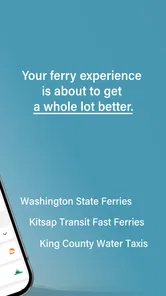
Compared with searching the web each time, FerryFriend feels more convenient for a recurring question because it keeps the task centered on Washington ferry schedules. Compared with a general map app, it is less comprehensive but potentially less distracting. Compared with official travel channels, it is more comfortable for routine planning, while official sources remain the better place to confirm exceptional conditions or urgent changes.
Who will get the most from it
I would recommend FerryFriend to commuters, frequent island visitors, local travelers, and anyone who finds themselves checking the same Washington ferry route more than once. It is also a sensible companion for a visitor who wants a dedicated schedule reference and is willing to pair it with a map app and current travel notices.
I would be less likely to recommend it as the only travel app for someone arranging a large multi-stop holiday. That traveler needs a wider planning system. I would also suggest skipping it if the only requirement is a one-time schedule lookup and an existing official source already fits the trip comfortably.
The app’s compact purpose is its main strength. It does not need to manage hotels or recommend attractions to be useful. When I am standing in the kitchen deciding whether to leave now or later, a direct schedule tool can be more valuable than a feature-heavy travel platform that makes me navigate through unrelated information.
Its free availability lowers the barrier to trying it, and the Everyone content rating makes it suitable for ordinary household travel planning. The developer, True Course LLC, has kept the concept recognizable: this is a practical ferry reference rather than a social travel network or a general booking marketplace.
My verdict after building a repeatable routine
FerryFriend works best when I give it a clear job. I use it to inspect Washington ferry schedules, establish a realistic departure window, and repeat that check before leaving. I do not ask it to replace navigation, official service alerts, or a complete itinerary manager. With those boundaries in place, it becomes a useful part of a travel routine rather than another app competing for attention.
The most effective approach is to combine three habits: verify the route direction, check the relevant date and departure window, and leave enough time to reach the terminal without treating the schedule as a guaranteed boarding promise. Those habits are more important than endlessly adjusting the app because they address the mistakes that actually disrupt ferry journeys.
My overall opinion is positive, with a practical qualification. FerryFriend is a good fit if ferry schedules are a recurring part of my life, and its focused design makes routine checks quicker than using a broad travel tool. It is a weaker fit for one-off travelers who already have a trusted source or for anyone expecting one app to handle every part of a complex trip.
At no cost to begin, with a current version of 5.6.1 and support for Android 7.0 and later, it is easy to test against a real journey. I would install it before a planned crossing, use it alongside navigation, inspect any optional purchase carefully, and judge it by one simple question: does it make my ferry decision clearer and more repeatable? In my experience, for regular Washington ferry travel, that focused clarity is exactly where FerryFriend earns its place.
FerryFriend Frequently Asked Questions
Who develops FerryFriend, and which devices can run it?
FerryFriend is a Travel & Local app developed by True Course LLC. It is intended for mobile use and supports devices running operating system version 7.0 or later. Before downloading, check your device’s software version and available storage so installation goes smoothly. Keeping your operating system and the app updated can also help you get the best experience when checking ferry information while planning a trip.
Is FerryFriend suitable for families and younger travelers?
FerryFriend has an Everyone content rating, so it is presented as suitable for a broad audience, including families. Its travel-focused purpose makes it relevant to passengers preparing for ferry journeys, though children should have an adult’s help when making travel decisions or handling bookings and payments. The rating does not replace checking the ferry operator’s own rules for passengers, minors, vehicles, or travel documents.
What is FerryFriend and what can I use it for?
FerryFriend is designed to help travelers organize and manage ferry journeys from a mobile device. Its store summary describes it as an app for Washington ferry schedules. Depending on the route and supported operator information, you can use it to check sailing details, review travel options, and keep important trip information in one place. It is especially useful for passengers who want a simpler way to prepare for a ferry crossing instead of searching through several websites or booking pages.
Can I book ferry tickets directly through FerryFriend?
Booking availability may depend on the ferry company, route, and region supported by FerryFriend. Some journeys may provide access to booking or ticket-related services, while others may only display schedules, route information, or travel details. Before relying on the app for a confirmed reservation, check whether your selected sailing includes an actual booking option and verify the final ticket, payment, and cancellation conditions with the operator.
Does FerryFriend provide live ferry schedules and delay updates?
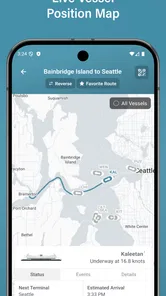
FerryFriend may provide schedule information and, where supported by the relevant ferry operator or service provider, updates concerning sailing times and disruptions. However, live information is not necessarily available for every route, and connectivity or operator data can affect how quickly changes appear. For important trips, it is sensible to compare the app’s information with official announcements, especially during bad weather or busy travel periods.
Pros
- Shows ferry routes
- schedules
- and service details in one place.
- Useful for comparing travel options across supported ferry operators.
- Clear sailing information helps with trip planning before departure.
- Can reduce the need to check several operator websites separately.
- Helpful for travelers unfamiliar with local ferry networks.
Cons
- Coverage may be limited to selected ferry companies and destinations.
- Schedules can change because of weather
- maintenance
- or operator updates.
- Some features may depend on an internet connection while traveling.
- Information accuracy may vary if operators update changes slowly.
- It may not support ticket purchases or reservations for every route.











