FaxFlow: Send & Receive Fax
- 3.36K
- 4.8
- Installs
- 100.00K
- Price
- Free
Screenshots

Analysis by Reviewed
Faxing from a phone sounds like the kind of task that should have disappeared years ago, yet many offices, clinics, landlords, insurers, and public services still ask for a fax. That is the situation where I found FaxFlow: Send & Receive Fax most useful. It is a business app from Mobile Flow Ltd that turns an Android phone into a practical bridge between a document on your screen and an organization still waiting for a fax.
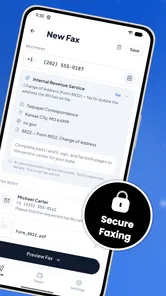
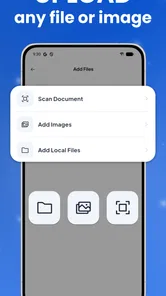
My first impression was that FaxFlow is aimed at solving a narrow problem rather than becoming an all-purpose document suite. You start with a file or image, prepare it for transmission, enter the destination, and wait for the result. The app also offers a number for receiving faxes, which makes it more useful than a one-way emergency sender. The real value is continuity: you can handle the whole fax exchange without finding a physical machine.
From a document on your phone to a completed fax
I look at the move from a phone document to a completed fax as a handoff that deserves a little care, not just a quick tap. In the next section, I focus on what changes when that handoff happens on a shared household device: who should prepare the file, who should check the destination, and how to avoid mixing one person’s paperwork with another’s.
When the app makes sense
The clearest use case is a last-minute request. Imagine a clinic asking for a signed form before it can process an appointment, or a small business needing to send an invoice to a supplier that accepts fax but not email. If the document is already stored on your phone, FaxFlow gives you a direct route from that file to the recipient.
This is especially convenient for people who work away from a desk. A salesperson visiting a customer, a freelancer handling paperwork from home, or a parent dealing with an insurance form may not have access to a printer, scanner, or office fax machine. Instead of moving the file to another device, I can keep the workflow on the phone and deal with the handoff while the context is still fresh.
It is also a reasonable option for occasional fax users. Buying or maintaining a fax machine makes little sense if you send documents only a few times a year. FaxFlow is free to install, so it is easy to try before deciding whether the paid usage model suits your needs. In-app purchases range from $9.99 to $199.99 per item, so I would check the available option carefully before sending a large batch.
Preparing the source document
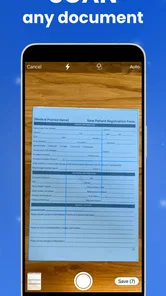
The quality of the original file matters more than many first-time users expect. A clean PDF is usually a better starting point than a hurried photograph of a page. If I need to photograph a paper form, I first place it on a flat surface, avoid shadows, and make sure all four corners are visible. A fax is not the place to discover that a handwritten signature was cropped or that a small account number became unreadable.
More From Our News Desk

Weather by Xiaomi Review: Clear at a Glance, Less Clear Up Close

X Under Pressure: Can It Recover When Posting Goes Wrong?

Clash of Clans Is Won Between the Battles

Android Auto Makes the Case for Quieter Car Software

MobiOffice: Transforming Mobile Productivity with Seamless Integration

EA SPORTS FC™ Mobile Soccer: Redefining Mobile Sports Gaming
Before opening the send step, I also check whether the document contains the correct version and the intended recipient’s details. Faxing is slower and less forgiving than attaching a file to an email. An email can be recalled or followed by a correction within seconds; a fax may already have entered someone else’s workflow. My practical tip is to rename the source file clearly and review every page in order before committing it.
That small preparation step is one of the hidden trade-offs of mobile faxing. The convenience comes from removing hardware, not from removing responsibility. FaxFlow can make transmission easier, but it cannot tell whether I selected an outdated contract, missed a page, or photographed a form at an angle.
Entering the destination without rushing
The recipient number deserves a deliberate check. A single wrong digit can send sensitive paperwork to the wrong place, and a busy office may not immediately notice the mistake. I prefer to copy the number from a trusted message or document, then compare it with the recipient name before sending. If the destination belongs to a large organization, confirming the department is worthwhile because a central fax line may not reach the person handling the case.
This is where FaxFlow differs from simply emailing a scan. Email usually gives me a visible address and an immediate message thread. Faxing often depends on a number and a later confirmation. I therefore treat the destination field as a formal checkpoint: document ready, number checked, recipient department confirmed. That habit is more important than any individual button in the app.
Watching the transmission and keeping the outcome
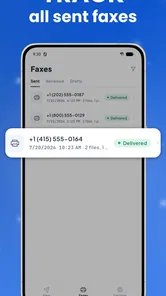
After sending, I do not immediately close the app and assume the job is finished. I wait for the transmission result and keep the relevant confirmation with the original document. If the recipient later says nothing arrived, having the sent file and result available makes the follow-up much easier than trying to reconstruct what happened from memory.
This is a useful workflow for business records. I can store the source document in the same folder as the related email, invoice, or case notes, then record when it was faxed and to which number. FaxFlow handles the sending part, while I remain responsible for the paper trail. For a solo professional, that division is sensible; for a larger team, it may feel limited if several people need shared access to the same history.
Receiving a fax on a phone
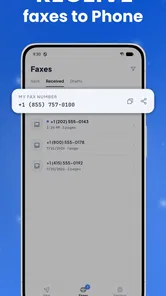
The receiving side changes the app from a one-off emergency tool into a more complete alternative to a physical fax line. Getting a number to receive faxes can help a small business that needs to remain reachable by traditional offices but does not want a machine occupying space. It can also help someone who is temporarily working from home and still needs incoming paperwork.
The important handoff is deciding who monitors the incoming number. A shared office should not leave it tied to one employee’s phone without a backup plan. If an incoming document is time-sensitive, the person responsible needs to know where to look and how to pass it to the next colleague. FaxFlow can provide the channel, but the office still needs a human process for naming files, forwarding documents, and confirming that someone has acted on them.
I would also avoid treating a received fax as automatically complete. The next step may be to download or review it, verify that every page arrived, and send it to the correct person through the company’s normal system. That extra inspection is particularly important for multi-page forms, where a missing final page can be more damaging than an obvious failed transmission.
How the workflow compares with familiar alternatives
Compared with a traditional fax machine, FaxFlow removes the need for dedicated hardware, a landline connection, paper, and a nearby scanner. That makes it much more practical for mobile work and occasional use. The compromise is that the phone becomes the place where document selection, number entry, transmission, and follow-up all happen, so a small screen can feel cramped when the job involves many pages.
Compared with email, the app is useful only when the recipient specifically requires fax or still relies on it. Email is normally faster for collaboration, easier for conversation, and more convenient for attaching several related files. I would not use FaxFlow simply because a document can be emailed. I would use it when fax is the accepted route and changing that requirement is not realistic.
Online fax services accessed through a desktop browser may be better for teams that send large volumes or need a wider administrative workspace. FaxFlow has the stronger case when the document and the person sending it are already on a phone. That distinction matters: this is a mobility solution first, not necessarily the best replacement for a busy department’s entire fax operation.
Small habits that prevent expensive mistakes
Review the page count and the final page before sending, especially when the original document came from a camera scan.
Keep the recipient’s name, department, and fax number together in your notes so a later follow-up does not depend on memory.
Save the source document and the transmission result in the same case folder, rather than relying on the app alone as your archive.
For an incoming fax, decide in advance who checks the number and who receives the document after review.
Use the app for a genuine fax requirement, not as a default replacement for email when the recipient accepts ordinary attachments.
Where the flow becomes less comfortable
The first friction is cost visibility. The app itself is free, but the presence of in-app purchases from $9.99 to $199.99 per item means the practical cost depends on how much faxing I plan to do. Someone sending one urgent document may find the arrangement reasonable, while a business with frequent transmissions should compare the total cost with a dedicated online fax plan before committing.
The second issue is scale. A phone is excellent for a single form, a signed letter, or a short business document. It is less comfortable when I need to inspect a long packet, coordinate several recipients, or maintain a shared archive for multiple employees. In that situation, a desktop-oriented service or office workflow may reduce errors even if it is less convenient at the moment of sending.
There is also a human risk in receiving faxes on a mobile device. A physical office machine is visible to everyone nearby, whereas a phone-based inbox can be overlooked if notifications or routines are not handled properly. I would not make FaxFlow the sole path for critical incoming documents unless the responsible person has a clear checking habit and a second way to confirm receipt.
Users should also pay attention to the phone itself. A weak connection, low battery, or a document stored somewhere difficult to access can turn a simple job into a delay. The app removes the fax machine from the equation, but it does not remove the need for a functioning phone and a prepared document. For urgent work, I would organize the file before leaving Wi-Fi or before starting a meeting.
Who should use it, and who should choose something else
I would recommend FaxFlow to occasional fax senders, mobile professionals, small businesses, and anyone who has been asked to fax a document without owning fax equipment. Its strongest moment is a short, self-contained workflow: find the document, check it, enter the number, send it, and preserve the result. The receiving-number option makes it more attractive for a small operation that needs occasional inbound communication too.
I would be more cautious for a company with several staff members, strict document-retention requirements, or a high daily volume. Such teams may benefit more from a service designed around shared access, desktop review, and centralized administration. FaxFlow can still be useful for field staff, but I would not assume that a mobile app alone replaces every part of a mature records process.
It is also not the right choice for someone who never needs fax. If every contact accepts email, cloud sharing, or an electronic signature, those options are usually simpler and easier to track. The app earns its place when an old-fashioned communication requirement blocks progress, not when there is already a better digital route.
What the current app details suggest
FaxFlow is listed as version 1.2.5 and supports Android 7.0 or later, which gives it a reasonably broad reach among Android phones still in everyday use. It is rated for Everyone, so the basic audience is not restricted by an older age classification. I would still treat business documents carefully, because an Everyone rating says nothing about whether a particular file is suitable to share from a personal device.
The app has a 4.8 average from around 27 thousand ratings and more than 100 thousand installs. That level of adoption makes it easier to view FaxFlow as an established option rather than an obscure experiment, although popularity does not remove the need to test the exact workflow with a non-urgent document first.
Mobile Flow Ltd has kept the product focused on the fax problem. I like that focus because the app is easy to explain to a colleague: it is for sending a fax from a phone and receiving one through a number. The downside is that a focused tool may feel bare if I expect document editing, team filing, or a full office suite around it.
My final take after following the complete handoff
FaxFlow: Send & Receive Fax is most convincing when a fax requirement appears unexpectedly and I already have the necessary document on my phone. The journey from file to recipient is much less awkward than locating a physical machine, and the option to receive faxes gives the app a role beyond emergency sending. For a freelancer, traveler, home worker, or small business, that can be a meaningful convenience.
My recommendation comes with one condition: treat it as a transmission tool inside a careful document workflow. Check the source, verify the number, watch the result, and preserve the record. If I follow those steps, FaxFlow solves a stubborn practical problem without asking me to buy office hardware. If I need heavy volume, shared administration, or a replacement for email, I would look elsewhere.
Overall, I see it as a useful free-to-install business app for the specific moments when fax is still unavoidable. Its best feature is not novelty; it is removing one physical obstacle between a ready document and the organization waiting for it.
FaxFlow: Send & Receive Fax Frequently Asked Questions
Can I use FaxFlow for occasional faxing without a physical fax machine?
Yes. FaxFlow is designed to send faxes from your phone, so you do not need a traditional fax machine to handle a document. It may be useful when a business, office, or organization still asks for paperwork by fax. The app is free to download, but consider the costs of sending and other paid options before relying on it regularly.
Can FaxFlow be used for business paperwork as well as personal documents?
FaxFlow is a business app for mobile faxing, and its purpose can suit common tasks such as sending forms, contracts, invoices, or other paperwork. Whether it fits your workflow depends on the kinds of files and fax destinations you need. If documents are important or time-sensitive, make sure they are readable and check the recipient details before submitting them.
Who develops FaxFlow, and what kind of app is it?
FaxFlow: Send & Receive Fax is a business app developed by Mobile Flow Ltd. It is designed to bring basic fax tasks to a phone, which may be convenient if you occasionally need to send paperwork but do not have access to a fax machine. The app is free to download, while some features or usage may involve in-app purchases.
What is FaxFlow: Send & Receive Fax used for?
FaxFlow: Send & Receive Fax is designed to let you send and receive fax documents from a mobile device without needing a traditional fax machine. It can be useful for contracts, forms, invoices, medical paperwork, and other files that still require fax delivery. Before downloading, check whether its supported file formats, fax destinations, and document tools match your personal or business needs.
Can I send a fax with FaxFlow from an Android or iPhone?
The app is intended for mobile faxing, allowing users to prepare a document, enter a recipient’s fax number, and submit the transmission through the service. In practice, availability can depend on the operating system, country, and current app version. Review the listing for your device before installing, and confirm that international faxing or specific destination countries are supported.
Pros
- Send and receive faxes directly from your smartphone.
- Supports document scanning with the phone camera.
- Useful for remote work and on-the-go faxing.
- Digital workflow reduces the need for a physical fax machine.
- Fax status updates help track sent documents.
Cons
- Fax credits or subscriptions may be required for regular use.
- Large documents can take longer to upload and process.
- Receiving faxes may require keeping notifications enabled.
- Scan quality depends heavily on lighting and camera focus.
- Sensitive documents are handled through a third-party service.











