FAX App: Send Faxes from Phone
- 5.38K
- 4.5
- Installs
- 1.00M
- Price
- Free
Screenshots


Analysis by Reviewed
For the occasional form that still has to be faxed, using a phone can save a trip to a copy shop or a search for a physical fax machine. FAX App: Send Faxes from Phone is built for that narrow but useful job. I see its appeal most clearly when a document is ready on your phone and the recipient still expects a fax; it is less compelling as an everyday document workspace.
The first week: quick relief, not a new routine
Kicking things off, downloading and installing the app is a piece of cake. Once installed, you're welcomed by a clean and intuitive interface. It's like the app just knows that you're not in the mood to fiddle around with complicated settings. I was up and sending my first fax within minutes, without any hiccups.
That quick start is exactly the right kind of first impression for a tool people often open under pressure. You are not choosing a new way to manage all your paperwork; you are trying to complete one task that might otherwise involve finding a machine, visiting an office, or waiting until you can use a computer. A focused app has an advantage here: it can make a rare chore feel manageable without asking you to reorganize your whole working life.
Still, I would not judge its lasting usefulness by that first successful send alone. The first-use relief is real, but it is also easy to mistake convenience for a reason to keep using any app. The better question is whether the situations that require faxing come back often enough for a phone-based route to earn space on your device.
What makes an urgent fax easier
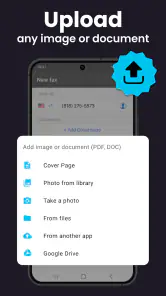
One of the first things I noticed is the app’s ability to handle multiple file formats. Whether it's PDF, DOC, JPG, or something else, FAX App has got you covered. This flexibility means you don't have to worry about converting files beforehand, which is a huge time-saver.
Another awesome feature is the integration with cloud storage services. You can easily pull documents from Google Drive, Dropbox, or iCloud. This is perfect for those of us who live in the cloud, and it makes the app even more indispensable.
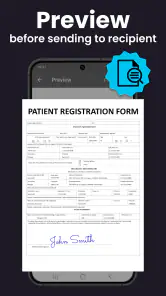
That flexibility is most useful when a form arrives in an email or lives in cloud storage and you need to act before you get back to a computer. I’d check the document before sending, especially if it began as a photo: make sure the text is legible, pages are in the right order, and the recipient’s number is correct. A quick review is easier than discovering a mistake after a time-sensitive submission.
More From Our News Desk

Clash of Clans Is Won Between the Battles

Android Auto Makes the Case for Quieter Car Software

MobiOffice: Transforming Mobile Productivity with Seamless Integration

EA SPORTS FC™ Mobile Soccer: Redefining Mobile Sports Gaming

How Microsoft OneDrive Became a Mobile Productivity Giant

How Google Translate Breaks Language Barriers Effortlessly
For a realistic example, imagine receiving a signed form while away from home and being asked to fax it that afternoon. You can locate the file, select it, and enter the destination without first transferring it to a desktop. That convenience matters more than having a long list of tools; the app’s value is in shortening this one awkward errand.
A small but useful habit is to keep a clean copy of the final document in a place you can reach from your phone, rather than relying on a blurry screenshot or a chain of forwarded attachments. If a form has several pages, I would open the source file first and make sure the copy I am about to send really is the signed, complete version. That quick check is more valuable than speed when the paperwork includes personal or business details.
It also helps to treat the recipient’s fax number as a detail to verify, not something to assume from an old note. A number saved for one office or department may not be the right destination for a new request. I would use the number on the current instructions, then pause before sending to compare it with what I entered. That is a practical safeguard for a tool whose convenience can make a quick send feel almost too easy.
How the sending process feels
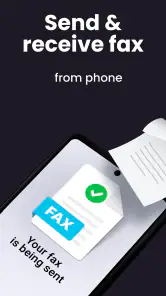
Using the app feels natural. After selecting the document you want to fax, you just enter the recipient’s fax number, hit send, and voila, your document is on its way. The app even provides confirmation once the fax is successfully sent, which is a nice touch.
I also appreciate the option to add a cover page. It might seem like a small detail, but it adds a touch of professionalism that might be needed for business communications.
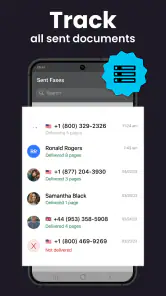
That confirmation is useful, but I would still keep the original file and any submission instructions until the recipient has what they need. A sent status can reduce uncertainty about the transmission, but it should not replace checking that the right pages and destination were selected. For business paperwork, that small habit is a sensible safeguard.
A cover page is especially helpful when the fax is going to a shared office line rather than directly to one person. It gives the receiving side context about who the pages are for and what they relate to. I would keep it brief and make sure the identifying details are appropriate for the recipient; unnecessary personal information does not become safer just because it is placed on a cover sheet.
Compared with email, faxing is more cumbersome when the other person accepts ordinary digital documents; email is often easier for replies and ongoing discussion. Compared with finding a public fax machine, a phone-based workflow is more convenient when you already have a clean digital file. I’d choose this app when fax is specifically required, not as a general-purpose way to share every document.
There is another trade-off in that comparison: fax suits a defined delivery task, while shared document services are better when several people need to edit, comment on, or track revisions. If you are sending a final signed page to an organization that insists on fax, the focused route makes sense. If the recipient is still reviewing a draft, sending a link to a shared file or using email may prevent a needless round of resending.
Does it earn a place beyond the first use?
Month-to-month value and the cost trade-off
Now, you might be wondering about the performance. In my experience, the app is reliable and quick. There were no crashes or slowdowns, and faxes were sent promptly. It's clear that a lot of thought went into ensuring the app runs smoothly, which is crucial for something as potentially urgent as faxing important documents.
It is a free business app from Municorn, and its average rating is 4.5 from around 59,000 ratings, with over 1 million installs. The app is rated for Everyone, and its current version is 3.27.0. In-app purchases range from $5.99 to $99.99 per item, so I would look at the available purchase details before relying on it for repeated or high-volume sending. Free to install does not necessarily mean every level of use will be free.
That makes the best fit fairly clear to me: someone who sends a fax now and then, such as a freelancer handling a signed document, a small-business owner dealing with paperwork, or a person completing an administrative task away from home. If faxing is a regular part of your work, compare the ongoing cost and workflow with a dedicated office service before making this your main channel. If you rarely encounter fax requirements, it can be handy to keep available without building a daily habit around it.
For a freelancer, the recurring value may come from avoiding the interruption of leaving a job site or delaying a client form until returning to an office. For a household, it might be a benefits or authorization document that comes up only occasionally. In either case, the app is most useful when the alternative is a real inconvenience, not simply because it offers another way to send a file. Before making repeated use part of a business process, I would check which purchase option suits that frequency and compare it with the cost and convenience of existing office arrangements.
One practical question is whether a phone is a sensible place to handle confidential paperwork. The app’s role is transmission, so I would think just as carefully about the document source and the recipient as I would with any other channel. Avoid sending a draft by mistake, use the intended destination, and retain the original until the receiving organization confirms it has what it needs. Those habits matter more than trying to turn a quick faxing tool into a secure archive or a full records system.
Maintenance, friction, and who should skip it
The maintenance burden seems low when the app is used only as needed: keep it available, keep your files organized, and check the recipient details before sending. The more meaningful friction is occasional rather than daily. You still need the correct fax number, a readable document, and a reason the recipient requires fax instead of email or another digital route. If you are trying to edit, sign, archive, and collaborate on documents in one place, a full document-management or PDF app is likely a better home for that work.
I would also skip it if you expect faxing to work like a free email attachment or if you need a complete office communication system. The purchase options make cost worth checking before frequent use, and fax remains a one-way-feeling process compared with a shared online document where both sides can comment. Its strength is focused convenience, not replacing every tool involved in paperwork.
There is little reason to open it between fax jobs just to maintain a routine. The useful preparation happens around the app: keep important files clearly named, know where the final version lives, and note the current destination instructions somewhere you can find them. I would avoid treating it as a filing cabinet, because the dependable record should be the document and any confirmation or follow-up information you preserve for yourself.
The app is also a less natural fit when the document needs substantial editing before it is ready. A phone screen is fine for locating a file and checking its pages, but reviewing dense terms, correcting a complicated form, or managing several versions can be awkward. I would do that work in a PDF or office app first, then use this one for the specific delivery step. Splitting those jobs keeps a simple send from turning into an error-prone editing session.
If you only need to send one fax, you may reasonably choose a local service or ask whether the recipient accepts a digital submission instead. If faxing returns every few months and traveling to a machine is a nuisance, keeping this option ready is easier to justify. People who fax many documents as part of a daily workflow should weigh a dedicated business solution more carefully, especially if they need shared access, consistent records, or predictable costs across a team.
As for what to do after pressing send, I would keep the source file and note any deadline or reference details until the recipient acknowledges receipt or the process is otherwise complete. The app’s transmission confirmation is a useful checkpoint, not proof that an organization has reviewed the paperwork or finished processing it. That distinction is easy to overlook when the immediate task feels complete, but it helps prevent a missed follow-up.
How it fits beside everyday alternatives
Most phone users already have ways to share documents: email, messaging, cloud links, and built-in scanning or PDF tools. Those options are usually more convenient if the recipient is willing to accept them. A fax app has a narrower advantage: it addresses the particular gap between having a digital document and dealing with a recipient that still requests fax. I would not replace a document scanner or cloud drive with it, because those tools solve different parts of the job.
There is also a useful distinction between scanning and faxing. If the paper is in front of you, a scanner app can help create a readable digital file; if the file already exists, converting or rescanning it just adds work. I would choose the clearest source available, then send that version. This simple order—prepare the document elsewhere if needed, verify it, and fax only when required—reduces the chance of confusing a transmission tool with a document-preparation tool.
For a small business, a phone-based option can be a practical fallback when someone is out of the office and cannot access the shared fax setup. It is not automatically the best central process for a team, though. Multiple staff members may need a common record or a consistent way to handle incoming requests, and an individual mobile workflow may not provide the coordination they need. The right choice depends on whether the need is occasional and personal or frequent and shared.
That distinction answers a common concern about keeping the app installed: I would base the decision on the likelihood and inconvenience of the next fax request, not on how often I expect to browse the app. If you have recently dealt with a form that could not be submitted by email, retaining it as a ready option has a clear purpose. If your work has moved entirely to digital submission, uninstalling it would not remove a tool you need every week.
My lasting impression
The Bottom Line
All in all, the FAX App: Send Faxes from Phone is a must-have for anyone who finds themselves needing to send faxes on the go. It's easy to use, reliable, and packed with useful features. Whether you're a business professional or just someone who occasionally needs to send a fax, this app makes the process quick and painless. Give it a try, and you might just find it becomes one of your go-to tools.
I would soften “must-have” for people who rarely face fax requirements: for them, it is a useful backup, not an essential part of a phone setup. The app earns lasting space when it repeatedly removes a frustrating errand or lets you meet a real deadline away from a machine. When that need disappears, there is no need to manufacture a habit around it. Its best long-term role is modest and clear: be ready for the occasional fax, then get out of the way.
FAX App: Send Faxes from Phone Frequently Asked Questions
Is the FAX App free to download, and what purchases should I expect?
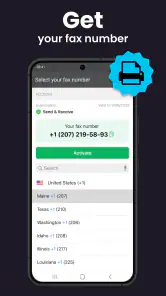
The FAX App is free to download, so you can install it without paying an upfront price. It also offers in-app purchases, with listed items ranging from $5.99 to $99.99. Since the available options may depend on what you want to do in the app, review the purchase screen before committing, especially if you expect to send or receive faxes regularly.
Can I use the FAX App to send documents while away from my office?
The FAX App is built for handling fax documents from a phone, which can be useful when you are away from a desktop or traditional fax machine. Its description focuses on sending and receiving mobile PDF documents, so it may fit everyday document tasks on the go. Before relying on it for an urgent fax, make sure the document is ready and check the app’s available sending options.
Can I scan a paper document with the FAX App before sending it?
The FAX App also serves as a document scanner, so it can help turn a paper document into a digital file on your phone before faxing. Its store summary highlights sending and receiving mobile PDF documents, making it a practical option when you need to handle paperwork away from a desktop scanner. Check the app’s current options to see which scanning tools suit your needs.
Which phones can run the FAX App?
The FAX App is available for Android, and its stated minimum operating system is Android 8.0. Before downloading, check your phone’s Android version in its settings to make sure it meets that requirement. The app is listed as free to install, though some features or usage may involve in-app purchases, so it is worth reviewing those details before relying on it for regular faxing.
What is the FAX App and how does it work?
The FAX App is a mobile application designed to allow users to send faxes directly from their smartphones. It works by converting digital documents from your phone into a fax format and transmitting them over the internet to a recipient's fax machine. This eliminates the need for traditional fax machines and phone lines, providing a convenient and efficient way to send important documents from anywhere. It is a business app developed by Municorn, intended for people who want to manage fax documents from a phone.
Pros
- Easy to use
- intuitive interface.
- Supports multiple file formats.
- Quick fax delivery times.
- Secure with encryption.
- Integrates with cloud storage.
Cons
- Requires a subscription for full features.
- Occasional app crashes reported.
- Limited editing tools for documents.
- No customer support on weekends.
- Ads in the free version.
- Category
- Business
- Version
- 3.27.0











