Favor Runner: Deliver & Earn
- 2.58K
- 4.7
- Installs
- 500.00K
- Price
- Free

Screenshots
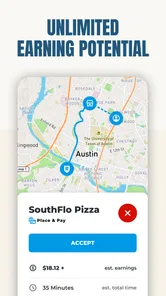
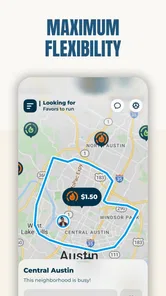
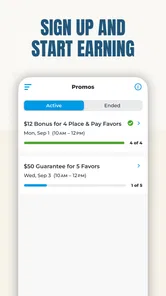
Analysis by Reviewed
I approached Favor Runner: Deliver & Earn as a practical work app rather than something to browse casually. Its purpose is clear: it connects Texans who want to run deliveries with an earning opportunity, and that makes the quality of the everyday workflow more important than flashy presentation. In my experience, the real question is not whether the idea sounds useful, but whether the app fits the way you already move around your city, manage your time, and handle phone-based work.
The app is free, belongs to the Business category, and is developed by NeighborFavor, Inc. It has built a sizeable audience, with more than 500 thousand installs and a 4.7 average from roughly 19 thousand ratings. That combination suggests that many people find the service worthwhile, although a high store score should never replace thinking about your own schedule, vehicle situation, and expectations. Favor is specifically aimed at Texans, so its usefulness depends heavily on whether you are located in the area it serves.
How Favor Runner feels when you need to move quickly
Speed matters in a delivery app in two different ways. First, the application needs to open and respond without making you wait before you can start working. Second, the whole process around accepting and completing a delivery needs to fit naturally into a busy day. Favor Runner is best understood as a tool that supports that process, not as a guaranteed shortcut to easy income.
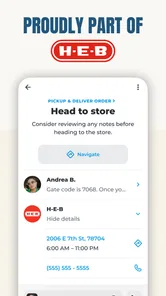
When I think about using it before heading out, the most sensible approach is to prepare in advance. Check the app while parked, make sure your phone is ready, and avoid trying to sort out important details while driving. That sounds obvious, but it is one of the most useful habits for any runner: a few quiet minutes before setting off can prevent rushed decisions later. The app cannot compensate for poor planning, traffic, parking delays, or a route that is inconvenient for your normal routine.
The store identifies the app as Favor Runner, and the short description keeps the focus on that role. I like that the purpose is not confusing. You are not downloading a general shopping app and then searching through unrelated tools; you are looking at an app designed around delivering with Favor. That narrow focus can make it easier to decide whether it belongs in your working setup.
One practical tip is to treat each delivery as part of a route rather than as an isolated task. Before accepting work, consider where it may leave you afterward. A delivery that looks attractive on its own may be less useful if it takes you far from the area where you normally want to continue. This is not a special feature I would promise the app provides; it is a decision-making habit that makes a location-based runner app more manageable.
What the first working session is really like
A new runner should expect a short adjustment period. You need to become comfortable reading the information shown for a delivery, switching between the app and navigation when necessary, and keeping track of the physical items involved. The app may be simple in concept, but the work around it is not always simple. Parking, apartment buildings, store layouts, customer instructions, and handoff timing all affect how smooth a delivery feels.
More From Our News Desk

Weather by Xiaomi Review: Clear at a Glance, Less Clear Up Close

X Under Pressure: Can It Recover When Posting Goes Wrong?

Clash of Clans Is Won Between the Battles

Android Auto Makes the Case for Quieter Car Software

MobiOffice: Transforming Mobile Productivity with Seamless Integration

EA SPORTS FC™ Mobile Soccer: Redefining Mobile Sports Gaming
I would not judge the service after one unusually good or bad run. A quiet period can make the app seem unhelpful, while a difficult order can make the entire platform feel unreliable even when the problem is traffic or a hard-to-find address. A better test is to use it during the kind of time you would genuinely be available to work and then compare the experience with your normal routine.
For someone who already drives around Texas for other reasons, the app may fit more naturally than it does for a person who would need to make every trip solely for delivery work. That distinction is important. The convenience of earning while moving through familiar areas is very different from building a full working day around uncertain demand and extra driving.
Heavy-use moments and the cost of multitasking
The demanding moments are likely to come when several parts of the job happen close together: checking an assignment, finding a pickup point, handling a customer request, and navigating through traffic. Even if the app itself feels responsive, the overall phone workflow can become tiring. I recommend keeping the phone mounted securely and making all meaningful decisions while stopped. No delivery is worth creating a distraction behind the wheel.
Heavy use also means more than leaving the app open. A runner may spend a long period moving between locations, checking status, consulting navigation, and handling calls or messages. That places more pressure on the phone than a short occasional session. I would begin with a fully charged device and keep a reliable charging option in the vehicle. This is a general working precaution, but it matters especially when the phone is both your delivery tool and your navigation device.
Another non-obvious trade-off is attention. A delivery app can make you feel productive because there is always another task to consider, but accepting too much work at once can make the experience less efficient. I find it better to protect a small amount of mental space for parking, confirming the address, and completing the handoff correctly. Rushing may save a minute on one step and cost much more when an item or location is misunderstood.
If you plan to use Favor Runner for several hours, think about the physical side of the job as well. Repeated stops, carrying items, waiting in pickup areas, and getting in and out of the car can be more tiring than the screen suggests. The app is not a replacement for a realistic work plan. It can organize the delivery side, but it cannot make a long shift comfortable if your vehicle, phone position, or daily schedule is poorly suited to it.
Reliability is more than an app opening
For this kind of service, reliability includes the app, the delivery information, the surrounding businesses, the customer handoff, and your own mobile connection. If any one part is awkward, the runner feels the effect. I would therefore avoid promising myself that every session will be equally smooth. A stable app can still be involved in a difficult delivery, and a straightforward delivery can still be affected by a weak signal or an unexpected delay.
My preferred recovery habit is simple: if something looks wrong, stop somewhere safe and review the situation before improvising. Do not keep driving while trying to solve a confusing screen or address. If the phone becomes unresponsive, restarting the app or checking the device connection may help, but the important part is preserving the delivery details and avoiding duplicate actions. When an app is part of a live task, calm recovery is more valuable than speed.
I also recommend keeping basic records for yourself. Note the time you started, the areas you covered, and the expenses that matter to your personal calculation. Favor Runner may help you perform the delivery, but your own notes help you decide whether the work is actually worth continuing. This is especially useful for separating a genuinely productive session from one that only felt busy because it involved a lot of driving.
The app has been available since October 2017, and its current version is 8.14.0. Those details tell me that this is an established product rather than a brand-new experiment. They do not guarantee that every update will feel perfect on every phone, so I would still pay attention to how the current release behaves on your device. If an update changes the workflow, give yourself time to learn it while parked rather than discovering the difference during a delivery.
Device limits and everyday preparation
Favor Runner requires at least iOS 9, which gives it a broad compatibility range for Apple users. That does not mean every older device will provide the same experience. An older phone may technically install the app but still struggle with battery health, storage, heat, or switching between delivery work and navigation. Compatibility is only the starting point; practical comfort matters just as much.
Before relying on the app, I would check four things on the phone: available storage, battery condition, mobile data, and the ease of reading the screen in daylight. A small screen or weak battery may be manageable for occasional work but frustrating during a long session. I would also update the phone when appropriate and close unnecessary apps if the device tends to slow down under pressure.
Android and iOS users should also remember that the experience may differ between devices even when the app is intended for both platforms. Screen size, operating-system behavior, notification handling, and background activity can affect how comfortable it is to move between Favor Runner and navigation. I would not choose a phone solely because it can install the app; I would choose one that remains dependable while charging, navigating, and being used repeatedly.
One useful workflow is to separate preparation from active driving. Before leaving, review your phone setup, place the charger where it can be used safely, and make sure you know how to return to the delivery screen after checking directions. During the run, use voice guidance where appropriate and handle the app only when stopped. This reduces friction without requiring any unconfirmed feature from the app itself.
A realistic day with the app
Imagine a runner who already plans to spend the afternoon in a familiar Texas area. Instead of treating Favor as a reason to drive randomly, that person could begin by deciding how much time is genuinely available and which parts of town are practical. While parked, they review the work shown in the app, choose an assignment that fits the route, and then complete the pickup without trying to read the phone in motion.
After the handoff, the runner considers the next location rather than automatically continuing. If the delivery ends near home or another planned stop, the trip may fit neatly into the day. If it leaves the runner far away, the extra return drive changes the calculation. This is where the app can be useful without being magical: it presents an opportunity, while the runner still has to judge distance, time, fuel, and personal energy.
For a parent with a narrow free period, a student with changing availability, or someone already traveling through a service area, that flexibility may be valuable. For a person who needs a predictable hourly schedule, guaranteed take-home income, or no vehicle-related costs, the same arrangement may be a poor match. The app is better for people comfortable making small decisions throughout the day than for people who want every part of work fixed in advance.
How it compares with ordinary alternatives
The usual alternative is not necessarily another delivery app. It may be a conventional part-time job, direct work for a local business, or simply keeping your existing schedule free from extra driving. Favor Runner has an advantage over a fixed shift because it is centered on on-demand running rather than a workplace timetable. That can make it easier to fit around other responsibilities.
The trade-off is predictability. A regular job generally gives you clearer expectations about when you work and what you will be paid for that time. Favor Runner is more suitable when you value flexibility and are willing to evaluate each session for yourself. Compared with a general courier service, its Texas focus can be a strength for local users and an immediate limitation for anyone outside its intended audience.
I would also compare it with doing errands independently. Working without an app gives you more control, but it also means finding customers, organizing requests, and managing communication yourself. Favor Runner can reduce that organizational burden by giving the runner a dedicated work channel. In exchange, you accept the platform’s workflow and the possibility that a delivery day will not match your ideal route.
The strongest comparison point is not the number of tools on the screen. It is how much uncertainty you are willing to manage. If you want a focused way to look for delivery work in Texas, this app is more relevant than a broad business app. If you want a stable schedule or dislike tracking vehicle expenses, a conventional employer may be the better option.
Who should use it, and who should skip it
I think Favor Runner is worth considering for Texans who enjoy independent work, know their local roads, and can make safe decisions while moving between pickups and drop-offs. It is also a reasonable option for people who want to test delivery work without paying to download the app. The Everyone age rating makes it broadly accessible as an app, although the practical responsibilities of driving and delivering still require adult judgment and compliance with local rules.
I would be more cautious if your phone is old, your battery is unreliable, or your data connection regularly fails. Those problems can turn a simple delivery into a stressful one. I would also skip it if you dislike variable routines, cannot absorb fuel and maintenance costs, or need a guaranteed return for every hour you are available.
One of the most important questions is whether you are comfortable working in a customer-facing role. Delivering is not only about following a route. You need patience when a pickup takes longer than expected, care when handling items, and enough communication skill to complete a handoff respectfully. If that part sounds unpleasant, the app may not feel like a good fit even if the technology works well.
My performance verdict after weighing the trade-offs
My overall view is positive but practical. Favor Runner has a clear purpose, a free entry point, a long presence in the App Store ecosystem, and strong user sentiment with a 4.7 average across about 19 thousand ratings. I see it as a focused tool for Texans who want to explore delivery work on their own terms, not as a promise that every hour will be fast, profitable, or effortless.
In terms of perceived speed, I would expect the best experience when the phone is prepared, the runner is parked before interacting with it, and the route is familiar. During heavy use, the main pressure comes from the complete driving workflow rather than from the app alone. Reliability depends on the device, connection, pickup location, and handoff as much as the software. Recovery is easiest when you stop safely, preserve the delivery information, and avoid rushing through a confusing moment.
The right way to judge Favor Runner is by how well it fits your real route, real phone, and real availability. Try it with modest expectations, keep notes on the time and costs involved, and decide after several ordinary sessions rather than one memorable delivery. For a Texas runner who values flexibility, that can make the app a useful addition to a working routine. For anyone seeking guaranteed hours, minimal driving, or a completely predictable income, another work arrangement will probably be a better choice.
NeighborFavor, Inc. has built an app with a straightforward audience and a straightforward goal. I would recommend giving it a fair trial if you are already interested in delivery work and can meet the practical demands safely. Just remember that the app can help organize the opportunity; your planning, equipment, and judgment determine whether the opportunity is genuinely worthwhile.
Favor Runner: Deliver & Earn Frequently Asked Questions
Can I use Favor Runner if I’m not in Texas?
Favor Runner is aimed at people signing up to deliver with Favor in Texas, so your location is an important first check before installing. The app can be available for download even when runner opportunities are not open in a particular area. Check whether Favor serves your city and whether registration is available there before planning to rely on delivery work.
Who develops Favor Runner: Deliver & Earn?
Favor Runner: Deliver & Earn is developed by NeighborFavor, Inc. It is a business app built around delivering for Favor customers, rather than a general-purpose shopping or navigation app. If you are considering it as a way to work, keep in mind that installing the app is only the first step; you still need to sign up and meet the applicable requirements before taking delivery requests.
Is Favor Runner: Deliver & Earn free to download?
Favor Runner: Deliver & Earn is free to download, so you can install it without an upfront purchase. Keep in mind that using the app as a runner is a separate matter from downloading it: you’ll need to complete the application process and meet the requirements for your area before taking delivery requests. It is a business app from NeighborFavor, Inc.
What kind of work can I do with Favor Runner?
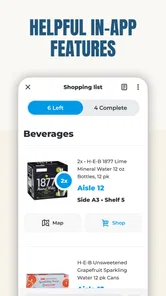
Favor Runner is centered on deliveries for Favor customers. Depending on the request, a runner may shop for items, pick up an order, and bring it to the customer. The app is intended for Texans who want to sign up to deliver with Favor and start earning. Whether this kind of work suits you depends on your location, transportation, and availability.
What is Favor Runner: Deliver & Earn?
Favor Runner: Deliver & Earn is a delivery-focused app that lets eligible users accept Favor delivery requests, shop for or pick up items, and bring them to customers. The app is designed for people who want flexible work rather than a traditional fixed schedule. Before downloading, check whether Favor operates in your area and review the current runner requirements.
Pros
- Flexible delivery work with the option to choose when you go online.
- Supports multiple vehicle types
- depending on local availability and rules.
- Clear order details help you review pickup and drop-off information.
- Earnings can grow during busy periods with more delivery requests.
- Useful for people seeking a side income without fixed shifts.
Cons
- Delivery availability may vary considerably by city and time of day.
- Fuel
- maintenance
- insurance
- and vehicle costs reduce your real earnings.
- Some orders may involve long distances or difficult pickup locations.
- Income can be unpredictable when demand is low or competition is high.
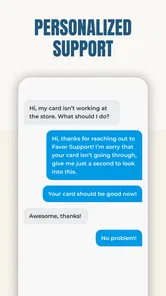
- You may need to handle customer support issues during active deliveries.












