Fashion Design Sketches Book
- 344.00
- 3.7
- Installs
- 1.00M
- Price
- Free
Screenshots
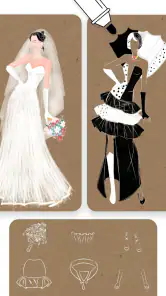
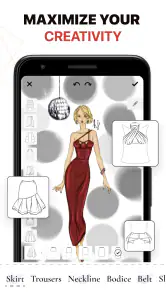
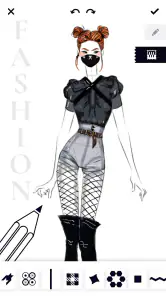
Analysis by Reviewed
I like that Fashion Design Sketches Book gives clothing ideas a place to take shape without requiring a full design setup. It is a free art-and-design app from Zenify, LLC, aimed at anyone who wants to sketch fashion concepts on a mobile device. The app is rated for Everyone, and its current version is 2.6.4. Its average rating is 3.7 from around 19,000 ratings, with more than a million installs, so it has reached a sizable audience, though those numbers alone cannot tell you whether its drawing approach will suit you.
Where it fits in a fashion sketching routine
I see this as a pocket sketchbook with a fashion-specific starting point, rather than a miniature replacement for every tool a designer might use. That distinction helps set expectations: it can be useful for getting a visual thought onto the screen, but a sketch is still an idea to develop, not a finished garment plan. If you want to explore shapes before committing to paper, it offers a practical low-friction place to begin.
The app is free to download, which makes it easy to test whether its approach suits you before investing time in a larger workflow. Its content rating is Everyone, and the minimum operating-system requirement is version 8.0. Those details make the basic decision straightforward: check that your device can run it, then try a small, specific sketch rather than expecting your first session to answer every question about how you will use it.
What to expect from the current app
The appeal here is a focused starting point: sketching clothes, rather than trying to be a complete digital illustration suite. If you tend to begin with a silhouette and then explore colors, patterns, or small details, the templates and editing tools described in the app’s experience can help you move from a vague idea to a more readable concept. I would treat it as a place to experiment and communicate an idea, not as a substitute for professional pattern-making or production software.
That distinction matters if you are deciding between a fashion-specific sketching app and a general drawing app. A broad art app may offer more control over layers, brushes, and canvas setup, but can leave you building clothing figures from scratch. A fashion-focused tool can make the first step less intimidating; the trade-off is that a template-led workflow may feel restrictive if you want to draw unusual poses, elaborate scenes, or highly polished editorial art.
Unleashing Your Creativity
When I first opened the Fashion Design Sketches Book, I was immediately drawn to its user-friendly interface. It’s intuitive, making it super easy even for beginners. You know how sometimes you get an app and spend ages trying to figure out where everything is? Well, not here! You'll be sketching your first masterpiece in no time.
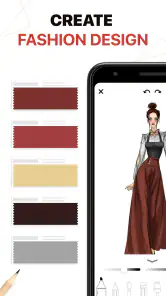
The app is loaded with a plethora of tools and features that let you sketch, edit, and bring your fashion ideas to life. From brushes to colors, and from textures to patterns, it feels like having a mini design studio right in your pocket. I especially loved the wide array of templates available, which are perfect for those days when inspiration needs a little kickstart. Just pick a template and start designing!
More From Our News Desk

Clash of Clans Is Won Between the Battles

Android Auto Makes the Case for Quieter Car Software

MobiOffice: Transforming Mobile Productivity with Seamless Integration

EA SPORTS FC™ Mobile Soccer: Redefining Mobile Sports Gaming

How Microsoft OneDrive Became a Mobile Productivity Giant

How Google Translate Breaks Language Barriers Effortlessly
A simple workflow for clearer concepts
A useful way to get more from a template is to decide what question the sketch should answer before you start. Is the main experiment about the length, the neckline, or the contrast between two colors? Keeping one decision in focus prevents decoration from obscuring the part you are trying to judge. I would make a quick first pass for the silhouette, then add only the details that help explain that choice.
This also makes the app more practical for someone who is still learning to draw clothing. Rather than treating every result as a finished illustration, use it to build a small collection of visual options: one shape with a softer palette, another with a bolder pattern, for example. The comparison can reveal which direction feels coherent before you spend time polishing either version. It is a modest but useful habit, especially when the original idea is clearer in your head than on the screen.
Make a sketch useful beyond the screen
A practical way to use a template is to keep the first pass simple: choose one garment idea, block in its main color, and use any pattern or texture sparingly. That gives you a clearer read on the shape before decoration takes over. If you are comparing several versions of a jacket or dress, make each one a separate concept rather than piling every variation into one busy sketch. It is an easy habit that makes feedback from a friend more specific: they can react to the cut or color instead of trying to decode the whole page.
For an everyday example, I can imagine getting a clothing idea while commuting or waiting for an appointment, then opening the app to capture the silhouette before it disappears. Later, I could refine the colors and send the result to someone whose opinion I trust. That is where a phone-based sketchbook is especially handy: it lowers the effort required to save an idea. It is less suitable when the job depends on exact measurements, fabric behavior, or a production-ready technical drawing; those needs call for a different tool and a more deliberate workflow.
Design, Edit, and Share
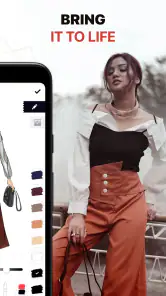
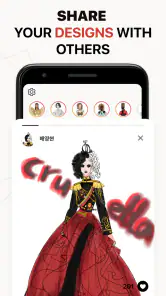
One of the coolest features is the editing tool. Made a mistake? No worries, you can easily tweak your designs without starting all over. This is a game-changer, especially when you're working on something intricate. Plus, once you're happy with your design, sharing it is a breeze. You can showcase your work on social media or send it to friends to get feedback. Who knows, your next design could be the talk of the town!
Editing is most helpful when used as a way to compare ideas, not just erase errors. I would save a clean version before making a bold change, then test a different color or detail on a second pass if the app’s workflow allows it. That keeps the original direction available while you explore. Since sharing is part of the appeal, it is also worth checking a sketch at phone size before sending it: small details that look clear while drawing can disappear in a compressed image or on someone else’s screen.
For a more useful critique, I would send one sketch with a short, focused question rather than a batch of alternatives and a vague request for opinions. Asking whether the shape or the color reads better gives a friend something concrete to respond to. It also helps separate feedback on the design from feedback on the drawing itself. If the image is only an early concept, saying so can prevent someone from judging it as though it were a finished technical illustration.
There is a cost consideration, too. The app is free to download, but it offers in-app purchases priced from $4.99 to $39.99 per item. I would start with the free experience and decide whether the tools you actually use justify spending anything, rather than paying simply because a design app seems like it should unlock more. If you are only testing fashion sketching as a hobby, that cautious approach makes sense; if you use it regularly, weigh any purchase against how much it improves your own workflow.
How it compares with paper and general drawing apps
Compared with pencil and paper, the main advantage is convenience: a phone is often already nearby, and digital editing makes it easier to test a change without redrawing the whole concept. Paper still wins if you enjoy the feel of drawing by hand, want an unrestricted blank surface, or prefer to annotate freely around a sketch. I would not abandon a medium you already like just to move everything onto a screen; the app is most valuable when its quick access solves a real problem, such as capturing a fleeting idea.
Against a general-purpose illustration app, the trade-off is different. A blank-canvas tool can be better for custom figure drawing, unusual compositions, and detailed control, but it asks you to construct more of the fashion sketch yourself. Here, the fashion-centered templates can make the first move easier, particularly for beginners who want to focus on garments rather than anatomy or page setup. The right choice depends on whether you value a guided start or a more open-ended workspace.
I would also keep the boundary between concept art and technical design clear. A colored garment sketch can communicate mood, silhouette, and styling, but it should not be mistaken for a specification that explains how to cut and assemble the clothing. If you are preparing work for manufacturing, need precise measurements, or must document construction details, a dedicated technical workflow is the stronger choice. For exploring a look and discussing it with someone else, a quick sketch may be enough.
Community, maturity, and remaining gaps
What’s even more exciting is the community aspect of the app. You can connect with other budding designers, share ideas, and get inspired by their work. The app frequently updates with new features and tools, ensuring you’re always on top of the latest fashion trends. It’s like having a fashion class at your fingertips, minus the hefty tuition fees.
The app was released on June 10, 2020, and its current version is 2.6.4. Those facts show that it has continued to a later version, but they do not establish which particular tools changed or how often updates arrive. For someone already using it, the sensible question is whether the current controls still support the way they sketch, not whether a version number sounds new. I would check the app’s present experience before building a long-term design process around it, especially if you need dependable access to a particular feature.
For an existing user, the best way to judge whether the app still earns a place in a routine is to revisit a few older concepts and see whether the current workflow makes them easier to refine or share. A version number by itself does not tell me whether a change will matter to my own habits. I would pay attention to the parts I actually rely on: how comfortably I can adjust a sketch, whether the templates suit the designs I want to explore, and whether the result is clear enough to show another person.
I would also keep expectations measured around the community and the word “share.” Connecting with other designers can be motivating, but it does not automatically replace structured instruction, critique from an experienced mentor, or a portfolio platform. If you want to learn garment construction or get detailed professional feedback, use the app as a sketching companion and seek those resources elsewhere. If your goal is simply to exchange early ideas with friends, its lighter, more casual role may be exactly what you need.
Who will enjoy it, and what to watch
For anyone looking to delve into fashion design or just explore a new hobby, Fashion Design Sketches Book is a must-try. It combines creativity with practicality, making the design process not just fun but also incredibly rewarding.
I think it is best suited to beginners, fashion fans who like drawing clothes, and hobbyists who want a quick visual notebook. It is less compelling for artists who need extensive control over a blank canvas, designers preparing technical specifications, or people who prefer to do every step with traditional pencil and paper. The minimum operating-system requirement is version 8.0, so it is worth checking that your device meets that before installing. Those who need a more flexible illustration workspace may be happier with a general drawing app; those who need fashion prompts and a quicker route to a garment sketch may prefer this focused approach.
It is also a reasonable option for someone who wants to make a small personal style board of clothing ideas without taking on a full illustration course. A student planning an outfit for an event, for instance, could use a few sketches to compare the overall shape and color direction, then bring the clearest one into a conversation with a tailor or friend. The app can help express the idea, but the conversation still needs to cover practical details that a sketch alone cannot settle.
If you are deciding whether to install it, ask yourself what you want your next drawing session to accomplish. For a quick garment concept, a starting template, or a visual message to share, it sounds well matched. If you need precise brush behavior, a fully customizable canvas, or a dependable technical document, I would start with another kind of tool instead. That is not a flaw so much as a limit of the app’s focused role, and knowing it beforehand makes the choice easier.
As you try it, watch for whether the templates help you move faster or begin to box in your ideas. That is the key trade-off: a ready-made starting point can turn a spare moment into a sketch, but it can also steer you toward familiar proportions. One useful test is to draw the same clothing idea once with a template and once in your own preferred medium. Comparing the results will tell you whether the app is helping you think, or merely making a particular kind of sketch easier.
My practical recommendation is to give it a short trial built around one real idea rather than browsing tools without a goal. Sketch the garment, make one meaningful variation, and see whether the comparison helps you decide what you like. If you find yourself returning to it because it makes that process easier, it may be a useful creative companion. If you keep wishing for more control over the figure or canvas, that is a good signal to move to a broader drawing app rather than forcing this one to do a different job.
In a nutshell, Fashion Design Sketches Book is more than just an app; it's a portal to a world of fashion possibilities. Whether you're designing your next runway piece or just having fun, it’s an app that promises to keep you engaged and inspired. So, why not give it a whirl and see where your creativity takes you?
Fashion Design Sketches Book Frequently Asked Questions
Is Fashion Design Sketches Book intended for clothing design or general drawing?
Fashion Design Sketches Book is focused on fashion design, particularly creating clothing concepts, rather than serving as a general-purpose drawing app. Its store summary presents designing clothes as an accessible activity, and the app’s tools are described around sketching and coloring fashion ideas. If you mainly want to draw subjects unrelated to clothing, a broader illustration app may be a better fit.
Can I share or present designs made in Fashion Design Sketches Book?
The app is described as supporting exports to different formats, which can be useful when you want to show a design to someone else or include it in a presentation. Sharing directly to social media may need an internet connection. Before building a workflow around a particular export option, check the available choices in the app and consider whether they suit the way you want to present your sketches.
Which devices can run Fashion Design Sketches Book?
Fashion Design Sketches Book is an Art & Design app for mobile devices, with support for operating systems starting at version 8.0. Before downloading, check that your device meets that minimum requirement and has enough room for another app. It is rated Everyone, so its age classification is suitable for a broad audience, including people exploring fashion illustration for the first time.
What is Fashion Design Sketches Book and how does it work?
Fashion Design Sketches Book is an app designed for aspiring fashion designers and enthusiasts to create their own clothing designs. It offers a variety of tools such as customizable templates, a wide color palette, and pattern designs. Users can sketch, draw, and color directly on their device, allowing them to bring their fashion ideas to life. Whether you're a beginner or a professional, the app provides an easy-to-use interface to explore your creativity.
Is Fashion Design Sketches Book suitable for beginners?
Absolutely! Fashion Design Sketches Book is tailored for users of all skill levels. Beginners will find the user-friendly interface and comprehensive tutorial guides helpful in learning the basics of fashion design. The app also includes pre-designed templates and patterns, making it easier for those just starting out to create beautiful designs without needing advanced skills.
Pros
- User-friendly interface for beginners
- Wide variety of design templates
- Offline mode available
- Customizable sketch tools
- Regular updates with new features
Cons
- Limited free version features
- Occasional app crashes
- In-app purchases can be pricey
- Requires large storage space
- No social sharing integration
- Category
- Art & Design
- Version
- 2.6.4