FaithPath
- 81.00
- 4.9
- Installs
- 10.00K
- Price
- Free

Screenshots

Analysis by Reviewed
I approached FaithPath as a quiet reading and reflection app rather than as a broad digital library. Its focus is simple: helping people read, pause, and grow in faith. That narrow purpose is also its main appeal. Instead of trying to be a general reference tool, it is aimed at someone who wants a regular spiritual reading habit on a phone or tablet.
My first impression was that the app makes the most sense when used deliberately. It is not the kind of application I would open only to search for a quick definition or settle a factual question. I would use it at the beginning of the day, during a short break, or before bed, when I have enough attention to read a passage and think about it. That distinction matters because the experience depends as much on the user’s routine as on the app itself.
FaithPath is a free app in the Books & Reference category, developed by SAILIBERTY TECH. It is suitable for Everyone, and the current version is 1.1.4. The app has reached over ten thousand installs and holds a 4.8 average from more than two hundred ratings, with over seventy written reviews. Those figures suggest that its focused approach is connecting with a meaningful group of readers, although popularity alone does not tell me whether it will suit every kind of faith study.
Where readers can get stuck before the first useful session
The first point of friction is expectation. A person who sees a faith-focused reading app may expect a full study platform, a searchable reference collection, a social community, or a complete replacement for printed books. I would not approach FaithPath with all of those expectations at once. Its store summary, “Read, Reflect, Grow in Faith,” points toward a guided personal habit, not necessarily an exhaustive research tool.
That means a new user can feel disappointed simply by choosing the wrong starting goal. If I want a fast lookup, a specialist commentary, or a large collection of academic references, I would normally choose a dedicated reference resource. If I want a calmer daily rhythm built around reading and reflection, this app is much more relevant. The difference is not a flaw in FaithPath; it is a question of matching the tool to the task.
Another common stumbling block is opening the app without deciding what “using it” actually means. Reading a single screen and closing it may technically count as a session, but it does not create much continuity. I found the experience more useful when I treated each visit as a small appointment: read carefully, pause before moving on, and note one idea that connects with the day ahead.
This approach also prevents a common mistake with devotional applications: consuming several passages quickly and remembering very little. FaithPath works better when I resist the urge to turn it into a scrolling feed. A short session can be more valuable than a long one if I give the text enough attention to become personally relevant.
More From Our News Desk

Weather by Xiaomi Review: Clear at a Glance, Less Clear Up Close

X Under Pressure: Can It Recover When Posting Goes Wrong?

Clash of Clans Is Won Between the Battles

Android Auto Makes the Case for Quieter Car Software

MobiOffice: Transforming Mobile Productivity with Seamless Integration

EA SPORTS FC™ Mobile Soccer: Redefining Mobile Sports Gaming
Start with a realistic purpose
Before judging the app, I would decide whether my aim is reading, reflection, or structured study. Those goals overlap, but they are not identical. Reading is about taking in the material. Reflection asks what it means in my current situation. Structured study usually requires comparison, cross-references, notes, and deeper research. FaithPath is most naturally suited to the first two.
A useful test is to plan a session that fits an ordinary day rather than an ideal one. I might open it after breakfast, read until I reach a natural stopping point, and spend a minute considering one practical response. If that feels comfortable, the app may become part of my routine. If I keep wishing for extensive study tools, I would pair it with a more specialized resource instead of forcing it to serve a different role.
The app’s Everyone age rating also makes it approachable for households where several people may want to explore it. Still, “suitable for Everyone” does not mean every passage or reflection will feel equally relevant to every reader. Parents, younger readers, and people from different traditions may want to decide together how the material fits their own context.
Setup checks that make the experience smoother
FaithPath supports devices running Android 8.0 or later. That is an important first check before installation. If the phone or tablet is older than that requirement, troubleshooting inside the app will not solve the compatibility problem. I would check the operating system first, then make sure the device has enough free space and a stable connection for installation.
Because the app is free, the decision to try it is relatively low risk. However, free does not remove the need for a sensible setup. I recommend installing it when the device is not already struggling with updates or storage pressure. A crowded device can make a new application appear unreliable when the real issue is the wider system.
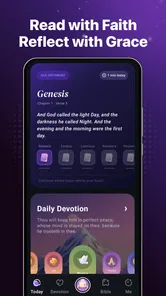
After installation, I would open the app once without rushing into a routine. I would look at how the reading area is organized, identify the natural starting point, and check whether the text is comfortable to read on the device. This is a small but useful step: a screen that is too bright, too small, or uncomfortable to hold can quietly undermine a habit that otherwise would have worked.
I would also keep the first session short. The goal is not to explore every corner immediately, but to confirm that the basic reading experience fits me. Can I find the material without confusion? Can I return to the same place later? Does the presentation encourage attention rather than distraction? These practical questions tell me more than an enthusiastic first impression.
Use the current version as a baseline
The current release is version 1.1.4, so I would make sure the installed copy is up to date before diagnosing odd behavior. An outdated installation can create avoidable inconsistencies, especially when the device has recently changed its operating system or app-store components.
If the app opens normally but a particular screen behaves unexpectedly, I would first close and reopen it, then restart the device if necessary. I would avoid immediately deleting the application, especially if I have created a personal routine around it. Reinstallation can be disruptive, and it should be a later step rather than the automatic first response.
It is also worth separating setup problems from reading preferences. If I dislike the pace, layout, or amount of reflection involved, that is not necessarily a technical fault. An app can be functioning correctly and still be a poor match for the way I prefer to read. Recognizing that early saves time and leads to a fairer assessment.
Recovering a reading workflow when a session goes wrong
Even a simple reading app can lose momentum when a session is interrupted. A phone call, low battery, accidental exit, or busy morning can turn a promising routine into an abandoned one. My preferred recovery method is to return without trying to compensate. I would not attempt to make up for a missed session by reading far more than usual. I would simply reopen FaithPath at the next practical moment and continue with a manageable amount.
If I am unsure where I left off, I would use the app’s visible reading flow rather than jumping randomly. Starting from the most obvious current point is usually better than spending several minutes trying to reconstruct a perfect sequence. The purpose of the routine is reflection, not record-keeping for its own sake.
A helpful workaround is to connect the app to an existing daily trigger. For example, I might read after making coffee, during a quiet lunch break, or once the children are asleep. That gives the app a dependable place in the day without requiring a complicated productivity system. The non-obvious advantage is that the trigger does the remembering for me; I do not have to rely on motivation alone.
Another useful workflow is to keep a very small personal note outside the app, such as a sentence in a notebook. I might write the date, one phrase that stood out, and one action I want to remember. This is not a claim that FaithPath includes a note system. It is a practical companion method that protects the reflective part of the experience if I later want to compare what I read across several days.
A simple recovery sequence
Return to the app at the next realistic opportunity instead of waiting for a perfect block of free time.
Read the next natural portion slowly, without trying to recover every missed moment.
Choose one idea to carry into the day and record it separately if that helps.
Adjust the timing of the next session so the routine fits the actual week, not an imagined schedule.
This sequence is particularly useful for people who tend to abandon habits after one interruption. FaithPath does not need to become another task that makes me feel behind. Its value is greater when I use it as a reset point, even after an untidy week.
When the app is not the cause of the problem
Some frustrations that appear during use may come from the phone, the network, or the surrounding environment rather than from FaithPath itself. If installation stalls, I would check the connection, available storage, and whether other downloads are competing for attention. If the app feels slow, I would close demanding background applications and restart the device before deciding that the reading app is at fault.
A weak connection can also confuse the diagnosis. When a screen does not load as expected, I would move to a more reliable network if possible and try again. I would not repeatedly tap the same control, because that can make a temporary delay feel like a larger failure. A calm retry after checking the basic conditions is usually the safer approach.
Display settings can create another false impression. Text that seems difficult to read may be affected by brightness, screen size, system font settings, or the angle at which I am holding the device. Adjusting those basics can make the session more comfortable without changing the application itself. For a reading-focused product, comfort is not a minor detail; it directly affects concentration.
There is also a human cause: distraction. If I open FaithPath while notifications are arriving, music is competing for attention, and several other apps are waiting in the background, the experience may feel shallow. I get a better result by putting the device in a quieter state for a few minutes. This is one of the clearest trade-offs of mobile spiritual reading: convenience makes access easy, but the same phone can interrupt the attention the app is trying to support.
For persistent technical trouble, I would record the exact behavior, the device’s Android version, and what I had already tried before seeking help through the normal app-store or developer support channels. That is more useful than reporting only that “it does not work.” Since SAILIBERTY TECH is the developer, keeping the report specific gives the people responsible for the app a clearer starting point.
How FaithPath compares with familiar alternatives
Compared with a printed devotional book, FaithPath is easier to carry and easier to fit into small gaps in the day. I can keep it available on a device I already use, which removes the need to remember another physical item. The trade-off is that a phone brings notifications, battery concerns, and the temptation to switch tasks. A printed book often creates a stronger boundary around reading.
Compared with a general e-book reader, FaithPath has a more focused identity. A general reader is better when I want a large personal library, adjustable reading systems, or a wide range of unrelated titles. FaithPath is more appealing when I want the app itself to point my attention toward faith and reflection rather than make me manage a broad collection.
Compared with a search engine or reference app, FaithPath is not the tool I would choose for rapid investigation. Search is better for locating a specific phrase, comparing interpretations, or checking background information. The focused app is better for a slower, more personal session where the goal is not simply to gather answers.
That difference suggests a useful two-tool arrangement for some readers. I could use FaithPath for regular reading and reflection, then turn to a trusted reference source only when a question genuinely needs more context. This keeps the main routine calm while avoiding the mistake of expecting one small app to perform every kind of study.
Who will benefit most from it
I would recommend FaithPath to someone who wants a free, approachable way to make faith reading more regular, especially if a short mobile session feels more realistic than carrying a book or planning a formal study period. It also suits readers who appreciate a narrow purpose and do not want to spend their first few minutes choosing among countless unrelated resources.
It may be useful for a person returning to a spiritual routine after a long break. In that situation, the best feature is not necessarily depth; it is the low barrier to beginning again. Opening a focused reading app can feel less demanding than organizing a complete study plan, and a small repeatable action is often easier to maintain.
I would be more cautious about recommending it as a primary tool for serious research, group teaching preparation, or readers who need extensive annotation and cross-reference capabilities. Those users may be happier with a dedicated study platform, a specialist library, or physical reference books. FaithPath can still sit beside those tools, but I would not make it carry work it was not designed to replace.
My practical verdict after using it as a daily reading companion
FaithPath succeeds when I treat it as an invitation to slow down rather than as a complete answer to every question about faith. Its free access, Everyone rating, focused purpose, and support for Android 8.0 or later make it easy to consider for a broad audience. The strong user response, including a 4.8 average and more than ten thousand installs, reinforces the impression that many readers find this focused approach worthwhile.
My strongest recommendation is to build a modest routine around it. Choose one dependable moment, keep the first sessions manageable, and separate technical troubleshooting from personal preference. If a page does not load, check the device and connection first. If the material does not fit your study needs, choose a complementary reference tool rather than blaming the app for being focused.
The most important trade-off is attention. FaithPath brings faith reading close at hand, but it lives on a device that can easily pull me away. I would therefore use it in a quiet setting, with notifications reduced when possible, and with a simple personal note if I want to remember what stood out. That small amount of preparation makes the experience feel intentional without turning it into a complicated project.
In the end, I see FaithPath as a practical starting point for readers who want to read, reflect, and grow in faith through a repeatable mobile habit. I would recommend it to a friend who wants something accessible and focused, while being clear that a different option is better for deep research, large personal libraries, or intensive study. Its real strength is not trying to do everything; it is making a small moment of reflection easier to begin.
FaithPath Frequently Asked Questions
Is FaithPath available for my device, and who develops it?
FaithPath is a Books & Reference app developed by SAILIBERTY TECH. Its current version is 1.1.4, and it requires Android 8.0 or later. The app is rated for Everyone, making its listed age suitability broad. If you use iOS, check the relevant app store for device compatibility before downloading, since requirements can vary by platform.
How popular is FaithPath, and what do users think of it?
FaithPath has a 4.8 average rating from around 236 ratings, with 77 reviews and over 10,000 installs. Those figures can offer a quick sense of how other users have responded, but individual experiences may differ depending on what they expect from a faith app and which features they use. Reading a selection of recent reviews can help you decide whether it suits your routine.
What is FaithPath and what can I use it for?
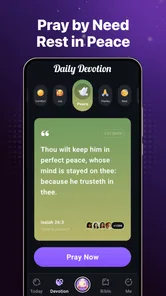
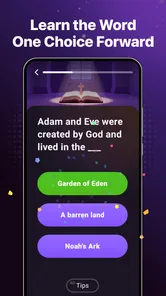
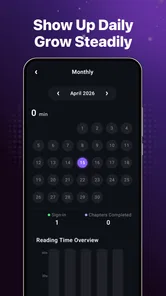
FaithPath is a faith-focused mobile app designed to help users build a more consistent spiritual routine. Depending on the available features in your version, it may provide devotional content, guided reflections, prayer support, Scripture-based resources, or progress tools. It is best viewed as a personal aid for daily faith practice rather than a replacement for a local church, religious leader, or professional advice.
Is FaithPath free to download and use?
FaithPath is free to download. Check the app-store listing before installing for the current pricing structure and any terms that may apply to optional content or tools. If the app presents a purchase or subscription option, review its conditions carefully before proceeding, including any renewal and cancellation details shown in your Android or iOS account settings.
Does FaithPath require an internet connection?
An internet connection is generally needed to download the app, create or synchronize an account, receive updates, and access newly loaded content. Some previously opened devotional materials or saved resources may remain available offline, although this depends on the version and the specific feature. If offline access is important to you, test the app after disabling mobile data and Wi-Fi before relying on it during travel.
Pros
- Clear Bible-based guidance for everyday faith decisions.
- Simple interface makes devotional content easy to browse.
- Encourages consistent prayer and spiritual reflection.
- Suitable for both new and experienced Christians.
- Can be used privately at your own pace.
Cons
- Content may feel too general for users seeking deep theological study.
- Some features may require an internet connection.
- Personalized guidance cannot replace advice from church leaders.
- Users from different denominations may find some views narrow.
- Regular reminders could feel repetitive over time.












