FACTS Family App
- 417.00
- 3.9
- Installs
- 100.00K
- Price
- Free

Screenshots

Analysis by Reviewed
Keeping up with school life can become surprisingly difficult when information arrives through several different channels. A message may appear in an email, a form may be handled through a website, and an important reminder may be easy to miss in the middle of a busy family schedule. I found that the FACTS Family App is most useful when treated as a central place for staying connected with a school rather than as a general-purpose education platform. It is an Education app from FACTS Management, and its main appeal is straightforward: it brings school-related communication into a mobile routine that parents can check without opening a browser every time.
That simplicity is also the key to understanding its limits. This is not an app I would choose for independent learning, lesson practice, tutoring, or replacing a school’s full online portal. Its value depends heavily on whether the school uses the FACTS ecosystem and how actively that school communicates through it. When the connection is in place, it can make everyday coordination less scattered. When a school uses several unrelated systems, the app may feel like one more place to check.
How I used it as part of a normal school routine
My preferred way to use a school communication app is not to keep it open constantly. I check it at predictable moments: once early in the day to catch anything time-sensitive, and again later when I have enough attention to deal with forms, notices, or follow-up tasks. That approach suits the FACTS Family App well because its role is mainly organizational and communicative. It works best as a habit, not as a destination for browsing.
A realistic example would be a parent preparing for a busy weekday. Before leaving home, I would open the app and look for new school information, then make a mental note of anything that affects transportation, paperwork, or the child’s schedule. In the evening, I would return to handle items that require a longer response. The important improvement is not that every task becomes instant; it is that school-related tasks are gathered into a repeatable check instead of being remembered from scattered conversations.
I also like the idea of using the app alongside a personal calendar rather than expecting it to replace one. If a school message contains an event or deadline, I would transfer that information to the calendar I already use for family planning. This creates a useful division of labor: the FACTS Family App remains the place to receive school communication, while the calendar remains the place to see the whole household’s commitments. That small habit reduces the risk of forgetting an item after reading it once.
Families with more than one child should also resist the temptation to treat every notification as equally urgent. I would first identify which child or school area the message concerns, then deal with the action that has a real deadline. This sounds basic, but it matters in an app that can become more valuable as the amount of school communication grows. The app does not remove the need for judgment; it gives that judgment a more consistent starting point.
The experience is especially useful for parents who are often away from a computer. A phone-based school connection is more practical when a message needs to be seen during a commute break, while waiting at an appointment, or between household errands. I would still avoid making important decisions from a rushed glance. Reading a notice on a small screen is convenient, but anything involving dates, requirements, or a response deserves a second look before I act.
More From Our News Desk

Clash of Clans Is Won Between the Battles

Android Auto Makes the Case for Quieter Car Software

MobiOffice: Transforming Mobile Productivity with Seamless Integration

EA SPORTS FC™ Mobile Soccer: Redefining Mobile Sports Gaming

How Microsoft OneDrive Became a Mobile Productivity Giant

How Google Translate Breaks Language Barriers Effortlessly
For students, the benefit depends on age and family expectations. Younger children will generally need an adult to interpret school communication and turn it into an action. Older students may use the app as a reminder of what is happening around school, but I would not assume that access alone teaches organization. A useful household rule is to decide who checks the app, who responds, and where completed tasks are recorded. That makes the app part of a workflow instead of another source of notifications.
What the app is really good at
The strongest use case is maintaining a direct connection with a participating school. The store summary describes it as a way to stay connected to school, and that is a more accurate expectation than imagining a complete digital classroom. I see it as a communication companion for families who want school information available on a phone and who prefer not to depend entirely on paper notices or inbox searches.
It is also a sensible option for parents who want one familiar mobile entry point. The benefit is less about advanced technology and more about reducing friction. If the school already uses FACTS services, having a dedicated family app can make the school relationship feel more organized than switching among unrelated pages. The gain is modest but meaningful: fewer moments spent wondering where a school update might have been posted.
There is a practical trade-off here. A dedicated school app is only as complete as the communication habits behind it. If teachers, administrators, or activity leaders continue to use separate channels, I would still need those channels. The app can become the first place I check, but not necessarily the only place. That is why I would ask the school which communications are expected to appear there before relying on it for every important update.
Settings and phone habits worth checking
Before settling into regular use, I would review the phone’s notification settings and make sure alerts are not being silently suppressed. This is one of the most important practical steps because a school app loses much of its value if the phone blocks its notifications or places them where I never look. I would also check whether the app is allowed to update normally in the background, while keeping the phone’s broader battery and privacy preferences in mind.
I would not turn every alert into an emergency signal. If the app offers different notification choices, I would keep genuinely important school communication visible and reduce interruptions that do not require immediate action. If the available controls are limited, my workaround would be a scheduled manual check. That is better than allowing frequent alerts to become background noise and then ignoring the one message that matters.
Another useful habit is to confirm that the correct family or school context is active before acting on a message. This is particularly important in households with multiple children or more than one school relationship. I would pause before submitting anything, replying, or assuming a notice applies to everyone. A quick context check can prevent the kind of mistake that comes from reading a message while distracted.
I would also keep the app updated through the normal app store process when updates are available. The current version is 60.7.0, and the app supports devices running Android 7.0 or later. Those details matter for families using older phones: the app is not aimed at every possible Android device, so compatibility should be checked before planning around it. On a supported phone, staying current is a sensible way to avoid preventable problems with sign-in or display behavior.
Because the app is free to download, the initial decision is easy for most families. It does include in-app purchases priced at $4.99 per item, so I would still pay attention to any purchase prompt rather than assuming every part of the experience is covered by the free download. The best approach is simple: use the app for the school connection first, understand what your school expects families to do inside it, and only consider an optional purchase if its purpose is clear and relevant to your needs.
The Everyone content rating makes it suitable for a broad family audience, but that should not be confused with a promise that every child will find it useful independently. A child-friendly rating describes the type of content, not the quality of the school workflow. In my view, adults should remain responsible for deciding how school messages are interpreted and which actions are appropriate.
Shortcuts that make repeated use less tiring
The most effective shortcut is a fixed checking routine. I would place the app where it is easy to reach, but I would not rely on seeing the icon accidentally. A morning and evening check creates a dependable rhythm, especially when notifications are inconsistent or when I prefer fewer interruptions. The routine also makes it easier to notice a pattern: if the school usually communicates at certain times, I can plan around those periods without constantly refreshing.
A second shortcut is to separate reading from processing. On a quick check, I would scan for anything urgent and mark the rest mentally for a later review. When I have time, I would then handle responses, record dates, and discuss relevant items with the child. Trying to complete every task the instant a message appears can make the app feel demanding, while postponing everything can create missed deadlines. Two-pass use gives each type of attention its own place.
I would keep a short family note outside the app for recurring information, such as the school’s preferred contact method or the usual place to find a particular type of notice. This is not a claim that the app provides a special shortcut; it is a workflow choice that prevents repeated searching. The app delivers the communication, while the note helps the household remember what to do with it.
When a message requires cooperation, I would turn it into a clear next step immediately. Instead of telling a child that “the school sent something,” I would say what needs to happen and by when. If a form needs attention, I would deal with it while the message is still visible. If it is only informational, I would record the relevant date and move on. This makes the app useful even when it does not perform the entire task itself.
For families sharing responsibility, I would agree on ownership. One adult might check new notices, while another handles transport or activity-related follow-up. Without that agreement, two people may assume the other has acted, or both may repeat the same work. The app can support a shared routine, but it cannot decide who in the household is accountable.
These habits are more valuable than trying to force the app into a role it was not designed to fill. I would not use it as a replacement for a full calendar, a document archive, or a messaging system for every family conversation. Its advantage comes from being the school-facing checkpoint. Keeping that role clear makes the experience calmer and avoids unnecessary duplication.
Where experienced use still runs into limits
The main limitation is dependence on the school’s setup. Two families can install the same app and have noticeably different experiences because their schools may communicate differently. If a school uses the app actively, it can become a useful daily reference. If communication remains spread across email, paper, classroom tools, and other portals, the app may provide only part of the picture.
That dependence also affects how confidently I would recommend it. I would recommend trying it when a school specifically directs families to use FACTS Family App. I would be more cautious if someone downloaded it independently hoping to discover general educational content. The app is not a universal school finder, study coach, or learning library. Its usefulness begins with an existing school relationship.
Another limitation is that mobile convenience does not guarantee clarity. Long notices, detailed instructions, or information involving several dates can be harder to process on a phone than on a larger screen. My workaround would be to read carefully, take a note of the action required, and use a computer or another device when the task becomes document-heavy. The phone is excellent for access; it is not always the best workspace for every follow-up.
I would also avoid treating notifications as proof that nothing has been missed. Notifications can be dismissed, delayed, grouped, or overlooked. The safest habit is to open the app itself during the planned check rather than relying only on the notification shade. This is a small but important distinction for families who cannot afford to miss a school request.
The app may be less attractive to parents who already have a highly organized school portal and calendar system that covers everything they need. In that situation, adding another app can create duplication rather than convenience. I would also skip it as a primary tool if my goal were homework instruction, interactive practice, or direct academic enrichment. A learning platform or classroom-specific tool would be a better match for those needs.
Its public reception is reasonably positive without being flawless: the app holds a 3.9 average from around 888 ratings, with over 100K installs and roughly 417 written reviews. I read that profile as a sign of practical usefulness mixed with the kind of variable experience common in school communication tools. The rating is not a guarantee that every family will have a smooth setup, but it suggests the app has reached a substantial group of users.
My verdict after building a repeatable routine
After looking at it as a daily family tool rather than a feature checklist, I think the FACTS Family App earns its place when a child’s school actively relies on FACTS communication. The app is free, accessible to a broad audience, and focused enough to support a simple routine: check school information, identify the next action, record important dates elsewhere, and return when follow-up is needed.
My recommendation comes with a clear condition. I would install it when the school tells me it is part of the expected communication process, then spend a few minutes setting notification behavior and deciding how the household will use it. I would not assume that installation alone creates organization. The real benefit comes from combining the app with a calendar, a shared responsibility rule, and a habit of checking the app directly rather than depending entirely on alerts.
For a parent who wants a school connection on a phone, it is a practical choice. For a student looking for lessons or practice, it is the wrong category of tool. For a family already overwhelmed by too many portals, it may help only if the school uses it as the main channel. The best reason to use it is not that it does everything, but that it can make one important part of family-school communication easier to keep under control.
FACTS Management has kept the concept focused on connection rather than trying to turn it into a general education suite. In my experience, that focus is its strength, provided expectations stay realistic. I would recommend it to families whose schools support it, especially those who want a dependable mobile checkpoint for school updates. I would skip it when there is no active school integration or when the real need is learning content, detailed document work, or a complete household planning system.
FACTS Family App Frequently Asked Questions
What devices and operating systems can run the FACTS Family App?
The FACTS Family App is an education app for families who want to keep up with school information on a mobile device. Its listed minimum operating system is Android 7.0, so check your device’s software version before downloading. Keeping your operating system up to date can also help with compatibility and security. Availability and performance may depend on your device and your school’s use of the FACTS platform.
Does my school need to use FACTS for the app to be useful?
Yes. The app is intended to connect families with schools that use the FACTS platform, so having the app alone does not provide school information. Your school also needs to set up the relevant services and connect your family account. Before downloading, it is sensible to check with your school that it uses FACTS and that families are expected to access its information through this app.
What is the FACTS Family App used for?
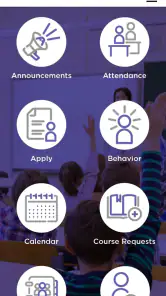
The FACTS Family App is designed to help parents and guardians stay connected with their child’s school community in one place. Depending on the school’s configuration, it may provide access to announcements, calendars, messages, grades, attendance, assignments, forms, and other family-related information. The exact tools available can vary, so your school must use the FACTS platform and enable the relevant features.
How do I sign in to the FACTS Family App?
To use the app, families generally need login credentials connected to their school’s FACTS account. You may be asked to enter an email address, username, password, or use an available single sign-on option. If you cannot sign in, first confirm that your school has activated your account and that your contact information is correct. Password resets and account questions are usually handled through the school or FACTS support resources.
Can I manage more than one child in the FACTS Family App?
In many cases, the app allows a parent or guardian to view information for multiple children linked to the same family account. This can make it easier to switch between students and check different schedules, grades, attendance records, or school communications. However, what you can see depends on your permissions and how the school has connected each student to your account. Contact the school if a child is missing.
Pros
- Simple way to organize family schedules and shared activities.
- Useful reminders help keep important family tasks on track.
- Private family-focused space limits conversations to invited members.
- Supports better coordination between parents
- children
- and relatives.
- Convenient access to family information from a mobile device.
Cons
- Some features may require a paid subscription or in-app purchases.
- The app is less useful if family members do not use it regularly.
- Notifications can become excessive when many activities are added.
- Setup may take time for larger families with multiple profiles.
- Performance and available features may vary by device or region.
- Category
- Education
- Version
- 60.7.0











