

FaceTool: AI Face Swap Videos
- 9.00
- 3.8
- Installs
- 10.00K
- Price
- Free

Screenshots
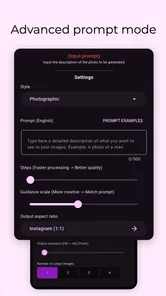
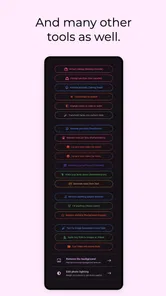
Analysis by Reviewed
I came to FaceTool: AI Face Swap Videos with a simple goal: turn an ordinary photo or short video into something playful enough to share. This is a photography app from SuTV, but it sits closer to an experimental face-editing studio than to a traditional camera or photo organizer. Its focus is on swapping faces in videos and photos, creating portraits, trying lip-sync effects, and working with voice-cloning tools.
That combination makes it interesting for people who enjoy visual experiments rather than polished manual editing. I would not choose it as my main photo editor, but I can see why someone might keep it installed for a birthday joke, a themed portrait, a social post, or a quick creative test. It is free to install, available for Everyone, and currently runs from Android 7.0 onward. The app has reached over ten thousand installs and holds a 3.8 average from around two hundred fifty ratings, which feels consistent with my impression: useful and entertaining in the right situation, but not equally smooth for every project.
From an ordinary image to a finished face-swap clip
I find the most useful way to approach a face-swap clip is to think about the source image and the destination video as a pair, not as separate choices. A clear, front-facing photo can still struggle if the clip has rapid turns or changing light, so I’d test a brief, simple scene before committing to a bigger idea. That small check sets up the next section: choosing source material that gives the effect a fair chance.
Starting with the right source material
The quality of the final result depends heavily on what I give the app at the beginning. A clear face looking toward the camera is a much safer starting point than a dim selfie, a side profile, or a group photo with overlapping heads. This is not unique to FaceTool, but the effect becomes especially obvious when the intended result is a moving video. A face that is easy to identify in one still image may become difficult to track as soon as the person turns, changes expression, or moves partly off screen.
My practical advice is to prepare the source before opening the editor. I would choose one image with even lighting and a visible face, then keep the target clip short and visually simple. That small amount of preparation saves time because it reduces the number of failed attempts caused by unsuitable material. It also gives the app a cleaner handoff between selecting the source face and generating the finished result.
For portrait creation, I would start with a single subject and a fairly uncluttered background. For a video swap, I would avoid fast camera movement and scenes where several faces cross each other. These choices are more important than chasing a dramatic effect. FaceTool can be playful, but it still needs recognizable visual information to work with.
Choosing the type of experiment
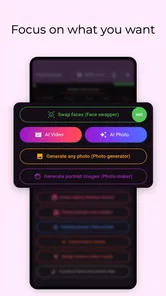
The app’s range is broader than a basic face-swap camera. I can approach it in several ways: edit a still photo, work with a video, create a portrait, try a lip-sync idea, or explore voice-related generation. That variety is one of its strongest points because I do not have to leave immediately when my first idea changes. A photo can become a portrait experiment, while a video can become a short performance-style clip.
More From Our News Desk

 Gmail
GmailGmail in a Busy Inbox: Who Benefits Most?
From first account to crowded workday, Gmail earns its place through dependable search and flexible sorting—but its best fit depends on how much inbox maintenance you can tolerate.

 Prime Video
Switching to Prime Video: What Changes in Your Viewing Routine
Prime Video can make a compelling second home for streaming, but switching means learning a different catalog, rental layer, and route from browsing to playback.

 Universal TV Remote Control
Universal TV Remote Control Works Best as a Reliable Backup
A phone remote earns its place through quick setup and reliable habits. Here is how to get more from Universal TV Remote Control—and where its limits show.

 Weather - By Xiaomi
Weather by Xiaomi Review: Clear at a Glance, Less Clear Up Close
Xiaomi’s weather app makes everyday forecasts quick to scan, but its calm surface can leave useful details and recovery paths harder to find than they should be.

 X
XX Under Pressure: Can It Recover When Posting Goes Wrong?
A resilience-focused review of X, examining setup, mistaken posts, interruptions, weak connections, and the gaps that matter when recovery needs to be dependable.

 Clash of Clans
Clash of Clans Is Won Between the Battles
Its raids are quick; its community is a long-term project of coordination, teaching, rivalry, and shared responsibility—with all the friction that entails.
Latest News



The trade-off is that the app feels less focused than a specialist editor. Someone who only wants accurate color correction, cropping, layers, or detailed retouching will probably prefer a conventional photography tool. FaceTool is built around transformation, not careful finishing. I see it as the place where I create the unusual element, then use another editor if I need precise trimming, captions, layout, or sound mixing.
Before starting a larger project, I would test one small sample. This is an important workflow habit because it reveals whether the chosen face, pose, and movement are compatible with the effect. A short test also helps me decide whether the result is amusing enough to continue or whether the concept needs different source material.
Working through the main creation flow
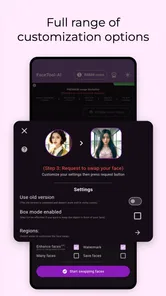
The basic process is easy to understand: bring in the image or video, select the face or faces involved, choose the transformation, and wait for the generated result. The appeal is that I do not need to draw masks frame by frame or manually animate a portrait. For a casual user, that removes the most intimidating part of face editing.
The important handoff happens when the app moves from my selection to its automated processing. At that point, the result is no longer controlled pixel by pixel. I can influence the input and the chosen effect, but I have to accept that the generated output may need another attempt. I found this more satisfying when I treated each render as a creative variation rather than expecting the first result to look like a professional visual-effects shot.
For a video, I would watch the entire output instead of judging it from the opening frame. A swap may look convincing at the start and become less stable during a turn or a change in lighting. Conversely, a slightly awkward first moment may settle into a fun result once the subject begins speaking or moving. Checking the whole clip is essential before sharing it.
Using lip-sync and voice tools responsibly
The lip-sync and voice-cloning options make the app more ambitious than a simple image filter. They can be useful for creating a character-style greeting, a humorous role-play clip, or a private creative experiment. I would keep the first project short and use my own face and voice, or material from people who have clearly agreed to it. That keeps the workflow enjoyable and avoids turning a novelty effect into a misleading imitation.
These tools also change how I evaluate the result. A face swap can be judged mainly by visual alignment, but a talking clip has an extra layer: does the mouth movement feel connected to the audio, and does the voice fit the intended character? A technically successful face edit may still feel strange if the expression, speech, and sound do not match. I would therefore review the clip with the sound on before deciding it is finished.
For public posting, I would label an altered clip clearly when another person could mistake it for a real recording. That is not a limitation of the app itself; it is simply good judgment when using synthetic faces or voices. The more realistic the result looks, the more important that distinction becomes.
Handling the handoff to sharing or further editing
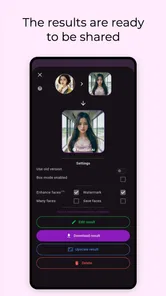
Once FaceTool produces the result, the next step is usually outside the app: save it, send it to a friend, post it, or open it in another editor. This handoff is where I would plan the final presentation. If the generated clip is funny but too long, I would trim it elsewhere. If the face effect works but the framing is plain, I would add text or a simple layout in a regular video editor.
This two-stage approach suits the app well. FaceTool handles the unusual transformation, while a conventional editor handles the finishing work. Trying to make one tool do everything can create unnecessary frustration, especially when the original goal is a clean social post rather than a raw experiment.
I would also keep the original image or video until I am satisfied with the exported version. Generated results are easy to replace, but the source is what lets me try a different face, crop, or effect without rebuilding the project from memory. That simple habit is particularly useful when the first attempt has a good idea but poor alignment.
What the finished result does well
At its best, FaceTool turns a familiar photo into something that feels new within a few steps. The strongest use case is casual creativity: a themed portrait for a group chat, a playful clip for a celebration, or a quick visual gag that would be too time-consuming to construct manually. The app lowers the barrier between “I have an idea” and “I can show someone the idea.”
I also like the way the different formats support different moods. A still portrait is easier to inspect and tends to be more forgiving. Video adds energy but exposes tracking problems. Lip-sync adds personality but makes mismatched expressions more noticeable. Voice tools can make a concept feel complete, yet they also require more care because audio changes how believable the whole result seems.
For a realistic everyday scenario, imagine preparing a birthday message for a friend who enjoys silly movie impressions. I would choose a clear portrait of myself, select a short video template or scene, test the face alignment, and then try a brief lip-sync version. If the result works, I would trim it and send it privately rather than building a long production. The value here is speed and surprise, not cinematic quality.
The app is also suitable for someone who wants to explore AI-assisted portraits without learning a desktop editor. A beginner can concentrate on choosing better source material and comparing outcomes instead of learning masks, keyframes, or compositing. That accessibility is a genuine strength.
Where the workflow breaks down
The same automation that makes FaceTool approachable can make it unpredictable. Difficult lighting, turned heads, partial faces, busy backgrounds, and fast movement can all reduce the quality of a swap. When that happens, the problem is not always obvious from the setup screen. I may only discover it after processing, which means repeating the workflow with a better source.
There is also a difference between a result that is technically complete and one that is convincing. A generated clip can finish successfully while still showing an unnatural edge, an expression that does not fit, or a face that appears to shift during movement. I would not rely on it for a professional campaign, a serious presentation, or any situation where visual accuracy matters more than novelty.
Another point to consider is cost. The app is free to install, but in-app purchases range from $1.99 to $64.99 per item. That makes it sensible to explore the free experience first and decide whether the available workflow justifies spending money. I would not pay before testing the types of source images I actually plan to use, because a purchase cannot fix a poorly lit or unsuitable input.
The current version is 1.1.81, and the app is developed by SuTV. Those details matter when comparing it with alternatives because this is a relatively focused tool rather than an established full editing suite. I would expect the best experience from a user who is comfortable experimenting and trying again, not from someone who needs a predictable professional pipeline.
Who should use it, and who should choose something else
I would recommend FaceTool to Android users who want quick face transformations, playful portrait work, or short AI-assisted video experiments. It is especially appealing if the main question is “What would this look like?” rather than “How do I perfect every detail?” The low entry barrier and mix of photo, video, lip-sync, and voice-oriented tools give curious users several directions to explore.
I would skip it if my priority were manual control, dependable tracking across complex footage, or detailed post-production. A standard photo editor is better for retouching and composition. A dedicated video editor is better for timing, captions, transitions, and audio control. A professional face-tracking application is a better choice when consistency across a demanding sequence matters.
I would also be cautious about using other people’s faces or voices without permission. The more personal the source material, the more important it is to keep the result private or make the alteration obvious. FaceTool makes experimentation accessible, so responsible choices need to be part of the workflow rather than an afterthought.
My final take after following the full workflow
FaceTool works best when I treat it as a creative starting point: choose a strong source, try a small test, inspect the complete result, and finish the clip somewhere else if necessary. Its face swaps, portraits, lip-sync experiments, and voice features make it more flexible than a single-purpose filter, while its automated nature keeps the process approachable.
The experience is not perfectly predictable, and the paid-item range means I would test carefully before spending. Still, for casual visual ideas, it can produce a result quickly enough to make experimentation worthwhile. My main recommendation is to keep the first project short, use clear source material, and judge the finished output rather than the promise of the effect.
For me, this is a fun photography app for quick transformations, not a replacement for a complete editing workstation. If that distinction matches what you want, FaceTool is worth trying. If you need precision, repeatability, or polished production control, I would use it only for the face effect and hand the rest of the job to a more traditional editor.
FaceTool: AI Face Swap Videos Frequently Asked Questions
What devices and operating systems can run FaceTool: AI Face Swap Videos?
FaceTool: AI Face Swap Videos is an Android photography app, and it requires Android 7.0 or later. Before downloading, check your device’s Android version and make sure you have enough free space for the app and any media you create. The app is free to download, though some features may involve in-app purchases.
Who makes FaceTool, and is it widely used?
FaceTool is developed by SuTV. It has a 3.8 average rating from around 255 ratings and has been installed over 10,000 times. Those figures can offer a quick sense of its reach, but ratings are only one part of deciding whether an editing app suits you; consider the features you want and review its permissions before using personal photos or videos.
What is FaceTool: AI Face Swap Videos, and what can I do with it?
FaceTool: AI Face Swap Videos is an entertainment-focused photo and video editing app that uses artificial intelligence to replace or transform faces in visual content. After selecting a compatible photo or video, you can apply a face-swap effect and create humorous clips, themed portraits, or social-media posts. Its tools also include features described for portraits, lip sync, and voice cloning. Results depend on image quality, facial visibility, and the templates or tools available in the current app version.
Is FaceTool: AI Face Swap Videos free to download and use?
The app is free to download, but some features, templates, exports, or advanced AI effects can require in-app purchases. Individual purchases range from $1.99 to $64.99. Before confirming any purchase, carefully review the pricing screen and payment terms shown by your app store. Availability and costs can vary by country, device, and version.
Does FaceTool: AI Face Swap Videos work with both photos and videos?
FaceTool is designed primarily for creating AI face-swap content from photos and videos, although the exact supported formats, video duration, number of faces, and export quality may differ between tools. For the cleanest result, use well-lit images with clearly visible faces and minimal motion. Complicated angles, obstructions, group scenes, or fast movement can produce less accurate or unnatural edits.
Pros
- Creates convincing face swaps in short videos with minimal editing.
- Simple interface makes the main tools accessible to beginners.
- Processes photos and videos directly from a mobile device.
- Offers entertaining templates for quick social media content.
- Previewing results before saving helps avoid unwanted exports.
Cons
- Results can look unnatural with poor lighting or side-facing subjects.
- Advanced features may require a subscription or additional credits.
- Video processing can be slow on older phones or longer clips.
- Exported content may include watermarks on the free version.
- Uploading face images raises privacy concerns for some users.










