Face Recognition
- 17.00
- 3.5
- Installs
- 10.00K
- Price
- Free

Screenshots
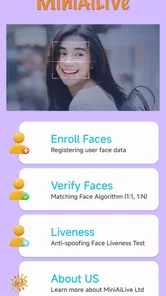

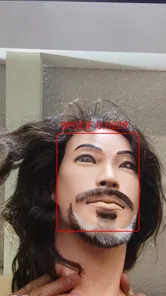
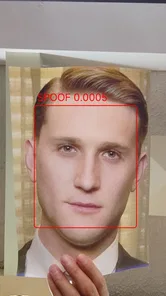
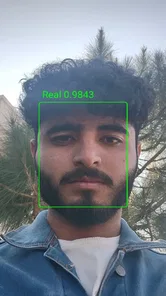
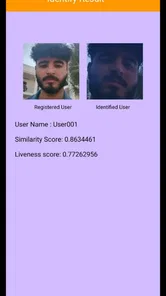
Analysis by Reviewed
My first impression of Face Recognition is that its name promises more than a cautious user should assume. Facial recognition is an interesting technology, but it is not automatically a complete security system, and the app’s brief description doesn’t tell you what tasks it supports. I’d approach it as a small technology demo: potentially useful for exploring the idea, but not something I’d rely on to protect accounts or replace a device’s built-in security.
A demo, not a replacement for your phone’s security
Face Recognition is a free app from MiniAi.Live in the Libraries & Demo category. It has a 3.6 average from around 330 ratings, and has been installed over 10,000 times. Those figures suggest some interest, but they don’t tell me how well it will work on your particular device or in your lighting conditions. The app is rated for Everyone, runs on Android 7.0 and later, and its current version is 2.1.
That context matters because a face-matching demo and a phone’s system-level face unlock are not interchangeable. Built-in biometric tools are designed to work with the device’s lock screen and compatible apps. A standalone app should not be assumed to control those features or provide the same protections. If you’re curious about how face recognition behaves, a demo can be a low-commitment place to start; if you need dependable access control, use your phone’s established security options instead.
What to check before trying it
Before entering personal information or using any face-related tool, I’d first look at the app’s actual screens and the access it requests. Ask yourself what task it performs, whether the result stays within the app, and whether you’re comfortable providing any image or biometric-related information. Facial data deserves more care than an ordinary preference setting, so I wouldn’t treat a quick setup as a reason to skip those checks.
A practical way to evaluate it is to test with a non-sensitive task and ordinary conditions, then repeat in a different room or with a slightly changed angle. That helps reveal whether recognition is consistent without risking access to banking, private photos, or important accounts. I’d also keep a PIN or password available; a face-based check is most useful as a convenience when there’s a reliable fallback, not as the only way into something you can’t afford to lose.
Who is likely to get value from it?
I can see this app appealing to someone who wants to explore face recognition on an Android device, understand the basic interaction, or demonstrate the concept to a curious friend. It may also suit a person comparing how a standalone demo feels against the face unlock already built into a phone. For that kind of experimentation, the free price and broad Android compatibility make trying it relatively straightforward.
I’d skip it if your main goal is stronger account security, hands-free website sign-in, or locking sensitive apps. Those are specific capabilities that should be confirmed in the app itself rather than inferred from its name. For everyday protection, a device’s built-in biometric feature paired with a strong backup passcode is the more sensible choice. A password manager is usually a better fit for managing website logins, because facial recognition alone doesn’t replace the need to store and protect account credentials.
More From Our News Desk

 Gmail
Gmail in a Busy Inbox: Who Benefits Most?
From first account to crowded workday, Gmail earns its place through dependable search and flexible sorting—but its best fit depends on how much inbox maintenance you can tolerate.

 Prime Video
Switching to Prime Video: What Changes in Your Viewing Routine
Prime Video can make a compelling second home for streaming, but switching means learning a different catalog, rental layer, and route from browsing to playback.

 Universal TV Remote Control
 Works Best as a Reliable Backup
A phone remote earns its place through quick setup and reliable habits. Here is how to get more from Universal TV Remote Control—and where its limits show.

 Weather - By Xiaomi
Weather by Xiaomi Review: Clear at a Glance, Less Clear Up Close
Xiaomi’s weather app makes everyday forecasts quick to scan, but its calm surface can leave useful details and recovery paths harder to find than they should be.

 X
X Under Pressure: Can It Recover When Posting Goes Wrong?
A resilience-focused review of X, examining setup, mistaken posts, interruptions, weak connections, and the gaps that matter when recovery needs to be dependable.

 Clash of Clans
 Is Won Between the Battles
Its raids are quick; its community is a long-term project of coordination, teaching, rivalry, and shared responsibility—with all the friction that entails.
Latest News



Getting to Know Face Recognition Technology
Alright, let's kick things off with a little background chat. Face Recognition technology has been buzzing around for a while now, and it’s basically like having a digital doorman who knows you by face. Imagine walking up to your phone or laptop, and it unlocks just by seeing your face. Cool, right? This app taps into that very technology, making it accessible and super easy to use for everyone.
How Does It Work?
Diving a bit deeper, the app uses advanced algorithms to scan your facial features - think of it like a digital blueprint of your face. Once it's got that down, it stores the data securely. Every time you want to unlock your device or access certain apps, it cross-references your face with the stored data. It’s like having a VIP pass that only your face can use!
The setup process is straightforward. You simply take a few snaps of your face from different angles, and the Face Recognition app does its magic. It’s fast, efficient, and surprisingly accurate. Even if you’re in a dimly lit room, it doesn’t shy away from recognizing your mug.
Practical Uses and Cool Features
So, what can you actually do with this app? Beyond just unlocking your phone, it can be used for a bunch of other things. For instance, it can safeguard sensitive apps – like your banking or photo apps. You can also use it to log into websites without typing out your password every time, which, let’s be honest, is a lifesaver for those of us with memory like a sieve.
One feature that really stands out is the ability to detect changes in your appearance. Whether you’ve grown a beard, got a new hairstyle, or even if you’re sporting glasses, the app adjusts and learns your face over time. It’s like having a personal assistant that evolves with you.
Is It Worth the Hype?
In a word, yes! If security and ease of access are big on your checklist, then this app is a game changer. It seamlessly blends into daily life, providing a layer of security that doesn’t feel intrusive. Plus, the tech behind it is just fascinating. Watching it work feels like you’re living in the future.
However, it’s not just about security. The sheer convenience factor is a massive plus. Think about all those times you’ve fumbled with passwords or PINs – with this app, all that is a thing of the past. Just a glance, and you’re in.
Everyday expectations and trade-offs
Imagine showing a face-recognition demo to a relative who is interested in phone security. A useful conversation starts with what the app actually recognizes and what it does not: matching a face in one app is not the same as unlocking the phone or approving a payment. Keeping those boundaries clear prevents a neat demonstration from being mistaken for a security guarantee.
Lighting, camera position, and changes in appearance are sensible things to pay attention to when judging any face-matching experience. If a scan struggles, I’d try a well-lit setting and a steady, front-facing position before concluding that the technology is useless. But I would not keep weakening a security setup just to make recognition work; a passcode is the safer fallback when the match is uncertain.
Compared with a built-in phone biometric feature, a standalone demo is generally better for learning and trying an interaction than for protecting the device itself. Compared with a password manager, it addresses a different problem: recognizing a face is not the same as storing unique passwords. The right choice depends on the job, and using the established tool for each job is less exciting but more dependable.
A sensible way to try it in daily life
A low-stakes test can tell you more than a quick first impression. For example, if I were showing the idea to a family member, I’d choose a moment when there’s no rush, use a familiar room, and explain that the purpose is to observe the interaction rather than secure anything important. That makes it easier to notice whether the camera framing feels natural and whether the person understands what the app is doing, without turning a demonstration into a promise about safety.
I’d also avoid enrolling several people casually just to see what happens. Face-related tools can involve personal information, so a useful test should be deliberate: make sure the person understands the purpose, check the app’s prompts, and stop if the requested access feels broader than the task warrants. This is a practical trade-off with biometric demos: the more realistic the test, the more carefully you should think about whose face is being used and why.
Choosing the right tool for the job
The everyday alternative depends on the problem you’re trying to solve. If you want to unlock your handset, start with the security controls already built into its operating system; they are the appropriate place to manage device access. If you want to get into online accounts, a password manager can organize credentials and help you avoid reusing them. If you want to understand what face matching feels like, a demo is the more relevant experiment, provided you keep its role modest.
That distinction is useful because convenience can make different technologies sound interchangeable. They are not. A face match may be interesting to watch, but it does not by itself create a strong password, verify a payment, or guarantee that the person in front of a camera is authorized. I’d judge the app by whether it helps me explore recognition, not by whether it replaces tools designed for those other responsibilities.
Questions worth answering before relying on it
If you’re wondering whether it will unlock your whole phone, I would not assume so: system-level unlocking is controlled by the device’s own security settings, and a standalone app should be treated separately. If you’re considering it for banking or private photos, first confirm that the app actually supports the specific action you need, and don’t make it the only barrier to sensitive material. The name alone is not enough to establish either capability.
You may also wonder whether it works in every room or after a change in appearance. I’d treat those as things to test rather than guarantees. Use steady framing and reasonable light, then see whether the experience remains consistent; if it becomes inconvenient, keep a secure passcode available instead of trying to force a match. And if your main concern is what happens to a face image or related information, inspect the app’s prompts and privacy details before continuing. That check is more useful than guessing how any biometric data is handled.
For a curious Android user, the most satisfying outcome may simply be learning how a face-recognition interaction is presented and where its limits are. Someone who expects a dependable security layer, account manager, or payment approval tool is likely to be disappointed unless the app’s own interface clearly supports that exact use. I’d make that decision before setup, so the app is judged as a demo rather than blamed for not being a different kind of product.
To wrap it up, if you haven’t already tried a face recognition app, now’s the time. With Face Recognition, you’re not just getting a tech tool; you’re stepping into a world where technology truly meets convenience. So go on, give it a whirl and let your face do the unlocking!
Face Recognition Frequently Asked Questions
What kind of app is Face Recognition, and who is it for?
Face Recognition is a Libraries & Demo app from MiniAi.Live, with a straightforward focus on face recognition. It may appeal to people who want to explore this technology through a mobile app, rather than users looking for a full photo-editing or social-networking service. It is free and rated for Everyone, so its listed age classification is suitable for a broad audience.
Is Face Recognition free to download, and what devices can run it?
Face Recognition is free to download. It requires Android 7.0 or later, which makes the minimum operating-system version an important compatibility check before installing. The app is currently version 2.1. If your phone meets the Android requirement, you can consider trying it without a purchase price; the recognition experience itself may still depend on your device’s camera and conditions.
How popular is Face Recognition, and what do users think of it?
Face Recognition has an average rating of 3.6 from 332 ratings, alongside 17 written reviews and over 10,000 installs. These figures suggest that the app has attracted a modest audience, while the rating reflects a range of user experiences rather than a guarantee of how it will work on every phone. Reading recent feedback can help you judge whether it suits your expectations.
How accurate is the face recognition feature?
The accuracy of the face recognition feature can vary based on several factors, including lighting conditions, facial expressions, and the quality of the camera being used. Generally, the app is designed to provide high accuracy in ideal conditions, but users may experience slight discrepancies if these factors are not optimal. Regular updates aim to improve accuracy.
Is my data safe with this app?
Data security is a top priority for the developers of this app. All facial data is encrypted and stored securely, ensuring that your personal information is protected. The app complies with international data protection regulations, giving users peace of mind that their data is handled responsibly and safely.
Pros
- Fast and accurate recognition.
- Integrates with most security systems.
- User-friendly interface design.
- Supports multi-factor authentication.
- Customizable privacy settings.
Cons
- High battery consumption.
- Requires constant internet access.
- May struggle in low light.
- Limited support for older devices.
- Potential privacy concerns.