ezClocker: Employee Time Track
- 336.00
- 4.6
- Installs
- 100.00K
- Price
- Free

Screenshots
Analysis by Reviewed
Keeping track of hourly work sounds simple until a team is moving between job sites, changing shifts, and trying to remember who arrived when. I found ezClocker: Employee Time Track most useful when I treated it as a shared daily routine rather than a magic fix for messy scheduling. It brings time tracking, shift planning, and GPS-based verification into one business app, which can remove a lot of back-and-forth between employees and managers.
The app is free to start, aimed at Everyone, and comes from ezNova Technologies DBA ezClocker. It has built a strong presence on Android, with an average rating of 4.6 from around 6,300 ratings and more than 100,000 installs. That does not automatically make it right for every workplace, but it does suggest that the basic idea is working for many small teams.
Where people usually get stuck before the first shift
The hardest part is often not tapping in or out. It is getting everyone to follow the same process. A manager may expect employees to clock in at the job location, while an employee assumes that opening the app is enough. Someone may also create a schedule but forget to check whether the correct day, shift, or worker is selected. Those small mismatches can make the app appear unreliable even when the underlying issue is setup.
I would begin with a short test involving one manager and one employee. Create a sample shift, have the employee try the normal clock-in routine, then check the resulting record from the management side. This is more useful than rolling the app out to an entire crew and discovering later that people interpreted the workflow differently.
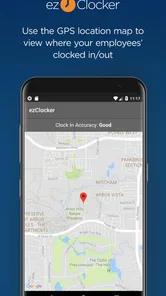
GPS verification deserves special attention. It can help establish whether a clock-in happened near the expected workplace, but location-dependent tools are naturally sensitive to the phone, the surrounding environment, and the way the employee uses the app. A worker who rushes through the process, has a weak location signal, or changes phones may experience a different result from someone testing in an open area.
I would also explain the purpose of location verification to the team before using it in daily operations. Employees are more likely to follow the process when they understand that it is being used to confirm a work event rather than to replace communication with a supervisor. The app can organize records, but it cannot settle every disagreement about why someone arrived late or left early.
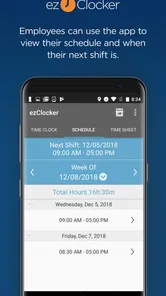
Another common sticking point is confusing the schedule with the timesheet. A scheduled shift describes what should happen; a time entry records what the employee actually did. If a manager edits a schedule and expects old time records to change automatically, frustration is almost guaranteed. I found it better to regard scheduling as planning and time tracking as documentation, then review both when something looks unusual.
More From Our News Desk

Weather by Xiaomi Review: Clear at a Glance, Less Clear Up Close

X Under Pressure: Can It Recover When Posting Goes Wrong?

Clash of Clans Is Won Between the Battles

Android Auto Makes the Case for Quieter Car Software

MobiOffice: Transforming Mobile Productivity with Seamless Integration

EA SPORTS FC™ Mobile Soccer: Redefining Mobile Sports Gaming
Make the first setup deliberately boring
For a small business, I would prepare the people and work locations before asking anyone to rely on the app. Use clear names that employees will recognize, avoid near-duplicate labels, and decide who is responsible for correcting an entry. This prevents the manager from becoming the only person who understands the system.
The current Android version is 3.27.1, and the app supports Android 7.0 or later. That makes it accessible on many older Android phones, although compatibility alone does not guarantee a smooth experience on every device. Before a busy week begins, I would open the app on the actual phones used by the team rather than assuming that an older handset will behave exactly like a newer one.
Because the app involves clocking actions and location verification, the phone itself matters. Keep the application updated, make sure the employee can sign in, and check that the device is not aggressively restricting its operation. I would avoid changing several phone settings at once; if something fails, changing one item at a time makes the cause much easier to identify.
A useful onboarding exercise is to ask an employee to describe the process out loud: where they go to view a shift, how they start work, how they finish, and what they do if the action does not appear to register. If they cannot explain it without guessing, the workflow is not ready for a real shift.
Managers should also decide how corrections will be handled. A missed clock-out, duplicate action, or incorrect shift should have a simple internal rule: report it promptly, record the actual hours, and let the responsible person review the change. Without that rule, the app may collect information while the business still relies on scattered texts and handwritten notes to interpret it.
Recovering a broken workflow without losing the workday
When an employee says a clock-in did not work, my first step would be to avoid repeated taps and immediately note the approximate start time. Repeated attempts can make the situation harder to understand. The employee should then close and reopen the app, confirm that they are using the intended account, and try the action once more. If it still fails, the manager should preserve the real-world time separately and reconcile the record later.
This fallback is important because time tracking should support payroll and accountability, not become a reason to delay work. A quick written note, message, or agreed internal form can preserve the essential detail while the app issue is investigated. The exact backup method is a business decision, but the principle is universal: do not let a technical problem erase a shift.
If the problem appears related to location, compare the result in a different physical position near the workplace rather than immediately blaming the employee or the application. Indoors, dense buildings, and device-specific location behavior can all affect what a phone reports. The manager should look for a pattern across several attempts before treating one failed verification as evidence of misconduct.
It is also worth checking whether the schedule itself matches the employee and date being tested. A person may be at the correct place but looking at a different shift, an old schedule, or the wrong account. This is one of the least obvious sources of confusion because the employee experiences it as “the clock-in is missing,” while the manager sees an apparently normal schedule.
For a team with changing locations, I would run a weekly review rather than waiting until the end of a pay period. Look for missing entries, unusually long shifts, and differences between planned and recorded work. Reviewing sooner gives the employee a chance to explain the situation while the details are still fresh.
The app is especially practical for a small landscaping crew, cleaning service, repair team, or other business where people do not spend the entire day at one office. Imagine a supervisor assigning morning work at one property and an afternoon visit at another. The schedule gives the crew a shared plan, while time entries and GPS verification can provide useful context when the manager later checks the hours.
That workflow still needs human judgment. A location check may show that a phone was near a job site, but it cannot prove the quality of the work or explain a delay caused by traffic. I would use the record as one piece of evidence, not as a substitute for a conversation.
When the app is not really the cause
Some complaints that look like application failures are actually policy problems. If employees are unsure whether travel time counts, whether breaks should be recorded, or whether they can correct an accidental tap, no time tracker will produce clean records by itself. The business needs a written, easy-to-follow rule before the technology can help.
Phone sharing creates another complication. If two workers use the same device, switching accounts can introduce mistakes that are not caused by the time-tracking system. I would strongly prefer each employee to use a clearly identified account and device whenever possible. If that is not practical, the handoff process needs to be explicit, with a quick check before each clocking action.
Connectivity can also confuse the diagnosis. A weak connection may make a screen appear unchanged even though the user believes an action was completed. Rather than assuming success, the employee should verify the visible result and report uncertainty immediately. Managers should avoid approving a questionable entry simply because the person remembers tapping the button.
There is a human side to GPS verification as well. Some employees may feel that location checks are intrusive, while some managers may expect more precision than a phone can reasonably provide. Before adopting the app, I would discuss what the business needs the verification for, who reviews the records, and how exceptions are handled. Transparency will do more for acceptance than adding more instructions after a dispute.
Privacy-conscious organizations should think carefully about whether this style of tracking matches their culture and operating model. A company with fixed office attendance may prefer a simpler sign-in method. A large organization with complex payroll, deep reporting, or extensive workforce management needs may outgrow a focused hourly tracker and benefit more from a broader platform, even if that platform takes longer to learn.
On the other hand, a tiny business that currently depends on paper sheets, group messages, and memory may find ezClocker easier to adopt than a full enterprise system. Its focus is a strength when the main need is to coordinate shifts and create a clearer record of hourly work without building a large administrative process around it.
What I would check before paying for more
The app itself is free, but in-app purchases range from five dollars to sixty dollars per item. I would not choose a plan based only on the first screen or on a feature that sounds useful in isolation. First, I would run the basic workflow through a complete pay period: schedule the work, record arrivals and departures, review exceptions, and confirm that the resulting information fits the manager’s process.
That trial period should include the difficult cases, not just a perfect clock-in. Test a late arrival, a missed clock-out, a changed shift, a different work location, and an employee using an older phone. These situations reveal more than a quick demonstration because they show whether the team can recover without creating extra administrative work.
I would also ask whether the app’s records are sufficient for the company’s payroll routine. If a manager still has to copy every entry into another system, the time saved may be smaller than expected. That does not make the app useless; it simply means the value lies in clearer collection and review rather than complete automation.
For a business with only a few workers, the most important benefit may be consistency. Everyone follows the same clocking habit, managers can compare the schedule with actual attendance, and corrections have a visible place to go. For a business with complicated labor rules or many layers of approval, the same simplicity may become a limitation.
My practical verdict for everyday teams
I would recommend ezClocker to a small business that needs a straightforward way to organize hourly shifts and add location context to clocking events. The combination makes particular sense for mobile crews, local service providers, and managers who are tired of reconstructing hours from messages at the end of the week.
I would not recommend introducing it without a short training routine and a backup process. The biggest risk is not that the app is impossible to use; it is that a team assumes the workflow is self-explanatory, then discovers inconsistencies when payroll is due. A ten-minute test with real devices and a clear correction rule can prevent most of that frustration.
Compared with paper timesheets, it offers a more immediate and structured record. Compared with informal messaging, it gives the team a defined place for schedules and clocking activity. Compared with a large workforce platform, it is likely to feel more approachable for a small operation, while offering less appeal to organizations that need a highly customized administrative system.
The rating of 4.6 and the app’s broad adoption are encouraging, but my own decision would still come down to fit. If your main problem is remembering who worked which hours and whether they were at the expected job location, this app is worth testing. If your main problem is payroll complexity, advanced compliance, or company-wide workforce planning, look beyond a focused tracker.
My final advice is to judge it after a normal week, including the imperfect moments. If employees can clock in without hesitation, managers can spot and correct exceptions, and the records reduce end-of-week guesswork, the app earns its place in the daily routine. If it creates more debates about phones, locations, and corrections than it resolves, the better choice may be a simpler process or a more comprehensive business system.
For the right small team, I see ezClocker as a practical organizer rather than an all-purpose management suite. That is exactly why I like it: when the goal is clearer hourly tracking and shift coordination, it stays close to the problem. Just build the human rules around it, test the location workflow honestly, and keep a sensible recovery method for the moments when technology does not cooperate.
ezClocker: Employee Time Track Frequently Asked Questions
Who is ezClocker designed for, and can employees use it without an employer account?
ezClocker is a business app for employers and employees who need to manage work hours and schedules. Employees generally join through an employer’s account, so it is not simply a personal timer for independently tracking work. If your workplace uses ezClocker, ask your manager how to join and which features are enabled before downloading it.
What devices can run ezClocker: Employee Time Track?
The app is available for Android and iOS, and its minimum operating system requirement is version 7.0. Before installing, check that your device meets the requirement and has enough available space for the app. Keeping your phone’s operating system and the app up to date can also help you use its current features reliably.
What is ezClocker: Employee Time Track used for?
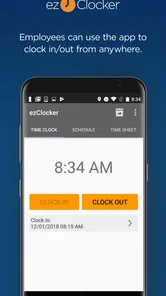
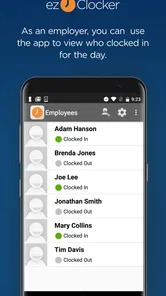
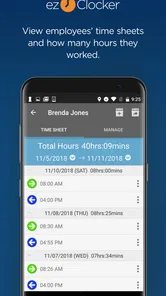
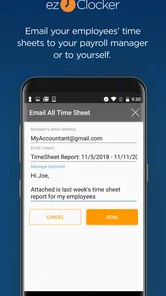
ezClocker is a time-tracking app designed for small businesses, managers, and employees who need a simple way to record working hours. Employees can clock in and out from their mobile devices, while business owners can review timesheets, monitor attendance, manage job locations, and prepare information for payroll. It is particularly useful for teams that work remotely, at customer sites, or across multiple locations.
How do employees clock in and out with ezClocker?
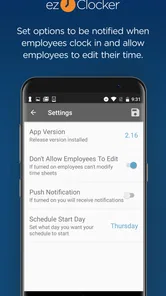
After joining the employer’s ezClocker account, an employee can use the app to clock in when starting work and clock out when finishing. Depending on the company’s settings, the app may use GPS location information to confirm where the time entry was made. Employees can also review their recorded hours, add notes, and report mistakes, although editing or correcting entries may require manager approval.
Does ezClocker track an employee’s location all the time?
ezClocker is primarily intended to record the location associated with clock-in and clock-out events rather than continuously follow an employee throughout the entire day. However, location features depend on the employer’s configuration, device permissions, and the app version. Before using it, employees should review the company’s privacy policy and Android or iOS permission settings to understand what location information is collected and when.
Pros
- Simple clock-in and clock-out process for employees
- GPS location options help verify where shifts begin and end
- Managers can review timesheets before approving payroll
- Supports multiple employees
- jobs
- and work locations
- Reminders can reduce missed clock-ins and forgotten breaks
Cons
- Some useful features may require a paid subscription
- Employees may have privacy concerns with location tracking
- Requires a reliable internet connection for smooth syncing
- Limited customization compared with larger workforce platforms
- Payroll exports may still require manual checking and adjustments











