

EZ TAG
- 345.00
- 4.2
- Installs
- 100.00K
- Price
- Free

Screenshots
Analysis by Reviewed
If your regular drive takes you onto Harris County toll roads, I’d treat EZ TAG as a practical account companion rather than a general travel planner. It is a free travel app from the Harris County Toll Road Authority, and its purpose is to make managing an EZ TAG account easier. That narrow focus is useful: instead of juggling account tasks on the roadside or relying on memory, you can keep the relevant toll account close at hand.
Who will get the most from it
I’d consider it most useful if you already use an EZ TAG and want a convenient way to keep track of the account between trips. It can also suit someone who has recently started driving a toll route and wants to make account management part of their routine. If you rarely use those roads, or you do not have an EZ TAG account, the app is less likely to become a regular part of your day. A general map app is the better choice when your main need is finding a route, while this one is specifically for the EZ TAG relationship.
A realistic routine is to check your account before leaving for a week of regular commuting, then review it again after a longer drive. That small habit can help you notice when something needs attention without trying to sort it out while navigating traffic. I would handle account checks while parked, not at the wheel; the app is a useful planning aid, not a reason to interact with a phone while driving.
How it fits alongside other travel tools
Compared with paper notes, a browser bookmark, or relying on memory, an account app can make routine checks easier to fit into a phone-based travel routine. But it is not a replacement for turn-by-turn navigation, broad trip planning, or information about every toll system you may encounter. I’d keep a navigation app for the route itself and use EZ TAG for the account-specific side of toll travel. That distinction matters if a journey crosses beyond the roads covered by your EZ TAG arrangements.
One useful trade-off is to keep the app for account tasks and avoid assuming it will answer every road question. Before an unfamiliar trip, check your route separately and work out whether your EZ TAG applies. For a drive where toll access is uncertain, comparing a toll route with a non-toll alternative in a navigation tool may be more helpful than opening an account app. The two tools solve different problems, and using them together is more sensible than expecting one to do both.
Using EZ TAG in everyday travel
Have you ever found yourself stuck in traffic, fiddling with change, or fumbling to find a toll tag while on the road? Well, you're not alone, and that's where the EZ TAG app swoops in like a superhero to save the day. Allow me to share my experience with you as I dive into the ins and outs of this nifty little app and why it might just become your new favorite travel companion.
Getting Started with EZ TAG
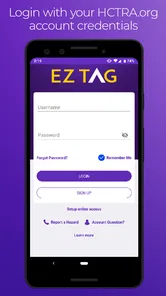
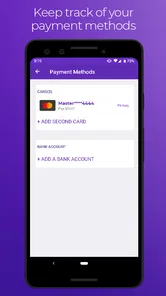
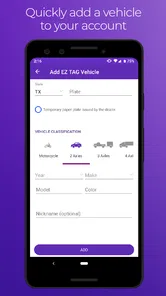
The first thing you'll notice when you download the EZ TAG app is its user-friendly interface. Setting it up is a breeze, and trust me, if I can do it, anyone can. You'll start by creating an account, which involves entering some basic info like your vehicle details and payment preferences. Once you're in, the app does a fantastic job of guiding you through the process of linking your toll tag. It's straightforward, no-nonsense, and gets you on the road in no time.
More From Our News Desk

 Weather - By Xiaomi
Weather by Xiaomi Review: Clear at a Glance, Less Clear Up Close
Xiaomi’s weather app makes everyday forecasts quick to scan, but its calm surface can leave useful details and recovery paths harder to find than they should be.

 X
XX Under Pressure: Can It Recover When Posting Goes Wrong?
A resilience-focused review of X, examining setup, mistaken posts, interruptions, weak connections, and the gaps that matter when recovery needs to be dependable.

 Clash of Clans
Clash of Clans Is Won Between the Battles
Its raids are quick; its community is a long-term project of coordination, teaching, rivalry, and shared responsibility—with all the friction that entails.

 Android Auto
Android Auto Makes the Case for Quieter Car Software
The car interface is no longer judged by how much it can do, but by how quietly it helps. Android Auto shows what drivers now expect—and what still gets in the way.

 MobiOffice: Word, Sheets, PDF
MobiOffice: Transforming Mobile Productivity with Seamless Integration
MobiOffice: Word, Sheets, PDF is redefining mobile productivity with a surprising blend of functionality and innovation.

 EA SPORTS FC Soccer Mobile 26
EA SPORTS FC™ Mobile Soccer: Redefining Mobile Sports Gaming
Dive into EA SPORTS FC™ Mobile Soccer, where immersive gameplay and strategic depth transform mobile sports gaming.
Latest News



Features That Make Life Easier
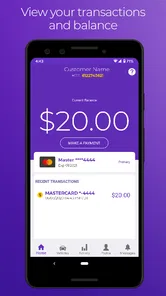
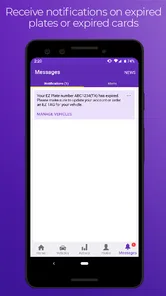
One of the standout features of the EZ TAG app is the real-time toll tracking. You can literally see your toll expenses as they happen, which is perfect for budget-conscious drivers who like to keep an eye on their spending. Plus, the app sends you alerts and notifications about your balance and even reminds you when it’s time to top up. It’s like having a personal assistant riding shotgun!
Another handy feature is the trip calculator. Planning a road trip? Just punch in your starting point and destination, and the app will give you an estimate of the toll costs. It’s super helpful for those long drives where every penny counts.
My Personal Take
Now, I’m not saying the EZ TAG app is perfect, but it’s pretty darn close. The convenience it offers is unmatched, and I love how it takes the stress out of toll payments. No more scrambling for cash or worrying about surprise deductions from my account. Everything is transparent and right at my fingertips.
However, there are a few things to keep in mind. The app relies heavily on your phone’s GPS and data services, so if you’re in an area with spotty signal, it might not be as reliable. But for the most part, it works smoothly and without a hitch.
What to expect from its current version
EZ TAG first appeared on December 9, 2019, and its current release is 3.1.1175401. That tells me the app has continued to receive version changes since launch, but a version number alone does not reveal exactly what changed or how those changes affect individual features. Existing users should judge an update by how their everyday account tasks work, rather than assuming a new number means a particular improvement.
The app has an average rating of 4.1 from around 1.1 thousand ratings, with 305 written reviews, and more than 100 thousand installs. Those figures suggest that it has found a meaningful audience, but they cannot tell me whether it will fit your particular driving routine. It is rated for everyone and supports Android 8.0 or later, so compatibility is worth checking before you plan to rely on it.
Small habits that make account management easier
For a smoother routine, I’d make account checks part of a moment when the car is parked: before a commute, after a run of toll-road trips, or when reviewing household expenses. If another family member drives the vehicle, agree on who checks the account so that two people do not make conflicting changes. This is a general account-management precaution, not a special feature, but it can prevent avoidable confusion.
I’d also treat alerts as prompts to review the account, not as a substitute for checking that the account is in order. Notifications are helpful when they arrive, but phone settings, connectivity, and attention all affect whether you notice them. If a trip depends on using a toll road, sorting out account questions before departure is more reassuring than trying to resolve them from a queue or shoulder.
Where I’d be cautious
The app’s value depends on having an EZ TAG account and on your travel actually involving the relevant toll roads. It is not the right choice if you want one tool to compare every regional toll operator, plan sightseeing stops, or guide you through a city. In those situations, a navigation app or the appropriate toll provider’s account service is a better fit. Keeping those jobs separate avoids mistaking account management for complete travel planning.
I would also avoid making a tight travel decision based only on a phone screen. If you are unsure whether a route uses a toll road or whether your account is ready, check before setting off and use a navigation tool for current route choices. The practical benefit here is convenience during account management; it does not remove the need to plan unfamiliar journeys with care.
Making it work for shared and occasional driving
For a household with more than one driver, I’d decide in advance who is responsible for account upkeep and who should contact the authority if something looks wrong. That simple division of responsibility matters more than checking the app repeatedly: multiple people making separate assumptions about the same account can create confusion. If a vehicle is used only occasionally, a quick parked check before a planned toll-road trip is more useful than turning account monitoring into a daily chore.
Occasional drivers should also think about whether the convenience outweighs the setup. If you use toll roads only rarely, keeping the official account route available for the occasional check may be enough; installing an app you seldom open may not improve your routine. By contrast, a regular commuter who wants account tasks close to hand has a clearer reason to keep it on the phone.
What the app can and cannot settle
A natural question is whether installing it alone is enough to use toll roads. I would not treat the download as a substitute for having an active, correctly managed EZ TAG account. The app is an account companion, so the important practical step is making sure the account and tag arrangements are in place before relying on them during a journey. If anything about your account status is unclear, resolve it through the relevant account channel while parked and well before departure.
Another point worth keeping straight is the difference between account visibility and trip certainty. Seeing account information on a phone does not by itself confirm that a particular road, vehicle, or toll arrangement is covered. I’d check the route and the terms of the relevant account separately when travelling somewhere unfamiliar. That extra check is especially worthwhile when a trip crosses into another toll network, where a local account app may not answer the question you actually have.
Product changes and what I’d watch
The release history offers a small but useful clue: this is not a brand-new app frozen at its original launch. Still, I wouldn’t infer a specific redesign, new feature, or improved reliability from the current version number alone. For existing users, the meaningful test is practical: can you sign in, find the account details you need, and complete routine tasks without extra friction? Those are the changes that matter in everyday use, regardless of how a release is labelled.
If you already rely on it, I’d pay attention after an update to whether your normal account-checking routine still feels clear and whether notifications remain useful to you. Keep the app current in the ordinary way, but don’t make a trip depend on a function you have not checked recently. If you are considering installing it, treat it as a focused tool for managing an EZ TAG account, not as a promise of broader travel features. That expectation makes it easier to judge whether it earns a place on your phone.
Final Thoughts
In conclusion, the EZ TAG app is a modern-day essential for anyone who frequently travels through toll roads. Its simplicity, efficiency, and real-time tracking make it a standout choice for drivers. If you’re looking to streamline your toll payments and avoid the hassle of traditional methods, give EZ TAG a try. It might just change the way you experience your daily commute or your next big road trip. Safe travels!
EZ TAG Frequently Asked Questions
What do I need to check before downloading EZ TAG?
EZ TAG is a free Travel & Local app from the Harris County Toll Road Authority, intended for managing an EZ TAG account. Before installing it, check that your phone runs Android 8.0 or later if you use Android, and that you are downloading the official app. It is rated for Everyone, so it is suitable for a broad audience.
What is EZ TAG and how does it work?
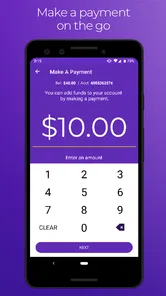
EZ TAG is an app designed to facilitate seamless toll payments for drivers using toll roads in specific regions. By registering your vehicle and linking a payment method, the app allows you to pass through toll booths without the need to stop and pay manually. The toll fees are automatically deducted from your linked account, making your travel experience more efficient and convenient.
Is EZ TAG available for both Android and iOS devices?
Yes, EZ TAG is available for download on both Android and iOS platforms. Users can easily find the app on the Google Play Store for Android devices and the Apple App Store for iOS devices. Ensure your device meets the minimum system requirements for optimal performance.
Are there any subscription fees or hidden charges for using EZ TAG?
While downloading the EZ TAG app is free, users may encounter certain fees associated with toll usage, depending on the region and specific toll roads. It's important to review the terms of service and any potential charges before registering your vehicle and payment method to avoid unexpected costs.
How secure is my personal and payment information with EZ TAG?
EZ TAG employs robust security measures to protect user information. This includes encryption and secure servers to ensure that your personal details and payment information remain confidential. Regular security updates are performed to maintain high standards of data protection, so users can confidently use the app for toll payments.
Pros
- User-friendly interface for easy navigation
- Quick payment processing for tolls
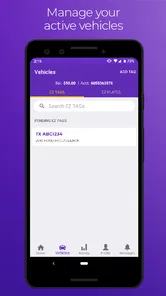
- Supports multiple vehicle registrations
- Real-time balance updates
- Notification alerts for low balance
Cons
- Limited to specific toll roads only
- Occasional app crashes reported
- Customer support can be slow
- No dark mode option available
- Requires stable internet connection











