

Eventleaf Guide
- 8.00
- 3.1
- Installs
- 10.00K
- Price
- Free

Screenshots
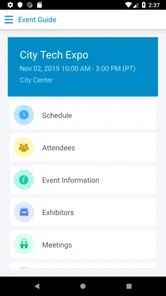
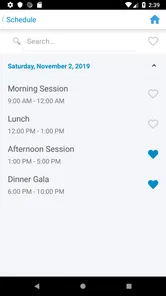
Analysis by Reviewed
When I attend an event, I usually want one thing from a mobile guide: less time searching through emails, printed papers, and scattered documents. Eventleaf Guide is built for that narrow but useful job. It is a free events app from Jolly Technologies Inc. that puts event information and documents on a phone or tablet, with the experience aimed at attendees rather than organizers.
I approached it as a companion for a real event day, not as a general planning tool. That distinction matters. This is not the kind of app I would install to create a guest list, sell tickets, or manage an entire conference. Its value begins after someone has already been invited or registered and needs a convenient place to consult the material connected with the event.
My overall impression is that Eventleaf Guide is most useful when an organizer has already prepared a well-structured event guide. In that situation, it can replace a folder of papers and make reference material easier to carry. If the event content is incomplete, poorly organized, or constantly changing, the app itself cannot solve those underlying problems.
How Eventleaf Guide feels in everyday use
The current version is 4.10.4, and the app has been available since May 3, 2017. That history gives it a more established feel than a brand-new event companion, while its modest average rating of 3.1 from around 25 ratings suggests that the experience may not be equally smooth for everyone. I would treat it as a practical event utility rather than a polished, feature-heavy social platform.
The basic workflow is straightforward: install the app, open the event material made available to attendees, and use the phone or tablet as a reference screen. The strongest part of this approach is the reduction in friction when I need to check information quickly. Instead of switching between a confirmation email, a browser tab, and downloaded attachments, I can look in one event-focused place.
That sounds simple, but simplicity is exactly what makes this type of tool worthwhile. At a conference, I might need to check a room detail while walking between sessions. At a school or community event, I might want to consult an agenda or an instruction document without carrying printed pages. At a trade gathering, a tablet can be more comfortable than a phone when the guide includes longer documents.
The app is listed for Everyone, which fits its role. I would feel comfortable recommending it to a broad range of attendees, including people who are not especially confident with complicated mobile software. The minimum operating system is Android 8.0, so anyone using an older device should check compatibility before relying on it for an important event.
More From Our News Desk

 Gmail
GmailGmail in a Busy Inbox: Who Benefits Most?
From first account to crowded workday, Gmail earns its place through dependable search and flexible sorting—but its best fit depends on how much inbox maintenance you can tolerate.

 Prime Video
Switching to Prime Video: What Changes in Your Viewing Routine
Prime Video can make a compelling second home for streaming, but switching means learning a different catalog, rental layer, and route from browsing to playback.

 Universal TV Remote Control
Universal TV Remote Control Works Best as a Reliable Backup
A phone remote earns its place through quick setup and reliable habits. Here is how to get more from Universal TV Remote Control—and where its limits show.

 Weather - By Xiaomi
Weather by Xiaomi Review: Clear at a Glance, Less Clear Up Close
Xiaomi’s weather app makes everyday forecasts quick to scan, but its calm surface can leave useful details and recovery paths harder to find than they should be.

 X
XX Under Pressure: Can It Recover When Posting Goes Wrong?
A resilience-focused review of X, examining setup, mistaken posts, interruptions, weak connections, and the gaps that matter when recovery needs to be dependable.

 Clash of Clans
Clash of Clans Is Won Between the Battles
Its raids are quick; its community is a long-term project of coordination, teaching, rivalry, and shared responsibility—with all the friction that entails.
Latest News



The best use case is an organized event with reference-heavy material
Eventleaf Guide makes the most sense when the event has more information than can comfortably fit in a short email. A multi-session program, a meeting with several supporting documents, or an event where attendees need to consult instructions throughout the day can benefit from a dedicated guide.
I can also see a useful role for it in situations where several people share the same information. Rather than asking each attendee to search for the latest attachment, the event guide can act as a common reference point. That does not automatically guarantee that every detail is current, so I would still pay attention to any organizer messages, but it creates a cleaner starting place than a long email thread.
One practical habit I would recommend is opening the guide before leaving for the venue. Check the event information while you still have reliable internet access, review the documents you expect to need, and make a note of anything that would be difficult to find quickly later. This small preparation step is more valuable than waiting until you are standing in a crowded entrance area with a weak connection.
What it is not designed to replace
I would not choose this app as a replacement for a full event-management service. It is not presented as an attendee networking platform, a ticket wallet, a live chat room, or a personal scheduling assistant. If your priority is messaging other participants, building your own itinerary, or receiving sophisticated real-time alerts, a broader event platform may be a better fit.
It also should not be confused with a normal document-storage app. A general cloud drive gives me more control over folders and files from different sources, while Eventleaf Guide is more focused on the event context. The trade-off is convenience versus flexibility: the dedicated guide can feel less cluttered for one event, but a cloud drive is more useful when I need to manage unrelated documents or keep my own filing system.
For a small gathering with only a short agenda, installing a dedicated app may feel unnecessary. A web page, a calendar invitation, or a single PDF could be quicker. I would recommend Eventleaf Guide when the organizer has made it the official place for several pieces of event material, not simply because an app exists.
Changes and the experience for existing users
The current version number indicates that the product has gone through multiple iterations since its original release. That is useful context for existing users: the app is not frozen at its first form, and the developer has continued maintaining a recognizable attendee-guide product. Still, a version number alone does not tell me which changes affect my particular event, so I would judge the current experience by whether the guide opens reliably and whether the information I need is easy to reach.
For someone who has used an earlier version, the most important question is not whether the interface looks dramatically different. It is whether familiar event material remains accessible and whether the app behaves consistently on a modern device. I would update before attending rather than waiting until the event begins, especially if the guide contains documents that I cannot afford to lose access to during the day.
There is also a useful distinction between app evolution and event-content evolution. Jolly Technologies Inc. can improve the application, but the quality of the actual guide depends heavily on what the event organizer publishes. A smooth app cannot make an outdated agenda accurate, and a complete document set can still feel frustrating if it is arranged poorly. Existing users should therefore assess both layers: the application and the specific event guide connected to it.
The app has over 10 thousand installs and is free to use. Those figures place it in the category of a focused utility rather than a mass-market consumer service. The lack of an upfront price is helpful for attendees who have been told to use it, since there is no purchase decision standing between them and the event material. I would still install it only when I understand which event it supports, because a free app is not automatically useful outside that context.
Small workflow choices that make a difference
My first tip is to use a larger screen when the guide is document-heavy. A phone is ideal for quick checks, but a tablet can reduce zooming and scrolling when I need to read several pages. That is especially helpful for people with visual strain or anyone reviewing detailed instructions while seated.
My second tip is to separate “quick reference” information from “deep reading” information. Before the event, I would identify the few details I am likely to need repeatedly, such as the schedule or location information, and keep them mentally prioritized. During the event, I would avoid repeatedly searching through every document. This is not a special feature; it is a practical way to work around the limitations of reading a document collection on a small screen.
My third tip is to treat the app as a companion, not the only backup. If an address, arrival instruction, or essential contact detail is critical, I would keep a personal note or screenshot as well. That is sensible for any event app, because a phone battery, connection, or login problem can turn a convenient digital guide into an unavailable one at the wrong moment.
A less obvious advantage is consistency. When an event has several documents, putting them under one attendee-oriented guide can reduce the chance that I open an old attachment from a previous email. The benefit is greatest for recurring events or programs with multiple sessions. The limitation is that this depends on the organizer maintaining the guide carefully; attendees cannot correct a confusing structure from inside the app.
Where the experience can become frustrating
The average rating of 3.1 indicates a mixed reception, and I would not dismiss that signal. An event guide is judged under pressure: people often open it while traveling, rushing between rooms, or trying to answer a question immediately. Any delay, unclear navigation, or difficulty locating a document feels more serious in that setting than it would in a casual app.
The narrow purpose can also feel limiting. If I want to combine the event schedule with my personal calendar, communicate with other attendees, or keep a long-term record of several events, I may end up switching to other tools. Eventleaf Guide can centralize event information, but it does not automatically become my complete event assistant.
Another trade-off is dependence on the organizer. The app can present documents, but it cannot decide which information matters most to me, explain a confusing venue layout, or guarantee that a late change is reflected in the guide. I would be more confident using it when the event team clearly tells attendees how the guide is maintained and where urgent updates will appear.
People who prefer not to install an app for a single appointment may also find the process excessive. In that case, a mobile-friendly event page or a downloadable document may be more convenient. Eventleaf Guide is a better choice when the event has enough material to justify a dedicated container and when the organizer expects attendees to consult it repeatedly.
Who should use it, and who should skip it?
I would recommend it to conference attendees, participants in structured meetings, volunteers at organized programs, and anyone whose event includes several documents rather than one simple invitation. It is particularly suitable for people who want event information available on a phone or tablet without carrying printed pages.
I would also consider it for an attendee who is often asked the same practical questions by others. Having the event guide available can make it easier to check the official material instead of relying on memory. That is a modest benefit, but it can prevent small misunderstandings about schedules or instructions.
I would skip it when the event is very small, the information fits neatly in one email, or the main need is social interaction. I would also look elsewhere if I need advanced personal planning, ticket management, attendee messaging, or a unified calendar experience. In those cases, a broader event platform or the organizer’s own web service may serve me better.
What I would watch before relying on it
Before an important event, I would look for three practical signs. First, does the guide contain the documents I was promised? Second, can I locate the information I need without repeatedly retracing my steps? Third, does the content appear prepared for the actual event rather than copied from an older occasion?
I would also watch how the product continues to evolve beyond version 4.10.4. Future improvements would be most meaningful if they reduce the pressure points that matter to attendees: clearer document discovery, dependable access during busy event days, and better handling of information that changes close to the start time. Those are the areas that determine whether the app feels like a genuine aid or merely another place to look.
For existing users, the sensible approach is to keep the app updated and test the event guide early. For new users, I would install it when an organizer specifically uses Eventleaf Guide as the official attendee resource, then judge it by the quality and usefulness of that guide. The application is free, rated for Everyone, and available for devices running Android 8.0 or later, which keeps the basic barrier fairly low.
In the end, Eventleaf Guide is a focused tool with a clear purpose: bringing event information and documents together for attendees. I like that it does not pretend to be an entire event ecosystem. Its usefulness comes from reducing document clutter and giving me a dedicated reference point, especially when an event is too detailed for a single email but does not require a full social platform.
My recommendation is conditional but positive. If your organizer has prepared a complete guide and expects you to consult it throughout the event, I think it is worth installing and testing ahead of time. If you only need a basic agenda or want advanced planning and communication features, the usual alternatives may be simpler. Eventleaf Guide works best when its focused design matches the event around it.
Eventleaf Guide Frequently Asked Questions
Who is Eventleaf Guide intended for?
Eventleaf Guide is intended for people attending events that use the Eventleaf platform. It is an event-focused app from Jolly Technologies Inc, rather than a general-purpose calendar or event discovery service. If you are considering installing it, check your event invitation or organizer’s instructions to see whether Eventleaf Guide is the app attendees are expected to use.
What devices and operating systems can run Eventleaf Guide?
Eventleaf Guide is available for Android and iOS phones and tablets. On Android, it requires version 8.0 or later. The app is designed to put event information and documents on a mobile device, which can be convenient for checking details while attending. Before downloading, make sure your device supports the app and has enough available storage for installation and event materials.
What is Eventleaf Guide used for?
Eventleaf Guide is a mobile companion for attendees at events created with the Eventleaf platform. After downloading the app and accessing the relevant event, users can typically view schedules, session details, speaker information, venue guidance, announcements, and other event resources in one place. The exact tools available depend on how the organizer configured the event.
How do I access my event in Eventleaf Guide?
Access normally depends on the event organizer. You may be asked to search for the event, enter an event code, scan a QR code, or sign in with the email address used during registration. If the event does not appear, check that your registration details are correct and that you are using the official invitation or access instructions supplied by the organizer.
Does Eventleaf Guide work without an internet connection?
Some event information may remain available after it has been downloaded or synchronized, which can be helpful when venue connectivity is weak. However, offline availability is not guaranteed for every feature. Live announcements, updated schedules, messaging, registration changes, maps, and other online services may require an internet connection, so it is best to open and sync the event before arriving.
Pros
- Clear event schedules make sessions easy to find.
- Useful maps help attendees navigate unfamiliar venues.
- Speaker and exhibitor details are available in one place.
- Event updates can reduce reliance on printed programs.
- Supports networking by keeping attendee information accessible.
Cons
- Useful features depend on the event organizer’s setup.
- Some event content may be unavailable without registration.
- Notifications can become distracting during busy events.
- Venue maps may be less helpful for complex or outdoor locations.
- Performance may vary with weak internet connectivity.











