

Eventify Event App for MICE
- 7.00
- 3.2
- Installs
- 10.00K
- Price
- Free

Screenshots
Analysis by Reviewed
When I first opened Eventify Event App for MICE, I approached it as a practical event companion rather than an app I would use every day. Its focus is clear: helping people involved in meetings, incentives, conferences, and exhibitions keep event information in one place. That immediately gives it a useful role, but it also raises an important question: does it remain valuable after the first event feels new?
My impression is that Eventify is most helpful when an organizer has a defined event workflow and wants attendees to have a dedicated mobile reference point. It is less convincing as a general-purpose planner for casual gatherings. The distinction matters because an app built around professional events needs to save time repeatedly, not simply look useful during launch week.
Eventify is a free Events app from Teksmobile, aimed at an Everyone audience. It has been available since March 29, 2019, and the current version is 3.1.43. Those details suggest a product with a continuing presence rather than a brand-new experiment. Its store summary describes it as a smart AI-powered event app, while the short description uses the name Eventify. In everyday use, I found the real appeal less about the label and more about whether it can reduce the small bits of confusion that surround a busy event.
What makes the first week appealing
The first-week appeal comes from concentration. A conference normally scatters information across email threads, PDFs, calendar entries, social posts, printed schedules, and messages from colleagues. A dedicated event app can give attendees a single place to check what matters, which is especially useful when a schedule changes or several sessions compete for attention.
For a participant, the value is easy to understand. Instead of searching through an inbox for the latest agenda, I can treat the event app as the first place to look. That habit is particularly useful at an exhibition or multi-track conference, where the question is not simply “what is happening?” but “what should I attend next, and where do I need to be?” Eventify feels designed for that kind of concentrated decision-making.
Its MICE focus also gives it a more professional character than a normal invitation or calendar app. A calendar is excellent for remembering a time. It is not necessarily designed to represent the wider experience of an event, including the surrounding program and the information an attendee may need while moving between sessions. Eventify makes more sense when the event itself is the main subject, rather than just one appointment among many.
One useful way to approach the app is to install it before the event becomes hectic. I would not wait until I was already standing at a registration desk with a low battery and a crowded schedule. Opening it early lets me become familiar with the event structure and identify the information I expect to revisit. That small preparation makes the app feel less like another task and more like a reference tool.
More From Our News Desk

 Gmail
GmailGmail in a Busy Inbox: Who Benefits Most?
From first account to crowded workday, Gmail earns its place through dependable search and flexible sorting—but its best fit depends on how much inbox maintenance you can tolerate.

 Prime Video
Switching to Prime Video: What Changes in Your Viewing Routine
Prime Video can make a compelling second home for streaming, but switching means learning a different catalog, rental layer, and route from browsing to playback.

 Universal TV Remote Control
Universal TV Remote Control Works Best as a Reliable Backup
A phone remote earns its place through quick setup and reliable habits. Here is how to get more from Universal TV Remote Control—and where its limits show.

 Weather - By Xiaomi
Weather by Xiaomi Review: Clear at a Glance, Less Clear Up Close
Xiaomi’s weather app makes everyday forecasts quick to scan, but its calm surface can leave useful details and recovery paths harder to find than they should be.

 X
XX Under Pressure: Can It Recover When Posting Goes Wrong?
A resilience-focused review of X, examining setup, mistaken posts, interruptions, weak connections, and the gaps that matter when recovery needs to be dependable.

 Clash of Clans
Clash of Clans Is Won Between the Battles
Its raids are quick; its community is a long-term project of coordination, teaching, rivalry, and shared responsibility—with all the friction that entails.
Latest News



I also think the first-use experience depends heavily on the quality of the event setup. Eventify can provide a framework, but the organizer still determines whether the content is clear, current, and easy to follow. A well-prepared event can make the app feel polished and dependable. A poorly maintained event can make even a capable app feel empty or confusing. That is an important trade-off: the attendee’s experience is tied not only to Teksmobile’s software but also to the people managing the event.
Useful for real event decisions
Consider a realistic workday at a conference. I arrive in the morning with several sessions that look interesting, but I also need time for networking and a meeting with a supplier. A paper program shows the full schedule, yet it does not help much when plans change. With Eventify acting as my event reference, I can check the program again between conversations instead of carrying a printed timetable or jumping between unrelated messages.
The less obvious benefit is reducing mental switching. I do not need to remember which email contained the venue detail, which message mentioned the next session, and which document held the wider agenda. Even if the app does not eliminate every question, placing event information together can make the day feel more manageable.
For organizers, the first week is also a test of communication. If attendees can find the information they need without repeatedly asking staff, the app is doing more than displaying content; it is absorbing routine questions. That can free staff to deal with exceptions, accessibility needs, registration problems, and personal requests that cannot be solved by a schedule screen.
There is a practical limitation here. I would not assume that downloading the app automatically replaces every other event channel. Important details may still arrive through email or direct communication, and an attendee should continue checking the official instructions used by the organizer. Eventify is best treated as the event’s working companion, not as a reason to ignore other confirmed communications.
Where it compares well with familiar alternatives
The usual alternative is a combination of a calendar, a PDF agenda, and a messaging service. That combination can work, especially for a small meeting with a simple timetable. Its weakness appears when an event has enough moving parts to make separate tools awkward. A calendar records appointments, a PDF presents information, and messaging handles conversation; none of those tools is naturally centered on the complete event experience.
Eventify’s advantage is specialization. It is more relevant than a generic notes app when the information belongs to a structured professional event. It also feels more focused than a broad project-management tool, which may offer many functions but require organizers to build their own event system.
On the other hand, a generic calendar may still be better for someone who only needs reminders. If my role is to attend one meeting and leave, installing a dedicated event application can feel like unnecessary overhead. The app earns its place when the event is rich enough to justify its own information hub.
What remains useful from month to month
The strongest long-term case for Eventify is not that I would open it constantly. It is that each new professional event can give it a fresh purpose. That makes recurring value different from daily-app value. I would not expect to browse it between events, but I could see myself returning whenever an organizer uses it for another conference, exhibition, or incentive program.
That pattern makes the app suitable for people whose work regularly involves events. Attendees who travel to several conferences may appreciate having a familiar event-specific tool instead of learning a new system every time. Organizers may also benefit from a repeatable approach, because a consistent mobile experience can be easier to manage than assembling a new collection of documents and channels for every occasion.
The important question is whether the app becomes part of a routine. In my view, it does when I use it at three distinct moments: before leaving for the event, during the busiest parts of the schedule, and afterward when I need to recall event information. Each moment has a different purpose. Beforehand, it supports planning. During the event, it reduces searching. Afterward, it can serve as a reference for details I did not want to lose in a crowded day.
A practical tip is to use the app as a decision filter rather than trying to inspect every available item. At a large event, reading everything can create fatigue. I would first identify the sessions, activities, or information directly connected to my goals, then use the app to revisit those areas. This turns the application from a digital brochure into a personal working guide.
Another useful workflow is to check the program at natural transition points: before the first session, during a break, and before leaving a venue area. Constantly refreshing an event app can become distracting, while never checking it can make the app irrelevant. A few deliberate checks are more sustainable than treating it like a social feed.
For event teams, recurring value depends on disciplined preparation. A consistent naming style for sessions, clear descriptions, and timely updates would make the experience easier for attendees. This is not glamorous work, but it is where the difference between a helpful event app and a neglected one is created. Eventify cannot rescue information that has been entered vaguely or left outdated.
The maintenance burden behind the convenience
From an attendee’s perspective, the maintenance burden is fairly simple: keep the app available, open it when needed, and avoid relying on it blindly for every communication. The larger burden belongs to organizers. They need to keep event content coherent, especially when speakers, rooms, times, or activities change. If that upkeep is ignored, the app becomes another place where outdated information can live.
This is the central long-term trade-off. A paper program is difficult to change but easy to understand. A dedicated app can support a more flexible event experience, but its usefulness depends on active management. Organizers should therefore decide in advance who owns updates and how attendees will be alerted to important changes. Without that responsibility, the digital format may create confidence without accuracy.
I would also recommend that organizers test the attendee journey before publishing the event. They should follow the same path a newcomer would take: open the event, locate the main schedule, identify the next activity, and find essential practical information. This catches problems that are invisible to someone who already knows the venue and program.
For users wondering whether the app is difficult to maintain personally, the answer is more reassuring. It is not the kind of tool that demands a daily content routine from an attendee. Its maintenance is mostly about keeping it ready for the next relevant event and using it with sensible expectations. The more events I attend, the more reasonable that small amount of preparation becomes.
Why novelty can fade
The novelty fades when the app repeats information without helping me act on it. A complete agenda is useful once, but if I must still search through multiple channels for changes, locations, or practical instructions, the dedicated app loses its advantage. This is why I judge Eventify by workflow rather than appearance. The question is not whether it looks like an event product; it is whether it shortens the path from “I need to know something” to “I know what to do next.”
There is also a risk of event-app fatigue. Attendees may be asked to install a different application for every conference, then remove it when the event ends. That can make people reluctant to engage, particularly when an event is short or the schedule is uncomplicated. Eventify is more likely to earn attention when the organizer explains its purpose clearly and gives attendees a reason to return to it.
People who dislike adding specialized apps to their phones may prefer a mobile website, a calendar file, or a well-designed PDF. Those alternatives are not automatically inferior. For a small meeting, simplicity can be more valuable than a dedicated platform. I would choose Eventify when the event has enough structure and movement to make a central app worthwhile.
The rating picture reflects a product that may not satisfy everyone equally: Eventify has an average rating of 3.2 from around 85 ratings, with 7 written reviews. I would read that as a reason to keep expectations practical rather than as a final judgment. Event apps are unusually dependent on the quality of each event’s setup, so one attendee’s smooth experience may differ greatly from another’s.
Compatibility and everyday practicality
Eventify is free to use and is suitable for Everyone, which removes two common barriers for casual attendees and mixed professional groups. It requires Android 7.0 or later, so users with older devices should check compatibility before an event day. That is a small but important preparation step, especially for organizations inviting a broad audience.
The app has passed the early-adoption stage, with over 10 thousand installs. I would still avoid judging its reliability solely by that number. What matters more to me is whether the specific event is well configured and whether the app behaves predictably on my device. Installing it ahead of time is the sensible approach, particularly if the event involves travel or a tight schedule.
One friction point is that a dedicated event app competes with the tools people already understand. Calendar apps, email, messaging services, and browser bookmarks are familiar, and users may need a clear reason to add another destination. Eventify’s best answer to that resistance is not extra complexity; it is making event information noticeably easier to find and revisit.
My long-term verdict
After the initial appeal wears off, I see Eventify as a specialized tool with recurring value rather than a permanent everyday app. It earns space when I am attending or managing a substantial MICE event and need a focused place for the event’s moving parts. It does not need to become a daily habit to be worthwhile; it needs to become a dependable habit whenever an event begins.
I would recommend it to conference attendees, exhibition visitors, corporate event teams, and professionals who regularly move through structured programs. It is especially suitable when a paper agenda feels too rigid and a collection of general-purpose tools feels too scattered. The app gives those users a clearer center of gravity for the event day.
I would skip it for a brief meeting, a small private gathering, or any situation where a calendar invitation already covers everything I need. I would also be cautious if the organizer has not demonstrated that event information will be maintained. In that situation, a simpler alternative may be more trustworthy because it creates fewer expectations.
My most useful advice is to judge the app together with the event, not in isolation. Install it before arrival, identify the information you will actually use, and keep another official communication channel available for critical changes. If the organizer has done the preparation properly, Eventify can reduce the clutter around a busy event and make the schedule easier to navigate.
In the end, Eventify Event App for MICE does not win me over through novelty alone. Its lasting value comes from repetition: the same focused approach can be useful each time I attend a well-organized professional event. The experience is not frictionless, and the app cannot compensate for weak event management, but it has a sensible role when a conference or exhibition needs more structure than a calendar and less chaos than a pile of messages. For that specific audience, it is worth trying, provided the event itself gives the app enough substance to justify the download.
Eventify Event App for MICE Frequently Asked Questions
Which devices and operating systems can run Eventify Event App for MICE?
Eventify Event App for MICE is an app for Android, and its minimum operating system requirement is Android 7.0. Before downloading, check the Android version on your device and make sure you have enough available storage for the installation and any event content you may access. The app is free to download, so you can install it without paying an upfront download price.
Who develops Eventify, and what should I expect from the app?
Eventify is developed by Teksmobile and is categorized as an events app. Its short description is “Eventify,” and it is presented as a smart AI-powered event app. That positioning makes it relevant to people attending or organizing professional gatherings, though the specific tools and content available in the app can depend on how each event is set up.
What is Eventify Event App for MICE used for?
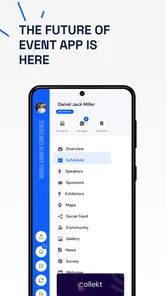
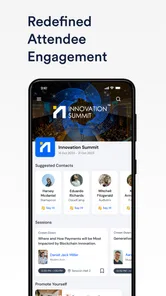
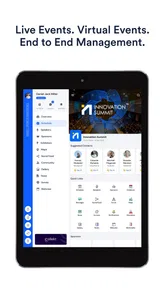
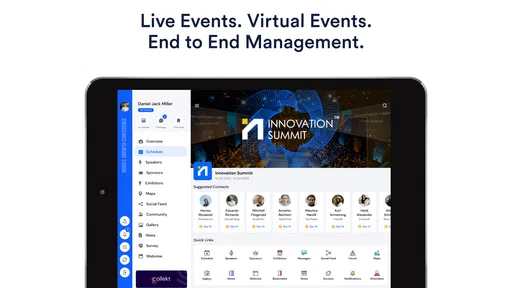
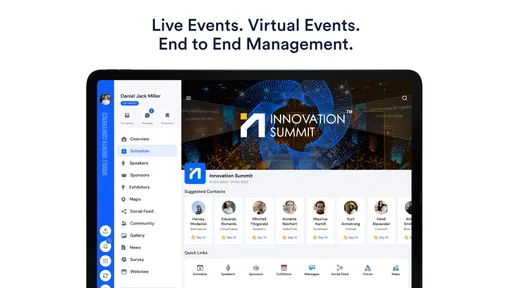
Eventify Event App for MICE is designed to support conferences, exhibitions, corporate meetings, trade shows, and other professional events. After exploring its features, the app appears focused on bringing schedules, speaker information, attendee networking, venue details, announcements, and event engagement tools into one mobile platform. It can help participants stay organized while giving event organizers a central way to communicate with attendees before and during the event.
Does Eventify Event App for MICE work for both attendees and event organizers?
Yes. The platform is intended to serve two different groups: attendees and organizers. Participants can typically use it to view agendas, create personal schedules, discover speakers or exhibitors, connect with other guests, and receive updates. Organizers can use the associated management tools to publish event content, send notifications, manage engagement, and provide important information. Available functions may depend on the event setup and the organizer’s subscription or configuration.
Can I use Eventify without an internet connection?
Eventify generally requires an internet connection for account access, event registration, live updates, networking interactions, notifications, and other online features. Some event information may remain available after it has been loaded, depending on the app version and organizer settings, but users should not assume that every feature works offline. For the best experience, connect to reliable Wi-Fi or mobile data before entering the venue or attending important sessions.
Pros
- Centralizes schedules
- speakers
- maps
- and event updates in one app.
- Useful networking tools help attendees connect with relevant participants.
- Push notifications can quickly share room changes or important announcements.
- Custom agendas make it easier to organize sessions around personal interests.
- Supports event branding
- creating a consistent experience for attendees.
Cons
- Some features may be unavailable unless the event organizer enables them.
- The app’s usefulness depends heavily on accurate organizer-provided information.
- Large events can make the attendee directory feel crowded or difficult to browse.
- Frequent notifications may become distracting during busy conference days.
- Account setup and permissions may feel excessive for one-time event attendance.











