Estimate Invoice Maker By Moon
- 131.00
- 4.3
- Installs
- 100.00K
- Price
- Free

Screenshots
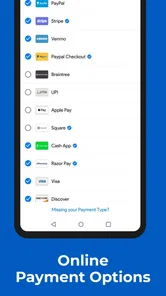
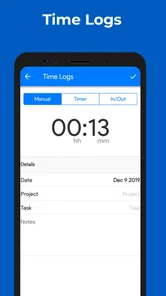
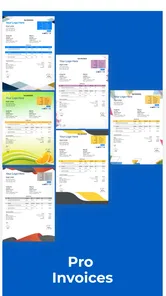
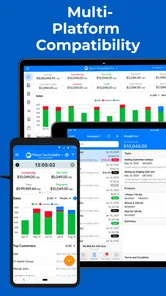
Analysis by Reviewed
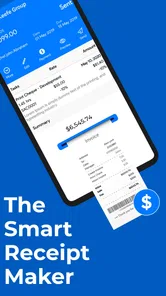
When I need to send a quick estimate or invoice without opening a full accounting system, Estimate Invoice Maker feels built for that exact moment. I found it most useful as a lightweight business tool: something I can reach for between appointments, on a phone, or while finishing a small job, rather than a complete replacement for bookkeeping software. Its central promise is simple—turn the details of a sale or service into a presentable document—and that focus gives it a practical place in a small business workflow.
The app is developed by Moon Technolabs Pvt. Ltd. and sits in the business category. It is free to install, carries an Everyone age rating, and has passed the point of being an obscure experiment, with over 100 thousand installs. Its average rating is 4.3 from around 865 ratings, which matches my impression that the basic invoice-making experience is approachable, even though the app is not equally suitable for every kind of business.
Making a usable estimate without carrying an office around
The capability I kept coming back to is the connection between an estimate and an invoice. In everyday work, these are not isolated documents. A customer first wants to know what a job may cost, and once the work is accepted, the same information needs to become a request for payment. A mobile app that handles both stages can save more time than one that only produces a polished invoice after all the work has already been done.
That matters especially for tradespeople, freelancers, home-service providers, consultants, and small sellers who do not want to maintain a desktop accounting package just to create a document. I can imagine using it after measuring a room, checking a repair, finishing a design task, or agreeing on a small project. Instead of writing figures in a notes app and rebuilding them later, I can organize the information while the conversation is still fresh.
The strongest part of this approach is not visual decoration. It is continuity. If the estimate already contains the customer, the work description, quantities, and amounts, converting that thinking into an invoice should reduce retyping and the mistakes that come with it. The real benefit is a shorter path from agreement to payment request. That is more valuable to me than having a long list of accounting features I may never use.
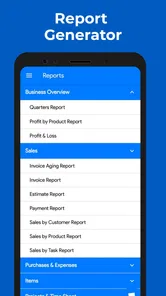
I would not confuse this with a full financial management platform. A dedicated accounting service is usually the better choice when a company needs detailed expense tracking, tax workflows, inventory control, payroll, bank reconciliation, or reports for an accountant. Estimate Invoice Maker is more convincing when the immediate problem is document creation, not the complete administration of a growing company.
What the estimate-to-invoice workflow changes
In practice, the workflow encourages me to treat an estimate as a working document rather than a disposable message. I can think through the job in a structured way, separate labor from materials, and give the customer a clearer picture of what is included. That alone can prevent an awkward follow-up later when someone asks why the final amount differs from the original conversation.
More From Our News Desk

Weather by Xiaomi Review: Clear at a Glance, Less Clear Up Close

X Under Pressure: Can It Recover When Posting Goes Wrong?

Clash of Clans Is Won Between the Battles

Android Auto Makes the Case for Quieter Car Software

MobiOffice: Transforming Mobile Productivity with Seamless Integration

EA SPORTS FC™ Mobile Soccer: Redefining Mobile Sports Gaming
A useful habit is to prepare the estimate before leaving the customer’s location, while measurements, requested changes, and special conditions are still easy to remember. I would describe the work in plain language instead of relying on a vague line such as “service charge.” A more precise description makes the later invoice easier to understand and gives both sides a reference point if the scope changes.
For a small operator, this also changes how the day is organized. Rather than collecting scraps of paper and rebuilding documents at night, I can create the first version close to the job. That does not eliminate the need to review the figures, but it moves the review to the moment when errors are easier to spot. On a phone, that is a meaningful advantage over waiting until I am back at a desk.
There is a trade-off in keeping the process mobile. A phone screen is convenient for a few items, but it becomes tiring when a project has many lines, several options, or complicated pricing. I would use the app confidently for a short service estimate, while taking more care with a renovation or multi-stage contract. The tool is quick because the job is simple; it should not be forced to make a complex job look simple.
A realistic day with the app
Imagine I run a small repair service. A customer asks me to replace a part and correct a second issue that may require extra labor. At the visit, I can separate the known work from the conditional work instead of presenting one unexplained total. The estimate then becomes a useful conversation: the customer can see what is certain, what may change, and what the expected cost is before approving anything.
After the repair, the final invoice can reflect what actually happened. If the second issue was not needed, I can avoid charging for it. If additional work was approved, I can include it as a distinct line rather than quietly changing the original amount. This workflow is not just tidier; it makes disagreements less likely because the document records the difference between the initial expectation and the completed job.
My practical advice would be to pause before sending anything. Check the customer name, the description, the quantity, and the final amount in that order. On a small screen, a misplaced digit or an omitted line is easy to overlook. I would also keep the estimate wording consistent across similar jobs, because consistent descriptions make later comparisons much easier.
Another useful approach is to create the estimate while discussing the work, but wait to finalize it until I have checked the arithmetic and scope. Speed is helpful, yet sending an unfinished document can make a business appear less reliable. The app can reduce administrative friction, but it cannot replace a final human review.
Where it fits better than the usual alternatives
The usual alternative for many small businesses is a word processor or spreadsheet. Those tools are flexible, but they often require manual formatting, repeated formulas, and a separate method for keeping estimates and invoices connected. They can work well for someone who enjoys building templates, but they make a quick job feel like a small design project.
A notes app is faster for capturing information, but it is poor at turning that information into a professional document. It may be fine as a temporary scratchpad, yet I would not want it to be the final stage of a customer-facing process. Estimate Invoice Maker occupies the useful middle ground between an informal note and a heavyweight accounting suite.
At the other end, full invoicing and bookkeeping platforms can offer deeper automation and broader financial records. They are preferable when several people need access, when a business has recurring billing, or when financial reporting is central to daily operations. Their extra structure can also feel excessive for a solo worker who only needs to issue estimates and invoices from a mobile device.
This app’s appeal therefore depends on the size and complexity of the workflow. It is not automatically “better” than a spreadsheet or accounting platform. It is better when the main pain is producing clear documents quickly, with less formatting work and less dependence on a computer.
Small details that improve the workflow
One non-obvious advantage of an estimate-first habit is that it creates a checkpoint before money changes hands. I can use the estimate to identify unclear scope, missing materials, or an unrealistic labor assumption. That makes the app useful before invoicing begins. The document is not merely an output; it can help me think through the job.
A second insight is that line-item clarity can protect both the customer and the business. A single total may look faster, but separate entries make changes visible. If the customer adds a task, I can show the effect instead of absorbing the extra work or surprising them at the end. This is especially important when a project has optional work that may or may not be approved.
Third, I would use the same wording for repeated services whenever possible. For example, if I regularly perform the same inspection or installation, a consistent description reduces the chance that I forget an important detail. It also gives customers a familiar format from one job to the next. The app becomes more useful when I treat it as a repeatable process rather than a blank form I reinvent every time.
A fourth trade-off is that convenience can encourage rushed administration. Because the app is available on a phone, I may be tempted to send a document immediately after entering the last figure. My better workflow is to save a short review step for every document, particularly when the estimate contains several quantities or when the final invoice differs from the original plan.
What to expect from the current app
The current version is 8.16.2, and the stated minimum operating system is Android 8.0. That makes it relevant to people using older Android phones, provided their device meets that requirement. I appreciate that the app is not positioned only for brand-new hardware, because many independent workers keep a reliable older phone for business tasks.
The app is free to install, but in-app purchases range from $0.99 to $599.99 per item. That is the point I would investigate before building a long-term workflow around it. A free installation is useful for trying the basic experience, but the possible purchase range means I would review exactly which functions are included and which may require payment before committing business records to the platform.
I would also treat the app as one part of an administrative routine, not as the only place where important information exists. After preparing a document, I would keep my own orderly record of the customer, job, amount, and payment status. That is good practice for any mobile invoicing tool, particularly when the business needs a reliable history later.
The Everyone rating makes the app broadly approachable from an age-classification perspective. That does not mean every interface decision will suit every user. Someone who is uncomfortable entering business information on a phone may prefer a desktop workflow, while someone who works mostly from a mobile device will likely find the format more natural.
Who will gain the most from it
I see the greatest value for a solo professional or very small team that sends straightforward estimates and invoices. A cleaner process can help a new freelancer look organized without requiring a large software subscription or a complicated setup. It can also help an experienced tradesperson replace handwritten paperwork with something easier to revise and present.
It is a particularly sensible fit when work happens away from a desk. A cleaner, technician, photographer, tutor, installer, or independent consultant may need to turn a conversation into a document before the next appointment. In those situations, mobility is not a minor convenience; it is the reason to choose this kind of app.
I would be more cautious for a business with several employees, complex tax obligations, extensive product catalogs, or a need for detailed financial reporting. Those users may outgrow a focused invoice maker quickly. They would probably be better served by accounting software that makes the broader financial picture the center of the experience.
I would also skip it if my main need is recurring billing, inventory management, or a complete customer relationship system. Creating a clear invoice is different from managing every stage of a commercial operation. Choosing a smaller tool for a larger problem usually creates extra manual work later.
My final view after using the workflow
Estimate Invoice Maker succeeds when I judge it by its most practical job: helping a small business move from a spoken agreement to a structured estimate and then toward an invoice without carrying a desktop workflow everywhere. Its 4.3 average and more than 100 thousand installs suggest that this focused approach has found a real audience, and I can understand why.
My recommendation is strongest for people who value speed, clear line items, and mobile access more than deep accounting features. I would install it, test the document workflow with a realistic sample job, and pay close attention to which abilities are available without an in-app purchase. If that trial matches the way I actually work, it can replace a messy combination of notes, spreadsheets, and manually formatted documents.
It is not the right answer for every business, and its convenience should not encourage careless checking. Still, for a freelancer or small operator who needs estimates and invoices rather than a complete financial command center, I find the focused design genuinely useful. Use it as a disciplined estimate-to-invoice tool, not as a substitute for full bookkeeping, and its simplicity becomes its main strength.
Estimate Invoice Maker By Moon Frequently Asked Questions
Who develops Estimate Invoice Maker by Moon, and is it available for iOS and Android?
Estimate Invoice Maker is a business app developed by Moon Technolabs Pvt. Ltd. It is intended for making estimates and invoices on a mobile device. Before downloading, check the app store on your particular phone to confirm availability and compatibility, then review the app’s current requirements and purchase details there. The app is free to download, with some in-app purchases available.
What is the current version, and what device requirements should I check before downloading?
The current version is 8.16.2, and the app requires Android 8.0 or later. Check your device’s operating system and available storage before installing, and make sure you download the current release from a trusted app store. Estimate Invoice Maker is rated for Everyone, so its stated age classification is suitable for a general audience.
What is Estimate Invoice Maker by Moon used for?
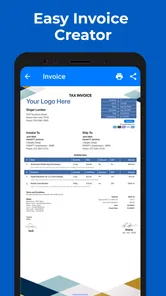
Estimate Invoice Maker by Moon is designed to help freelancers, contractors, small businesses, and independent professionals prepare estimates and invoices from a mobile device. After reviewing the app, its main purpose is to simplify creating professional-looking documents, adding customer and service details, calculating totals, and sharing invoices digitally without relying on complicated accounting software.
Can I create both estimates and invoices with the app?
Yes, the app is intended to support both estimates and invoices, which makes it useful throughout the sales and payment process. You can prepare an estimate before starting a job, then create an invoice when the work is completed. Before downloading, users should check the current version’s available templates, conversion options, tax fields, and document customization tools, as features may vary between updates or subscription plans.
Is Estimate Invoice Maker by Moon suitable for small businesses and freelancers?
The app is particularly suitable for users who need a straightforward way to manage basic billing while working away from a desktop computer. Freelancers, tradespeople, consultants, and small business owners can use it to organize customer information, list products or services, apply prices, and send documents quickly. However, businesses requiring full bookkeeping, inventory management, payroll, or advanced accounting reports may need a more comprehensive solution.
Pros
- Creates professional estimates and invoices quickly from a mobile device.
- Useful templates help maintain a consistent
- businesslike appearance.
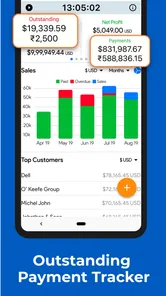
- Tracks invoice details
- making it easier to monitor outstanding payments.
- Suitable for freelancers and small businesses with straightforward billing needs.
- Saves customer and product information to reduce repetitive data entry.
Cons
- Advanced accounting and inventory tools may be limited compared with full software.
- Some features or templates may require in-app purchases or a subscription.
- Customization options may not satisfy businesses needing highly branded documents.
- Manual data entry can become time-consuming for large customer or product lists.
- Cloud backup and cross-device syncing may depend on the selected plan.











