

epocrates: Drug Info & Pill ID
- 5.45K
- 2.7
- Installs
- 1.00M
- Price
- Free

Screenshots
Analysis by Reviewed
When a medication question interrupts an ordinary day, I want a focused reference rather than a maze of search results. epocrates: Drug Info & Pill ID brings drug information, interaction checking, pill identification, and medical calculators together, which makes it especially relevant to people who handle medication questions regularly. I see it as a useful starting point for looking things up—not a substitute for a pharmacist, prescriber, or careful reading of a prescription label.
A quick reference for real medication questions
I find this kind of reference most useful when a question comes up in the middle of an ordinary task, not when I have time to read broadly. A clinician checking a medication during a busy appointment, a student revising drug information, or a caregiver trying to identify a tablet from a labeled container all have different needs, but they share one thing: they need a focused starting point. For me, the best habit is to treat a result as a prompt to check the relevant details, rather than as a substitute for professional judgment.
For example, imagine helping a relative sort out which medicines belong in a weekly organizer. A pill identifier can help narrow down an unfamiliar tablet using its visible characteristics, while a medication reference can help you confirm the name before you ask a pharmacist or check the prescription packaging. I would not use a visual match alone to decide that a loose pill is safe to take. Packaging, the prescription record, and advice from a qualified professional remain important safeguards.
Getting to Know epocrates: Your Digital Health Companion
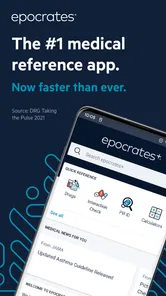
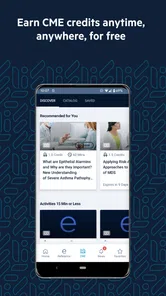
First off, let’s talk about what epocrates actually does. It’s primarily a drug reference app designed for healthcare professionals, but honestly, anyone who wants to be better informed about their medications can benefit from it. The app offers a comprehensive drug database, which includes pill identification, interaction checkers, and even medical news updates. It’s like having a library of medical knowledge, all condensed into your smartphone.
As a medical app from Epocrates, Inc., it sits closer to a point-of-care reference than to a general wellness tracker. It is free to install, has an Everyone age rating, and its current version is 26.2.0; in-app purchases range from $12.99 to $224.99 per item. The app has been available since February 22, 2010, and has reached over one million installs. Its average rating is 2.7 from around 26,000 ratings, alongside roughly 5,500 written reviews, so I would not assume every user experience is equally smooth. Those figures suggest a substantial audience, but they are not a substitute for deciding whether its workflow fits yours.
Drug tools and the details that matter
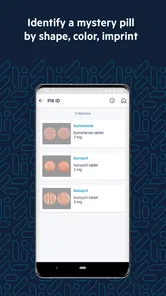
One of the standout features of the app is the pill identification tool. You simply enter the color, shape, and imprint of a pill, and voilà, the app gives you detailed information about it. This has saved me a ton of time, especially when managing medications for family members. Imagine not having to sift through endless Google searches to figure out what’s what.
A practical tip is to inspect the imprint carefully before searching and enter each visible character accurately. Similar-looking tablets can differ in small but important ways, and a partial or misread imprint can send a search in the wrong direction. I would also compare the result with the medication’s packaging or a trusted professional’s guidance, especially if the tablet is damaged, the imprint is hard to read, or the pill came from an unknown source. The feature is useful for narrowing possibilities, not for proving a loose pill’s identity beyond doubt.
More From Our News Desk

 Gmail
GmailGmail in a Busy Inbox: Who Benefits Most?
From first account to crowded workday, Gmail earns its place through dependable search and flexible sorting—but its best fit depends on how much inbox maintenance you can tolerate.

 Prime Video
Switching to Prime Video: What Changes in Your Viewing Routine
Prime Video can make a compelling second home for streaming, but switching means learning a different catalog, rental layer, and route from browsing to playback.

 Universal TV Remote Control
Universal TV Remote Control Works Best as a Reliable Backup
A phone remote earns its place through quick setup and reliable habits. Here is how to get more from Universal TV Remote Control—and where its limits show.

 Weather - By Xiaomi
Weather by Xiaomi Review: Clear at a Glance, Less Clear Up Close
Xiaomi’s weather app makes everyday forecasts quick to scan, but its calm surface can leave useful details and recovery paths harder to find than they should be.

 X
XX Under Pressure: Can It Recover When Posting Goes Wrong?
A resilience-focused review of X, examining setup, mistaken posts, interruptions, weak connections, and the gaps that matter when recovery needs to be dependable.

 Clash of Clans
Clash of Clans Is Won Between the Battles
Its raids are quick; its community is a long-term project of coordination, teaching, rivalry, and shared responsibility—with all the friction that entails.
Latest News



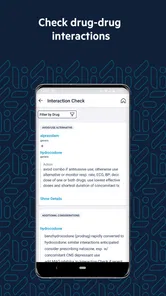
The drug interaction checker is another game-changer. You can input multiple medications, and the app will alert you to any potential harmful interactions. For someone juggling various prescriptions, this feature is invaluable. It’s like having a safety net, ensuring you’re not inadvertently mixing meds that shouldn’t be mixed.
For a more careful check, I would enter the full medication list rather than only the two drugs I happen to be thinking about. That makes the tool more useful when a person takes several prescriptions, while also reminding me that supplements and over-the-counter medicines can matter in a medication review. An alert is a reason to investigate, not an instruction to stop or change treatment. If a warning appears, the next step should be to discuss it with a prescriber or pharmacist who knows the person’s medical history.
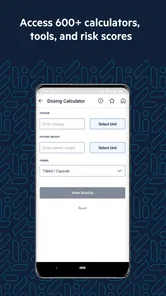
And let’s not forget the medical calculators. From BMI to GFR, these tools are incredibly handy for quick assessments. You don’t have to be a doctor to appreciate how useful it is to have these calculations at your fingertips.
Calculators are most helpful when you already know which inputs and units are appropriate. I would double-check what values I am entering and how the result should be interpreted, particularly for a clinical decision. They can save time on arithmetic, but they cannot supply missing context or replace a full assessment. That distinction matters for casual users too: a convenient number can look more definitive than it really is.
Speed expectations and everyday workflow
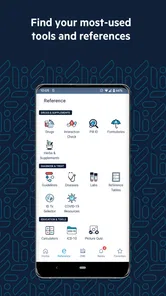
Now, I’m not a tech guru, but I found the app’s interface to be super intuitive. The design is straightforward, which means you won’t waste time hunting for the feature you need. The home screen is clean, with easy navigation tabs that direct you to the drug guide, interactions, and more.
In terms of speed, a reference app earns its keep by getting me to the right search quickly. I would expect straightforward lookups and calculator tasks to feel lighter than the more involved work of entering several medicines and reviewing the resulting information. A slow connection, an older device, or a long list to check can affect the overall experience, so I would avoid assuming every task will feel instant. When I am in a hurry, preparing a medication list before opening the interaction checker is a simple way to reduce repeated searching.
Setting up the app is a breeze. It doesn’t bombard you with a million options; instead, it focuses on functionality and efficiency. Even if you’re not the most tech-savvy person, you’ll find it easy to navigate.
During heavier use, such as switching between a drug reference, an interaction check, and a calculator, the main practical challenge is keeping the clinical question clear. I find it helpful to search one medicine at a time, note the exact question, then move to the interaction review with the complete list. That workflow makes it less likely that I will confuse a general drug fact with advice about a particular patient. If the app stalls or a result does not appear as expected, I would retry the search and verify important information through another reliable channel rather than relying on an incomplete screen.
Reliability and sensible cross-checks
What really sets epocrates apart is its reliability. The information is consistently updated, which is crucial in the ever-evolving world of medicine. Unlike some apps that might leave you second-guessing, this one instills confidence. You can trust that the data you’re accessing is accurate and up-to-date.
For reliability, I would separate the convenience of having a reference close at hand from the responsibility of confirming decisions. A medication app can help me spot a question or organize a check, but I would still verify high-stakes details with a qualified clinician or pharmacist. That is especially important when the patient has complex conditions, a changing prescription, or symptoms that need attention. I value the fast access, but I would not treat any single app as the final authority.
And sure, there are other medical apps out there, but epocrates combines a wealth of features without overwhelming the user. It’s not just about being comprehensive; it’s about being helpful.
Compared with a broad web search, a dedicated drug reference can keep the task centered on medication information instead of mixing in unrelated pages and forums. A pharmacy label or patient leaflet, on the other hand, may be the better first stop when I need instructions specific to a medicine dispensed to one person. For a quick interaction review or pill search, this app is more purpose-built; for a diagnosis, treatment plan, or urgent concern, I would turn to a clinician rather than expect a reference app to answer the whole question.
Who benefits from the reference—and who may not
I would recommend it most to healthcare workers and students who regularly need drug facts close by, and to caregivers who want a structured way to look up medication information before raising questions with a professional. The combination of drug reference tools, interaction checking, and calculators makes more sense when you have recurring medication questions than when you only need a one-off answer.
If you are a casual user looking for a simple reminder to take a medicine, a general health tracker may suit that need better. Likewise, anyone who wants the app to make treatment decisions, confirm a diagnosis, or guarantee that a pill is safe should skip that expectation. The free entry point is appealing, but the availability of in-app purchases means I would check which functions meet my needs before spending money; users who only need occasional basic lookups may not value paid options in the same way as someone who relies on the reference regularly.
Device constraints and practical trade-offs
For a student reviewing drug information between classes, the appeal is having medication-focused tools together instead of reopening several search pages. For a caregiver, the more useful routine may be to keep the prescription packaging close, search a question before calling the pharmacy, and write down what needs clarification. These workflows make the app a companion to a conversation, not a replacement for one. I would also avoid entering a rushed, incomplete medication list and treating a clean-looking result as proof that every relevant factor has been considered.
People often ask whether this kind of app is suitable for someone without medical training. I think it can help a curious patient or caregiver understand what to ask, provided they are comfortable with medical terminology and cautious about interpreting results. It is less suitable for someone who wants plain-language treatment instructions or reassurance about a new symptom. In those situations, a pharmacist, clinician, or patient-specific medicine leaflet is a better source of guidance.
Another practical question is whether the tools can replace a pharmacy label or a reminder app. I would use the label for instructions tied to the medicine actually dispensed, and a dedicated reminder tool if the main problem is remembering doses. This app’s strength is looking up medication information and checking questions; it is not the same thing as tracking adherence or managing a personal treatment schedule. Keeping those jobs separate reduces the chance of using a reference result for a task it was not meant to handle.
On a device with limited space or an older operating system, I would check compatibility before relying on the app as part of a daily routine. Its minimum OS requirement is version 9, and how responsive any medical reference feels can still depend on the phone, connection, and the complexity of the task. I would keep a second route to essential information—such as the medicine packaging or a professional contact—rather than making one app the only way to answer an urgent medication question.
Final thoughts
In conclusion, if you’re looking for a dependable, user-friendly app to manage medication information, epocrates: Drug Info & Pill ID is a fantastic choice. Whether you’re a healthcare professional or simply someone who wants to be more informed about the drugs they’re taking, this app is worth a download.
The peace of mind it provides, knowing that you’re making safe, informed decisions about your health, is truly priceless. So go ahead, give it a try, and see how it can make a difference in your life.
My performance verdict is that its value comes from focused access to several medication tools in one place, rather than from replacing a clinician or every other health resource on your phone. The modest rating makes me cautious about promising a flawless experience for everyone, and device speed or connectivity may shape how smoothly a busy lookup goes. Still, for people who repeatedly check drug information, interactions, or calculations, I would consider it a practical companion—provided they verify consequential findings and choose it for reference, not self-diagnosis.
epocrates: Drug Info & Pill ID Frequently Asked Questions
Can Epocrates help me identify a medication from a pill?
Yes. Pill identification is one of the app’s stated features, alongside drug information and clinical tools. It can be useful when you need to check a pill as part of a healthcare task, but an identification result should be treated as a reference rather than the sole basis for taking or giving medication. Confirm any uncertain identification with a pharmacist or other qualified professional.
Does Epocrates include tools beyond drug lookups?
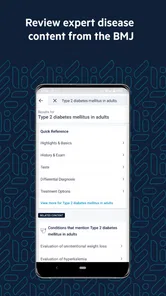
Yes. Along with drug information, the app’s stated focus includes dosing, interactions, and labs, and it also offers a pill identifier, medical calculators, and clinical guidelines. These tools make it more than a simple medication search app and may help healthcare professionals consult several kinds of reference material in one place. Its usefulness will depend on which features fit your work.
Is Epocrates suitable for someone who is not a healthcare professional?
Epocrates is a medical reference app designed for healthcare professionals, so its drug information and clinical tools are best suited to users who can interpret them in a professional context. It may still be useful for general learning, but it should not replace advice from a doctor or pharmacist or be used to make treatment decisions on your own.
What is Epocrates and what does it offer?
Epocrates is a comprehensive medical reference app designed for healthcare professionals. It provides detailed drug information, including dosages, interactions, and side effects. The app also features a pill identifier, medical calculators, and clinical guidelines, making it a valuable tool for quick consultations and informed decision-making in clinical settings.
Is Epocrates free to use, or are there any subscription fees?
Epocrates offers a free version with basic features, including drug information and interaction checking. However, a subscription to Epocrates Plus unlocks premium features such as disease information, alternative medicine guides, and lab tests. The subscription is available for a monthly or annual fee, making it a flexible choice for different user needs. The app is free to download, with in-app purchases ranging from $12.99 to $224.99 per item.
Pros
- Comprehensive drug database.
- Accurate pill identification tool.
- User-friendly interface.
- Regular updates with new data.
- Offline access available.
Cons
- Limited free features.
- No dosing calculators.
- Occasional app crashes.
- Requires account login.
- High subscription cost.











