

enRoute Delivery Route Planner
- 28.00
- 4.3
- Installs
- 10.00K
- Price
- Free
Screenshots
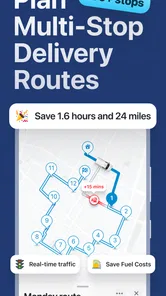
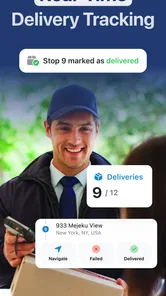
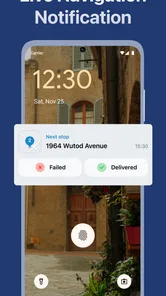
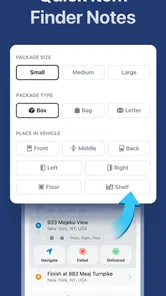
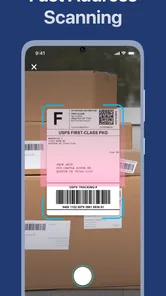
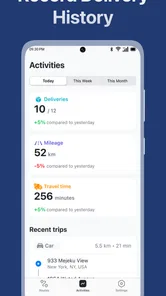
Analysis by Reviewed
I came away from enRoute Delivery Route Planner with a fairly clear impression: it is aimed at people who need to organize several delivery stops, not at drivers looking for a general-purpose navigation replacement. That distinction matters. The app’s purpose is practical—turning a list of destinations into a more efficient driving sequence—so its value depends less on flashy extras and more on whether it reduces the small decisions that make a delivery shift tiring.
In my experience, that focus makes enRoute appealing for independent couriers, small local businesses, and anyone who regularly handles multiple drop-offs. It is a free Maps & Navigation app from Astraler, with a 4.3 average from around 347 ratings and more than 10K installs. Those figures suggest a modest but useful user base rather than a huge mainstream platform. I would approach it as a focused route-planning tool: potentially very helpful for a particular job, but not automatically the best choice for every kind of trip.
What enRoute does well when a normal map app feels too basic
The strongest reason to try this app is the difference between finding one destination and managing a sequence of destinations. Standard navigation apps are excellent when I enter a single address, ask for directions, and follow the suggested route. Delivery work is different. I may have several addresses, a preferred starting point, a limited amount of time, and a need to avoid wasting fuel by crossing the same area repeatedly. A route planner built around that situation is more suitable than simply entering stops one after another into a conventional map.
The useful mental shift is to treat the app as a preparation tool before driving. Instead of making route decisions at every stop, I can organize the day’s destinations first and then use the resulting order as a working plan. That is especially valuable when the addresses are spread across neighboring streets or districts. Even when the final route needs a small adjustment, starting with an organized sequence is easier than improvising from the first delivery onward.
A realistic example would be a small bakery handling local orders in the afternoon. The driver has several packages, some going toward one side of town and others scattered farther away. Without planning, the first few deliveries might be chosen according to the order in which messages arrived, leaving the driver to return through the same streets later. With enRoute, the useful workflow is to gather the destinations before leaving, create a route, inspect the sequence, and then begin the shift with a clearer idea of how the stops fit together.
That preparation step is one of the app’s less obvious strengths. Route optimization is not only about shaving distance from a map. It also reduces mental load. I do not have to keep asking myself which stop should come next or whether I am moving toward the remaining addresses efficiently. For a person making deliveries repeatedly, that reduction in decision-making can be more valuable than a dramatic change in the route itself.
The app also makes sense for occasional multi-stop errands. Someone moving between a hardware store, a customer’s home, a parcel drop-off point, and a final destination can use the same basic idea. It is not limited to professional couriers in principle; the key requirement is simply that the journey contains several destinations and that their order matters.
More From Our News Desk

 Weather - By Xiaomi
Weather by Xiaomi Review: Clear at a Glance, Less Clear Up Close
Xiaomi’s weather app makes everyday forecasts quick to scan, but its calm surface can leave useful details and recovery paths harder to find than they should be.

 X
XX Under Pressure: Can It Recover When Posting Goes Wrong?
A resilience-focused review of X, examining setup, mistaken posts, interruptions, weak connections, and the gaps that matter when recovery needs to be dependable.

 Clash of Clans
Clash of Clans Is Won Between the Battles
Its raids are quick; its community is a long-term project of coordination, teaching, rivalry, and shared responsibility—with all the friction that entails.

 Android Auto
Android Auto Makes the Case for Quieter Car Software
The car interface is no longer judged by how much it can do, but by how quietly it helps. Android Auto shows what drivers now expect—and what still gets in the way.

 MobiOffice: Word, Sheets, PDF
MobiOffice: Transforming Mobile Productivity with Seamless Integration
MobiOffice: Word, Sheets, PDF is redefining mobile productivity with a surprising blend of functionality and innovation.

 EA SPORTS FC Soccer Mobile 26
EA SPORTS FC™ Mobile Soccer: Redefining Mobile Sports Gaming
Dive into EA SPORTS FC™ Mobile Soccer, where immersive gameplay and strategic depth transform mobile sports gaming.
Latest News



Its smart GPS navigation positioning is useful once the route has been planned, because the practical goal is not merely to produce a list of places. I want guidance while traveling between them. That combination—planning first, navigating afterward—is more coherent than using a separate planning method and then manually transferring every stop into another app. It gives enRoute a clear role in a delivery workflow.
How I would use it before starting a delivery shift
I would begin by collecting all the destinations in one place before turning on navigation. This is important because route planning becomes less useful when stops are added randomly while driving. I would check the addresses for obvious mistakes, make sure nearby destinations are represented correctly, and decide whether the starting point should be my home, workplace, warehouse, or current location.
Next, I would review the proposed order rather than accepting it blindly. An optimized sequence may be efficient geographically but still need a human adjustment. For example, a customer who must receive a package early, a location with a narrow access window, or a stop that requires unloading bulky items may deserve priority. The app can help arrange the route, but it cannot replace the driver’s knowledge of the day’s practical constraints.
My most useful tip is to separate route logic from delivery logic. Let the planner handle the broad movement between areas, then make small changes for real-world needs. If two stops are close together, keeping them together may be sensible even if another address appears slightly preferable mathematically. A route that is easy to follow and easy to remember can be better than one that is theoretically shortest but awkward to execute.
I would also avoid treating the first generated route as a promise of exact arrival times. Traffic, parking, building access, loading, and conversations with customers all affect a delivery run. The app’s strength is organizing movement, not eliminating the unpredictable parts of the job. Planning a little spare time around the route is still necessary.
Where it compares favorably with ordinary navigation
Compared with a typical map app, enRoute is more directly concerned with the order of multiple stops. A general navigation app usually starts with the question, “How do I get there?” This app starts with a broader question: “Which destination should come next?” That difference is small for a single trip and significant for a route containing many deliveries.
Compared with manually writing an itinerary, it should be easier to adapt the plan when the list changes. A handwritten sequence can work for a handful of familiar addresses, but it becomes inconvenient when a customer cancels, a new stop appears, or the driver realizes that two areas should be handled together. A digital planner provides a more flexible starting point than a note on paper.
There is also a useful middle ground between a full business logistics system and a consumer map. A large fleet platform may offer far more operational tools, but it can be excessive for one driver or a small shop. enRoute’s appeal is precisely that it focuses on the route itself. For a person who does not need dispatch dashboards, team management, or complex delivery records, a focused planner may be easier to approach.
That said, I would still keep a familiar navigation app in mind as a companion option for unusual situations. General map services often feel more comfortable when I need to search for a place, check nearby businesses, or explore an unfamiliar area. enRoute is strongest when the destinations are already known and the main problem is putting them in a sensible order.
The practical weakness: route planning is not the same as delivery management
The most important limitation is that a route sequence cannot account for every operational detail. A delivery driver may need customer notes, proof of delivery, payment status, package size, parking instructions, or a record of completed stops. A route planner can be valuable without handling those tasks, but I would not mistake it for a complete courier-management system.
This creates a possible friction point during a busy day. If I use enRoute for the route, a messaging app for customer instructions, a separate note for completed deliveries, and another navigation tool for searching unfamiliar places, the overall workflow can become fragmented. The app may solve the geographic part of the problem while leaving the administrative part to other tools.
Another limitation is that optimization can encourage overconfidence. A route that looks efficient on screen may be less convenient in practice because of parking difficulty, one-way streets, apartment access, school traffic, or a customer who is not ready. I would use the suggested order as a strong starting point, not as an instruction that overrides local knowledge.
There is also a learning curve in any multi-stop planner. Adding and checking destinations takes preparation, and that preparation may feel unnecessary for only two stops. If I am making a quick personal trip, opening a familiar map app and entering the next address is probably faster. enRoute earns its place when there are enough destinations for ordering them to become a real problem.
The free entry point is attractive, but the app includes in-app purchases ranging from $3.99 to $29.99 per item. I would therefore inspect which tools are included before building an important work routine around it. The existence of paid items does not make the app poor value, but it does mean that “free” should be understood as a way to start rather than a guarantee that every useful capability has no cost.
Who will get the most from it
I think enRoute is best suited to an individual driver who already knows the destinations and wants help arranging them. Local food sellers, independent couriers, home-service workers, real-estate professionals visiting several properties, and small retailers making their own deliveries are the clearest matches. In each case, the app addresses a repeated problem: too many stops to handle comfortably in an arbitrary order.
It can also suit someone who works across a compact service area. When destinations are within the same town or nearby districts, route organization can make a noticeable difference to the rhythm of the day. The driver can group the work mentally, reduce unnecessary backtracking, and spend less time deciding where to go next.
I would be more cautious about recommending it to a large delivery operation. If several drivers need shared assignments, live supervision, detailed customer records, or formal delivery status tracking, a dedicated logistics platform may be a better fit. The focused nature that makes enRoute approachable for one person may become restrictive for a team.
It is also not my first recommendation for someone who mainly wants turn-by-turn navigation to one place at a time. In that situation, a familiar general map app may be simpler and faster. Likewise, if a driver’s work depends heavily on appointment times, special handling instructions, or documented handoffs, route order is only one part of the job and should not be the deciding factor.
For new users, I would test it with a small, non-critical route before relying on it for a full shift. Use a few familiar destinations, compare the suggested order with the route you would normally choose, and notice whether entering addresses fits comfortably into your routine. This trial can reveal more than a store description because the best route planner is the one that saves time without adding preparation work that feels heavier than the original problem.
Device support, cost, and the overall ownership picture
The app is rated for Everyone, which makes it broadly approachable from an age-rating perspective. It was released on November 22, 2023, and the current version is 2.0.1. It requires Android 8.1 or later, so people using older phones should check compatibility before planning to use it for work.
I like that the app can be tried without an upfront purchase. That lowers the risk for an independent driver who wants to see whether multi-stop planning actually improves a normal route. At the same time, the paid items mean I would look carefully at the upgrade prompts and decide whether any optional cost is justified by the amount of driving I do. For occasional errands, the free experience may be enough; for repeated commercial use, the calculation depends on how much preparation time the app saves.
The developer, Astraler, presents a focused product rather than a broad collection of unrelated functions. That focus is helpful when I want a tool with a clear purpose, although it also means I should not expect the breadth of a major mapping ecosystem. The app’s relatively small install base does not tell me whether it will fit every workflow, so hands-on testing remains important.
One practical habit I would adopt is keeping a backup plan for the day’s addresses. I would save the delivery list in whatever ordinary method I already trust, then use enRoute to organize the driving order. This is not because the app has no value; it is because delivery work is too time-sensitive to depend on a single planning layer. A backup list also makes it easier to recover if I need to switch navigation tools for a particular stop.
My verdict after weighing the trade-offs
enRoute Delivery Route Planner succeeds because it addresses a specific annoyance that ordinary navigation does not always solve well: deciding how to move through several destinations without unnecessary backtracking. Its strongest use is before the vehicle starts moving, when a driver can gather the stops, review a sensible order, and begin the route with fewer decisions to make.
I would recommend it to independent couriers and small businesses that need a straightforward multi-stop planner and do not require a complete logistics suite. I would also suggest it to anyone who regularly runs several errands and wants more structure than a handwritten list provides. The app’s free starting point makes experimentation easy, while its Everyone rating and Android 8.1 support keep the basic entry requirements uncomplicated.
My recommendation becomes weaker for single-destination trips, large teams, or delivery work built around detailed customer records and proof-of-delivery processes. In those cases, a general map app or a full delivery-management service may be more appropriate. The in-app purchase range also deserves attention before treating it as a permanent business tool.
Overall, I see enRoute as a useful specialist rather than an all-purpose replacement for every map application. If your main problem is arranging several known stops, not simply navigating to one address, it is worth trying. Its real benefit is the calmer, more deliberate workflow it can bring to a route. Just keep human judgment in the loop, test it on your own streets, and remember that efficient driving order is only one part of a successful delivery day.
enRoute Delivery Route Planner Frequently Asked Questions
Who makes enRoute Delivery Route Planner, and what kind of app is it?
enRoute Delivery Route Planner is a Maps & Navigation app from Astraler, built around planning routes for delivery work. It may suit couriers, drivers, and small businesses that need to arrange several stops in one trip. The app is free to download, with in-app purchases available, so check the options shown in the app store before deciding whether its paid features fit your needs.
Is enRoute Delivery Route Planner suitable for new or occasional delivery drivers?
Its route-planning focus can be useful whether you deliver every day or only occasionally, particularly when a trip involves several addresses. New users may want to try a short route first and get comfortable adding stops and reviewing the suggested order. That simple test can help you decide whether the workflow suits your deliveries before you depend on it for a full workday.
What is enRoute Delivery Route Planner used for?
enRoute Delivery Route Planner is designed to help delivery drivers, couriers, and small businesses organize multiple stops into a more efficient route. After entering delivery addresses, the app can arrange them in a practical order, helping reduce unnecessary driving, save time, and make daily delivery work easier to manage than planning each stop manually.
Can enRoute plan routes with multiple delivery stops?
Yes, the app is intended for multi-stop delivery planning rather than simple point-to-point navigation. You can add several destinations and use the route-planning tools to organize them into a suitable sequence. The exact number of stops, optimization options, and available features may depend on the version of the app, your device, and whether certain tools require a subscription or in-app purchase.
Does enRoute provide turn-by-turn navigation?
enRoute focuses primarily on creating and optimizing delivery routes, while navigation may work together with a supported map or navigation service on your phone. Before starting a route, check that your preferred navigation app is installed and that location permissions are enabled. Drivers should also review the planned stops because traffic, road closures, and access restrictions can change the best route.
Pros
- Optimizes multi-stop routes to reduce driving time and fuel use.
- Supports efficient planning for deliveries
- errands
- and service calls.
- Clear route overview helps organize stops before starting the trip.
- Useful for independent drivers and small delivery teams.
- Can make recurring delivery planning faster and more consistent.
Cons
- Advanced route features may require a paid subscription.
- Optimization quality depends on accurate addresses and stop details.
- Large delivery lists may take time to review and adjust manually.
- Drivers still need to verify parking
- access
- and local road restrictions.
- Battery and mobile data usage can increase during active navigation.













