

DMV Permit Practice Test 2026
- 7.32K
- 4.7
- Installs
- 1.00M
- Price
- Free
Screenshots
Analysis by Reviewed
Studying for a learner’s permit can feel like a lot of rules packed into one long manual. I’d use DMV Permit Practice Test 2025 as a way to make short study sessions easier to fit into the day, not as a substitute for learning the driving handbook. It’s an education app from Astraler, and its focus is practical: help prospective drivers prepare for permit questions without turning every review session into a major project.
Free to start, with optional purchases
The app is free to download, so you can try it without paying upfront. It also offers in-app purchases, with items ranging from $0.99 to $29.99. That makes the basic decision simple: start with the free access and judge whether it suits your study routine before considering any paid option. I wouldn’t treat a purchase as necessary just because it appears in the app; the right value depends on what you actually use and whether it helps you study more consistently.
Its audience is broad: the content rating is Everyone, and the app has a 4.6 average from around 33,000 ratings. It has passed 500,000 installs, which suggests many learners have tried it, but popularity alone can’t tell you whether its material matches your local test. The app first appeared on June 16, 2022, and version 3.4.1 supports devices running Android 8.0 or later.
Making practice useful, not just familiar
For me, the best way to use a permit-prep app is to treat wrong answers as a study plan. After a short session, note the rule behind each mistake and revisit that topic in the official driver’s handbook. That extra step matters: recognizing a question you have seen before is not the same as understanding what a road sign or right-of-way rule means in a new situation.
A realistic routine might be a few questions while waiting for a ride, followed by a longer review at home. If you’re studying for a state-specific test, check that the material you use reflects your state’s rules rather than assuming every traffic law is identical. An app can make repetition convenient, but local requirements and the current handbook should remain the final reference.
Getting Started: The User Experience
First off, downloading and installing the DMV Permit Practice Test 2024 is a breeze. Available for both Android and iOS, it’s like having a pocket-sized driving instructor minus the intimidating glare. The interface is super intuitive, which means you won’t spend hours trying to figure out how to navigate through it. It’s all about getting you right into the driver’s seat—figuratively, of course.
Features That Put You in the Driver's Seat
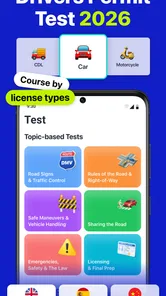
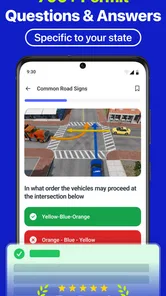
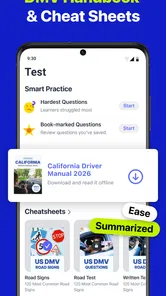
Once you’re in, you’ll notice a slew of features designed to mimic the real test experience. The practice tests are categorized by state, which is a real lifesaver because, let’s be honest, those rules can vary quite a bit. The app keeps things fresh with randomized questions each time you take a test. So, no cheating by memorizing the order of the answers!
More From Our News Desk

 Weather - By Xiaomi
Weather by Xiaomi Review: Clear at a Glance, Less Clear Up Close
Xiaomi’s weather app makes everyday forecasts quick to scan, but its calm surface can leave useful details and recovery paths harder to find than they should be.

 X
XX Under Pressure: Can It Recover When Posting Goes Wrong?
A resilience-focused review of X, examining setup, mistaken posts, interruptions, weak connections, and the gaps that matter when recovery needs to be dependable.

 Clash of Clans
Clash of Clans Is Won Between the Battles
Its raids are quick; its community is a long-term project of coordination, teaching, rivalry, and shared responsibility—with all the friction that entails.

 Android Auto
Android Auto Makes the Case for Quieter Car Software
The car interface is no longer judged by how much it can do, but by how quietly it helps. Android Auto shows what drivers now expect—and what still gets in the way.

 MobiOffice: Word, Sheets, PDF
MobiOffice: Transforming Mobile Productivity with Seamless Integration
MobiOffice: Word, Sheets, PDF is redefining mobile productivity with a surprising blend of functionality and innovation.

 EA SPORTS FC Soccer Mobile 26
EA SPORTS FC™ Mobile Soccer: Redefining Mobile Sports Gaming
Dive into EA SPORTS FC™ Mobile Soccer, where immersive gameplay and strategic depth transform mobile sports gaming.
Latest News



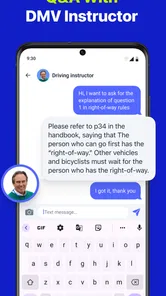
Another feature that deserves a gold star is the detailed explanations provided after each question. It’s not just about knowing the right answer, but understanding the why behind it. Trust me, this will come in handy when you’re on an actual road and need to make a split-second decision.
The Learning Curve
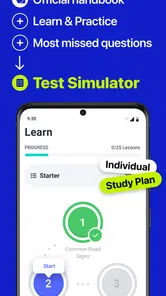
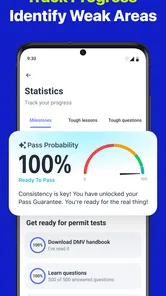
Now, let’s talk about the learning curve. The app is designed to cater to different learning speeds. Whether you’re a quick learner or someone who needs a bit more time to absorb information, the app’s got your back. You can track your progress, see which areas you need to focus on, and even set reminders for practice sessions. It’s like having a personal trainer, but for driving.
And here’s something cool: the app includes a night mode feature. So, if you’re a night owl like me, you can practice without straining your eyes. Plus, it’s pretty easy on the battery life, which is a huge plus when you’re on the go.
Choosing the right study companion
The main trade-off with a practice app is that familiar multiple-choice questions can create false confidence. I’d mix sessions with the handbook, especially for topics where a small wording change alters the correct response. Compared with studying only from a printed manual, this format is easier to dip into and gives you a more active way to check recall. Compared with a class or an instructor, though, it cannot explain a confusing rule in conversation or tailor an answer to your exact circumstances.
If you learn best by testing yourself and then reviewing why an answer was wrong, this format can be a helpful companion. If you need a structured lesson, have trouble learning from written explanations, or want a person to clarify unfamiliar road situations, a handbook-led plan or instructor support may be a better fit. I’d also avoid relying on any single practice source as proof that you are ready for the exam.
A practical way to judge progress
Rather than repeating the same session until the questions feel easy, I’d keep a small list of rules that still trip me up: for example, signs, right-of-way decisions, or other topics where I hesitate. Then I’d use the app to check recall and return to the handbook for the reasoning. This helps separate real understanding from remembering an answer pattern, and it makes a short study window more purposeful.
One useful question is whether the app can replace the official study material. I wouldn’t use it that way: practice is most valuable as a check on what you know, while the relevant handbook is the safer source for the full rules in your area. Another is whether paying is required to begin. The app is free to download, while optional purchases are available, so I’d try the free access first and spend only if a specific paid option clearly helps your own routine.
Turning short sessions into a useful routine
The most effective workflow is not necessarily to sit down for a long mock exam every time you open the app. I’d use a quick session to expose what needs attention, then stop and look up the underlying rule instead of immediately tapping through another round. That pause is important: it prevents a string of guesses from feeling like progress and gives the handbook a clear job in the routine.
For example, if I had a few minutes before an appointment, I could use that window for questions and make a brief note of one uncertain topic. Later, at home, I’d read the matching handbook section and explain the rule to myself in plain language. On the next practice session, I’d check whether I can apply the idea to a differently worded question. This is a more reliable test of learning than chasing a perfect-looking score.
There is also a practical distinction between studying when alert and studying simply because a reminder appears. The app’s reminders can help someone who tends to forget to practice, but I would not treat every notification as a reason to rush through questions while distracted. A short, attentive session is more useful than a longer one done while juggling errands. If reminders become noise, changing the routine or ignoring them is better than turning study into another source of pressure.
What to check before relying on a practice set
Because permit rules are tied to where you plan to test, I’d first confirm that the state selection and test context match your situation. This is especially important if you recently moved, are preparing in a different state from where you live, or are helping a family member study. The app’s state-organized practice is useful only when you choose the relevant jurisdiction; a strong result in the wrong one does not prepare you for local requirements.
I’d also pay attention to the explanation, not just the marked answer. When an explanation feels too brief to resolve a doubt, use the handbook to settle it rather than filling in missing logic from memory. That approach makes the app a convenient checkpoint while preserving a dependable source for detailed wording and local rules. It also gives you a sensible answer to the question of whether practice quizzes alone are enough: for me, they are not.
Where it fits among permit-prep options
The usual alternatives each have a different strength. A printed handbook is the better reference when you want full context or need to check exact local rules, but it can be harder to turn reading into regular recall practice. A classroom or instructor can respond to questions and talk through a confusing scenario, which a quiz cannot do. This app’s appeal is the middle ground: a phone-based way to make self-testing easier to start and repeat.
I would choose it over a handbook-only routine if I already understood how to find the right material but kept putting off review. I would choose guided instruction over the app if I needed someone to diagnose why I misunderstood a rule, or if written explanations were not enough for me. Neither choice makes the other useless. The best fit depends on the gap in your preparation: access to the rules, active recall, or personal explanation.
Who is most likely to get value
This is a good match for a learner who wants a low-friction way to check knowledge between other parts of a study plan. It can also help a parent or other support person turn a vague “have you studied?” conversation into something more concrete: ask which rules felt difficult, then review those topics together using the official handbook. That makes a phone session a starting point for a useful conversation rather than a score report to celebrate or criticize.
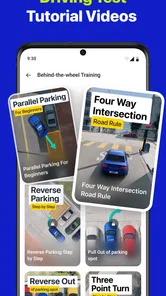
It is less suitable for someone who expects a quiz app to teach every rule from the beginning, guarantee readiness, or settle questions about a particular local situation. If you prefer to learn through demonstrations, discussion, or a carefully sequenced course, a human instructor or structured class may serve you better. And if you already study consistently from the handbook and do not benefit from repeated questions, adding another practice source may not improve your preparation enough to justify the extra screen time.
Final Thoughts: Is It Worth the Download?
So, is the DMV Permit Practice Test 2024 worth a spot on your home screen? Absolutely. It’s comprehensive, user-friendly, and offers a real shot at nailing that permit test on your first try. And let’s not forget, it’s far less stressful than flipping through a manual the size of a small novel.
In the end, this app is like having a trusty co-pilot as you embark on your journey to becoming a licensed driver. It’s not just an app; it’s your ticket to freedom on the open road. So, buckle up and give it a whirl. Who knows, you might just find yourself enjoying the ride!
My verdict is to try it if bite-sized practice suits you, while keeping your state’s handbook close and checking that the material fits the permit you plan to take. I wouldn’t pay simply because an option is offered, and I wouldn’t skip the handbook in favor of quizzes alone. Used as a focused practice companion, it can make preparation feel more manageable; if you need guided teaching or a definitive source for local rules, choose those first.
DMV Permit Practice Test 2026 Frequently Asked Questions
What subjects should I review before starting a permit practice app?
Before studying, it helps to have a general idea of the topics covered by your local permit test, such as road signs, traffic rules, and safe driving practices. DMV requirements can vary by location, so use the app alongside current guidance from your local DMV. That gives you a useful framework for deciding which material to revisit and what to ask while practicing.
Can a beginner use DMV Permit Practice Test 2025 without prior driving knowledge?
Yes. The app is intended to help people prepare for a DMV permit test, so it can be used by someone just beginning to study. Practice questions can make test-style material more familiar as you work through it. For a solid foundation, pair your app sessions with official driver education materials and your local DMV’s guidance rather than relying on practice alone.
Who develops DMV Permit Practice Test 2025, and what kind of app is it?
DMV Permit Practice Test 2025 is an education app developed by Astraler. Its focus is permit-test preparation, with practice questions intended to support studying before an exam. If you are looking for a dedicated study aid rather than a general driving or navigation app, its purpose is centered on reviewing material for a DMV permit test.
What is the DMV Permit Practice Test 2025 app?
The DMV Permit Practice Test 2025 app is an education app from Astraler designed to help people prepare for a DMV permit test. It offers practice questions intended to support study and test preparation. Its store summary describes it as a way to learn to pass DMV permit tests, while its short description identifies it as a DMV permit test app.
Is DMV Permit Practice Test 2025 free to download, and are there in-app purchases?
The app is free to download, so you can try it without paying upfront. It also offers in-app purchases, with items priced from $0.99 to $29.99. Check the purchase details in the app before confirming any transaction, and consider whether the available free experience meets your study needs before choosing to buy anything.
Pros
- Comprehensive question bank.
- User-friendly interface.
- Regularly updated content.
- Customizable practice tests.
- Offline mode available.
Cons
- Limited free content.
- Ads in free version.
- Requires internet for updates.
- No live support.
- Basic graphics.













