Enphase Enlighten
- 5.80K
- 3.7
- Installs
- 1.00M
- Price
- Free

Screenshots
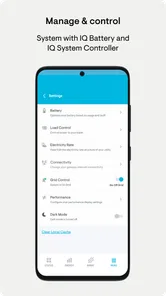
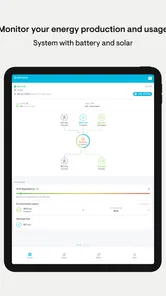
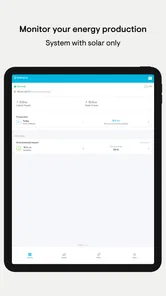
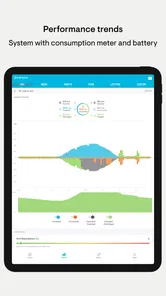
Analysis by Reviewed
I find solar monitoring most useful when it answers a practical question quickly: is my system producing today, and does the picture make sense for the weather? Enphase Enlighten is built for owners of Enphase systems who want that view on a phone, rather than relying only on occasional bills or a visit to the equipment. It is a free business app from Enphase Energy, and its focus is deliberately specific: keeping an eye on the performance of an Enphase solar setup.
What the app is best at showing
The useful habit is to treat the dashboard as a check-in, not a promise of perfectly live readings. On a bright day, I would look for production to rise as daylight improves; on a cloudy day, I would expect a different shape. That context matters more than reacting to every short pause or small change. If a reading looks stale, checking again later is more sensible than assuming the panels have stopped working.
This is where the app differs from a typical household energy app. A general utility app is usually strongest at showing billed use, costs, or account information, while Enlighten is aimed at the solar system itself. It can help an owner connect everyday energy use with generation, but it is not a substitute for a utility account when the question is about a bill, tariff, or payment.
A useful routine for ordinary days
Imagine checking the app before running a dishwasher or charging a device during daylight. A quick look can help you understand whether solar production is active and whether using power now fits your household routine. I would use that as a nudge, not as a precise control system: household demand and sunlight change, and a phone display cannot make the decision for you.
A second useful routine is to compare similar days rather than judging performance from a single afternoon. A cloudy morning followed by sunshine can look very different from a clear day, so the longer view is more informative than one snapshot. This is also a practical way to notice a persistent change worth asking an installer about, without treating ordinary weather variation as a fault.
Who will benefit, and who may not
The app makes the most sense if you already have an Enphase system and want convenient access to its performance information. It can suit a homeowner who likes checking production occasionally, as well as someone who wants a clearer picture before discussing system behavior with an installer. You do not need to be an energy analyst to get value from a basic check-in, though people who enjoy comparing trends may spend more time exploring the information.
If you do not have an Enphase system, this is not a general solar-monitoring tool that can simply be pointed at any panels. Likewise, if your main goal is to manage a utility account, compare electricity plans, or control household appliances, the relevant provider or device app is likely a better fit. The narrow focus is a strength for the right owner and a clear reason for everyone else to look elsewhere.
More From Our News Desk

Weather by Xiaomi Review: Clear at a Glance, Less Clear Up Close

X Under Pressure: Can It Recover When Posting Goes Wrong?

Clash of Clans Is Won Between the Battles

Android Auto Makes the Case for Quieter Car Software

MobiOffice: Transforming Mobile Productivity with Seamless Integration

EA SPORTS FC™ Mobile Soccer: Redefining Mobile Sports Gaming
Getting Started with Enphase Enlighten
First things first, let's talk about getting the Enphase Enlighten up and running. Whether you're on Android or iOS, downloading the app is a breeze. Once you’ve got it installed, setting up is as easy as pie. You just log in with your system details, and you’re all set to start monitoring your solar setup. The interface is clean and intuitive, which is super important when you're dealing with all those kilowatts and energy graphs.
Features That Shine
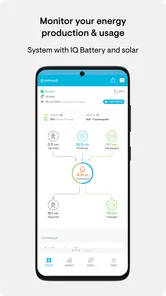
One of the standout features of this app is its real-time data tracking. You can literally see how much energy your panels are producing at any given moment. This is perfect for those of us who love to geek out over numbers and efficiency. Plus, you can monitor your energy consumption, which is a great way to manage your household's energy usage more effectively.
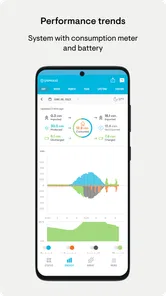
Another cool feature is the detailed reports. The app provides insights into your energy production and consumption over time, making it easier to spot trends and identify when your system is performing at its best. If you're someone who loves diving into the data, this feature is going to be your best friend.
Why You'll Love It
What really sets Enphase Enlighten apart is its user-friendly design. The app not only provides detailed information but does so in a way that's accessible to everyone. You don't need to be a tech whiz to navigate through it. Everything is pretty much laid out in a simple, straightforward manner.
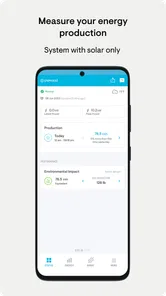
Also, for those who are environmentally conscious, the app gives you a sense of how much you're contributing to reducing carbon emissions. It's pretty rewarding to see the positive impact your solar panels are making on the environment.
Room for Improvement?
Now, while the app is pretty stellar, there’s always room for improvement. Occasionally, users have reported minor glitches, like data not updating in real time. But hey, what app doesn't have its occasional hiccups, right? The developers are usually quick with updates and fixes, so these issues tend to get resolved swiftly.
Another thing is the initial setup might be a bit daunting for those not familiar with tech. But once you get past that, it’s smooth sailing.
Speed, stability, and everyday expectations
For a monitoring app, I care less about flashy animation than whether I can open it, find the relevant system view, and understand what I am seeing. Enlighten is designed around that straightforward check. The experience will still depend on the phone, connection, and system data being available, so I would not judge the health of an installation solely by whether a screen refreshes at once.
When I am checking several times during a busy day, the useful question is whether a pattern is developing, not whether each glance changes. That approach keeps small delays from becoming needless worry. If the app seems behind, I would close and reopen it later or compare the next reading with the broader trend before drawing a conclusion; a temporary display issue and an equipment problem are not automatically the same thing.
Making sense of changes without overreacting
A less obvious benefit of keeping a regular, light-touch routine is that it gives you a personal baseline. Check around the same part of the day under broadly similar conditions, and you will gradually learn what ordinary variation looks like for your home. That is more useful than comparing your output with another household, since roof direction, shade, system size, and local weather can all make those comparisons misleading.
If several readings seem unusual, make a note of the date and the conditions you noticed, then bring that context to an installer or support contact if needed. A screenshot or remembered single number is less helpful than a simple pattern over time. The app is a monitoring aid, not a diagnosis tool, so I would use it to ask better questions rather than to attempt technical repairs myself.
Device fit and setup trade-offs
The app is rated for Everyone and has been available since January 10, 2014; its current version is 4.4.0, with Android 6.0 as the minimum operating system. That makes it worth checking your phone’s software before installing, particularly if you keep an older device in service. On a compatible phone, this kind of dashboard should not demand the attention or resources of a game, but older hardware or a weak connection can still make screens feel less responsive.
There is a small setup trade-off: signing in with the details associated with your system is essential, so a new owner may need to ask the person who arranged the installation which account to use. Sorting that out before you depend on the app for a daily check can prevent avoidable frustration. The app has a 4.0 average from around 28,000 ratings, with more than a million installs, suggesting it is widely used while still leaving room for individual differences in setup and experience.
Where it fits among solar tools
Compared with a broad energy dashboard, Enlighten is more directly tied to Enphase system monitoring and less suited to bringing every household energy service into one place. That trade-off is worthwhile if system performance is what you want to follow. If your priority is comparing bills, tracking spending across providers, or coordinating equipment from different brands, a utility app or a broader home-energy tool may answer more of your questions.
I would also avoid treating every graph as an instruction to change your habits. Use the information to spot opportunities—such as shifting a flexible task toward daylight—then decide whether that routine works for your household. The best result is a clearer understanding of your system, not constant checking or chasing a perfect-looking curve.
My performance verdict
Enlighten is a focused companion for people who already own an Enphase solar system and want an accessible way to follow its output over time. I like the practical value of checking production and looking for trends, especially when I keep weather and household routines in mind. Its main constraints are equally clear: it is system-specific, readings may not always feel immediate, and initial account setup can take a little patience.
The app is free, and Enphase Energy has built it for a specific job rather than trying to replace every energy service on your phone. I would recommend it to an Enphase owner who wants a convenient daily overview and is comfortable treating the display as guidance rather than a live guarantee. If you want a universal solar tool or a complete electricity-management hub, another option will suit you better.
Making the information useful at home
One practical way to get more from the app is to decide in advance what question you are checking. Before using a flexible appliance, for example, I might want to know whether production is underway, not whether a particular screen looks impressive. Keeping that small purpose in mind makes the app easier to use and reduces the temptation to keep refreshing it without gaining anything.
For a household with several people, a shared routine can also make the information more actionable: one person checks the system at a convenient point in the day and tells the others whether shifting a task seems sensible. That is not the same as controlling devices through Enlighten, and I would not treat it as an automatic energy-management system. It is simply a way to use monitoring information in ordinary decisions without letting the phone dictate the household schedule.
What to expect when something looks wrong
A natural question is whether a low or missing reading proves that the system has failed. I would not draw that conclusion from one check. Weather, timing, connectivity, and the freshness of the displayed information can all affect what appears on the phone. Rechecking later and comparing the reading with the same time on other days gives a more grounded starting point than reacting immediately.
If an unusual pattern continues, the most helpful next step is to describe what you observed and when, then contact the installer or an appropriate support channel. The app can help you notice and communicate a change; it does not replace an inspection or confirm the cause. That distinction is especially useful for new owners, who may otherwise feel pressured to interpret every fluctuation as a technical warning.
Who should choose a different tool
Enlighten is a sensible choice when the central question is how an Enphase system is behaving. It is less compelling if you want one screen to combine generation from different equipment, utility charges, household budgets, and appliance controls. In that situation, a provider’s app or a broader home-energy product may be a better everyday companion, even if it offers less detail about the Enphase setup itself.
I would also skip it if you do not have an Enphase installation or rarely want to check solar performance. For an owner who only needs occasional bill information, opening a monitoring dashboard may add another account and routine without solving a real problem. Its value comes from a specific match between the system and the owner’s interest, rather than from being a must-have app for every household with solar panels.
In conclusion, if you're looking to keep a close eye on your solar energy system, the Enphase Enlighten app is definitely worth checking out. It's packed with features that make monitoring your energy production and consumption a breeze. With its user-friendly interface and detailed insights, it’s no wonder this app is a favorite among solar panel users.
Enphase Enlighten Frequently Asked Questions
Is Enphase Enlighten suitable for beginners who have never monitored a solar system before?
Enphase Enlighten is intended to make monitoring an Enphase system accessible through a mobile app. It is most useful when you already have an Enphase installation and can sign in to its account. If you are new to solar monitoring, the app gives you a place to follow system performance, while the information you can view depends on the system connected to your account.
Can I check my Enphase system when I am away from home?
The app is designed to let users monitor Enphase system performance through a mobile experience, so it can be convenient when you are away from the property where the system is installed. You will need to sign in to the relevant Enphase account, and the system must be connected to the internet for its energy data to be accessible.
Is Enphase Enlighten free, and what devices can run it?
Enphase Enlighten is free to download and is intended for mobile devices running Android or iOS. The Android version requires Android 6.0 or later, while the app is also available for iOS. It is rated for Everyone, so its content rating is suitable for a broad audience. Before installing, check that your device’s operating system meets the relevant requirement.
Who is Enphase Enlighten designed for?
Enphase Enlighten is a business-category app from Enphase Energy, built for people who want to monitor an Enphase solar system. Its central purpose is to make system performance easier to follow through a mobile experience. If you are considering it for a household or business installation, the key question is whether your solar setup uses Enphase equipment and whether you have access to the account for that system.
What is Enphase Enlighten and how does it work?
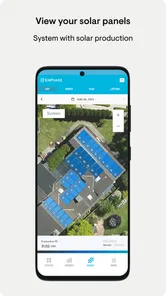
Enphase Enlighten is a comprehensive solar energy management application that allows users to monitor and manage their solar energy systems. It provides real-time data on energy production, system performance, and environmental benefits. Users can access detailed information about each solar panel, ensuring optimal performance and efficiency. The app's intuitive interface makes it easy to track energy usage and savings over time.
Pros
- User-friendly interface for easy navigation.
- Real-time energy monitoring capability.
- Detailed insights on energy production.
- Remote system management feature.
- Compatible with various devices.
Cons
- Requires stable internet connection.
- Limited offline functionality.
- Complex setup for non-tech users.
- Occasional data sync issues.
- Subscription needed for advanced features.











